For my 4-bay NAS I chose to go with 2x-2-wide mirror vdevs but there’s no open bay for a hot spare. I’m planning to get a spare 12TB disk to keep in storage, for when it’s ever needed. I would do initial checks on it (e.g. badblocks scan) and then put it back in its shipping carton and up on a shelf somewhere.
Do HDDs have a shelf life? Assuming it doesn’t get damaged due to shock or moisture, is there anything I would practically need to worry about in keeping a disk in (potentially very) long term storage?
That is a good question. The only thing I might be concerned about is if the drive was Helium filled, the helium “could” leak out over time. I’m not saying it will, but could.
To be honest I have not giving this plan much thought. If it were me and I had to keep the system operational all the time, meaning that it “must” be online, no powering the unit off for a few days, then I’d periodically run a SMART Extended/Long test on the drive, probably once every 3 to 4 months just to make sure the drive appears to be operating good. I would also place it in some external drive case so I wouldn’t need to make any changes to my NAS. The external case could be USB, but sometimes these can be tricky to get smartctl to use the correct interface type. If used in a Windows system just to run the SMART test, that is easily done as well.
Speaking for my own use in my home, I use to have a spare but do not have a spare drive laying around now. My drives are 4TB NVMe. These are not cheap, most of the data I store is backups of my other computers, and I also store some critical data (medical/financial data). I do have all my critical data backed up to another single drive, and when I run a backup, only the changed data is copied which makes it faster. I do not compare the data bit for bit, I guess thinking about this means I will adjust my backups to perform a bit for bit comparison. And my backup is fully automated. So I do not have a 4TB NVMe Spare, but if I needed to, I could buy one when a drive fails. I can power down my NAS for days without impacting my daily life.
I don’t know how critical your data is, but did you choose the correct pool layout. Using the layout you have now means that any one drive loss puts you into a critical situation where if a second drive fails in the same mirror, all data is gone. If you selected this layout for a reason, fine, but if speed is not a factor here, I would suggest a RAIDZ2 layout which provides better resiliency.
Why? Well a 12TB drive, depending on how much data you have, can take a very long time to resilver into the pool. Very long! During this time you are stressing the one remaining good drive. A mirror is faster to resilver than a RAIDZ2, however it is not that much faster to rely on the replacement happening in only a few hours. 12TB could be days depending on your hardware.
I know I posted a lot here, hopefully I answered your question and then provided you something to think about. And I’m not saying you need to do anything, I have no idea if you have a solid backup plan already in place, nor how critical your data is.
Appreciate the response, Joe. I now have a couple things to (re)think about.
The only reason I’m even considering this is because I can’t foresee how available HDDs will be in the coming years for The Little People™. Strange times we live in where self-hosting has never been more important, yet owning the hardware has never been more of a personal liability.
I digress.
Yep, this is a concern I share. I appreciate how cool and quiet they are but there is that little nagging thought.
Do we know how these drives tend to fail when they leak? Do they just crash, or keep going on atmosphere but in a degraded state?
Also a good idea, although if I’m going to have an external HDD I wonder if it should pull double duty as a local backup location for the NAS which can also be sacrificed to replace a failed drive on short notice.
I’m fortunate that I’m able to remotely access a smaller NAS at a family member’s home, which is my offsite backup. It’s a Synology though, so no snapshot replication. It’s either rsync or I mount it as an SMB share and copy what I need.
Although I can still easily change this, deciding the layout was where I spent a lot of time. Which doesn’t mean I chose well. I think it indicates my uncertainty.
I tried to balance between tolerance for disk failure, performance for a range of tasks (VMs, SMB, streaming/transcoding), and ease of administration offered by mirrors.
If I may challenge the suggestion a bit- could you expand on some of the tradeoffs with a single RAIDZ2 vdev? As long as I can still saturate a 2.5GbE link I think I could be happy, but I am more concerned about the administration side of things and ease of future expansion.
-
Bringing it back to the original question, I know that certain devices (like SSDs) lose their cell charge when disconnected from power for too long and can lose data. Although it’s a different medium, I wonder if HDD controllers can similarly get corrupted or lose their firmware after enough time? (It probably takes at least a decade, but I don’t know.)
The data on the magnetic platters isn’t a concern in this case.
EDIT: your suggestion to keep it an external enclosure takes care of this concern; I’m just wondering for curiosity’s sake.
I honestly have no idea, but there is a He level detector built in and it should remain at 100, but it can drop down to I think 25, but that is manufacturer specific. However if it drops down to 99, I’d keep a close eye on it.
This is a good thing to have it available.
I had not idea your use case and a Mirror does make sense for VMs.
I don’t see why you couldn’t saturate a 10GbE connection. You need to have a decent system of course.
How long is too long, a few years? These are not RAM and they do retain the memory for a long time.
And this is a completely different type of memory as well. Firmware is electronically “burned” into the chip. While I don’t know if it is exactly the same technology (I just haven’t bothered to look), look up EEPROM, Electrically Erasable Programmable Memory. Before this it was called EPROM and you could burn a program into the chip, if you wanted to erase it you needed an ultraviolet light. This was around for a very long time and then EEPROM showed up where you could apply a voltage to the chip to erase it. And it was a complete erase.
This is the only thing that you should be aware of. This is a completely mechanical operation and is subject to physical damage, and that even includes manufacturing issues such as the platter flaking off, one of the main issues.
I advice that a drive be expected to last only as long as the warranty that comes with the drive and not a day longer. And it isn’t the the drive will or won’t fail, but if it does fail, there is no cost to RMA the drive. You are paying for the warranty. With that said, most peoples drives I see last significantly longer than the warrant, The server I just dissembled had drives with a 3 year warranty, and they have been running for the most part, non-stop 8 years. One of 4 died last year so I had to buy a new drive, but I at a minimum all the drives were exceeded twice the warranty time. I often see drives with over 60,000 hours on them. I maintain the script Multi-Report so I do see a lot of this kind of data.
With all that said, Infant Mortality does exist so you may have a drive that lasts 3 months and then fails. This is with anything, not just computers.
I personally like having an external enclosure, specifically with a USB interface then I can plug into my Windows computer and then backup my important data. It is slower than a SATA connection but it just makes things simple. In your situation you do not have a space slot to install a 5th drive. If you did, then you could use that fifth slot to make a backup faster.
One fella I know swaps out two hard drives each week in his system and rotates them with other pairs. These two drives are a backup of his sever data. Then he moves it offsite.
Let me ask you a few small questions:
Can you install a pair of SSD’s into your system? If you have the data connections then you can likely stuff the SSDs into the case and connect some cables to make it work. You can even use velcro tape to secure a SSD in place. I don’t, I make the effort to drill holes for screws, but you must remove all electronics and ensure it is very clean. Metal particles will kill your day.
Okay, only 1 question I guess. I ask because if you can install a mirror of SSDs, then you can run your VMs from that. That would make it fast. But if you don’t have a good CPU and lots of RAM, it may not be worth it.
Please do think about your pool layout. I just think that using 12TB drives in this configuration is a mistake. And us Little People can’t afford to replace drives like a company can, but one last thing I tell people is to know what capacity you need for the warranty of the drives, and then double it, that is your target. We live in a place where we want to store EVERYTHING and we do. I don’t, I have actually downsized and my capacity is about 9TB, I am using about 2TB. I use to be at 16TB, then 12TB, and I will likely reconfigure again and drop 4TB and I can then remove one of my 4TB NVMe drives and save it for a rainy day.
Last thing, Keep It Simple. Do not overthink ways to make your system faster. Reconfigure what you have and test it. Prove that you cannot use a RAIDZ with reasonable VM speed.
=== START OF INFORMATION SECTION ===
Model Family:     Seagate IronWolf
Device Model:     ST12000VN0008-3MH101
Serial Number:    ZZxxxxNZ
LU WWN Device Id: 5 000c50 0eb550f97
Firmware Version: SC60
User Capacity:    12,000,138,625,024 bytes [12.0 TB]
Sector Sizes:     512 bytes logical, 4096 bytes physical
Rotation Rate:    7200 rpm
Form Factor:      3.5 inches
Device is:        In smartctl database 7.3/5528
ATA Version is:   ACS-5 (minor revision not indicated)
SATA Version is:  SATA 3.3, 6.0 Gb/s (current: 6.0 Gb/s)
Local Time is:    Sun Dec 21 05:47:29 2025 EST
SMART support is: Available - device has SMART capability.
SMART support is: Enabled

=== START OF READ SMART DATA SECTION ===
SMART overall-health self-assessment test result: PASSED

<snip>

SMART Attributes Data Structure revision number: 10
Vendor Specific SMART Attributes with Thresholds:
ID# ATTRIBUTE_NAME          FLAG     VALUE WORST THRESH TYPE      UPDATED  WHEN_FAILED RAW_VALUE
  1 Raw_Read_Error_Rate     0x000f   077   064   044    Pre-fail  Always       -       53296024
  3 Spin_Up_Time            0x0003   096   093   000    Pre-fail  Always       -       0
  4 Start_Stop_Count        0x0032   100   100   020    Old_age   Always       -       45
  5 Reallocated_Sector_Ct   0x0033   100   100   010    Pre-fail  Always       -       0
  7 Seek_Error_Rate         0x000f   078   060   045    Pre-fail  Always       -       57750385
  9 Power_On_Hours          0x0032   099   099   000    Old_age   Always       -       941
 10 Spin_Retry_Count        0x0013   100   100   097    Pre-fail  Always       -       0
 12 Power_Cycle_Count       0x0032   100   100   020    Old_age   Always       -       45
 18 Head_Health             0x000b   100   100   050    Pre-fail  Always       -       0
187 Reported_Uncorrect      0x0032   100   100   000    Old_age   Always       -       0
188 Command_Timeout         0x0032   100   100   000    Old_age   Always       -       0
190 Airflow_Temperature_Cel 0x0022   063   048   000    Old_age   Always       -       37 (Min/Max 37/39)
192 Power-Off_Retract_Count 0x0032   100   100   000    Old_age   Always       -       30
193 Load_Cycle_Count        0x0032   100   100   000    Old_age   Always       -       1431
194 Temperature_Celsius     0x0022   037   045   000    Old_age   Always       -       37 (0 25 0 0 0)
197 Current_Pending_Sector  0x0012   100   100   000    Old_age   Always       -       0
198 Offline_Uncorrectable   0x0010   100   100   000    Old_age   Offline      -       0
199 UDMA_CRC_Error_Count    0x003e   200   200   000    Old_age   Always       -       0
200 Pressure_Limit          0x0023   100   100   001    Pre-fail  Always       -       0
240 Head_Flying_Hours       0x0000   100   100   000    Old_age   Offline      -       815h+33m+36.873s
241 Total_LBAs_Written      0x0000   100   253   000    Old_age   Offline      -       93814861544
242 Total_LBAs_Read         0x0000   100   253   000    Old_age   Offline      -       93755493378
My source is ChatGPT so take it for what it’s worth…
Typical data retention (unpowered)
Consumer SSDs (TLC/QLC NAND)
~6 months to 2 years under normal room temperature
Older or heavily used drives tend to be closer to the low end
Enterprise / higher-grade SSDs
2–5+ years
Use better NAND, stronger error correction, and are designed for longer retention
Once I learned this, I took images of any SSD boot disks I had laying around for safe keeping.
That… is a good and painful reminder of our economic system.
So what I did (maybe I’ll later regret)-
I picked up a UGREEN DXP4800 Plus and swapped out the boot disk. I also upgraded the RAM to 64GB, luckily right before the prices shot up, and I picked up a data center NVMe disk which I partitioned to 16GB for use as a SLOG. I have UPS backup and the SLOG disk has PLP capacitors, so I felt OK to not mirror that.
So at the moment I only have 1 free NVMe slot on it, but I could be convinced to ditch the SLOG and put a second NVMe in. Would I create a separate pool from my main storage pool with just a single mirror VDEV of the NVMe disks?
This is convincing wisdom. I’m really glad we had this chat.
I don’t want to grow my data larger than I can handle and to be honest I only got those disks because of a holiday pricing bundle. I project we only need ~4-8TB for our files, computer backups, and family photos/videos. The rest would be for VMs and media… all of which I could stand to lose. I’ll aim to keep the important datasets small. I’ll make a rule: if it can’t fit on the offsite NAS, it ain’t important enough to protect.
I can and will scrap and redo the pool as RAIDZ2. Maybe I was overthinking and over-designing it. Thank you.
He level is normally ID 22, 23, and/or 24, but I do not see those ID number here. Maybe you could run smartctl -x /dev/??? and provide that output. It will be much more data and I will hopefully be able to tell you with confidence that answer, but since I don’t see any other related data, ID 200 is likely the He level/pressure.
As for the SSD retention, how can I argue against ChartGPT But I have some pretty old SSDs which I know I can pick up and pull data off from over 5 years ago, a few probably closer to 10 years ago. I have used one last month and while I didn’t verify the data was correct, I had no reason to doubt it. I guess I’d have to say, Your Mileage May Vary.
If you have 64GB RAM, then odds are very good you would not need an SLOG. You could always remove it and then test the speed of your system. Do you even notice a difference? And if you notice a difference with the VMs, then I would recommend you use two NVMe drives in a Mirror for your VMs. That would make things much faster for a VM. Of course I don’t know how much memory you are allocating to your VMs so that matters as well. It all comes down to experimenting with what you have.
If you really only need less than 10TB of storage, you might consider a 3-way Mirror. This gives you redundancy and a lot better data read speed. Writing speed comes from your RAM where it should be cached. Using only 3 drives for your data would leave one slot open for a fourth drive to do whatever you want.
Believe it or not, many people over-design a TrueNAS system, mainly because they do not know how fast the system will run so they buy and build for as fast as they can afford. However, these systems do not need to be this complex. RAM is the most important part, followed by the CPU. A lot of people will buy a small amount of RAM thinking a larger drive or SLOG or L2ARC will make the gods happy. RAM makes them happy. You upgraded to 64GB, more than enough for a home system, unless you have very specific needs for a high speed system, like real-time video editing.
Make your changes slowly but I would definitely advise a different pool structure for your setup. If you can use a 3-Way Mirror, yor VMs would be very happy, unless you decide to use an NVMe pool for that, which would be a little faster.
I suggest experimenting and trying different pool layouts if you are able to. It would help you understand the system better at the same time.
Good luck and I hope you write back with the changes you make and if performance was increased, decreased, or not noticable. Others would learn from it.
Sorry, I should have been clearer, I only needed the info from one of the drives since they are all the same model.
I am actually a little surprised there is no mention of helium at all, the only remote indication is the Pressure value, and that doesn’t say helium. I had to go look up the spec for this drive to know it was helium filled.
What did I find out?
This: Min/Max recommended Temperature: 10/25 Celsius and guess what, you are definitely above this. The Max temp is 70C so you are still technically good, however if the recommended max temp is 25C, then it was designed to be in a cold room. Again, not really an issue but just wanted you to know. It is important to look up the specification of whatever you are purchasing.
You have only run one SMART Extended/Long test, and no other SMART tests. I recommend you setup to run a Daily SMART Short test on all drives and a weekly SMART Long test on all drives. the easy way is to use something like Drive_Selftest or Multi-Report (which contains Drive_Selftest) which will by default perform this. The Long tests would be split one drive a day, a week. Again, by default this means on Monday you would have 3 drives running a short test and one drive running a long test. This will cycle the long tests to all the drives each day. Once all drives have been SMART Long tested, no more drives will have a Long test that week.
You saw me use the words (by default), this means if you make no changes to the settings, that is what the script will do. If you are only using Drive_Selftest, then you only need to run the script from CRON. If you use Multi-Report, then there are a few small things to setup, but it is fairly easy. Just realize you should use the default values until you are certain the script is working and then only change a setting if you feel it should be changed. In Multi-Report there a a gazillion optional settings.
I hope this helps you some. Well it is bedtime for this old man. If you have any questions about the scripts I mentioned, you can leave a message on the Multi-Report thread, if I don’t answer it, someone else will. I only suggest this so you are not waiting around all day waiting on me. I’m trying to purchase a new car and the prices are nuts. $65,000 USD out the door. That is more than my first new built house. That should tell you how old I am. There I was with Chris, I always called Chris Columbus by his first name. We drank Grog to pass the time, and throw people overboard that got ill. We didn’t have penicillin back then, it was Grog or die.
I’m surprised at the cold room requirement, too. Those are consumer IronWolf (non-pro) NAS drives and even came in a bundle with my unit from the retailer. Maybe I should get a WD Red and swap one out, for some variability.
My equipment room is very small and not well ventilated. This time of year our furnace is running and it’s not right-sized for the house unfortunately. It cycles a lot and makes us sweat when it kicks on, even if we set the thermostat low.
I see the Multi-Report link in your signature. Will definitely take a look at that.
Best of luck with the car. You’re still driving so there’s clearly gas left in the tank Have a lot of fun! Enjoy the downtime and thank you again.
My advice on the drive temperature thing, 25C is a rather low temperature for a hard drive and I can say that this is the lowest temperature for a Max temp on a drive I’ve ever noticed. There are probably other drives out there in a similar situation, as I said, I just haven’t noticed it. You have a 70C max temp on the drive, which is close to the max temp on many drives and you are running at least 20C below that limit. You should do some research on that drive model, maybe there is more data to gain about this temperature Min/Max. It just seems very low to me.
The Seagate website states this for your drive model, so you are safe, I would have imagined that Non-operating would have been higher that 70C, but I’m not Seagate:
I did not intend to scare you about your drives. Keep using them, investigate if. Many people use these drives, this is as I said, the first time I’ve noticed an Operating Min/Max temp like this.
If you use Multi-Report, you can set the alarm thresholds and I would set it to 55C to start with. The default values will likely give you an alarm indication in the email. The goal with the email is to have an “All is Good” subject line under normal conditions, this includes a SCRUB where the drives do generate more heat. Then adjust the upper threshold to a few C above that value. This will let you know if something may be wrong, then you can investigate it. If you use this script, Never let it keep sending you an email with an alarm condition. If it has one bad sector, there are “Compensation” values to address this and to make the script accept the value as a non-alarm condition. If you keep seeing alarm emails and you think it was due to something small, would you realise if an alarm was then serious? Hopefully you understood what I was saying. I can be long winded at times.
Best of luck to you, I’m sure everything will be fine using those drives.
A bit longer answer: Any synchronous write uses either in data vDev(s) ZIL, ZFS Intent Log. Or if available, a SLOG, Separate intent LOG.
Unnecessarily long answer: The default synchronous write behavior for Datasets can be changed using the sync property:
 sync=standard|always|disabled
     Controls the behavior of synchronous requests (e.g. fsync, O_DSYNC).

     standard is the POSIX-specified behavior of ensuring all synchronous requests
     are written to stable storage and all devices are flushed to ensure data is not
     cached by device controllers (this is the default).

     always causes every file system transaction to be written and flushed before
     its system call returns. This has a large performance penalty.

     disabled disables synchronous requests. File system transactions are only
     committed to stable storage periodically. This option will give the highest
     performance. However, it is very dangerous as ZFS would be ignoring the
     synchronous transaction demands of applications such as databases or NFS.
     Administrators should only use this option when the risks are understood.
I redid the pool as 4-wide RAIDZ2, but I’m surprised by the numbers I’m seeing in initial testing. I don’t think it’s the pool layout. I wonder if something else is amiss (or I just have to reset my expectations?).
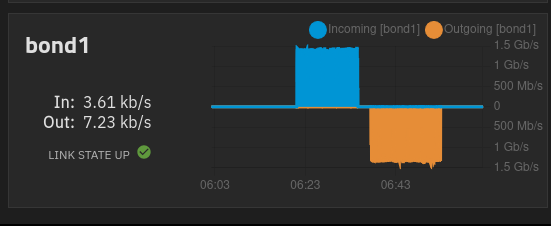
Using a 32GB test file with random bytes, I transferred it to an SMB share and then also back again. In the client→NAS transfer (blue plot) I got a sustained ~161 MB/s. In NAS→client direction (yellow plot) I got a little less at ~154 MB/s.
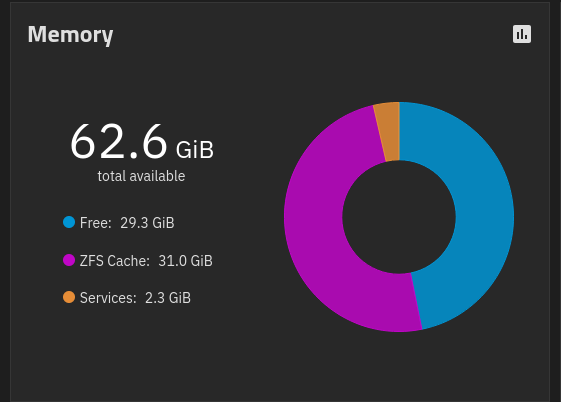
The reason I tried with a 32GB file is because I assumed it would fit entirely in ARC since my system has 64GB and it’s almost all free at the moment. That is in fact what I saw, because at the end of the initial transfer the ARC had grown to almost that size:
I expected the NAS→client transfer to be much faster, since in theory it would be reading from RAM. I think it was, because I could not hear the disks being accessed during this transfer.
I’m adding additional network info / stats below in case relevant. The client PC and the SMB service (via bind IP) are on the same VLAN with ID 30 (172.21.30.0/24).
traceroute to 172.21.30.100 (172.21.30.100), 30 hops max, 60 byte packets
 1  blackbox.clear.h1.internal (172.21.30.100)  0.189 ms  0.139 ms  0.114 ms
NAS interfaces / IPs:
truenas_admin@truenas[~]$ ip -brief a
lo               UNKNOWN        127.0.0.1/8 ::1/128
enp6s0           UP
enp3s0           UP
bond1            UP             fe80::<redacted>:4109/64
vlan20@bond1     UP             fe80::<redacted>:4109/64
vlan30@bond1     UP             fe80::<redacted>:4109/64
vlan60@bond1     UP             fe80::<redacted>:4109/64
br1              UP             192.168.1.118/24 fe80::<redacted>:3846/64
br20             UP             172.21.20.118/24 fe80::<redacted>:432b/64
br30             UP             172.21.30.118/24 fe80::<redacted>:b611/64
br60             UP             172.21.60.118/24 fe80::<redacted>:f0ec/64
The NAS main IP with the default gateway is 192.168.1.118, but the SMB service has a bind on 172.21.30.118 in Services settings.
It looks like the issue might just be SMB protocol overhead. I did the same test over NFS and I got the full 2.5GbE line rate on upload to the NAS Haven’t been able to test download yet (permissions issue) but I expect similar results.
Sorry for the taking this thread so far from the original topic. Thanks for the help provided.

 But I have some pretty old SSDs which I know I can pick up and pull data off from over 5 years ago, a few probably closer to 10 years ago. I have used one last month and while I didn’t verify the data was correct, I had no reason to doubt it. I guess I’d have to say, Your Mileage May Vary.
 It would be fitting.
 Have a lot of fun! Enjoy the downtime and thank you again.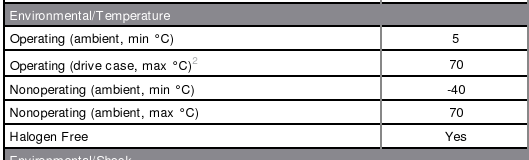
 Haven’t been able to test download yet (permissions issue) but I expect similar results.