
Just an update here also 25.04.2 and still have a faulted AD, checking the logs it says that krb5.conf is missing entirely.
1 Like
Have you got AD User/Group cache enabled?
I have it disabled currently as when I have it enabled it seems to increase the chance of something incorrect getting cached and breaking my smb shares.
2 Likes
thanks for the post, i just hit this on my machine, this was helpful as i failed to rejoin using command line or mdictl
one change to @GlendonKuhns instructions it is remove the machine account from the field ‘kerberos principle’ that enables the rejoin UI elements, there is no field called keytab
I also did a kdestroy for good measure at the command line before rejoining
possible causes?
the only thing i can think of is the kerberos keys are expiring and not being renewed
I also changed my administrator password about 7 days ago - not sure if thats cached to renew trhe ticket
co-incidentally i was learning how to make a debian VM join a domain so it could update DNS - one of things i had to do was make a systemd unit.service to run kinit to refresh the kerberos tokens every 4 hours… i wonder how truenas does it and that is where this is all failing - the tickets are not being renewed, expired, then we are borked…?
this was the error i was getting when i just toggled the service
Traceback (most recent call last):
  File "/usr/lib/python3/dist-packages/middlewared/plugins/kerberos.py", line 418, in do_kinit
    gss_acquire_cred_principal(
  File "/usr/lib/python3/dist-packages/middlewared/utils/directoryservices/krb5.py", line 261, in gss_acquire_cred_principal
    cr = gssapi.Credentials(
         ^^^^^^^^^^^^^^^^^^^
  File "/usr/lib/python3/dist-packages/gssapi/creds.py", line 77, in __new__
    res = cls.acquire(name, lifetime, mechs, usage,
          ^^^^^^^^^^^^^^^^^^^^^^^^^^^^^^^^^^^^^^^^^
  File "/usr/lib/python3/dist-packages/gssapi/creds.py", line 173, in acquire
    res = rcred_cred_store.acquire_cred_from(b_store, name,
          ^^^^^^^^^^^^^^^^^^^^^^^^^^^^^^^^^^^^^^^^^^^^^^^^^
  File "gssapi/raw/ext_cred_store.pyx", line 161, in gssapi.raw.ext_cred_store.acquire_cred_from
gssapi.raw.exceptions.MissingCredentialsError: Major (458752): No credentials were supplied, or the credentials were unavailable or inaccessible, Minor (2529638936): Preauthentication failed

During handling of the above exception, another exception occurred:

Traceback (most recent call last):
  File "/usr/lib/python3/dist-packages/middlewared/plugins/activedirectory.py", line 465, in do_update
    await self.validate_credentials(new, domain_info['KDC server'])
  File "/usr/lib/python3/dist-packages/middlewared/plugins/activedirectory.py", line 691, in validate_credentials
    await self.middleware.call('kerberos.do_kinit', {
  File "/usr/lib/python3/dist-packages/middlewared/main.py", line 1000, in call
    return await self._call(
           ^^^^^^^^^^^^^^^^^
  File "/usr/lib/python3/dist-packages/middlewared/main.py", line 726, in _call
    return await self.run_in_executor(prepared_call.executor, methodobj, *prepared_call.args)
           ^^^^^^^^^^^^^^^^^^^^^^^^^^^^^^^^^^^^^^^^^^^^^^^^^^^^^^^^^^^^^^^^^^^^^^^^^^^^^^^^^^
  File "/usr/lib/python3/dist-packages/middlewared/main.py", line 619, in run_in_executor
    return await loop.run_in_executor(pool, functools.partial(method, *args, **kwargs))
           ^^^^^^^^^^^^^^^^^^^^^^^^^^^^^^^^^^^^^^^^^^^^^^^^^^^^^^^^^^^^^^^^^^^^^^^^^^^^
  File "/usr/lib/python3.11/concurrent/futures/thread.py", line 58, in run
    result = self.fn(*self.args, **self.kwargs)
             ^^^^^^^^^^^^^^^^^^^^^^^^^^^^^^^^^^
  File "/usr/lib/python3/dist-packages/middlewared/schema/processor.py", line 178, in nf
    return func(*args, **kwargs)
           ^^^^^^^^^^^^^^^^^^^^^
  File "/usr/lib/python3/dist-packages/middlewared/plugins/kerberos.py", line 431, in do_kinit
    raise KRB5Error(
middlewared.utils.directoryservices.krb5_error.KRB5Error: [KRB5KDC_ERR_PREAUTH_FAILED] Major (458752): No credentials were supplied, or the credentials were unavailable or inaccessible, Minor (2529638936): Preauthentication failed

During handling of the above exception, another exception occurred:

Traceback (most recent call last):
  File "/usr/lib/python3/dist-packages/middlewared/job.py", line 515, in run
    await self.future
  File "/usr/lib/python3/dist-packages/middlewared/job.py", line 560, in __run_body
    rv = await self.method(*args)
         ^^^^^^^^^^^^^^^^^^^^^^^^
  File "/usr/lib/python3/dist-packages/middlewared/schema/processor.py", line 174, in nf
    return await func(*args, **kwargs)
           ^^^^^^^^^^^^^^^^^^^^^^^^^^^
  File "/usr/lib/python3/dist-packages/middlewared/schema/processor.py", line 48, in nf
    res = await f(*args, **kwargs)
          ^^^^^^^^^^^^^^^^^^^^^^^^
  File "/usr/lib/python3/dist-packages/middlewared/plugins/activedirectory.py", line 540, in do_update
    raise ValidationError(key, msg)
middlewared.service_exception.ValidationError: [EINVAL] activedirectory.kerberos_principal: Kerberos principal credentials are no longer valid. Rejoining active directory may be required.
IMO there is 100% a bug here in keeping keys refreshed and upto date… and if this is because the admin crednetials are being used to kinit - that is the wrong way to have designed this, admin creds should be used at first join to get initial tickets, do kinit for the machine account, thereafter kinit can be called to renew the machine account certs without needing the AD admin credentials ever again
yes i think i see the design issue, this is a thesis based on my incomplete knowledge of how truenas is doing kinit to refresg the machine account ticket…
truenas_admin@truenas1 ~ 11:09:43 $ sudo -s
root@truenas1:/home/truenas_admin# klist
Ticket cache: KEYRING:persistent:0:krb_ccache_vncwFEh
Default principal: alex@MYDOMAIN.COM

Valid starting     Expires            Service principal
08/05/25 10:56:48  08/05/25 20:56:48  krbtgt/MYOMAIN.COM@MYDOMAIN.COM
        renew until 08/06/25 10:56:48
root@truenas1:/home/truenas_admin#
IF the machine account is running as root the default principle should not be user@mydomain.com it should be TRUENASHOSTNAME$@MYDOMAIN.COM this means if you don’t logon before the expirey and issue a kinit for the username the ticket will expire…
I will keep digging (or maybe someone else can cofirm / refute my interpretation above) i want to see what what klist exists for service accounts…
I found after doing @GlendonKuhns fix it doesn’t fix the issue with kerberos keys - this is i guess why folks are seeing repeated issues quite quickly and frequently once hit.
A manual kinit was failing with pre-auth and key errors as the keys in the keytab have been invalidated and should the domain join doesn’t seem to correctly update the machine account on join (you can see this basd on the update time in ADUC snapin)
Here were my steps.
- disable active directory in the truenas UI and switch out of UI when done (it caches keytab entries)
rm -f /etc/krb5.keytab- delete machine account in Active Directory Users and Computers
- perform the domain rejoin
- test kinit is good with command as root `kinit -k -t /etc/krb5.keytab ‘TRUENASMACHINENMAE$@DOMAIN.COM’ it should not error
you are deleting the keytab and machine account, make sure you understand the implications of that before you do itas it will make the machine look like a totally new machine to AAD
note this mayn create older KVNO entries in keytab that nead to be cleaned up - i think trunas is rembering the old keys in someway, so please only do this on a test system for now
there is a bad bug here…
i will see if my debian VM setup in the same way does the same thing (i.e. is this an upstream issue or not)
if someone has a failed machine it might b interested to get output of these (run as root)
net ads status -U user@DOMAIN.COM
net ads testjoin
net ads info
i doubt i will get the issue on my debian as mentioned above as i run sssd+realmd not winbind+samba as it is not samba server
Just glancing at your series of ops, your probably making the problem much worse by doing this because you’re not even trying to remove the existing keytabs through the UI.
The problems I’ve seen recently with this are primarily of this kind:
- AD domain has multiple DCs and domain replication is unusually slow or possibly broken for some DCs.
- When we initially join AD the machine account password is properly set on the initial DC we are talking to. We temporarily lock in the DC we first talk to until the domain join completes and we get our first system kerberos ticket.
- Meanwhile the DC will replicate the account settings / changes to other DCs in the domain.
- At some point in the future we need to redo the kinit for the join (for example, user reboots server, ticket expires, etc). Kerberos library will select a DC via DNS. Perhaps it hits one that has the account password set correctly (no error), perhaps it hits one that hasn’t had things get replicated yet (you get kerberos errors). If for some reason the admin pre-staged the computer object, this could be KRB5KDC_ERR_PREAUTH_FAILED.
What is being done in 25.10 about this - we’re persistently storing the KDC we first talked to an hour after joining AD. Hopefully this is enough for most domains. The side-effect of this is that failover to a second DC is not going to work until that time is up.
1 Like
and if this is because the admin crednetials are being used to kinit - that is the wrong way to have designed this, admin creds should be used at first join to get initial tickets, do kinit for the machine account, thereafter kinit can be called to renew the machine account certs without needing the AD admin credentials ever again
We only use them for the initial join. We renew using the machine account credentials and shouldn’t be keeping around user credentials.
1 Like
–edit: oh just realized you mean there is a fix in 25.04.02 that should mitigate this, installing now
Thanks for the reply, how do you suggest removing the keytab from the UI? The leave steps do not appear to remove the keys from keytab and leaves it populated (or i did something wrong). my manual steps were done because once it said FAULTED kinit no longer worked on rejoin, for example the Kerberos principle for the machine accoutn was invalid and if selected in the adavanced options causes an error
my limited understanding is samba expects to own and populate the keytab, however it doesn’t seem to be correctly doing that if a verification with kinit fails after rejoining
the only time i could get kinit to work after a rejoin was to nuke the keytab and the machine account in AD
The hour time limit sees fine design decision to me, not sure why you wait an hour tho? why not 10 minutes?
tl;dr the failure mode of FAULTED seems to be something that shouldn’t happen, and the workarounds in this thread didn’t seem to fully fix samba and kerberos. Is there a set of different steps we can take to avoid this FAULTED and fix it if it doesn occur?
I assume at the hour mark is when this gets populated as it is not poulated after my totally clean domain join (i manaually switched it), selected it after using Gordons instructions caused an error because the keys were expired…

At least in my case the Account I use to connect for AD has not changed passwords in years and definitely is correct on my 2 DCs. Hopefully the changes you mention correct the faulted domain though. I currently have no keytab at all getting saved so something funky there.
This is on a connected but faulted domain.
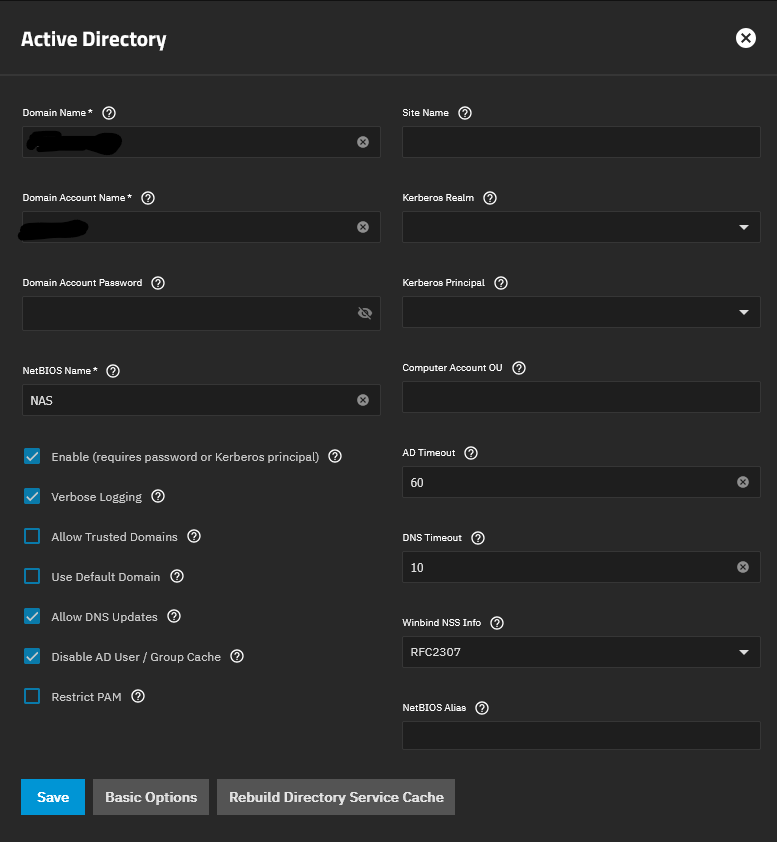
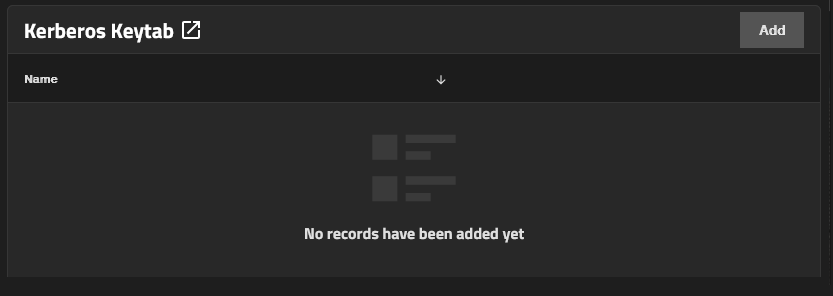
I’ve completely left the domain a few times and rejoined but it never creates the keytab.
I am also still seeing issues I think are intrinsic to how RID works on Truenas though even on 25.04.2… if for any reason an address cannot be resolved by RID it seems I somehow also get values generated in the TDB range (tdb shouldn’t even be generating its own IDs right its ONLY storing values)? That said, so long as I disable cache, and clear the directory service cache, it usually works (so long as I dont’ mess with it too much) it will still randomly fail though eventually. Opening ACL settings or resaving presets can potentially screw it up also.
1 Like
Never create, or never recreated - and is left hanging around with old key entries?
The latter is what i saw in my testing this week, deleting the keytab was the only solution so that forced winbind/samba to recreate it, that said i ended up witn keys with 1, 0 and -1 statuses so i am not sure if this is a good approach (i cleaned the keytab with kutil)
1 Like
I have a spare NAS I setup in my environment and it seems to be staying healthy (over an hour since configuration fingers crossed)
This one I did as a fresh install. So perhaps something got screwed up over time in my production install due to upgrades.
It auto created all the kerberos files when setting up the domain as expected unlike my existing installation.
1 Like
There was no keytab or anything kerberos related shown in the UI to even be able to delete it.
you can try removing the use of the machine credential for domain operations from the domain join here, save, and it will use the admins cred rather than the machine cred when you uncheck enable and save

that may not fix your problems, it may leet you leave and completely rejoin
othwerwise its using ktutil on the command line to mess with the kerbeross ticket file - i intetionally did not say how to do that, esp given the staff comments about messing with it as its managed by samba…
only do what i just said on a broken system… removing the machine kerberos principle ot chaging it could break domain join on a healthy system…
That never gets populated so its already doing that it fails to generate any of the kerberos credentials at all.
Only domain name, account name and realm have anything populated as you can see the rest is blank this is AFTER saving it and reopening, SMB works in the state somehow.
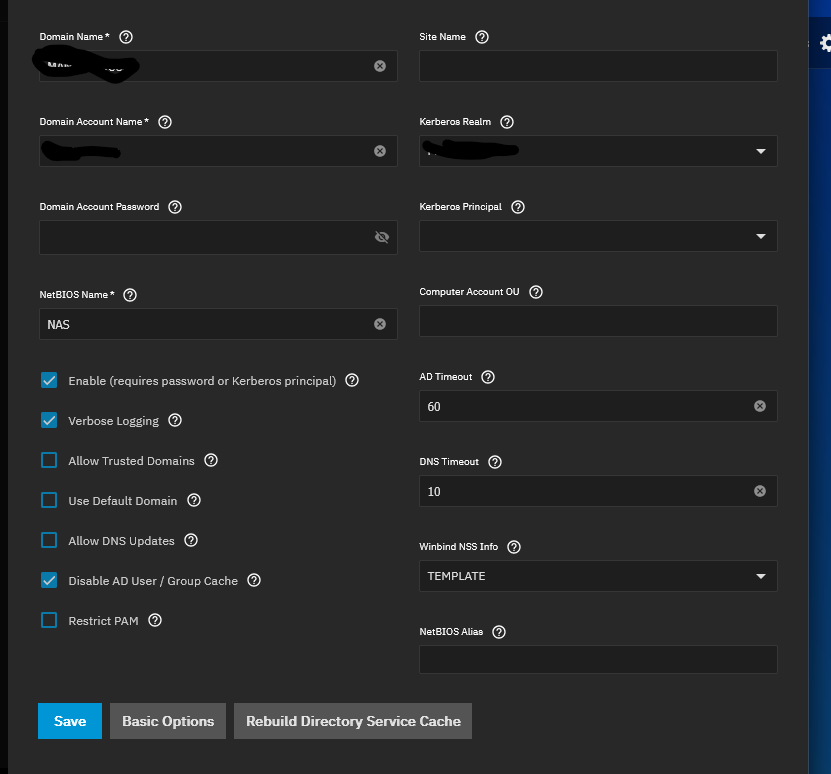
i might have mis-understood what was said earlier by staff, on a join the machine account only gets populated after an hour or two when the ‘switch’ to using that under the covers (in my mind it should do it after 5 mins, if thats not possible because of AD issues then the admin should fix their AD…)
if you are in an unhealthy state you can’t fix, you can try this, i am not responsible for any issues
- disable domain
- disable smb in the ui
- delet the machine account in active directory users and computers and delete any Windows Server DNS entries made with the computer account (if you dont it will fail on DNS updates later) - be aware this will look like a new computer after this… so if you have used the computer account…
- delete the kerberos ticket file via the command line (krb5.keytab)
- enable smb in the ui
- rejoin the domain
- if it says health wait a couple of hours to see the switch to using the machine ticket
this is what fixed it for me, at one point i did need to use ktlist and ktuitl to clean old invliday kerberos tickets that kept getting populated but thats because i had done other stuff… this is all actively recommended against by TN staff (for good reasons… but)
tl;dr wait a couple of hours to see if that auto populates and only do the other things above if you end up back in a unhealthy state (look in journactl for why it is unhealthy too)
1 Like
Yeah I haven’t done the delete machine account part or DNS I will try that… since that part would be a major difference from my production system to the spare… since that is the first time it has been joined to AD.
Yeah I have no keytabs though
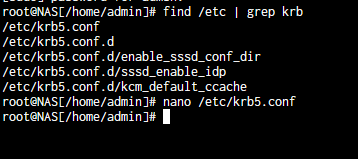
i don’t know if the system clears those out / delets them when the config is disabled…
but yeah at this point if there is no keytab if it were me i would first try rejoining and see what error i see in journatlctl, might give a clue as to wether the are broader domain issues (DNS, existing accounts, time, etc) and don’t forget to check the windows AD controllers secuity logs too to see if you are getting any denieds your shouldnt
2 Likes
I have the same issue that started with 25.04.2 and continued after upgrading to 25.04.2.1. From what I saw here, 25.10 is expected to fix it.
From what I gather, if the permissions are still working, it’s best to leave it. But it would be nice to be able to change permissions sooner than later, if anyone decides to test a 25.10 nightly or beta once it’s released to see if it fixes this issue, I would love to know the results.
Sooo… what are the steps to fix this?
I m somewhat of a beginner (and somewhat surprised about the amount and severity of bugs in TrueNAS).
Will this automatically be fixed by updating to 25.10?
Are any additional steps required after the update?