
I need to uninstall TrueNAS v25 and replace with v24 as I’ve been unable to successfully install v25 due to various problems such as storage config (RAID) and other complex (for me) issues.
How do I uninstall v25 and go to v24? Is there an uninstall program that I’m missing?
You don’t uninstall.
Under system/boot you should find previous boot environments. Just pick the one you want and boot it. I am assuming you had V24 installed beforehand.
Hopefully you haven’t updated your ZFS pool feature flags.
Thanks for your prompt response. I’ll try my luck in a few hours time. I’m not sure about ZFS pool feature flags but I’ll look for that before I try the reinstall of V24. If you have any further information of what and where I should be looking for this V24 item, that would be much appreciated.
You could discribe the issues you’ve encountered and maybe it’s not required to roll back to 24.10 and could potentially be resolved on 25.04.
But since you didn’t discribe the issues we can’t tell if it’s solvable…
Apologies for not describing the issues encountered in V25 but, in short, I’ve been unable to allow the entire 4TB (minus sys admin overheads) in the V25 RAID setup. Maybe I’m trying to establish too many config layers for what I’d expect to be a much simpler config.
It’s presented a more complex (could be my imagination) environment than I seemed to encounter under V24.
I’ll try to provide a more detailed description after I get my system up and running in basic form.
On 2nd thoughts, maybe there’s a chance that V25 can meet my needs, which in the most basic form, are 2x HDDs (4TB each) as a RAID config for my photos, music, and some docs . All I seemed to get from V25 was a knock back when I tried to upload all my above file types, which I didn’t get when using V24.
There’s no change between 24.10 and 25.04 in regards to setting up storage. Nothing has changed in that section of the gui. So it’s unlikely that installing 24.10 will solve your problem…
That’s both interesting and encouraging. Perhaps the YouTube video I was following (https://youtu.be/SJZxgxc0Qhg?si=x7TfwnJCgFTw_nPv) has led me astray. Or perhaps I really need simple, easy to follow steps that even a novice like me can simply and accurately setup:
2x 4TB HDDs RAID config that creates an acccessible to Windows storage facility;
Security as part of my home network that’s predominately Windows 10 based (for now, until I decide future direction re Windows).
That seemed to work OK under TrueNAS V24 but I’ve got myself into a heap of complexity in TrueNAS V25 (maybe thanks to YouTube).
Inconsistent, minimal and revelant setup instructions might be the problem, not V25 VS V24.
Storage layout for 2 disks with redundancy would be a mirror.
- In the Truenas Gui go to storage-> top right corner big blue button “create Pool” Choose Mirror as layout (1 Datadisk 1 Parity disk) for 4TB usable capacity.
- Under Credentials → users create users to access the shares you want to create, don’t forget to tick the “smb user” checkbox at the bottom of the setup screen
- Under Storage → Datasets create Datasets and Edit the permissions, so that the users you created have access permissions.
- In the Gui under shares create a smb share with the Child dataset you’ve created in step 3
- in Windows explorer you should be able to access the share froom step 4 under
\\ipadressofyourtruenas\sharename
That should be all the steps required and those steps haven’t changed since truenas scale was released in 2022…
So what did you then do? If you had this set up under 24.04 or 24.10, and then upgraded to 25.04, everything should have stayed as it was. Clearly it hasn’t. So what did you do, specifically?
Thanks for your input - I’ll give this a try tomorrow, here’s hoping this can put all my woes to bed.
Thanks again, I’ll get back to you tomorrow, hopefully with a positive result.
Heart felt, sincere thanks for your effort to get me up and running. Unfortunately so far this is not working for me, as follows:
I get to item 3 and that’s as far as I’m able to go forward. The following screen shot shows the error message when I try to follow your instructions in item 3:
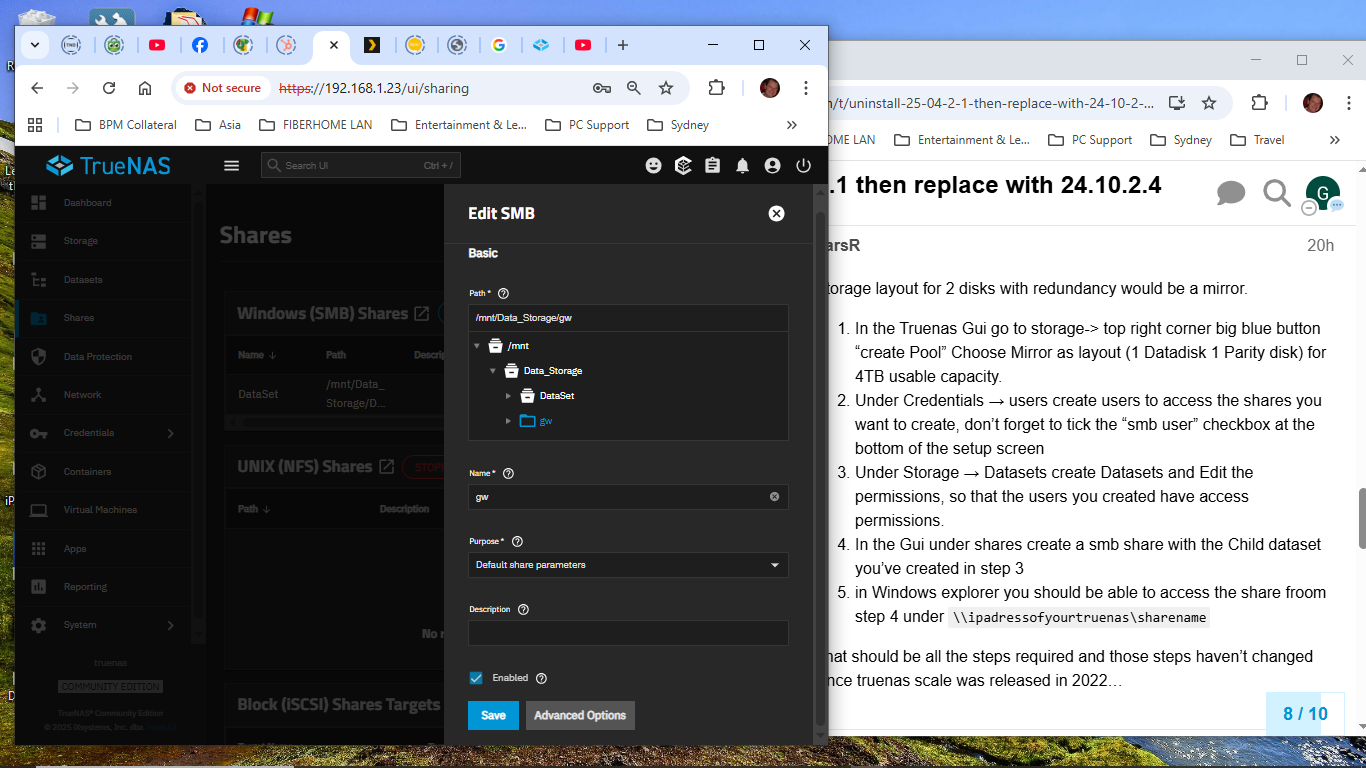
Validation Error
[EINVAL] sharingsmb_update.path_local: ACL type mismatch with child mountpoint at /mnt/Data_Storage/DataSet: Data_Storage - POSIX, Data_Storage/DataSet - NFSV4
I can’t get past this point to complete your instructions.
That’s an relatively easy fix. When I’m at my workstation I can tell you what to fix and where, right now I only have access to my phone.
The error says there’s a permission type missmatch. Changing the permissions type on the datasets should fix that
On the Datasets Tab you have to check which of your datasets uses posix and which uses nfsv4 acls. Click on Advanced options and scroll down until you see ACL Type. It can be posix or nfsv4 and for a child dataset inherit (from parent dataset). Decide which permission type you want to use posix or nfsv4 (personally i find nfsv4 easier to understand then posix) and edit the dataset Details, or for child datasets set it to inherit to let it inherit the acl type from the parent dataset.
I’m not able to follow your instructions, for example “scroll down until you see ACL Type” I’ve opened Advanced Settings then selecting the “Access” option, (I’m presuming Access means ACL type) but I don’t see “permission type”, and there’s only 1 Username (truenas_admin). This probably means I’m looking at the wrong menu or perhaps there’s inconsistent naming between my screen and yours?


Thank you!
I’m now at the right menu item but the ACL type is ‘POSIX’ and it won’t allow me to change it to nfsv4 as the field is disabled
Thats normal for the root dataset, you have to do those steps on a child dataset
Edit:
for clarification, your root dataset is called Data_Storage and DataSet and gw are child datasets.
So, if I change the ACL Type child dataset (SMB/NFSv4) from ’ Restricted’ to Mode 'Passthrough", we’re done?
As far as i know of, yes.
I’ll follow on now with your earlier list to complete items 4 & 5 as follows:
4. In the Gui under shares create a smb share with the Child dataset you’ve created in step 3
5. in Windows explorer you should be able to access the share froom step 4 under \\ipadressofyourtruenas\sharename
Thanks in advance for your patience and assistance