Metadata vdev didn't increase in size when replacing ssd's

Hi. When I originally set up my pool, I added 2 x 1T ssds as a mirrored metadata vdev. Recently I saw a post that suggested I should be using 3 devices, as my main pool is raidz2, so I thought while adding a third ssd, I’d also increase the size, so did these steps:

  • Added a 3rd ssd, size 2T. Selected “Extend” in the GUI. Left it to resilver
  • Detached/Offlined (can’t remember which :grimacing:) one of the 1T ssds. Replaced it with a 2T. Left it to resilver
  • Repeated the above with the last 1T ssd.

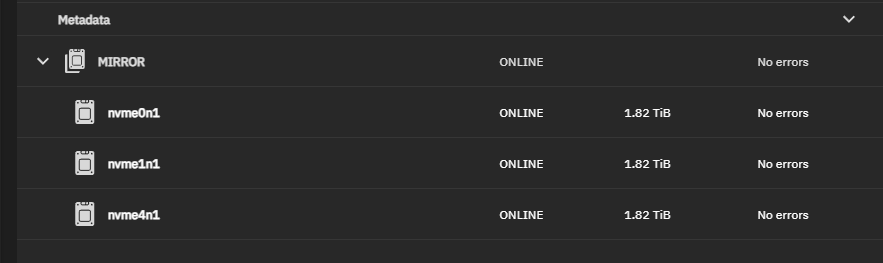
Thought all was well, as the devices display showed:

But while checking on something else, I found this under lsblk:

nvme1n1     259:0    0   1.8T  0 disk
└─nvme1n1p1 259:3    0 929.5G  0 part
nvme4n1     259:1    0   1.8T  0 disk
└─nvme4n1p1 259:4    0 929.5G  0 part
nvme0n1     259:2    0   1.8T  0 disk
└─nvme0n1p1 259:5    0 929.5G  0 part

So it really didn’t expand the size, just told fibs about how much it was using to make me feel good.

How do I get this vdev to expand out to fully use the ssds.

No one with any thoughts on this.

There was sort of a feature or bug with CE / SCALE in that the partition size did not increase with drive replacement. This was partly done because if you replaced a drive with something larger, but did not intend to grow the vDev, you would not want automatic expansion.

That said, I vaguely recall someone saying you have to push an expand button. But, don’t quote me.

It may be useful to see the output of zpool get all | egrep expand.

The autoexpand is probably off and I don’t know if Metadata vDevs would list size in expandsize. Nor if the vDev limited by partition size would even show up here.

TheBigPool  autoexpand                     on                             local
TheBigPool  expandsize                     -                              -
boot-pool   autoexpand                     off                            default
boot-pool   expandsize                     -                              -

Cheers.

Then it may be time to see about the GUI expand button. I have not used it, so I don’t know where it is. Perhaps someone else will know.

That’s the button I clicked when I added the first 2T to the 1T x 2 mirror to start the expansion.

Cheers.

There must be another button to have CE actually make use of the new space.

Having the same problem here after replacing a couple of 1TB SSDs for the metadata vdev, with 2TB ones. The pool indicates they have the same size as previously:

N5Pro% zpool list -v tank5
NAME                                       SIZE  ALLOC   FREE  CKPOINT  EXPANDSZ   FRAG    CAP  DEDUP    HEALTH  ALTROOT
tank5                                      128T  53.7T  74.6T        -         -     0%    41%  1.00x    ONLINE  /mnt
  raidz1-0                                 127T  53.6T  73.7T        -         -     0%  42.1%      -    ONLINE
    19276ab5-2cf8-43ff-8a8a-22cd34a68a7f  25.5T      -      -        -         -      -      -      -    ONLINE
    186eaad1-6d69-4afe-ab62-a7352ea0fe72  25.5T      -      -        -         -      -      -      -    ONLINE
    b67d3ee1-2fb8-414f-a4c6-0befee964732  25.5T      -      -        -         -      -      -      -    ONLINE
    94931272-64a0-4ad9-9ea7-7366fd4f1e43  25.5T      -      -        -         -      -      -      -    ONLINE
    6e9dc9c5-a950-41ad-98f7-7b1cbfd6a22b  25.5T      -      -        -         -      -      -      -    ONLINE
special                                       -      -      -        -         -      -      -      -         -
  mirror-1                                 944G  34.5G   909G        -         -     2%  3.65%      -    ONLINE
    6fc4bd65-15af-467c-8d2a-6b7dd5dad7c2   952G      -      -        -         -      -      -      -    ONLINE
    a4f0a8fe-b534-459c-ae2a-dc360c750e3d   952G      -      -        -         -      -      -      -    ONLINE

The autoexpand toggle is on:

N5Pro% zpool get autoexpand
NAME       PROPERTY    VALUE   SOURCE
boot-pool  autoexpand  off     default
tank5      autoexpand  on      local

Any suggestions?

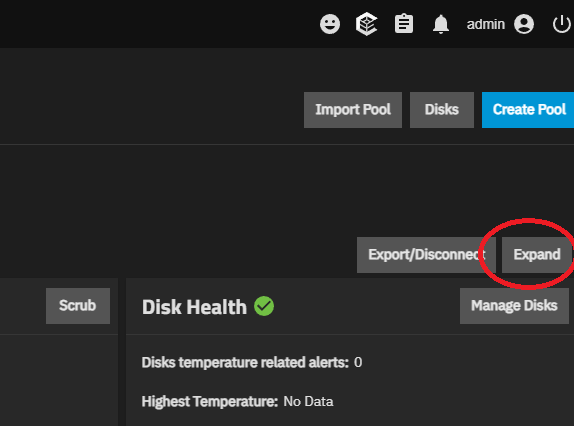
I initially tried this button:

Which led to this post. But YMMV.

But after much searching and crossing my fingers, I did this for each of the devices in turn:

zpool offline  <pool> <device>
parted /dev/<disk> resizepart <partition> 100%
zpool online -e <pool> <device>

So far I haven’t seen any issues. But I also haven’t done a full scrub since the changes.

Cheers.

Hey! Thanks for the help. Very stupid for me to not see it. Doing the expand from the GUI fixed the size:

N5Pro% zpool list -v tank5
NAME                                       SIZE  ALLOC   FREE  CKPOINT  EXPANDSZ   FRAG    CAP  DEDUP    HEALTH  ALTROOT
tank5                                      129T  52.5T  76.6T        -         -     0%    40%  1.00x    ONLINE  /mnt
  raidz1-0                                 127T  52.4T  74.9T        -         -     0%  41.2%      -    ONLINE
    19276ab5-2cf8-43ff-8a8a-22cd34a68a7f  25.5T      -      -        -         -      -      -      -    ONLINE
    186eaad1-6d69-4afe-ab62-a7352ea0fe72  25.5T      -      -        -         -      -      -      -    ONLINE
    b67d3ee1-2fb8-414f-a4c6-0befee964732  25.5T      -      -        -         -      -      -      -    ONLINE
    94931272-64a0-4ad9-9ea7-7366fd4f1e43  25.5T      -      -        -         -      -      -      -    ONLINE
    6e9dc9c5-a950-41ad-98f7-7b1cbfd6a22b  25.5T      -      -        -         -      -      -      -    ONLINE
special                                       -      -      -        -         -      -      -      -         -
  mirror-1                                1.81T  33.9G  1.78T        -         -     1%  1.82%      -    ONLINE
    6fc4bd65-15af-467c-8d2a-6b7dd5dad7c2  1.82T      -      -        -         -      -      -      -    ONLINE
    a4f0a8fe-b534-459c-ae2a-dc360c750e3d  1.82T      -      -        -         -      -      -      -    ONLINE

Thanks!

1 Like