Migrated TrueNAS from older host to UEFI host, and cannot upload saved config ; also, boot pool issues?

Been running TrueNAS since forever, 15-TB, 5 data drives + 1 boot SSD.

Since I’ve been running it forever, the host computer isn’t new, and the motherboard only supports a max of 8-GB RAM (like I said, been running it for a while!)

Although my network is pretty simple - just use it for an SMB share for network storage - I’d been reading how the most recent TrueNAS versions were even more memory-hungry, and things would run ideally with 16-GB RAM, so I thought I’d upgrade my dusty 8-GB RAM host to newer hardware that would support 16 …

Newer hardware is UEFI of course, so my ‘Legacy’ boot SSD would no longer boot on the new host. Oh. I read I’d have to re-format the boot drive, because UEFI.

First odd-ball issue. I’m using a PCIe SATA controller - PCE8SAT-M01 (Marvell 88SE9215 + JMicron JMB5xx chip)[which has been running well for years!) with all drives attached, including the SSD boot. The TrueNAS installer didn’t see the drive, so I un-hooked it from the PCIe, hooked it up local, installed TrueNAS on the SSD, re-connected it to the PCIe controller – if I boot it with the now-UEFI boot SSD drive on the PCIe card, I rather quickly get a “cannot import boot pool - no such pool available” error.

If I connect the boot SSD to the motherboard’s controller, it will boot – but then I have no apparent ability or options to restore/upload my saved config tar file.

Now, with everything down, I’ve seen a message to two about exporting my pool, but.. obviously can’t do that now. I thought all I needed was my saved config. But.. with the ‘new’ TrueNAS running, I cannot find any way to upload/restore my config. Help!

As an aside, I was suspecting I needed to have my boot SSD connected to the same controller my ZFS drives are on, but that doesn’t appear to be possible now. (If I leave the boot SSD on the PCIe controller and try re-running TrueNAS setup, the Installer says “no drives” to install on. If I install w/ local controller, then move SSD to PCIe controller after install, the boot then says "cannot find boot pool”.. so I will leave the boot SSD on the motherboard controller for the moment..

So, now, how do I restore/upload my saved config tar file, as there appears to be no menu option for this? How do I regain access to my pool!? HeLp!
It would help if you posted hardware details on the previous system and OS version and the new one.
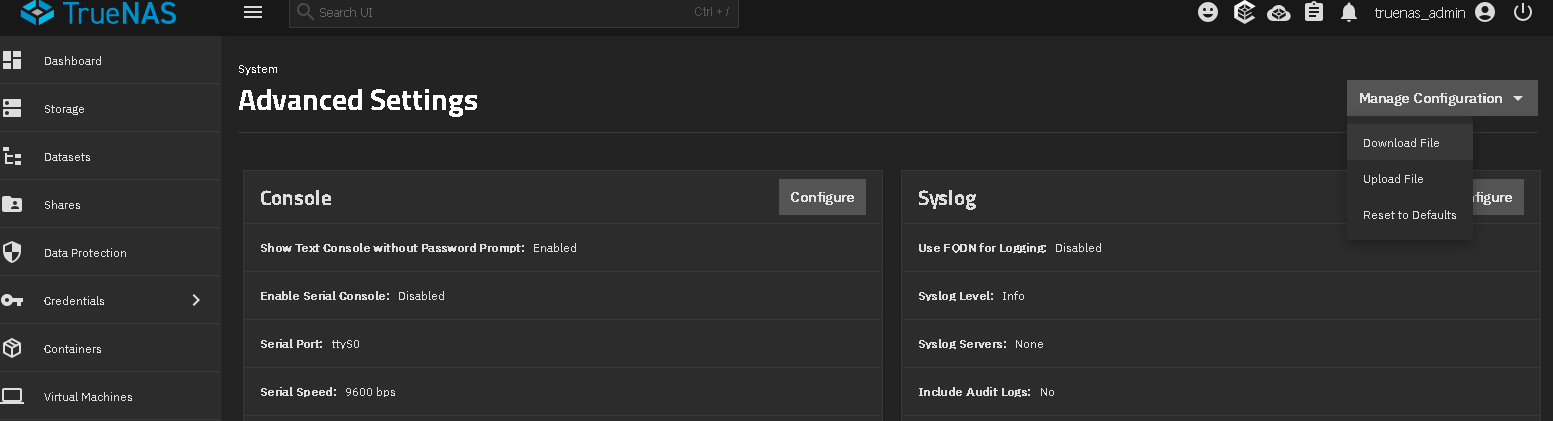
Screenshot from 25.10.1 showing Sys Config menu on right

Read the following, Now might be the time to switch before you have data loss.
Multiply your problems with SATA Port Multipliers and cheap SATA controllers

What’s all the noise about HBA’s, and why can’t I use a RAID controller?

Why not? So long as you can see your data pool just simply upload your config file.

User couldn’t find where to upload config in GUI and multiposted. Got responses in both threads.

1 Like

“So long as you can see your data pool just ..”

Well, problem B has now gone away. I found the blasted ‘Upload’ option hiding under ‘Advanced’ … I somehow missed that previously. So I’ve re-uploaded my config, and that’s good.

Unfortunately, I am left with the larger ‘problem A’. I cannot see my data pool, as I re-formatted my boot drive to UEFI, because new UEFI hardware. I am only now learning that my saved config isn’t restoring my pool.. this is a problem.

Ah! Much appreciation for the screenshot. They moved it to ‘Advanced’. I thought I’d checked every menu, I somehow missed that one. Thanks for that, I’ve now uploaded my config.

This of course now leaves me with my larger remaining issue. My pool. Only now am I learning that my (config) backup isn’t restoring access to my pool. Now I need to learn how I can save my pool!

After running into my first problem earlier, I pulled my orig. boot SSD drive (that I’d let the TrueNAS installer reformat, for re-installation) and tucked it aside. I am now using a -different- boot SSD. So.. I technically have my original boot SSD I can interact with, if any fancy techy stuff might could resurrect my data pool from it, after TrueNAS formatted it once (for the UEFI re-install)..

I’m not imagining the original boot SSD will be overly helpful after that format .. but I -did- sit it aside, Just In Case .. thought I’d at least mention it.

Your going to have to provide screenshots or better descriptions of your current system state. Screenshots of the Storage, Storage Dashboard should help us see if you pool is there but you just can’t see shares or what

You can just reply once and quote sections or @SmallBarky the user for the paragraphs.

To recap, moved my TrueNAS host from an older (8-GB max) PC, to a newer (16-GB RAM) UEFI PC.

5 ZFS drives + 1 boot (SSD) drive. Latest TrueNAS - 25.10.1. Dataset is RAIDZ1.

The base problem now, is I am learning that my backed-up config did not back up my pool. I reformatted my boot drive (required for moving to UEFI), thinking that my “backup” (my saved config tar) could be used to restore my system (i.e, pools).

I re-installed a clean TrueNAS on a new PC (host), 16-GB RAM. Unfortunately I let TrueNAS reformat the boot SSD.

So my 5 ZFS drives (RAIDZ1, 15-TB) are all fine, so-to-speak .. I just need to figure out how I can regain access to my pool! :flushed_face:

It really should import the pools once you upload it if everything goes smoothly.

The boot pool is expendable and not really important. That’s the point of the config file, so I don’t think that’s the issue.

This is just a shot in the dark, but It could be that PCIe SATA port multiplier is not behaving nicely in your new system that is giving you problems importing the data pool. This is one of the reasons why we discourage the use of them. They work fine until…. something happens like power failure or in your case, hardware refresh.

My thought also, the PCIe card is so old it does not support UEFI boot options period..only works in Legacy bios mode…

!whew! Got my pool back.

Decided to grab the old (‘legacy’) PC, hook it back up, re-install a non-UEFI TrueNAS to a different (‘legacy’, non-UEFI) SSD … so it booted up, and -bing!- Import pool, and there my pool was. I clicked on it, and -bing- it imported my missing pool, ALL my data and drives were there.

Whew. Now I don’t have to jump off a building somewhere. Man. That was some stress I did not need to have.

Needless to say, I’ll not be trying to get this SATA port multiplier on UEFI. This older (host) system is old enough, so the multiplier ends up running without issue. Guess I’ve been lucky.

So, yeah. I am not ‘touching’ my host PC, until I can get my hands on a nice HBA card.. (!)

1 Like

As an aside, I discovered the PCIe card ‘would’ support a UEFI boot, -if- the boot drive was specifically connected to port 3 on the card. Not that that helped me any .. the TrueNAS installer couldn’t see it. Now that I can access my pool again (after hooking up the old non-UEFI PC), I’ll be replacing that Marvell controller with an HBA .. (!)

Noice! Seems like it was indeed compatibility problem. I’m glad that you were able to get it all back.

This is one of those situations where the old saying of “if it ain’t broke, don’t fix it” really truly applies.

No kidding.. that was quite the adventure.

When I originally bought that card (a SATA ‘port multiplier’, the now-troublesome PCE8SAT-M01) (over a decade ago, I think), my FreeNAS was running a RAID5 array. Over the years and software upgrades, RAID5 went away, replaced with ZFS and RAIDZ1. I hadn’t imagined that my SATA card would transition from “hey, working great!” to “hey, I don’t play well with ZFS!” Welp, it was a learning experience.

I now have a replacement LSI SAS3008 9300-8I (IT mode) card ordered and on the way, that’ll play very nicely with ZFS. Looking forward to it!

1 Like