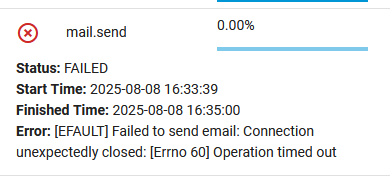
I do not create a log however TrueNAS may since I am using TrueNAS to send the email. I too have experienced this myself which is why I have thought about dumping that method in favor for @oxyde script in the next version. We will get there eventually anyway.
I know you use a different email address than most so I would check the email address you are using. Check the email account which sends the TrueNAS emails in the ‘sent’ folder. Did TrueNAS try to send the missing email? If it is not there (what I suspect) then the problem is definitely TrueNAS.
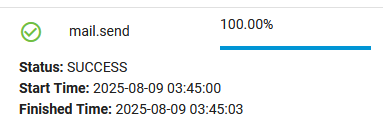
Next look in the Task Manager (clipboard upper right corner) to see what it did, or failed to do. You should see mail.send which is TrueNAS sending an email. Click on it to open it up and see the results.
To force the script run @oxyde python script, open multi_report_config.txt and add the line truenas_sendmail_support="No" somewhere near the email lines just so you keep the grouping and it easy to locate later should you desire. It can be anywhere you really want in that file. Note: This will not survive an update to the config file if created by Multi-Report. This will tell the script that the TrueNAS does not support using sendmail (the old way) and force the change. This “should” force the script @oxyde wrote to be downloaded automatically. This should happen even if you have automatic updates turned off for when the sendemail.py script is not present.
Multi-Report, or more accurately Drive-Selftest has a built in delay, to sleep 130 seconds (default) and is user changeable in the multi_report_config.txt file. However, Multi-Report executes Drive-Selftest and Drive-Selftest sleeps and waits for the timer before continuing with the script and releasing control back to Multi-Report, where it gathers all the data and creates the report to email, and then sends the email. There is no delay where you are thinking it might be. With that said, feel free to change the delay value to 1 or 2 seconds. The script will run fine but you will not have any Short tests completed so it will tell you that they were initiated, maybe. Look for this value near the bottom of the config file Short_Drives_Test_Delay=130 and change the value to whatever delay you would like.
In short, the failure is on the TrueNAS side of things or most likely your email server.
Strange enough I had a failure myself, well a few and I’m using a different method to send email. The commonality is the Microsoft Exchange Server that I use. I looked up the error code I was getting (different from yours) and while I understand what it is telling me, I find it hard to believe it is accurate. I don’t think I’ve sent 10,000 emails in one day, nor sent 3 emails concurrently at that particular time. That error was 5 days ago and using @oxyde script to send email. You are using the built in email service that TrueNAS uses for CORE, unless you made the change I mentioned above to force the use of the @oxyde script.
My best guess is the email server is closing your connection early. I will not explain why as I don’t know much at all about email servers. I know I set one up in the early days before the internet when email was quite a bit different, on FidoNet.
To me seems that the server not respond, this seems a classic timeout error.
Something i have learned with qqmail, connection can be closed unexpectedly, but the mail Is delivered nor with error or not client side.
If you want send me the logs, maybe Is an issue my side, i will investigate
It rarely happens and I don’t think it is your script, but I appreciate the offer. I just updated to v1.25 today so if I have another error that I notice, I will forward the logs.
@joeschmuck@oxyde ok think I worked it out. I run my own mailserver (Mailcow). For security I protect the mailserver with Crowdsec. A few weeks ago the Crowdsec updates stopped working. Found a fix that said to change the MTU to 1300 on the server hosting Mailcow.
I’m seeing errors in the Mailcow postfix logs such as:
lost connection after DATA (81902 bytes) from unknown[192.168.0.6]
The timing seems to match up in terms of when I made the change, and the multi report emails started to only intermittently work.
I have stopped getting emails from multi-report since Friday.
I have seen one error:
Sendemail had a problem. Check the file log at /mnt/BigPool/SMB/NewNAS-Scripts/Multi-Report-2/sendemail_log {"error": true, "detail": "Error: Command '['/usr/bin/midclt', 'call', 'mail.config']' returned non-zero exit status 1.", "logfile": null, "total_attach": 2, "okPreformatted text``
There are no sendmail logs since march
And after a reboot of the client - they all turned up.
@oxyde will have to respond to this one. There was an update to sendemail.py to version 1.25. I only updated it myself yesterday, but it has been out for a few days. Maybe related?
@joeschmuck i don’t think is strictly related to 1.25 (it introduce just 2 small features - test mode and update advice - that not impact the point is failing)
@NugentS the error seems raised trying retrieving the mail.config from middleware.
Watching your signature your system should be Scale, and the path is correct /usr/bin/midclt (from 1.20 there is a switch to /usr/local/bin/midclt for Core users). Also i take for granted that the script is running with enough privileges ( or neither multi report would work well).
I’m on 25.04.2 and everything works as expected, are you on the newest 25.04.2.1? Does those errors start after the (eventually) update?
Also i don’t quite understand this
you mean the emails or the logs? because
this is work as intended, logs file are not more automatically generated.
You can fast test the script as standalone, via shell, calling the script with only the --test_mode flags if you have the 1.25. The log will be generated, feel free to DM me so i can give a deeper look
Weird issue, but honestly i don’t think there was something on the script side.
If happen again, Is worth to try the single command via shell (mail.config) to see what happens, if fails the same or not.
Let me know!
Recently had to change my smtp provider for mail sending and I am experiencing a new issue, the log says KO: 501, b’ sender address must contain a domain’, ‘myusernamehere’ . When I enter the data into the TrueNAS Scale email settings and perform a test it is successful, but when attempting to run the cron job for the Multi Report and sending via the Standalone TN Send it fails with the above in the log.
@MrTVirus
Unfortunately we are not able to use the TrueNAS way of sending emails these days due to hardening of the TrueNAS application. In SCALE we are now using the Python script @oxyde created for us.
In the multi_report_config.txt file you will find a section called EMAIL.
In here you will need to change the From="" to From="youremailaddress" and then test again. If it already has something in it, try to change it to From="" and see if that works.
If that does not work, send a message to @oxyde with the complete error code and any log files generated. He is a wizard at this and will get you back up and running very quickly.
Hey there thanks for the swift reply! Yes, I’ve been using the TN send for a while with your multi report since moving to Scale and finding that the previous method was depreciated. The multi report was being sent successfully until I had to change SMTP providers and that appears to be what broke, somehow.
I’ve modified my file but it appears to still fail and just references the username of the mail user.
@MrTVirus as @joeschmuck already suggest, can be the From override the culprit (must respect your SMTP guidelines), but in case you didn’t notice anything fancy i will help you understand what’s going on, but i need you share the debug file:
open the shell and cd into the multi report config
if you don’t have the latest 1.25 version, launch the update directly from the multi report
launch the sendemail alone, just using the --test_mode flag to trigger a test email; this will also generate the debug file, in case you receive the email somehow don’t use the file attacched but grab it from the sendemail_log folder (the attachment is truncated in the moment of being attached, is just for test purpose)