
I’m out of the house right now but should be back in a few hours. I can look into it then. Sorry for your troubles.
@steasenburger
You are correct, this does look like a permissions issue, but with that said, What version of TrueNAS are you using? If CORE, then the disk layout feature does not work and it “should” just tell you and keep going. I suspect you are running CORE and I messed up the version check.
I hope this is the case. I am almost ready to pop out another minor version change in a few days, and if this is the problem, I will need to build a VM to test in a CORE environment. I turned off and disassembled my CORE system so I did not test in Core.
Don’t worry, it’s not urgent at all.
But no, i am actually on TrueNAS SCALE - Fangtooth 25.04.2.4.
This is what the script reports with the disk layout turned off:
Multi-Report v3.28 dtd:2025-12-09 (TrueNAS SCALE - Fangtooth 25.04.2.4)
Report Run 23-Dec-2025 Tuesday @ 17:53:32
Total Memory: 31Gi, Used Memory: 23Gi, Free Memory: 4.1Gi
System Uptime: 21 days, 8:34:18
Script Execution Time: 21 Seconds
I have to confirm the script with the disk layout does work properly. The script was run from ssh as it had already run automatically run earlier from cron. This is the version and header info from the email:
Multi-Report v3.28 dtd:2025-12-09 (TrueNAS SCALE - Fangtooth 25.04.2.6)
Report Run 23-Dec-2025 Tuesday @ 17:44:19
Total Memory: 62Gi, Used Memory: 30Gi, Free Memory: 24Gi
System Uptime: 49 days, 6:39:50
Script Execution Time: 17 Minutes : 2 Seconds
Here is a partial image of the email showing the disk layout section.
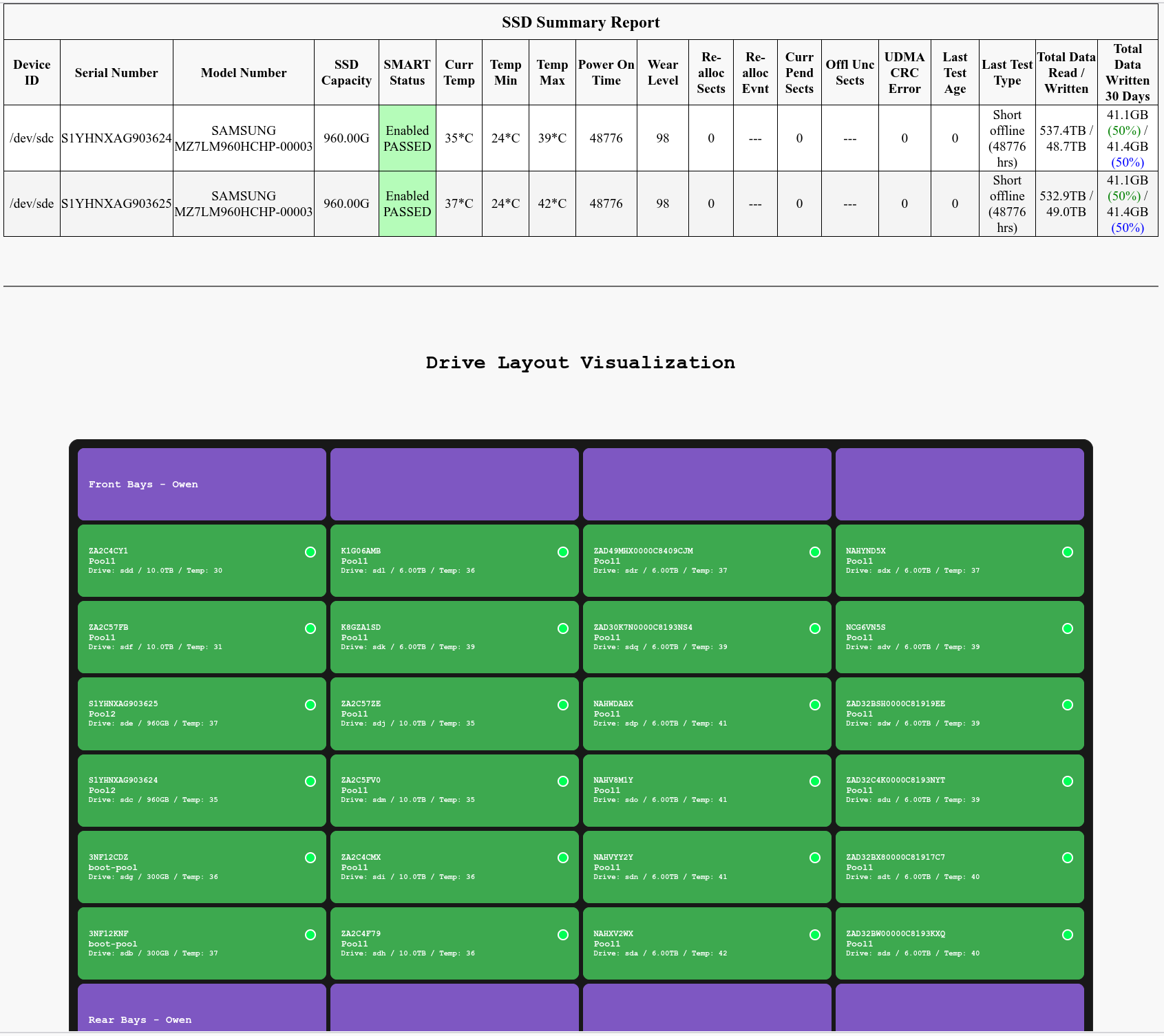
I would check the permissions. At the command line enter the directory for multi-report and use the command ls -l It will give you all the info needed on the permissions user:group. Here is an example of what my permissions on this server are.
-rwxrwxr-x+ 1 phild admin 10470 Dec 23 18:01 disklayout_config.json
-rwxr-xr-x+ 1 root root 714889 Dec 23 17:42 multi_report.sh
-rwxrwxr-x+ 1 phild admin 39847 Dec 23 17:43 render_case.py
Most of the active scripts in the directory are similar with only multi_report being root:roor
@steasenburger
You said this happened when you upgraded to v3.28. What was the previous version that was running?
If you were running a previous version, in the same directories, I don’t know why it would not run now.
With the Disklayout="enable" does the script run when logged in via SSH or Shell windows, as root ? If it runs, then there is a problem with the CRON setup.
If the script still indicates errors when run via SSH, will you please run the script using the -dump email switch to send me the data that might help diagnose what is happening. After that you can change the multi_report_config.txt file back to “disable” and then let me digest the data.
If the script runs via SSH, then you should look into ACLs. That might explain it. I unfortunately barely understand ACLs, although I have muddled through it to make mine work, just don’t ask me how I did it.
Disk Layout is simply a way to identify the physical locations of your drives. For people who have removable drive bays, this will benefit them the most. Once you have configured a drive bay, from that point on, this layout graphic will update itself with the new drive data. If you have to manually crack open a case to replace your drives, so long as you keep the data connector in the same physical location, then the drive that you place in the case will have the proper location.
The alternate solution it to add into Multi-Report the Location Data, where you can add some works to the location, such as “Top Front Drive”, “Drive location 2”, “Third form the bottom left side”, basically anything you want. But if you have a lot of drives and use removable drive bays, the Disk Layout is the overall better tool. Also, a bad drive will not be Green which makes a great visual tool.
To be honest, I’m only using Disk Layout my self for the development of the tool. Once it is working very well and has a few months of user time, I will disable it on my system as I have a small number of drives. It may not be for everyone but it is an option that some people will like.
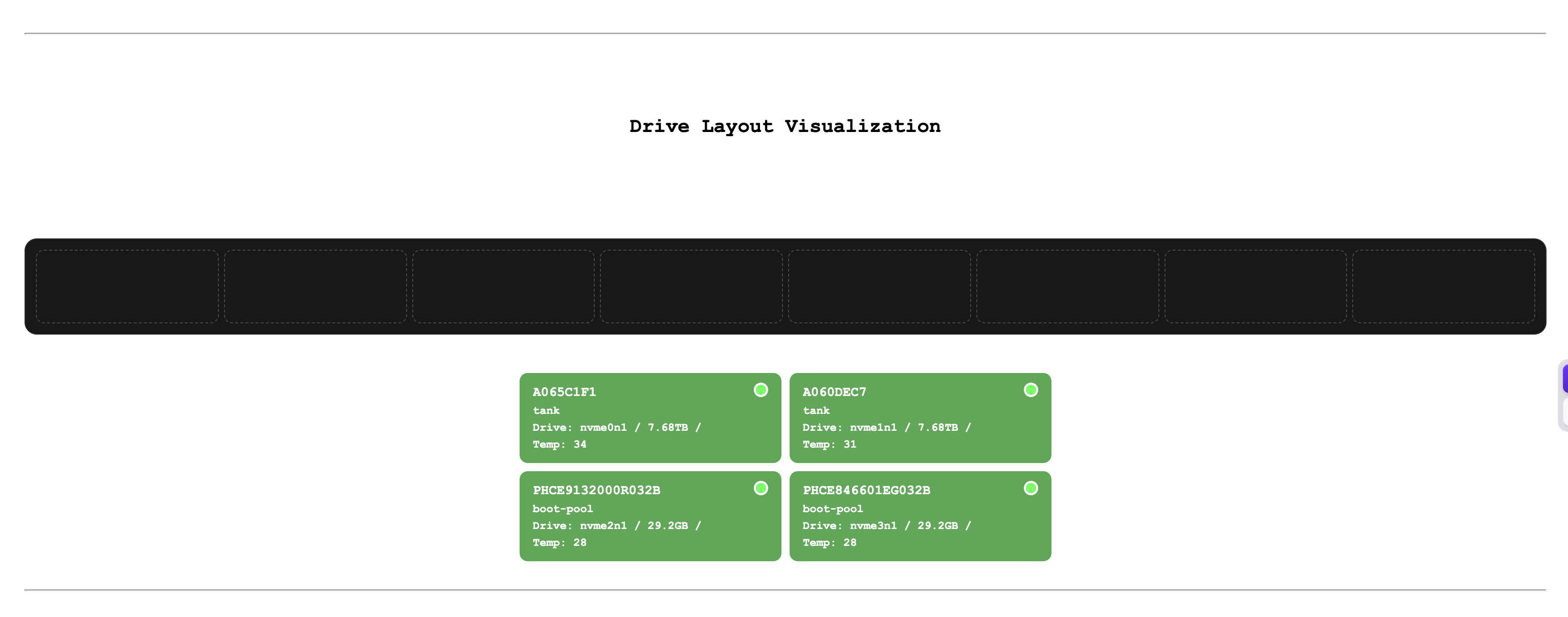
Recently I’ve encountered this problem where the driver layout rendering has issues, and it has been going on for many days.
It’s very regrettable that @Protopia has been banned. He was a user I really liked, and I wonder if he will ever return to the community in some other form.
1 Like
Can you share your drive config file? Also via DM if you pref!
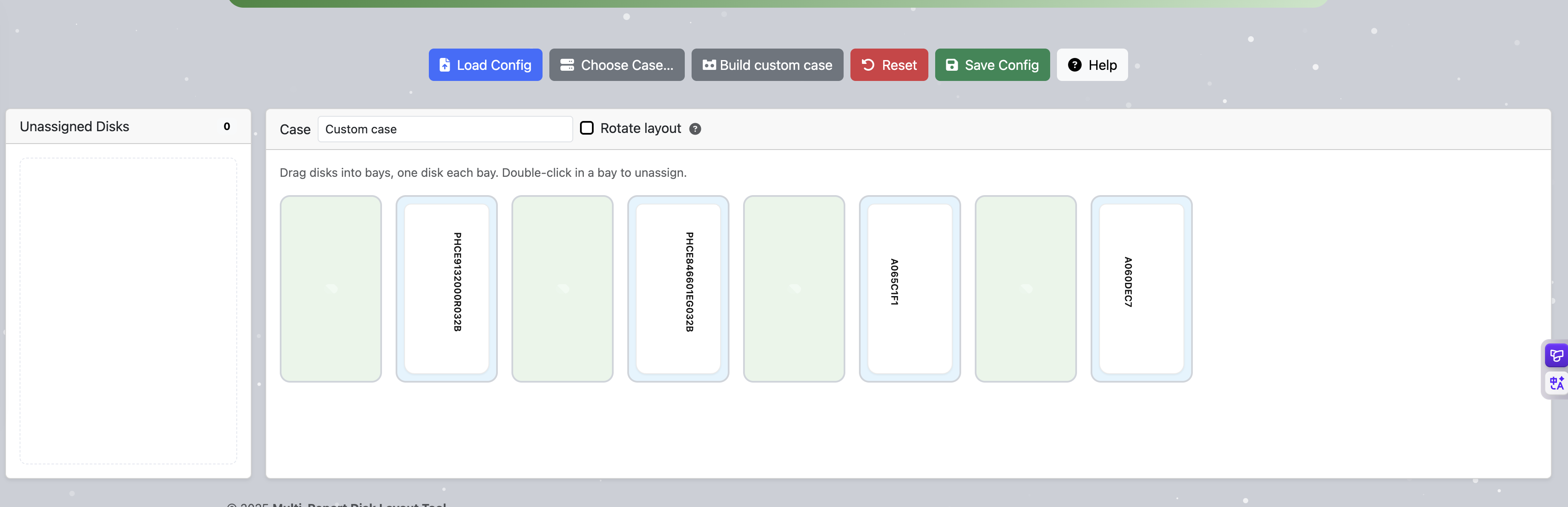
{
  "version": [
    {
      "version": "0.3",
      "last_updated": "Fri Dec 26 02:02:54 CST 2025"
    }
  ],
  "high_contrast": "false",
  "bays": [
    {
      "slot": "6",
      "address": "N:0:0:1",
      "pool": "",
      "drive_id": "",
      "type": "",
      "serial": "",
      "model": "",
      "capacity": "",
      "uuid": "",
      "drive_color": "",
      "drive_temp": ""
    },
    {
      "slot": "8",
      "address": "N:1:0:1",
      "pool": "",
      "drive_id": "",
      "type": "",
      "serial": "",
      "model": "",
      "capacity": "",
      "uuid": "",
      "drive_color": "",
      "drive_temp": ""
    },
    {
      "slot": "2",
      "address": "N:2:0:1",
      "pool": "",
      "drive_id": "",
      "type": "",
      "serial": "",
      "model": "",
      "capacity": "",
      "uuid": "",
      "drive_color": "",
      "drive_temp": ""
    },
    {
      "slot": "4",
      "address": "N:3:0:1",
      "pool": "",
      "drive_id": "",
      "type": "",
      "serial": "",
      "model": "",
      "capacity": "",
      "uuid": "",
      "drive_color": "",
      "drive_temp": ""
    },
    {
      "slot": "",
      "address": "0000:84:00.0",
      "pool": "tank",
      "drive_id": "nvme0n1",
      "type": "nvme",
      "serial": "A065C1F1",
      "model": "WUS4BB076D7P3E3",
      "capacity": "7.68TB",
      "uuid": "75d37940-171c-47ce-82e5-1a0f4a3caa38",
      "drive_color": "green",
      "drive_temp": "34"
    },
    {
      "slot": "",
      "address": "0000:86:00.0",
      "pool": "tank",
      "drive_id": "nvme1n1",
      "type": "nvme",
      "serial": "A060DEC7",
      "model": "WUS4BB076D7P3E3",
      "capacity": "7.68TB",
      "uuid": "f44a2fe1-146c-4b7d-837f-bfaa623b7d06",
      "drive_color": "green",
      "drive_temp": "31"
    },
    {
      "slot": "",
      "address": "0000:44:00.0",
      "pool": "boot-pool",
      "drive_id": "nvme2n1",
      "type": "nvme",
      "serial": "PHCE9132000R032B",
      "model": "M15 MEMPEK1F032GAD NVMe INTEL 32GB",
      "capacity": "29.2GB",
      "uuid": "2adf61cd-f3f1-4455-a0d6-b67ce5572aee",
      "drive_color": "green",
      "drive_temp": "28"
    },
    {
      "slot": "",
      "address": "0000:04:00.0",
      "pool": "boot-pool",
      "drive_id": "nvme3n1",
      "type": "nvme",
      "serial": "PHCE846601EG032B",
      "model": "M15 MEMPEK1F032GAD NVMe INTEL 32GB",
      "capacity": "29.2GB",
      "uuid": "a34a6c74-c08d-4a67-91ac-e8e8c8fa61d6",
      "drive_color": "green",
      "drive_temp": "28"
    }
  ],
  "case": {
    "name": "Custom case",
    "bays": 8,
    "layout": {
      "rows": 1,
      "cols": 8,
      "placeholderSlots": [],
      "sepSlots": [],
      "activeSlots": [
        1,
        2,
        3,
        4,
        5,
        6,
        7,
        8
      ],
      "rotate": false
    }
  }
}
That is odd, I didn’t think that you would ever get an address with “N:X:X:X” and you should have “0000:84:00.0” format. This is most likely the problem.
A few questions:
- How many physical drives do you have in this system?
- For the troubleshooting, use the file attached to the email, we know it is a constant as for working to display the data, vice shoving it into Multi-Report where something may have gone wrong.
- What version of TrueNAS are you running? It should have no bearing on this but you never know.
- Have you deleted the
disklayout_config.json, run Multi-Report to regenerate a new config file, then to the HUB to configure it, and place the updated copy on your system? - Are you running render_case version 0.14 and Drive_Selftest version 1.07?
- Did you by chance relocate any drives after the config was generated? We know NVMe is likely not going to be reliable here. If you have NVMe drives that you can move to a location which previously held a HDD/SSD, then the addressing will not work. I’m sure I can find a fix, but we need to find someone willing to do the testing, and it could be a lot of testing, swapping drives around. I wouldn’t ask anyone to do that and risk damaging hardware. My thought: need to setup some logic that would erase the address value if and NVMe is installed in the slot, and try to maintain the configuration.
@oxyde is likely sleeping now and it is time for me to do the same. Looking forward to those answers.
- Four NVMe drives
- Multi-Report v3.28 dtd:2025-12-09 (TrueNAS SCALE - Goldeye 25.10.1)
- Disk Layout - Beta (v0.14)
- S.M.A.R.T. Testing External File (v1.07) - (Enabled)
- no change relocate any drives after the config
I can try deleting disklayout config.json and regenerating it to see if that fixes the problem.

Glad you were able to fix it. Eventually I will know why this happened. If it happens again, please think back to what you might have done to the system. What changes were made, and think about even the small things that you would imagine would have no impact. That may be the key to the solution. Especially since this feature is new, I do expect some growing pains.
I checked the emails; the last normal one was “Multi-Report v3.27 dtd:2025-11-14.” After upgrading to “Multi-Report v3.28 dtd:2025-12-09,” problems began. During this period, no changes were made to the script directory—everything, including upgrades, was handled by automatic updates—and the system remained at 25.10.0.1.
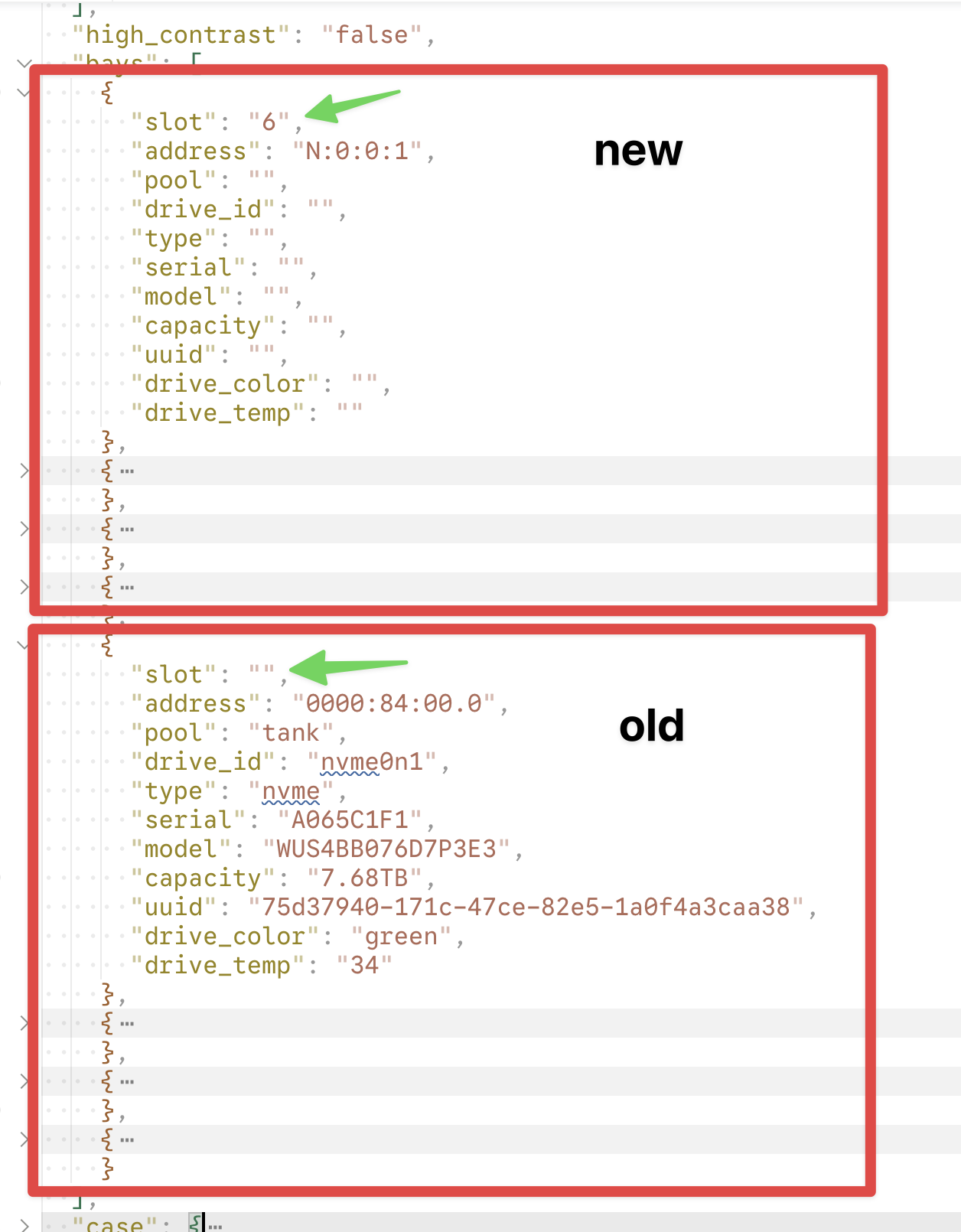
I compared the previous disklayout_config.json file on the server and found that after the upgrade some rules seem to have changed: four new disk configurations were added at the disk node, and the slot assignments for the original four-disk configuration were all reset to empty, which is why rendering now fails.
@zzzhouuu
Just so I understand what you are saying… The Disk Layout was working, then you made a hardware change? If that is true, that would explain the reason it failed to work.
I would like to make Multi-Report better at handling hardware changes, but that will come with time. It should work fine if you replace a drive with a drive using the same interface type, however reconfiguration required more software work, and I’m fairly sure I could make those changes, but it will be slow moving as I’m on a few different projects which suck my time away.
@joeschmuck, I’m about to make the 25.10 plunge, and your Multi-Report script is commonly recommended for those of us less confident in the recent decisions made around SMART. This comment from 11 months ago looks to be your most recent mention of using a Docker image. I’m guessing you may have tabled the effort, as I don’t see either a Dockerfile or docker-compose.yml in your public git repo.
If you’re interested in having some help making this as easy to install/automate as possible in Docker (e.g. via Dockge), then I’d like to help make that happen (not least of which for my own NAS). Automation across various projects (especially with container images) has been a substantial part of my day job for quite a while.
The first thing I’d need is a list of all the key system resources your scripts directly touch (e.g. smartctl?) so I can work out what each of those in turn need to have mounted in the container (e.g. /dev and with privileged mode enabled). We could continue discussing here or over on GitHub (though I haven’t used it much as my employer has to work in private git repos, usually GitLab).
You misunderstood—I haven’t made any hardware changes. After updating to version 3.28, this layout file changed automatically; it must have been altered by the program, and that’s what’s causing the issue.
Thanks for the clarification. The script was changed in this area of operation.
I think it would be safe to say, if the Disk Layout changes after a Multi-Report update where it looks wrong, the user should delete the disklayout_config.json file and generate a new one. Since this is a new feature, I am still learning. I do not have any intentions of changing the json file format again, and if I do, I will put in code to migrate the current version to the new version.
Well, Docker and I were not working well together and then I stopped with the Docker, until I get version 4.0 built. I’d rather not spend time on something if I would not push it to the people. And if I did push out a Docker version, I know I would be flooded with questions, problems, etc. This consumes a lot of time when I have to investigate what happened and the proper fix and takes away time from development.
I am sending you a DM.
1 Like