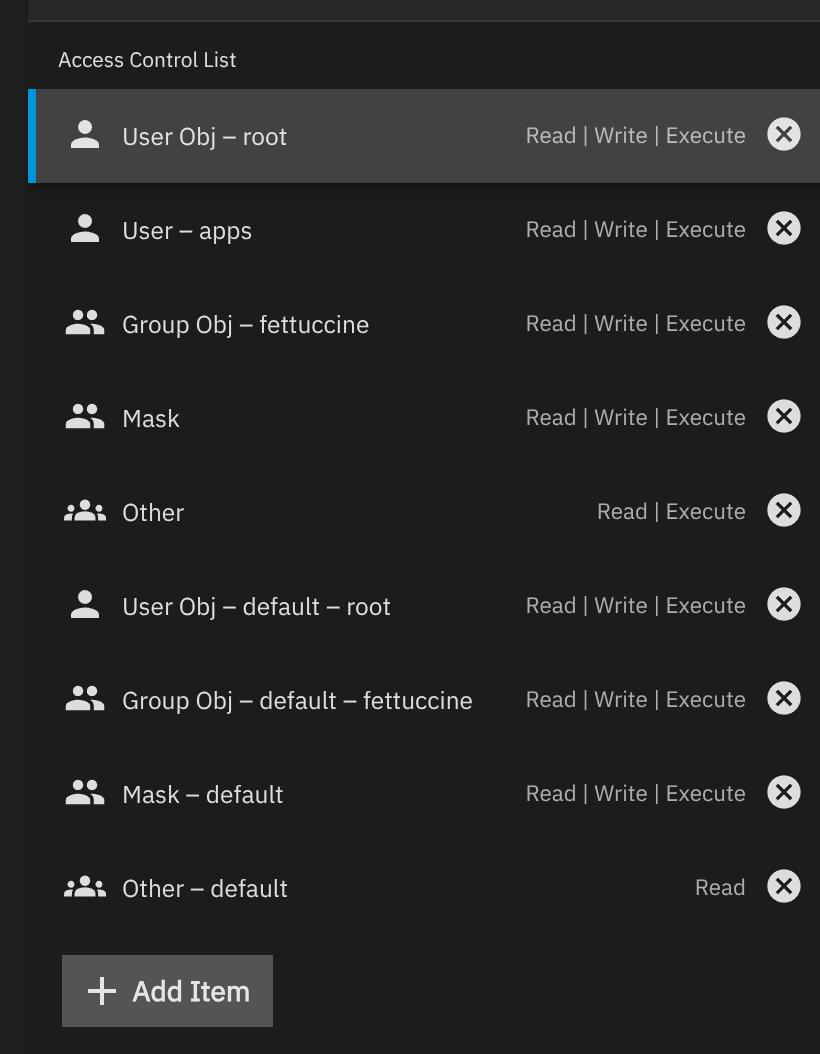
I appear to have messed up the default POSIX permissions that get applied to new folders on my SMB share. I am still learning TrueNAS so I am unsure how I did this, so I am hoping for some direction on how to fix it:
This is what my folders that work look like:
truenas_admin@truenas[~]$ getfacl "/mnt/Plex/Media/TV Shows/Mad Men (2007)"
getfacl: Removing leading '/' from absolute path names
# file: mnt/Plex/Media/TV Shows/Mad Men (2007)
# owner: root
# group: fettuccine
# flags: -s-
user::rwx
group::rwx
other::r-x
default:user::rwx
default:group::rwx
default:other::r--
How do I adjust default POSIX permissions to be correct?
This set of commands fixes the permissions issue after the folder is created (There is an additional command there for files I am leaving in case someone needs it)
To change the default permissions on an SMB share in TrueNAS SCALE, you should use the web interface to adjust either the share-level ACL (Access Control List) or the dataset permissions associated with the share. Here’s how you can do it:
Go to Shares in the TrueNAS web interface and locate your SMB share.
Click the Edit Share ACL icon for the desired share. This allows you to modify permissions at the SMB share level.
In the Edit Share ACL screen, select either User or Group in the Who field, then choose the specific user or group.
Set the permission level using the Permissions and Type fields.
(Optional) Click Add to include additional users or groups and set their permissions.
Click Save to apply your changes.
Note: Changing permissions at the share level only affects SMB access for that specific share. If you want to change permissions for all access methods (including NFS or direct file system access), you should also update the dataset ACL by editing the dataset’s permissions directly.
Traceback (most recent call last):
  File "/usr/lib/python3/dist-packages/middlewared/job.py", line 515, in run
    await self.future
  File "/usr/lib/python3/dist-packages/middlewared/job.py", line 562, in __run_body
    rv = await self.middleware.run_in_thread(self.method, *args)
         ^^^^^^^^^^^^^^^^^^^^^^^^^^^^^^^^^^^^^^^^^^^^^^^^^^^^^^^
  File "/usr/lib/python3/dist-packages/middlewared/main.py", line 622, in run_in_thread
    return await self.run_in_executor(io_thread_pool_executor, method, *args, **kwargs)
           ^^^^^^^^^^^^^^^^^^^^^^^^^^^^^^^^^^^^^^^^^^^^^^^^^^^^^^^^^^^^^^^^^^^^^^^^^^^^
  File "/usr/lib/python3/dist-packages/middlewared/main.py", line 619, in run_in_executor
    return await loop.run_in_executor(pool, functools.partial(method, *args, **kwargs))
           ^^^^^^^^^^^^^^^^^^^^^^^^^^^^^^^^^^^^^^^^^^^^^^^^^^^^^^^^^^^^^^^^^^^^^^^^^^^^
  File "/usr/lib/python3.11/concurrent/futures/thread.py", line 58, in run
    result = self.fn(*self.args, **self.kwargs)
             ^^^^^^^^^^^^^^^^^^^^^^^^^^^^^^^^^^
  File "/usr/lib/python3/dist-packages/middlewared/api/base/decorator.py", line 101, in wrapped
    result = func(*args)
             ^^^^^^^^^^^
  File "/usr/lib/python3/dist-packages/middlewared/plugins/filesystem_/acl.py", line 805, in setacl
    self.setacl_posix1e(job, current_acl, data)
  File "/usr/lib/python3/dist-packages/middlewared/plugins/filesystem_/acl.py", line 610, in setacl_posix1e
    verrors.check()
  File "/usr/lib/python3/dist-packages/middlewared/service_exception.py", line 72, in check
    raise self
middlewared.service_exception.ValidationErrors: [EINVAL] filesystem_acl.dacl: Presence of [USER_OBJ] entry is required.
But you can clearly see from the first screenshot, I screwed up and duplicated permissions.