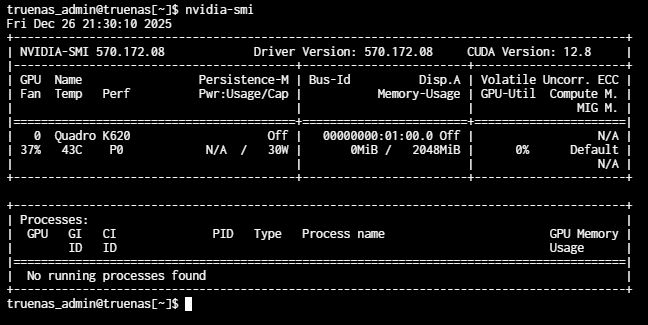
That was it! File didn’t download right on my wget. That’s never happened before, so I never even thought to check that.
After a full day of migrating hardware, my brain was cooked. Thanks for the sanity check. You saved me a ton of unnecessary troubleshooting today.
And thanks for the work you put in to creating this solution for folks like me in this exact situation. You saved us all from a ton of tedious driver/kernel hacking.
Just wanted to say thanks for this, it’s working perfectly on 25.10.0.1 with a GTX 960M. I am running TrueNAS on an old laptop motherboard connected to a drive bay, so I can’t upgrade the GPU as it’s soldered to the motherboard. Thanks to this I can keep using my janky setup a little longer .
Hey has anyone gotten this to work on the new 25.10.1 goldeneye? I have an nvidia quadro k620. Looking to see if i can get this to work before i drop a bunch of money on a new card. Also use case is for a jellyfin server.
Are their any steps i need to do differently with 25.10.1 goldeneye? or just follow the steps as if it were 25.10.0? I ask because im using Chatgbt to help with my learning curve and it flipped out when i got a 404 error.
Hey could you help me I’m a little confused. I’m out 25.10.1 goldeneye. When i go to manually update truenas with the update file for 25.10.1 it says failed to update I’m already at that version. Do i need to downgrade my system to then upgrade is with the legacy drivers? Or is their a way to override the process to force it to upgrade.
If you’re already on 25.10.1, just download nvidia.raw from the repository and replace the file following the steps. Alternatively, grab the install script from the repo and run it. To use the upgrade package, you must first downgrade to 25.10.0.1 and then apply the upgrade package.
It’s interesting how this thread to reinstate the previous driver in to 25.10 has significantly more engagement than the thread that triggered the switch to the new driver: [Accepted] [25.10] Nvidia Driver update
And with this hopefully i add something to this forum that will help others.
Once i got to step 3 of the github instructions I couldn’t download or overwrite the file in the shell with the lines of code provided. So i download the. Raw file put it in an SMB Share folder on my Server. Then In Midnight Commander (MC) i was able to manually copy and overwrite the. Raw file. Finished the last few steps as outlined and it worked.
Also i had to re-install the OS on a new boot drive and when i uploaded the config files the mod did not carry with it and so i had to reinstall the mod.
Sorry in advance if any of this has already been stated in the above posts.
I think the dev team is missing the fact that so many of us use the parts we have available, and there is zero good reason to throw away perfectly good hardware when we don’t have to.
In my case (literally) I have a GTX 970 that is a great Jellyfin transcoding card, and Handbrake card. Why would I toss it? It cost me $0 and is doing it’s job beautifully.
I’m going to tinker with the custom 25.10.1 upgrade with the legacy NVIDIA drivers, but if it goes sideways, I’ll be back on OpenMediaVault by New Years.
I wanted to let @zzzhouuu know that I tried his package on my Truenas 25.10.1 server, but unfortunately my card is too old and isn’t recognized. It’s not like you could perform this miracle, either. I have the following card:
Yes, very old hardware is also not supported by the new version of the driver. However, you can find the last driver version that supports your graphics card, then modify the version used in the scale-build and compile it yourself.
Second, I tried to follow the github instructions to install the drivers manually and I ran into a zfs permission error that said the boot-pool/25.10.1/usr was unmountable because readonly even though that is what I was trying to change. Ultimately I ended up rolling back boot image and used the manual update file instead. this worked and my gpu is backup and encoding now.
Thanks for the effort and sharing!
I have followed the steps to try get my Quadro K4200 working in 25.10.1, but no bueno so far.
It was working fine in Core 13 but went through all the upgrades today and was expecting this issue in the 25.1 release notes.
It is likely that NVIDIA’s new driver version has discontinued support for this graphics card. Specific support information can be found on the NVIDIA official website.
Tried to install the nvidia.raw file ( downloaded from 25.10.1 github folder ) but I probably forgot something, driver not loading on my TrueNAS 25.10.1 (No extensions found when merge).
truenas_admin@toutatis[~]$ lspci | grep -i nvidia
84:00.0 VGA compatible controller: NVIDIA Corporation GP104GL [Quadro P4000] (rev a1)
84:00.1 Audio device: NVIDIA Corporation GP104 High Definition Audio Controller (rev a1)
truenas_admin@toutatis[~]$ sudo systemd-sysext unmerge
truenas_admin@toutatis[~]$ zfs list -H -o name /usr
boot-pool/ROOT/25.10.1/usr
truenas_admin@toutatis[~]$ sudo zfs set readonly=off "boot-pool/ROOT/25.10.1/usr"
truenas_admin@toutatis[~]$ sudo cp nvidia.raw /usr/share/truenas/sysext-extensions/nvidia.raw
truenas_admin@toutatis[~]$ sudo zfs set readonly=on "boot-pool/ROOT/25.10.1/usr"
truenas_admin@toutatis[~]$ sudo systemd-sysext merge
No extensions found.
truenas_admin@toutatis[~]$ ls -l /usr/share/truenas/sysext-extensions
total 476889
-rw-r--r-- 1 root root    139264 Dec 17 23:19 functioning-dpkg.raw
-rw-r--r-- 1 root root 487841792 Jan 29 07:21 nvidia.raw
truenas_admin@toutatis[~]$ md5sum /usr/share/truenas/sysext-extensions/nvidia.raw
2dd4dda3dbe73efe20cf2fb238909f9b  /usr/share/truenas/sysext-extensions/nvidia.raw

 .
.