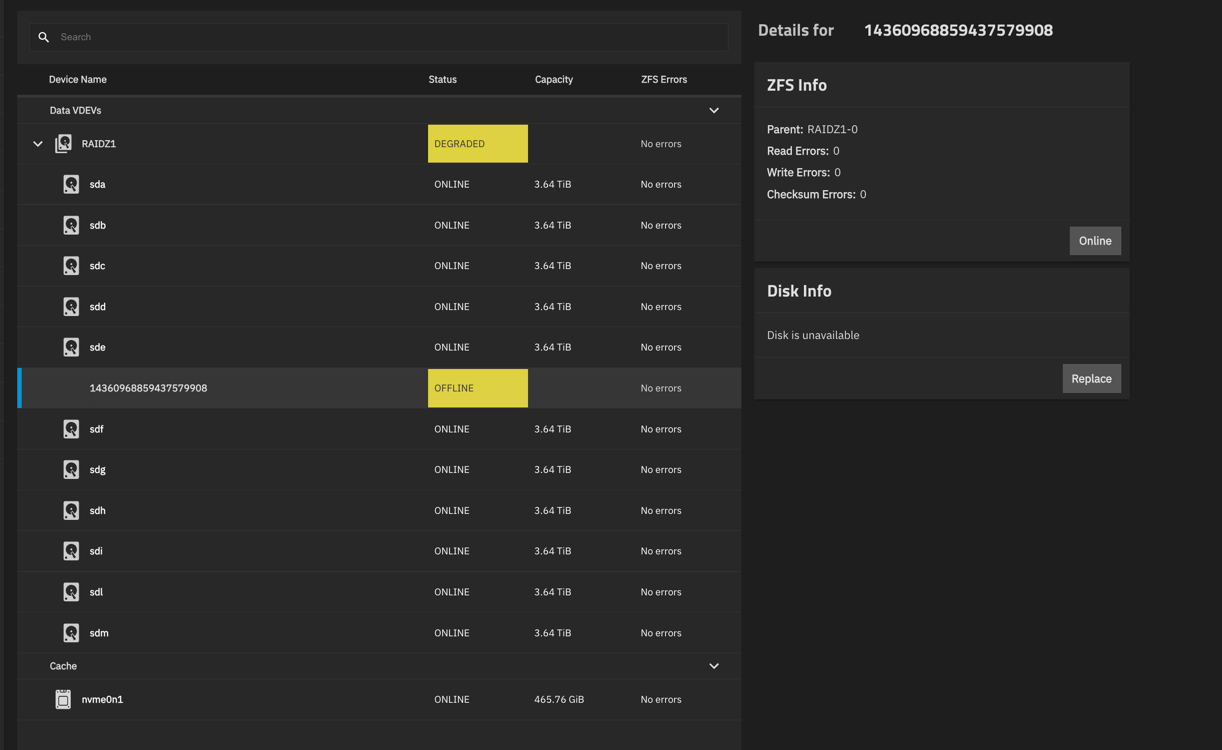
I am on System Version: 25.04.2.4.
I am not new to TrueNAS been using it for at least 5yrs now, work professionally in IT as a Security Manager for a large entertainment company with 30yrs of experience. I just state that, as I usually don’t hail for help, but I am stuck here. I have another server here that I can spin up with 6x8tb disks and can backup, and rebuild my ZFS but would prefer not to go that route if its something simple or stupid that I am missing here.
My system has 12 x 4TB disk, configured in RaidZ1, 500GB NVME cache, and 250gb NVME Boot and is an Intel i9 10 core, 128gb ram, with dual 10gb SFP ports to my Unifi network, I have had disks previously fail and replace with zero issues. Recently another one my 4TB disks decided to fail and expected the system took it offline. Tried to replace it using the usual process:
-
Verify the disk is offline
-
Pull the bad disk.
-
Replace with new disk (Disk is a brand new Toshiba 4TB CMR, all my other disks are also 4TB CMRs)
-
Follow the usual process of going back into storage, finding the disk that was failed, and then choosing the new member disk that was just inserted and the process kicks off.
This is where things go sideways. But I should say the system tells me that there are sufficient replicas to perform the function, and no existing disks show errors, it starts the replacement process, eg (resilvering, etc..) I just let it do its thing.But come back several hours later, where it takes the new disk offline. I have tried 2 other brand new Toshibas, as well as 2 other HGST that were known good 4TB CMRs)
I have searched and searched the web and can find what wrong. It doesnt give me any specific error, other than for some reason no matter what disk I use it doesn’t like something in SMART test, but yet all the disks are full SMART compatible.
No ZFS errors, no SCRUB errors, everything looks like its good to go and replace the disk.
Is there some CLI command that I need to run, to clear this (maybe something in the background that I can’t see if stopping the process)?
Any ideas would be great, and I can provide screen shots as needed. This has me pulling my hair out.
>>> For some reason I can not attach or even include screen shots into this post, it gives me an error. Forum mod fixed this more me. TY.