Disclaimer: CORE guy here, trying out SCALE’s Apps for the first time with little understanding of docker.
Fiddling around with Paperless-Ngx, Paperless-AI and Open Web UI I find myself stranded trying to link up Paperless-AI and Open Web UI: for the love of me I aren’t able to establish a connection between the two apps – Paperless-AI continues to spit me with a Ollama connection failed. Please check URL and Model. error.
Open Web UI is on localhost:31028
Paperless-AI is on localhost:30226
I feel like the issue is me not being able to give Paperless-AI a proper Ollama API URL… hence I suspect some kind of networking configuration issue: on CORE I (kinda) knew what was required, on SCALE I have many ideas and confused. To make it clear, I configured nothing in the network tab of SCALE or in the specific apps’ settings.
The issue might be another altogether, but figured it would be best to start from here. Maybe someone can point me to the right direction, or shed some light on the underlying structure of the App feature.
Do tell if you want me to go in more details about the attempts I made to make the two Apps talk, for now I left it out as it feels a more systemic issue.
For what’s worth, I started my journey on this project from this video.
Trying hard not to miss good old comfort-zone CORE.
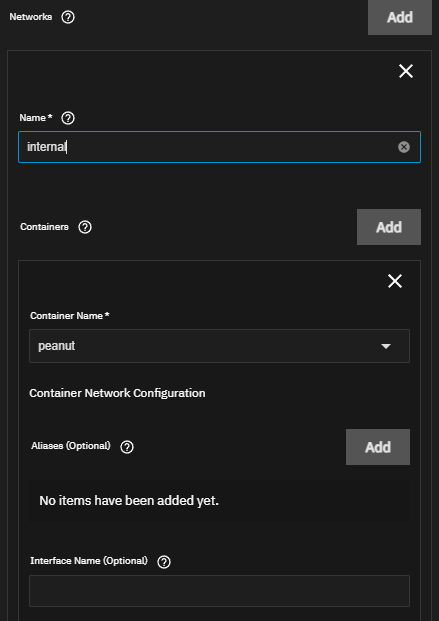
For docker apps to be able to “speak” to each other they need to share a common network. If you edit the app, there should be a menu option to “enable inter app communication” which should let you join apps to different networks so they can talk to each other
If you are talking about Port Bind Mode it was my impression, from reading the official documentation, that Publish port on the host for external access included Expose port for inter-container communication.
If however you are talking about Networks then I fear I have to ask for a bit more guidance: do I need to create a Bridge Interface from TN WebUI before fiddling around with this App-specific setting?
if you manually create a docker network from cli called e.g. app_internal and join all your apps to it they should be able to communicate with each other no problem
I see. I vaguely recall that there was a feature request about this… maybe a year ago? It seems it was not implemented.
Is running portainer or a similar app a valid option instead? I’m very rusty with CLI commands right now, and the vast majority of my command line knowledge is based on BSD/CORE – I will have to search the proper way to manually create the networking, maybe there is something on the forums.
Thank you for your input, now I have a direction to scout.
Thanks, that helped me figure out a way to make the qbittorrent webUI exposed only to the Caddy reverse proxy I made without binding it to the host.
To state the obvious, you need the reverse proxy set-up first, so that the network name (in my case ix-caddy_default, which i found using sudo docker network ls) exists when creating or updating the qbittorrent app, otherwise you’ll get an error.
The whole network magic is kind of confusing at first.
For Apps to work, I had to implement a bridge interface first, under the networking window in the general TrueNAS GUI (ie not part of apps subsystem). See the @stux YouTube video on that.
Then, inside Apps, there is a whole sub-network going on whose IP addresses have ZERO to do with the addresses that the apps use when interacting outside the app container, even if they have an assigned IP address via their config settings.
This can be really confusing because let’s say you gave the UniFi App an IP of 192.168.1.20 in the app settings, you can reach it via that IP via your home network but when you open the App, it cheerfully tells you that it’s at 172.16.23.46, for example.
Aside from all that, one of the biggest pluses of apps is that you can pull real SSLs from Cloudflare to assign to the FQDN of the app, and never have to worry about renewing them. It just works.