Pool Recovery following power cut

Hi all,

I am looking for some guidance on recording a pool following a power cut.

My original OS was seeing some strange corruption and wouldn’t boot, I have since re-installed the latest CORE to try recover the pool before switching to latest community release.

All my drives are appearing as ONLINE when I try import

root@truenas[~]# zpool import
pool: Pool1
id: 2552067155131147195
state: ONLINE
status: Some supported features are not enabled on the pool.
(Note that they may be intentionally disabled if the
‘compatibility’ property is set.)
action: The pool can be imported using its name or numeric identifier, though
some features will not be available without an explicit ‘zpool upgrade’.
config:

    Pool1                                           ONLINE
      raidz1-0                                      ONLINE
        gptid/c4c4c954-e736-11eb-9a2c-049226bec90b  ONLINE
        gptid/c5af0bc7-e736-11eb-9a2c-049226bec90b  ONLINE
        gptid/c5d55769-e736-11eb-9a2c-049226bec90b  ONLINE
        gptid/c5fa7a97-e736-11eb-9a2c-049226bec90b  ONLINE
    logs
      gptid/26810674-e737-11eb-9a2c-049226bec90b    ONLINE

root@truenas[~]# zpool import -F Pool1
cannot import ‘Pool1’: I/O error
Destroy and re-create the pool from
a backup source.

Any help would be appreciated, thanks all.

Did this happen after the sudden power cut or had it been happening before?

This was following the power cut, had not seen it before.

Do you know what caused the power cut? Is the NAS protected by a surge protector or UPS?

Let’s rule out something. Run short SMART selftests on all 4 drives to see if it catches obvious failures. It should only take a few minutes at most.

The fact that you couldn’t boot into TrueNAS anymore after a power cut is concerning.

NAS sits on a surge protector.

Short SMART tests all passed.

When I try run test on the LOG drive, it returns an error.

[EINVAL] disks.0.identifier: {serial_lunid}X71S1156TP4T_000000000000001000080d020032b56e is not valid. Please provide a valid disk identifier.

Error: Traceback (most recent call last):
File “/usr/local/lib/python3.9/site-packages/middlewared/main.py”, line 141, in call_method
result = await self.middleware._call(message[‘method’], serviceobj, methodobj, params, app=self)
File “/usr/local/lib/python3.9/site-packages/middlewared/main.py”, line 1242, in _call
return await methodobj(*prepared_call.args)
File “/usr/local/lib/python3.9/site-packages/middlewared/schema.py”, line 981, in nf
return await f(*args, **kwargs)
File “/usr/local/lib/python3.9/site-packages/middlewared/plugins/smart.py”, line 411, in manual_test
verrors.check()
File “/usr/local/lib/python3.9/site-packages/middlewared/service_exception.py”, line 62, in check
raise self
middlewared.service_exception.ValidationErrors: [EINVAL] disks.0.identifier: {serial_lunid}X71S1156TP4T_000000000000001000080d020032b56e is not valid. Please provide a valid disk identifier.

Don’t try to force an import.

Try to import it normally with the UI and then check:

dmesg | tail -n 50
zpool events -v

Import from the GUI errors out:

Error: concurrent.futures.process._RemoteTraceback:
“”"
Traceback (most recent call last):
File “/usr/local/lib/python3.9/concurrent/futures/process.py”, line 246, in _process_worker
r = call_item.fn(*call_item.args, **call_item.kwargs)
File “/usr/local/lib/python3.9/site-packages/middlewared/worker.py”, line 111, in main_worker
res = MIDDLEWARE._run(*call_args)
File “/usr/local/lib/python3.9/site-packages/middlewared/worker.py”, line 45, in _run
return self._call(name, serviceobj, methodobj, args, job=job)
File “/usr/local/lib/python3.9/site-packages/middlewared/worker.py”, line 39, in _call
return methodobj(*params)
File “/usr/local/lib/python3.9/site-packages/middlewared/worker.py”, line 39, in _call
return methodobj(*params)
File “/usr/local/lib/python3.9/site-packages/middlewared/schema.py”, line 985, in nf
return f(*args, **kwargs)
File “/usr/local/lib/python3.9/site-packages/middlewared/plugins/zfs.py”, line 352, in import_pool
self.logger.error(
File “libzfs.pyx”, line 402, in libzfs.ZFS.exit
File “/usr/local/lib/python3.9/site-packages/middlewared/plugins/zfs.py”, line 346, in import_pool
zfs.import_pool(found, new_name or found.name, options, any_host=any_host)
File “libzfs.pyx”, line 1175, in libzfs.ZFS.import_pool
File “libzfs.pyx”, line 1203, in libzfs.ZFS.__import_pool
libzfs.ZFSException: I/O error
“”"

The above exception was the direct cause of the following exception:

Traceback (most recent call last):
File “/usr/local/lib/python3.9/site-packages/middlewared/job.py”, line 355, in run
await self.future
File “/usr/local/lib/python3.9/site-packages/middlewared/job.py”, line 391, in __run_body
rv = await self.method(*([self] + args))
File “/usr/local/lib/python3.9/site-packages/middlewared/schema.py”, line 981, in nf
return await f(*args, **kwargs)
File “/usr/local/lib/python3.9/site-packages/middlewared/plugins/pool.py”, line 1462, in import_pool
await self.middleware.call(‘zfs.pool.import_pool’, pool[‘guid’], {
File “/usr/local/lib/python3.9/site-packages/middlewared/main.py”, line 1285, in call
return await self._call(
File “/usr/local/lib/python3.9/site-packages/middlewared/main.py”, line 1250, in _call
return await self._call_worker(name, *prepared_call.args)
File “/usr/local/lib/python3.9/site-packages/middlewared/main.py”, line 1256, in _call_worker
return await self.run_in_proc(main_worker, name, args, job)
File “/usr/local/lib/python3.9/site-packages/middlewared/main.py”, line 1175, in run_in_proc
return await self.run_in_executor(self.__procpool, method, *args, **kwargs)
File “/usr/local/lib/python3.9/site-packages/middlewared/main.py”, line 1158, in run_in_executor
return await loop.run_in_executor(pool, functools.partial(method, *args, **kwargs))
libzfs.ZFSException: (‘I/O error’,)

And I have attached the output from the shell commands:

output.txt (8.3 KB)

A power strip is almost useless as they all stop protecting against high voltages, sooner or later (internal MOVs that clamp high voltage, go bad after sacrificing their life on every spike).

Power/voltage sags or interruptions are more common that big voltage spikes!

Smart people invest in a UPS and verify, monitor battery life etc.

Now ugh, raidz config in trouble after sudden crash/power off.

Simply reinforces my belief and understanding that raid anything is always more prone to failures or easier corruption/inability to mount. Check the details and internals of any raid code if you can’t get it.

I do run some ssds and NvMEs with sync disabled, but again, have not had any similar issues as I do have UPS on every TN system (even a small one that can only last 10 minutes is good enough to do proper shutdown. Or a bigger one and do remote UPS monitoring/shutdown).

I would try to import the pool without the SLOG.
Physically remove the drive, then try to import the pool using the -m flag.

@adam2keva9 - Sorry to hear about your pool.

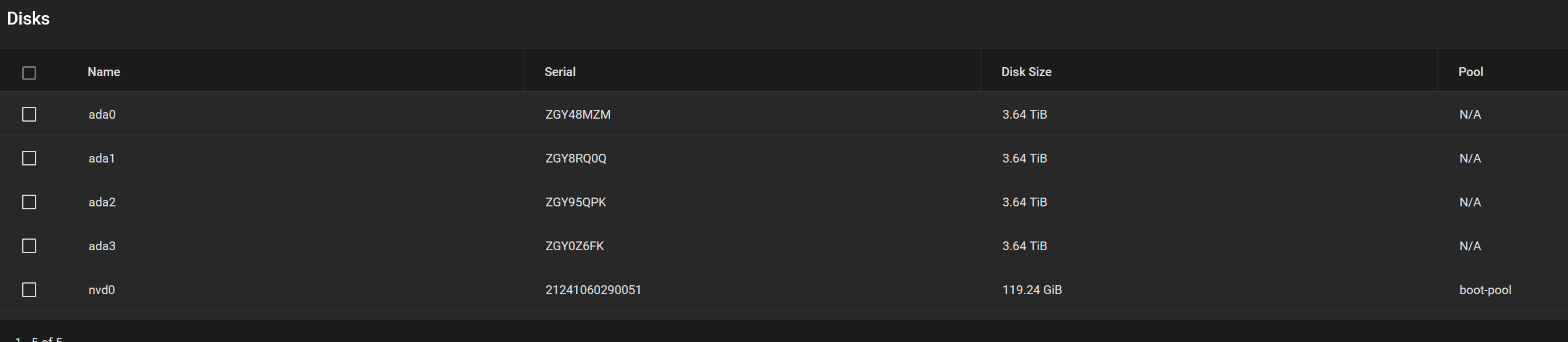
How are the disks connected to the computer?
System board SATA ports?

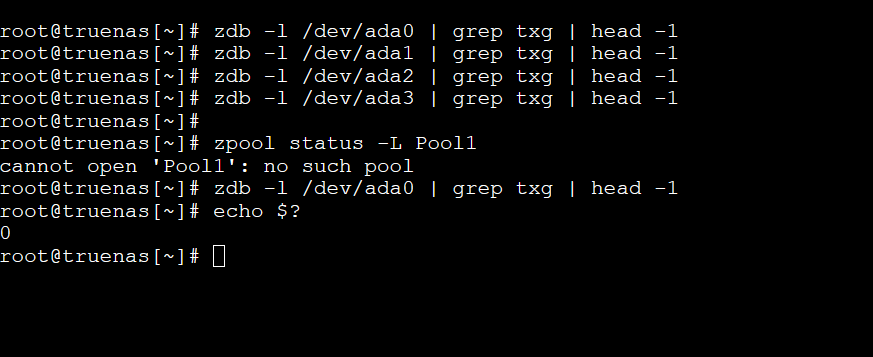
One thing we can check, is the current write transaction for the 4 disks. Run this command on each of the 4 disks, (as user root). They should all return the same number. Let us know the results.

zdb -l /dev/DISK_PART | grep txg | head -1

You can use zpool status -L Pool1 to get the DISK_PART names.

ZFS was specifically designed and written to NOT corrupt existing data on sudden power loss or OS crash. This was thoroughly tested and is a hard core feature of ZFS.

That said, hardware RAID backed devices under ZFS, consumer hardware, and the occasional ZFS bug can cause corruption.

See this Resource for more details:

Trying this just gives me the IO error:

These drives are connected via SATA ports on the motherboard

Log drive is an m.2 directly inserted on the board.

Don’t seem to get an output when I run the commands, assuming I have the disk_part name correct.

Run it against the partition GPTIDs, not the entire disks.

zdb -l /dev/gptid/c4c4c954-e736-11eb-9a2c-049226bec90b | grep txg | head -1
zdb -l /dev/gptid/c5af0bc7-e736-11eb-9a2c-049226bec90b | grep txg | head -1
zdb -l /dev/gptid/c5d55769-e736-11eb-9a2c-049226bec90b | grep txg | head -1
zdb -l /dev/gptid/c5fa7a97-e736-11eb-9a2c-049226bec90b | grep txg | head -1
zdb -l /dev/gptid/26810674-e737-11eb-9a2c-049226bec90b | grep txg | head -1

This was meant to mean “disk PARTITION”, so (assuming usual CORE partitioning)
zdb -l /dev/ada0p2 | grep txg | head -1
etc.

Unless it is a DC-grade M.2 22110, or a rarer-than-hen-teeth 2280 with PLP, the device is likely not suitable for SLOG duty.

Updated captures below

I plan to upgrade my hardware following this whole situation, whatever the outcome :grinning_face_with_smiling_eyes: I built this NAS years ago and was fairly hands-off with it, so will pay more attention next time!

HDDs are in sync but there’s an issue with the SLOG (/dev/gptid/268…).
If you can setup a SSH connexion (so you can cut, and then paste here as formatted text </>), experts might want to see the full output of
zdb -l /dev/nvd0p2 or
zdb -l /dev/gptid/26810674-e737-11eb-9a2c-049226bec90b

But I have no idea why import -m did not work (at the cost of some last seconds of data).

Please report back after doing that:
Try to import the pool first, before issueing the commands !

The SLOG device might be available, but has errors. You’re right that -m should have been able to discard the pending sync writes and import the pool with the SLOG.

I suppose the OP can physically remove the NVMe and try to import the pool again with -m.

EDIT: @adam2keva9 There is another way you can try to import the pool by specifying only the disks of the data vdevs combined with -m. (The below command excludes the m.2 drive.)

zpool import -m -R /mnt -d /dev/gptid/c4c4c954-e736-11eb-9a2c-049226bec90b -d /dev/gptid/c5af0bc7-e736-11eb-9a2c-049226bec90b -d /dev/gptid/c5d55769-e736-11eb-9a2c-049226bec90b -d /dev/gptid/c5fa7a97-e736-11eb-9a2c-049226bec90b Pool1

I think the OP did that and got the I/O error aswell.

They did, but it’s not clear if -m forcefully excludes a SLOG device that is supposedly available in the system. Specifying -d for every disk except the NVMe will exclude the SLOG device from import, combined with the -m flag.