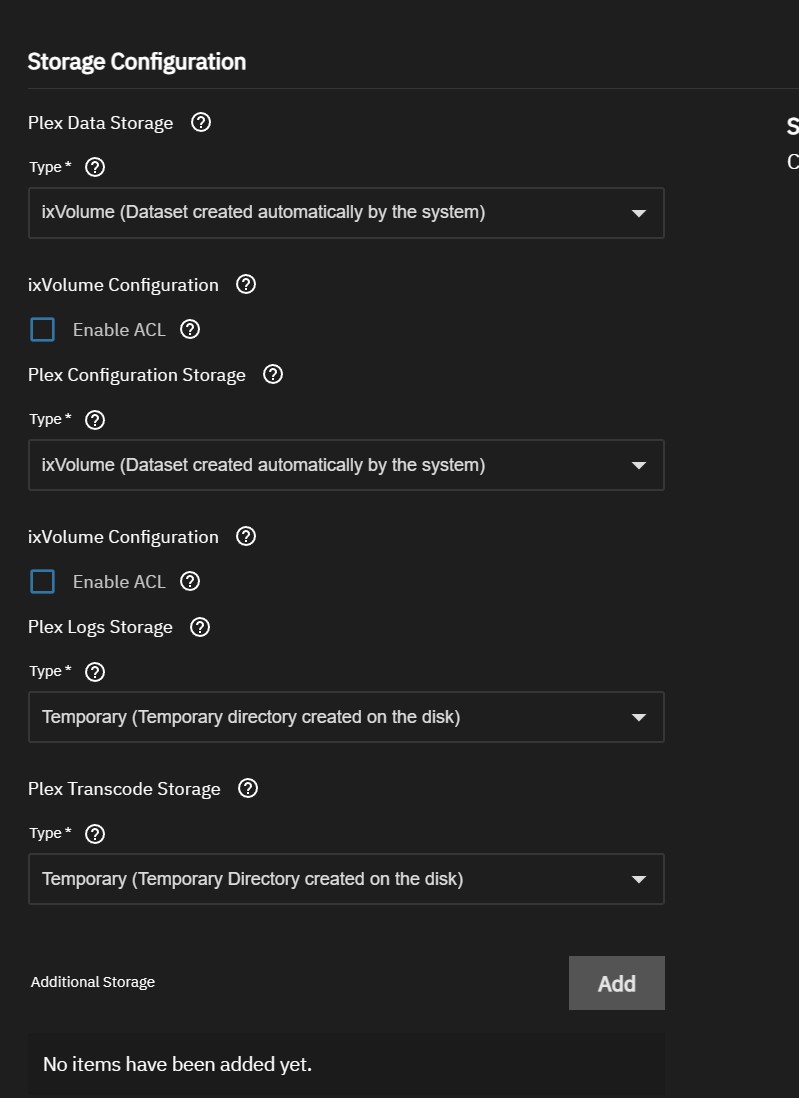
What are the advantages to this? Is Plex Data storage the same as my media library? For Plex configuration storage do I choose a dataset created on my Apps pool (ssd) or on my Data pool?
Do I create separate datasets for Movies, TV Shows. etc. or just one dataset for media? In my initial goofing around with this I had problems getting Plex to see my media dataset.
The config storage should be on a fast app pool. The data you can set up as you like. I recommend one dataset, let’s call it media, with child datasets named however you want to categorise your files e.g. movies, series, musicvideos, homevideos, etc. which live on your spinning rust storage pool.
While I use a different media server, the logic is the same. The described way is the easiest for me to organise, mount and backup. But you can alter it however you want.
Is there any documentation to this? I’ve upgraded to 25.10 from 13.0 and am struggling with how to “point” the new plex instance to my existing media on my zfs pools without accidentally destroying them.
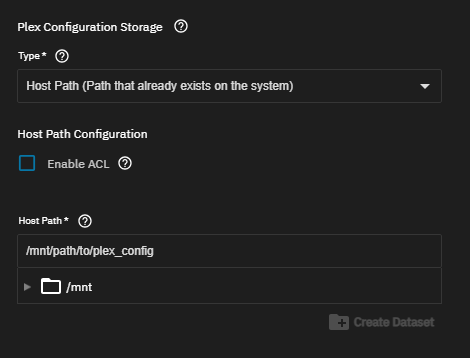
What you want to use for storage are hostpaths. They map a Dataset or directory on your pool to a folder inside the docker container.
No data will be destroyed since all you do is map point a to point b.
Here’s an example for the plex config folder
If you are worried how it all works, you can always make a test dataset or datasets, install everything, try it, learn from it and then scrap it and set it up how you like it. This takes a little bit more time but it ensures that you can’t accidentally break something.
I followed the instructions on Dan’s Wiki to setup Plex with a Synology data storage. Matched every step exactly. After installing and setting up Plex on the Truenas Scale 25.10 server (been running Plex on other servers for years), I was not able to create libraries. Everything looked great but when choosing the data folder and then Movies…..nothing. It’s as if Plex can’t see the Synology nas media files. Any thoughts?