My replacement drive SDD is not part of the raid I believe. It’s listed as spare.
hoe to I move it into raid?
root@truenas[~]# zpool status
pool: boot-pool
state: ONLINE
status: One or more features are enabled on the pool despite not being
requested by the ‘compatibility’ property.
action: Consider setting ‘compatibility’ to an appropriate value, or
adding needed features to the relevant file in
/etc/zfs/compatibility.d or /usr/share/zfs/compatibility.d.
scan: scrub repaired 0B in 00:01:25 with 0 errors on Fri Jul 18 03:46:26 2025
config:
    NAME                                             STATE     READ WRITE CKSUM
    boot-pool                                        ONLINE       0     0     0
      ata-SanDisk_SSD_PLUS_240GB_22195P800260-part2  ONLINE       0     0     0
errors: No known data errors
pool: tank
state: DEGRADED
status: One or more devices could not be used because the label is missing or
invalid. Sufficient replicas exist for the pool to continue
functioning in a degraded state.
action: Replace the device using ‘zpool replace’.
see: Message ID: ZFS-8000-4J — OpenZFS documentation
scan: scrub in progress since Tue Jul 22 16:52:09 2025
1.34T / 5.54T scanned at 7.19G/s, 89.6G / 5.54T issued at 481M/s
0B repaired, 1.58% done, 03:18:20 to go
config:
Run this in the console or Shell and post the results back using Preformatted Text </> on toolbar or Ctrl+e This should give us an update on your pool status along with some drive info. Don’t reboot unless you have to as the drive names, like ‘sda’, may change. The serial number should be unique for tracking.
You should probably post your full hardware, os version and how you have your pools set up. Expand the ‘Details’ under my post to get an idea of what I’m asking for.
sudo ZPOOL_SCRIPTS_AS_ROOT=1 zpool status -vLtsc lsblk,serial,smartx,smart
The Spare IS being used, that is why it is “UNAVAIL” for other replacements.
Now if you did not intend this replacement drive to be a Spare, then it is simple. Remove the “9054689916214298171” drive from the pool and your Spare will become a permanently replacement. After that, you no longer have a Spare drive. Of course you can add another spare drive in the future.
All the notices of “DEGRADED” and “Replace the device” are letting you know that you still need to take action. Either replace the failed drive or remove it so the Spare takes it’s place permanently.
Arwen, Thanks but I’m not sure how to do what you just suggested. Also, I never intended this to be a spare so I don’t know hot it happened. Would you be kind enough to explain exactly what steps I need to take inorder for this drive to become part of the raid?
I was able to detach the drive as a spare. But when I try to add it to the pool, I get the error: At least 1 vdev is required to make an update to the pool.
Here is the readout:
zpool status tank
pool: tank
state: DEGRADED
status: One or more devices could not be used because the label is missing or
invalid. Sufficient replicas exist for the pool to continue
functioning in a degraded state.
action: Replace the device using ‘zpool replace’.
see: Message ID: ZFS-8000-4J — OpenZFS documentation
scan: resilvered 1.23M in 00:00:02 with 0 errors on Wed Jul 23 13:24:15 2025
config:
    NAME                     STATE     READ WRITE CKSUM
    tank                     DEGRADED     0     0     0
      raidz1-0               DEGRADED     0     0     0
        9054689916214298171  UNAVAIL      0     0     0  was /dev/sdb2
        sdc2                 ONLINE       0     0     0
        sdd2                 ONLINE       0     0     6
Looks like you removed the Hot Spare drive and not the failed drive. Your pool is now in jeopardy.
Either follow the instructions in the manual to replace the failed drive, or re-add your other drive as a Hot Spare.
No, pool “tank” is not part of the boot pool. Nor any of it’s drives. Drive letters can change on boot, and the note “was /dev/sdb2” only says that at the time of failure, it device “sdb2”. Not necessarily now.
I have four drives, one an SSD holds the OS. The other spinning drivers were part of the raid. I replaced the bad drive with a new one with the serial number: ZW63DW4G. It is listed as SDA. Somehow when I tried to install it, it became a hot spare, not part of the raid. I have since disconnected it as a hot spare but I got an error a VDEV error message when I try to add it to the raid.
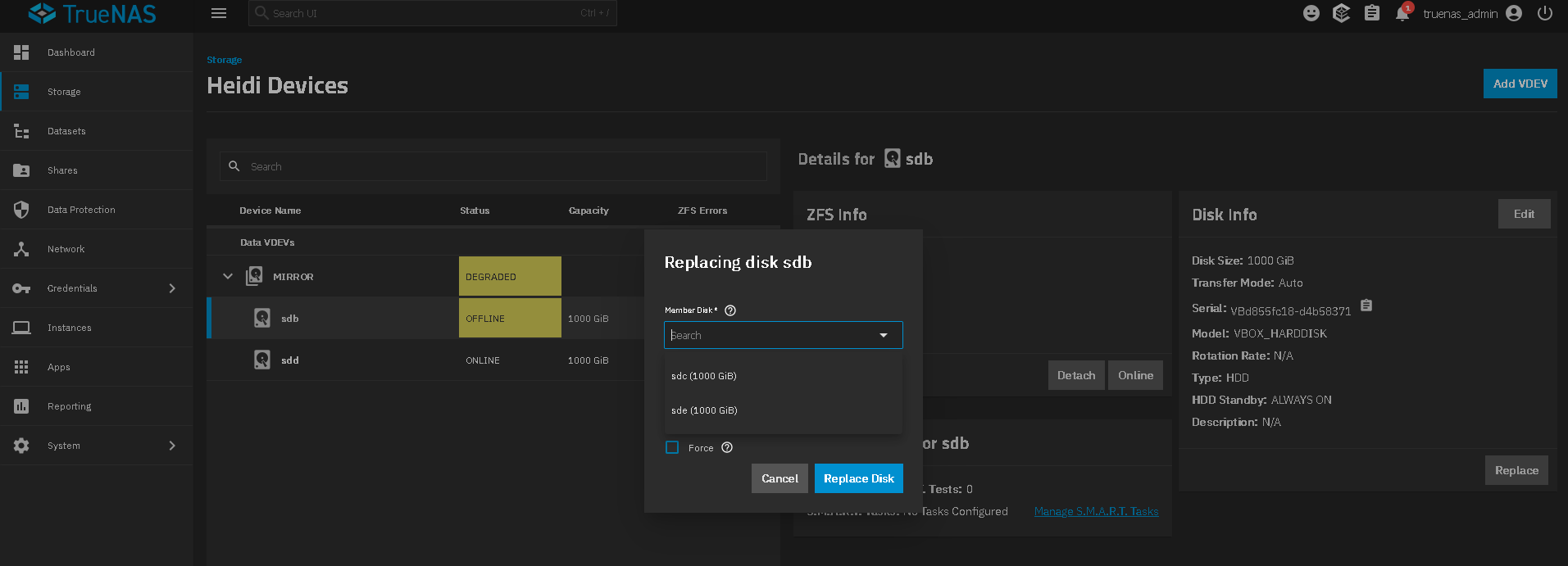
You should have gone to Storage, Manage Devices, made sure you could see all disks in your Raid-Z2. (I have a mirror showing). Offline the bad drive, or just click on the Replace button on right side. It brings up the square box and you choose your new disk and click replace.
It looks like you went through adding a drive to your pool and selected the type as spare instead.
I wanted to replace a bad drive. I took the bad drive off line. I physically replaced it with a new drive and tried to add it to the pool. Somehow, unintentionally it got added as a spare. I detached it as a spare. Now when I go to storage “unassigned disks” I try to add it to my existing pool called “tank” from the drop down list. I go to the next wizard which says data and choose the size from the drop down list. Then I hit “Save Go To Review” and get the following error message: At least 1 vdev is required to make an update to the pool.
And I am unable to click on “Update Pool.”
I am confused. If I have an existing pool there must be a vdev assigned to it. Why am I getting this error?
The other thing I have tried is going to Topology and Manage Devices. I click on “Add Vdev”
and go through the same wizards as before and get the same error message.
Lastly, when I try “manual disk selection” and click “add” and drag the icon for the extra disk into the “add” window I get the error message "Atleast 3 disk(s) are required for Raidz1 vdevs " even though two disks should already be in there.
You’re doing all wrong.
Spare was a mistake but it wasn’t bad outcome: All you had to do was to follow @Arwen’s instructions and remove the failed drive to confirm the “spare” as a permanent member.
Now, read the new advice carefully: Do not try to add a new drive, replace the failed drive. That’s not the same thing in the GUI!