
As others have stated, be very mindful of cable quality and airflow when drives throw errors. I had a POWERDIS enabled disk that needs SATA pin 3 disabled to start, and I didn’t have an adapter, so I had to use a cheap Chinese power adapter cable. The cheap cable works fine on most, but not with my enterprise drives as it started throwing errors a few hours in. zpool clear fixed them, but it would happen again a few hours later. I eventually covered pin 3 (with electrical tape) on my power supply lead and it’s been fine since.
The spare disk has arrived and i don’t have a spare cable or backplane. I know the cables are cheap knockoffs(trying to save money has its costs). I will put an air mover in front of the server. I am going to add the following change, please let me know what you think
echo “vfs.zfs.resilver_delay=8000” | tee /etc/sysctl.conf
echo “vfs.zfs.scan_idle=1” | tee -a /etc/sysctl.conf
echo “vfs.zfs.scan_max_time_ms=500” | tee -a /etc/sysctl.conf
yeah am thinking its either the cable or backpane. I have another truenas server build exactly like this one and its not showing any issues at all. Am used to handling other electronics jut not server so am nervous about opening it up.
FWIW, I have my fan script set so the drives do not go over 30 deg C. The room is at about 21-25 deg C, depending on the time of year. None of the BackBlaze data means much of anything with your drives because their use case and temperatures are so different.
I totally agree with @joeschmuck, do something about the ventilation - on the drives and HBA. High temperatures will only accelerate drive wear and HBA errors.
PS: None of us are likely to recreate Backblaze operating conditions in our homes. As best as I can tell, the datacenter where those pods are being stored operates likely close to 12 deg C, year round (some of their drives listed 17 deg C as the average operating temperature, IIRC).
So your fans go into hyperdrive if the temperature of the disks go over 30C (86F)? I put a fan in front of the server. That does keep the disks cooler.
I do allow my 7200rpm drives to get a bit warmer… maybe 36C? (I forget the exact setting)
Comes down to case design and sysadmin neurosis, I suppose. The Lian Li backplane spacing is pretty generous, leaving ample room between each drive. That in turn allows for relative ease quietly cooling them.
Drives that are stacked tighter produce more static pressure drop, which in turn also means you have to pay a lot more attention to sealing and fan selection. There is a reason that supermicro and like server vendors use batteries of thick screaming delta fans - redundancy, massive suction, etc.
That’s why I love the Q26 as a case for smaller NAS’ and the A76 for larger ones. Your spinning drives will be kept at maybe 5 deg over ambient, the fans can run quieter, and drive replacements when they have to happen are easy.
Sadly, the Q26 is unobtainable now and the a76 did require some additional sealing on the inside to direct all airflow over the front drives. I used duct tape to create some “wipers” between the disk tower stack and the case wall, for example. It’s not pretty but it works just like my other “ghetto but awesome” case modifications.
As an aside, I highly recommend keeping at least one drive on hand as a cold spare - having been previously qualified by badblock, SMART long tests as good. That also allows you to take advantage of timing, ie I was able to buy my latest replacement set of used but warrantied drives for $7.9/TB (10TB He10s from goharddrive.com).
It gets louder down there as drives warm up during a scrub in the summertime. The loudest is before the fan script kicks in and the fans run at their default maximum setting during boot. Inside and outside that NAS I have 8 fans running. Most are 120mm Noctua industrial.
Another solution I implemented once consisted of building a cardboard duct into the bottom of my refrigerator that ended in a standard box fan. That combination (box fan + duct) kept the condenser coil and compressors cool enough while we awaited the arrival of a replacement condenser coil fan to keep using the refrigerator w/o issues.
More fans != more noise as long as you can use a fan script (thank you!) and direct the air flow where it is needed as opposed to spray and pray. Most tower designs show utter contempt re: good cooling and air flow (NXZT) while others prioritize super compactness over cooling performance.
Presently, the loudest fans around my NAS are associated with my Pi rig, which uses four 50mm little beasties with zero speed control. If I had more time, I’d modify that case to allow the use of two quiet 80mm fans instead. Oh well.
That would be right, if temperature were a factor in drive longevity.
I am not sure about that one.
AFAIK, the only ones that really run a test like that was a Google study, and they found no correlation. But of course, that could be different again for newer drives.
I had my HDDs in my old case running for half a decade at 45-55° without issues.
Something like a Seagate X20 is rated to run in a 60° environment.
And it comes with a 5y warranty.
At the same time, lower temps are probably better. Seagate MTBF is based on 30°.
But if there is a huge difference between something like 30° and 50°?
I have my doubts.
What we IMHO do know, from our own experiences and from the Backblaze data, is that drives mostly fail like this:
Not failing at all for X amount of time.
Then after time Y, all of a sudden, they fail like dominos.
Where Y is, we don’t know.
In the backblaze chart, it is after 8y.
But it isn’t important if Y is after 6y or 10y!
The important thing is, that they behave like dominos.
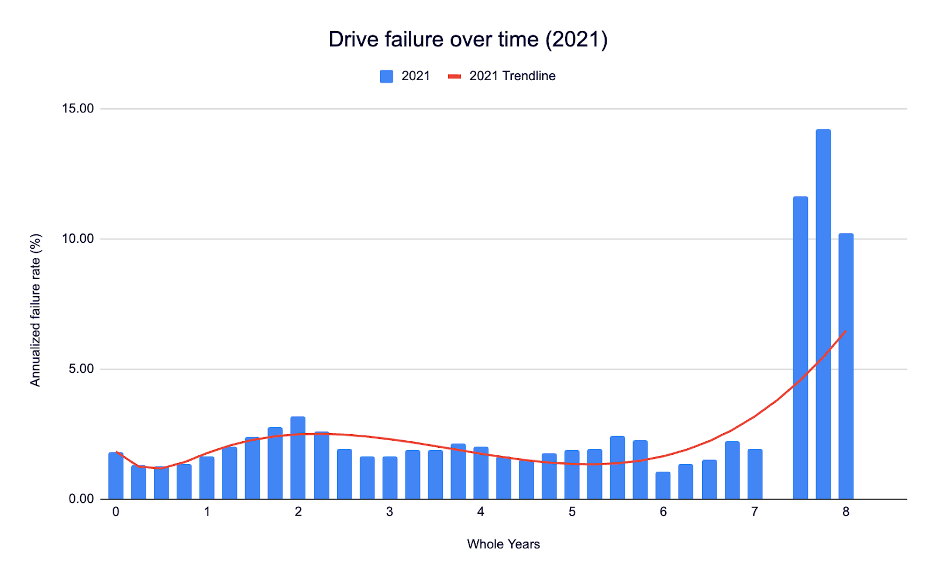
And in a monoculture RAIDZ, with all the same drives, same model, same runtime, that is IMHO a serious risk.
That is why IMHO something like OPs RAIDZ is risky, despite being RAIDZ3.
If 4 out of 12 drives fail, before he/she can resilver, the pool is gone.
OPs drives are roughly 10y old and have 7y runtime.
FWIW, that’s one argument in my book for buying used drives with warranties. No possibility of getting drives from the same batch, drives that were likely to die infant deaths are already weeded out, and the resultant death curve should be pretty random.
When used drives hit <$8/TB, I bought a whole replacement set, qualified them, and set them aside. So far, I’ve only replaced two out of eight He10 drives, the rest are still trucking along.
Edit: If my search skills are up to snuff, I bought these He10 drives in 2018 or so, used, with like 20k hrs on them. That makes them all 10+ years old. Per your chart, more should have expired by now. 
Naturally, one should not extrapolate from my use case / conditions, backblaze has a lot more drives to draw on. But they also tend to get rid of them well before the curve curves sharply up per @Sara chart.
OP should have a backup.
Some drives actually do require a cooler surrounding. I ran into this a few weeks ago, this Seagate IronWolf ST12000VN0008-3MH101 drive specs:
Min/Max recommended Temperature:     10/25 Celsius
Min/Max Temperature Limit:            5/70 Celsius
This is crazy, recommended temp is 10C to 25C.
@Stux I do have a backup
i am about to start resilvering. I’ll keep you updated
I’d wager that’s pretty typical for a data center like backblaze. Frigid. Hence the low end temperatures they show in their datasets.
I wonder if it’s also used to deny warranty coverage- or if the drive shows excess time at temperatures outside the recommended range, the vendor gets to say NYET!
This would be particularly relevant to data centers where the gear is not cooled using refrigerant-cycle appliances, ie where only cleaned outside air gets used. Those OEMs allegedly design their own boards to allow operation at high ambient, saving them the cost of actively cooling the whole data center.
You guys piqued my curiosity… just how cool are those drives running in the stack?
Here are two of them going back a while.
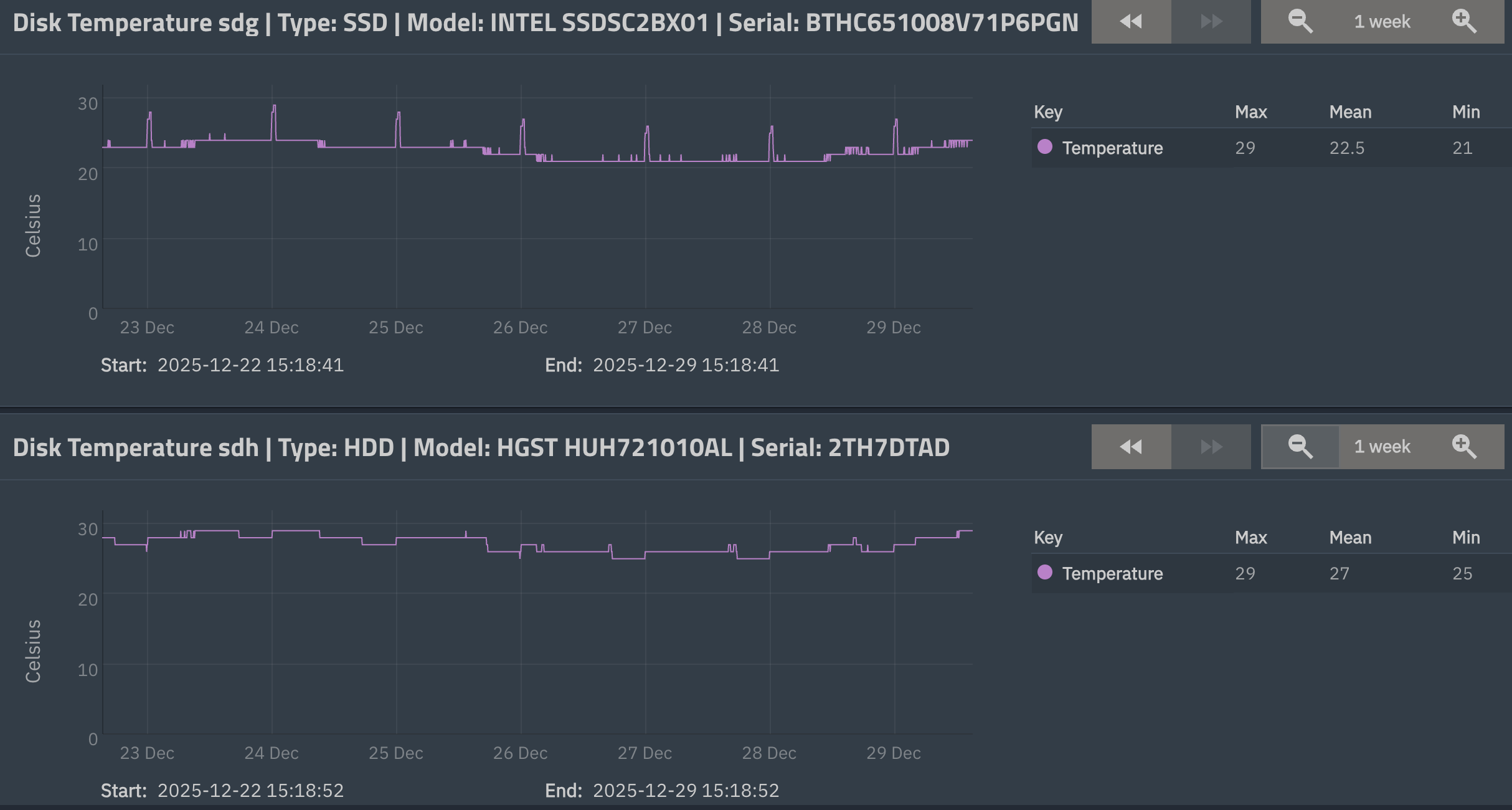
The Intel drive is one of three 2.5" SATA SSDs that make up my sVDEV. The other is one of my 3.5" He10 HDDs. Note how the SSD is running cooler than the HDD, which may be partially due to the heat sink I put on each SSD. Now you may ask, why a heat sink on a SSD? Those things don’t care a lot about heat?
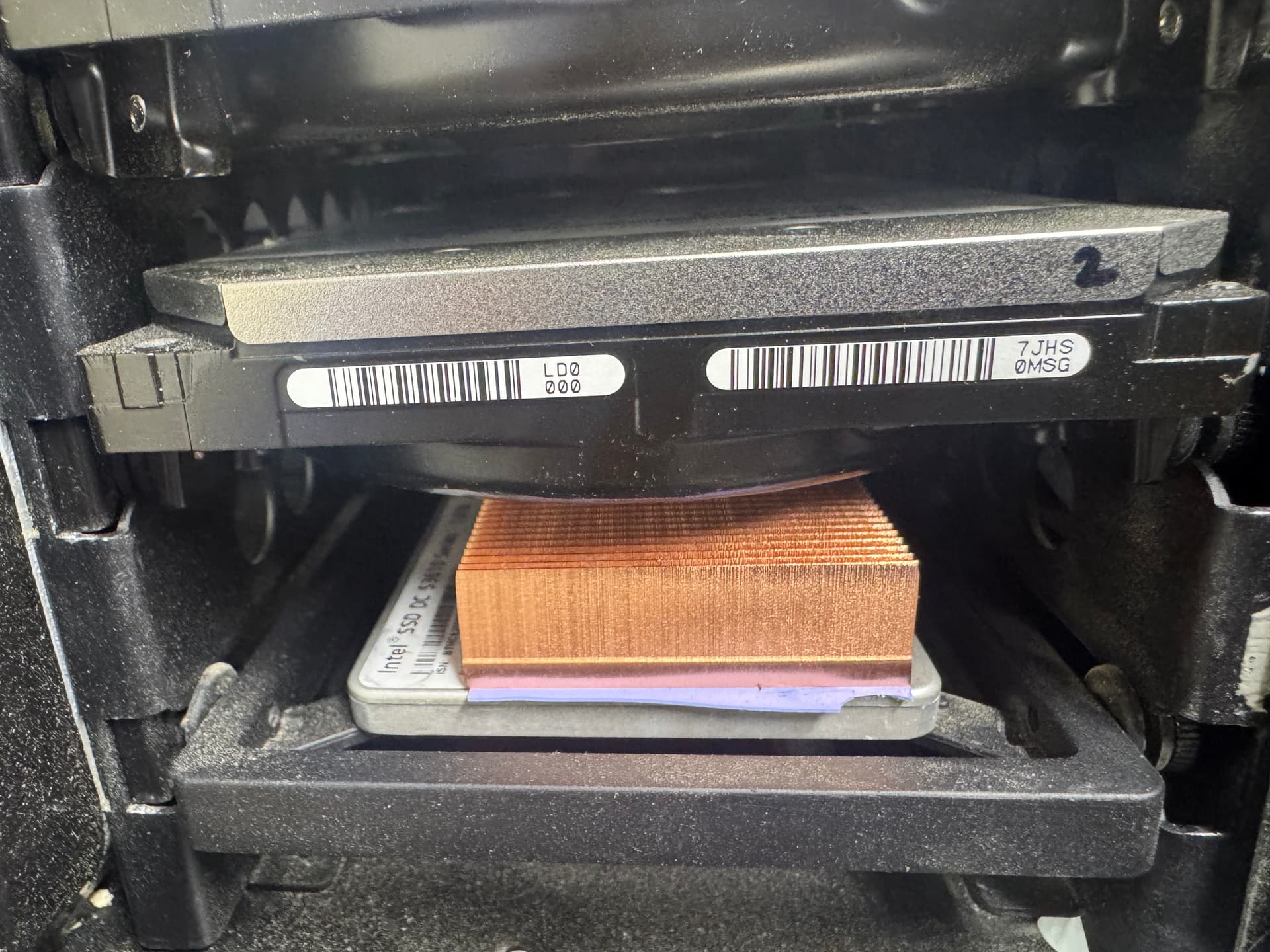
Ah, but this is not about the SSDs… it’s about trying to ensure that every slot in the HDD tower stack gets the same air flow, whether they contain a slim 2.5" SSD or a fat 3.5" HDD. By putting a heat sink on the SSD, I make it taller and increase the static pressure drop in those locations, losing some air flow there while increasing air flow elsewhere.
Depending on the hot-swap design, it’s also the same reason that empty bays in a file server should feature some blocking - to help force air flow over the drives that fill the other ones.
What are the these values on your system?
vfs.zfs.top_maxinflight = ? (1000 on mine)
vfs.zfs.resilver_min_time_ms = ? (9000 on mine)
My system doesn’t seem to have an entry for either (25.10.1 or 25.10.0.1 IIRC).
FWIW, the search function seems to have a problem with underscores, but even if I hack off the ends, the entries do not come up.