
Is that a copper block?
no, that’s a skived copper heat sink. The fin openings align with the air flow, which goes right to left in that picture.
Good news. I resilvered my drives. Bad news is another disk failed.
        disk01  FAULTED    136     0     1  too many errors
        disk02  FAULTED     66     0     0  too many errors
        disk03  FAULTED    245     0     0  too many errors
        disk04  DEGRADED   245     0     0  too many errors
i made sure that there was adequate cooling but issues are still persisting.
So these are just some wild guesses.
Your system is normally not under high load, right?
Maybe just some light sequential read tasks like Jellyfin streaming?
Now you put your decades old drives under stress by resilvering and they collapse like a domino.
That’s what made SMR drives so pernicious. It’s one thing to have random drop outs here and there under load, it’s a whole different ball of wax when a resilver takes 13x longer with a SMR drive than a CMR one, see here.
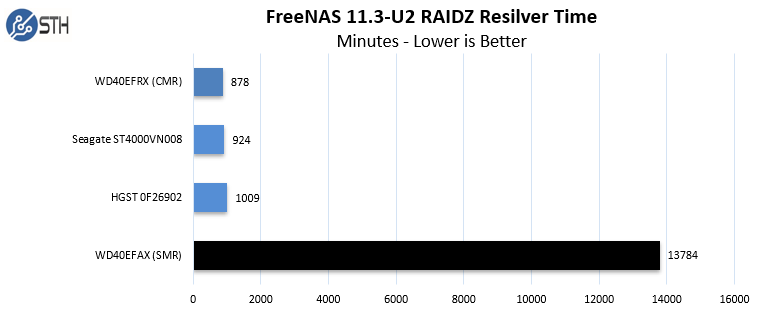
Source: WD Red SMR vs CMR Tested Avoid Red SMR - Page 2 of 2 - ServeTheHome
FWIW, some of my drives are pushing 63k hours, but the oldest are data center SSDs living out their golden years loafing along and mostly playing occasional sVDEV golf.
My NAS also has a bunch of HDDs with 40k+ hrs on them, ie well past 5 years of my own use (after 2-3 somewhere else and a SMART stats wipe).
So far, each failure has been fairly random and resilvers have never resulted in another drive also faulting.
That is a significant difference in time! I understand why but WOW!
@Constantin The heatsink is a very good idea. If you can get them for cheap (free), they would be a cost effective way to pull some heat away from the drive. It looks like you also are using a thermal pad to help transfer the heat.
Question: Does it seem to work really well? Do you by chance have any “before” and “after” specs? If not, no big deal, I can honestly see how it would benefit. For a SSD however I think if you sandwiched the drive between two heatsinks, it would perform better, unless you know that only the one surface is acting as a heatsink for the drive internally, which is very possible.
Just thinking out loud here: Wouldn’t it be great if there was a single SMR drive that you could use exclusively to rewrite an entire otherwise corrupt drive?
Here is how it would go:
- The HELPER SMR drive would be wiped clean, as in completely cleared during a specific period of time, likely after it has performed a complete optimization (the next few steps).
- During a resilver or significant rewrite operation for your SMR pool drive (just a single SMR drive at a time, called TARGET), all the drive data is copied from the TARGET drive to the HELPER drive, while performing the resilvering so the HELPER drive ends up being a completely repaired data drive, but not actually part of the pool.
- Next the TARGET drive is erased.
- Next the HELPER drive data is copied to the TARGET drive.
- Lastly we delete the HELPER drive data and have it ready to support the next resilver operation or significant rewrite of data.
This would only work provided the helper drive is the same or larger in capacity from the target drive.
This sounds so obvious, it must already exist, but it would need to be integrated with ZFS and the resilver operation. So maybe it does not exist. As I said, just thinking out loud.
Or wait! Making a ZIL actually help with a resilver, which I understand it does not at all right now. It would need to be a rather large ZIL, but hey, when dealing with SMR…
It’s why I had such an allergic reaction to the underhanded ways in which WD was trying to market their Red SMR “NAS” drives. Or the “5900-RPM” class hard drives, or SSDs where the internals were downgraded w/o changing the SKU, updating the consumer-facing info, etc.
The people running WD in the 2020s seemingly made a sport out of burning any and all consumer goodwill towards the company. Given that the company / board took no significant action as a result of 3 major mis-labeling scandals, I presume this behavior may repeat.
What you are describing could likely only be achieved using a host managed SMR drive (HMSMR). Such drives exist, but they’re only sold into the B2B market and there is, to my (very limited!) knowledge, close to zero integration between ZFS and HMSMR at the moment.
If the host cannot manage the writes, the drive gets to make choices and those choices in device managed SMR (DMSMR - the type sold into the consumer market) basically boil down to “fill the CMR cache, write to the SMR sector, rinse and repeat” under continuous write conditions.
As long as the drive gets to decide what it’s going to do, I don’t see a major improvement opportunity. A resilver may drop in time if all metadata & small writes are eliminated… ie a sVDEV may help a little bit.
But, by virtue of how DMSMR works, it has to, at minimum, be at least 2x slower than a comparable CMR drive under continuous write conditions since every bit of data is written twice - once to the CMR cache, then a second time to the SMR sector. If there are verification reads, add that to the performance impact also. But the measured performance impact is well beyond 2x under continuous writes with larger pools.
The biggest ZFS issue with DMSMR remains that the entire pool gets write-blocked every time a drive in the pool gets locked while it drops out and flushes its internal cache to a SMR sector. Hence, the more DMSMR drives in the pool, the worse the continuous-write impact, which hits especially hard during resilvers.
DMSMR drive writes cannot be coordinated or ganged, ie by a SATA command to all drives - “write your CMR cache to SMR now” - that’s only possible with HMSMR. Unsurprisingly, a HGST employee explained in 2015 why DMSMR drives are fundamentally incompatible with ZFS. See here: https://m.youtube.com/watch?v=a2lnMxMUxyc
DMSMR is a dead end technology for most NAS applications that was a fiscally attractive way to squeeze an extra 20% of storage out of each platter while kneecapping performance. Making such a massive change under the hood while not disclosing it to your customers is fundamentally dishonest. Note how long it took WD to even admit that they quietly
injected DMSMR drives into the “Red” NAS line.
I don’t have anything against DMSMR per se BUT OEMs better disclose when they make changes under the hood that can have significant negative performance impacts.