Pls forgive what might seem a trivial question, but I have trawled all the resources I can think of, and I am still unable to fill-in some of my knowledge / understanding gaps. I am running 25.04.2.6 tn_scale
My goal is to backup via rsync app from a truenas folder to a remote linux local m/c’s folder via smb.
I have setup the rsync app with a ‘host path’ of /mnt/Local_Pool/rsyncd/rync-test,.
I assume this is private working space for the app.
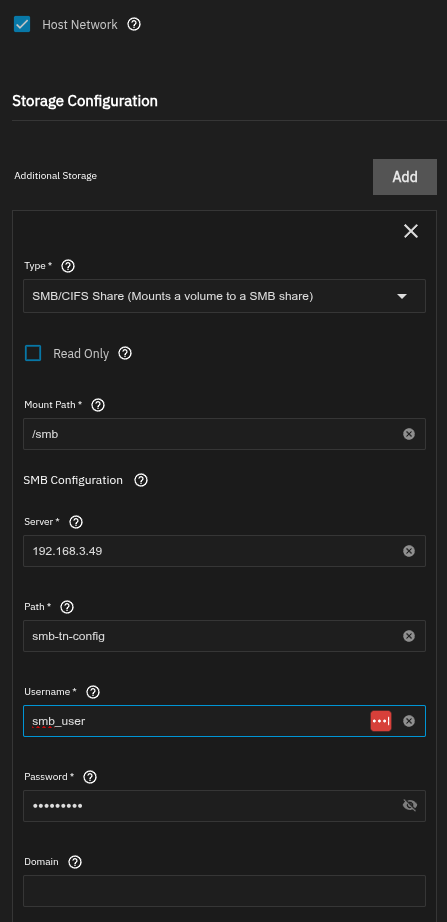
I am then trying to copy to another host, ( same local LAN ) via smb,.. but the storage for config fields I am getting confused with,.. ‘Mount Path’, why would I have a local mount path, ( help states ‘the path inside container to mount the storage’, but I have no container,.. confused… and ‘Path’,.. path to what actual smb remote file storage Path,.. or smb name,..
I have found various videos, but these talk about backups to other NAS servers,.. not a simple remote file system,.. and many of the videos are outdated,.. and do not reflect the latest i/f.
If I go to the docs,… they stop at the point where it might talk about smb mounts,.. so dead end for guidence…
It looks like you’re trying to install a rsync App thus docker. This is what might confuse you since you are in the setup process of the docker container itself. If this doesn’t mean anything to you, you can ignore the verbiage.
While I have no 25.04. system, only core and 25.10.2, I guess rsync didn’t change much. What you most likely want is in “Data Protection” > “Rsync Tasks”. You should be more familiar with this and find your way there if you already read/watched many tutorials. Look it over and if you still need help feel free to ask again.