
I did actually hear about that, I suppose I underestimate what this company may be doing behind the scenes. I am not in the world of scientific research so I don’t get how things work but, I suppose it makes sense. It is one of the few things I believe AI is very useful/should be used for, science. And writing code for me 
SO. I wanted to update. I have now replaced the RAM temporarily with a single stick of 8GB from Timetec, “premium”… whatever. Point is, I just removed it from the packaging, installed it, and tried to boot the server. It still went straight to the GRUB menu I mentioned in my initial post. So, I stuck the USB drive with TrueNAS installation media on it, and attempted to reinstall the software, and guess what? Same errors. “Unable to enumerate USB device.”
I am currently running memtest86 again with the new RAM installed in order to rule out a defective out of box RAM stick.. but then just now read a recent post saying “memtests are pointless” which has confused me even further… Here: PSA: "Memtests" are pointless - #5 by winnielinnie
So. I will report with the results in the morning but, it’s been running for over an hour and I’ve had zero errors.
Important to note, I have also tried multiple USB flash drives, and tried multiple USB ports when attempting to re-install TrueNAS. Same outcome, every time.
At this point I’m actually feeling like smashing my server with a hammer and starting over. Motherboard? CPU? What the actual hell..? Is it possible I had faulty RAM AND a faulty CPU, or motherboard? How would I go about troubleshooting the next most likely thing?
I’m sorry guys. Thank you for your input, so much.
Are you using the same USB port to plug in or have you tried other USB ports also?
Winnie told me that he tends to use sarcasm to make a point. 
2 Likes
Antiphrasis even.
Thanks, I’m a bit dense I suppose
So the memtest passed anyway, and yes I have tried multiple USB ports for the installation media. I read somewhere to try a USB 2.0 port as it is likely to utilize a different USB controller, not sure if I tried that or not, I just picked a random port each time.. I won’t be home until Friday, working at the FL Panthers hockey stadium but I’ll start there when I get back. I suppose I’ll check on ways to validate the CPU as well, after that? Gods what an annoyance. Thanks all.
Update:
After installing the new RAM stick I tried:
- Installing from multiple (3x different) USB drives
- Re-downloading and re-imaging the truenas install ISO as well as a Debian live image to the same 3 USB drives
- Disabling secure boot and fast boot in BIOS
- Running all of the previously mentioned installation media on my personal laptop and proving that they would boot just fine on that system, the Debian live image ran perfectly on the laptop on the three different USB drives.
Nothing made any difference. And then…-
- I re-seated my CPU and…
Magically, I was able to install TrueNAS successfully onto this system again. The thing is… one of the first symptoms I noticed when I FIRST posted about having issues was - that when I plugged in an external monitor into the system, it would flash on and off constantly or be completely invisible (dark screen) towards the end of my issues, “the end” being that my server just failed to start. So just immediately prior to my server failing to boot, I had the issue of no video with an external monitor plugged directly into it, although I was still able to log into the GUI through the IP address.. Now I am having the same issue and am still able to log into the server remotely, no local video.
In addition, I am able to see my previous storage pool and it shows the name of the system it is associated with but I am unable to import it.
This is after importing my configuration file.
I have some screenshots to show what I mean:
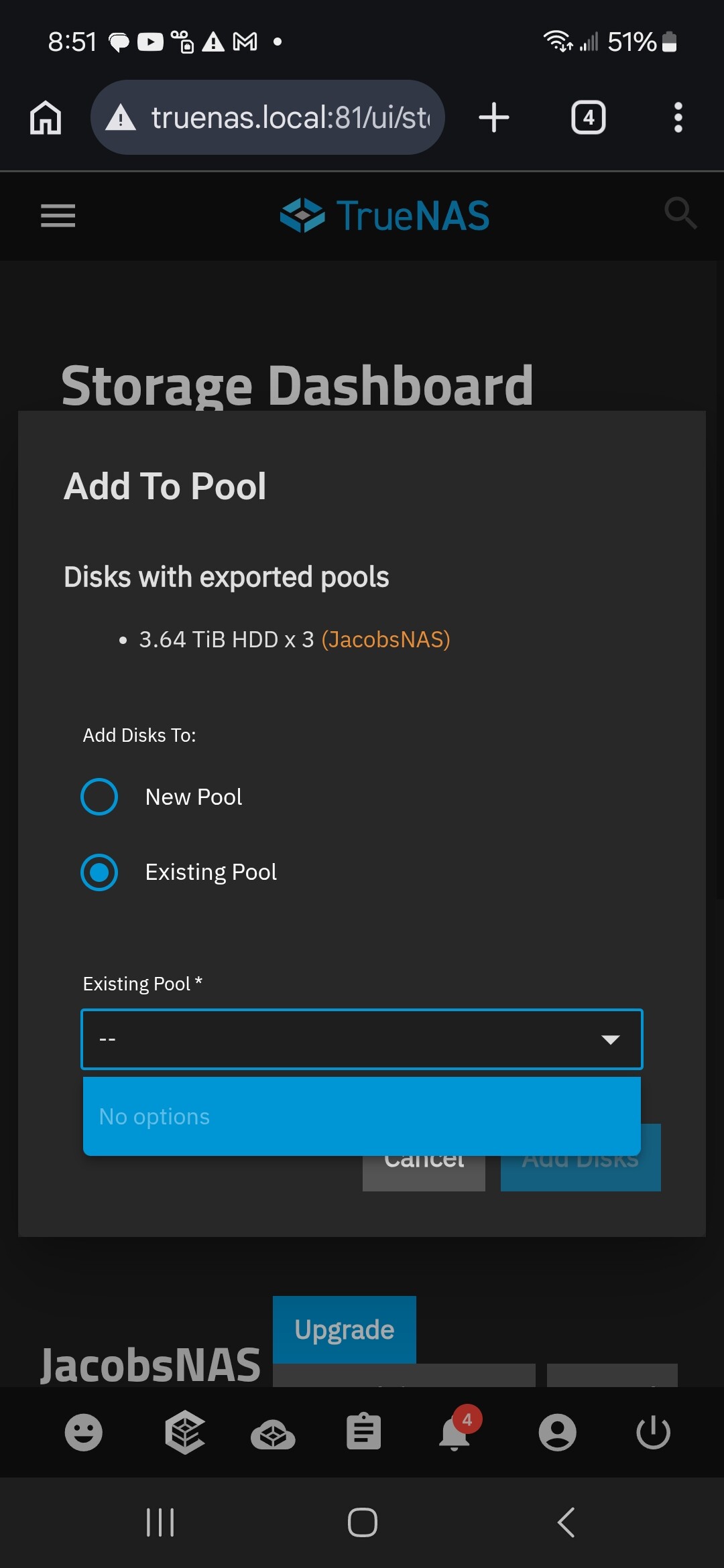
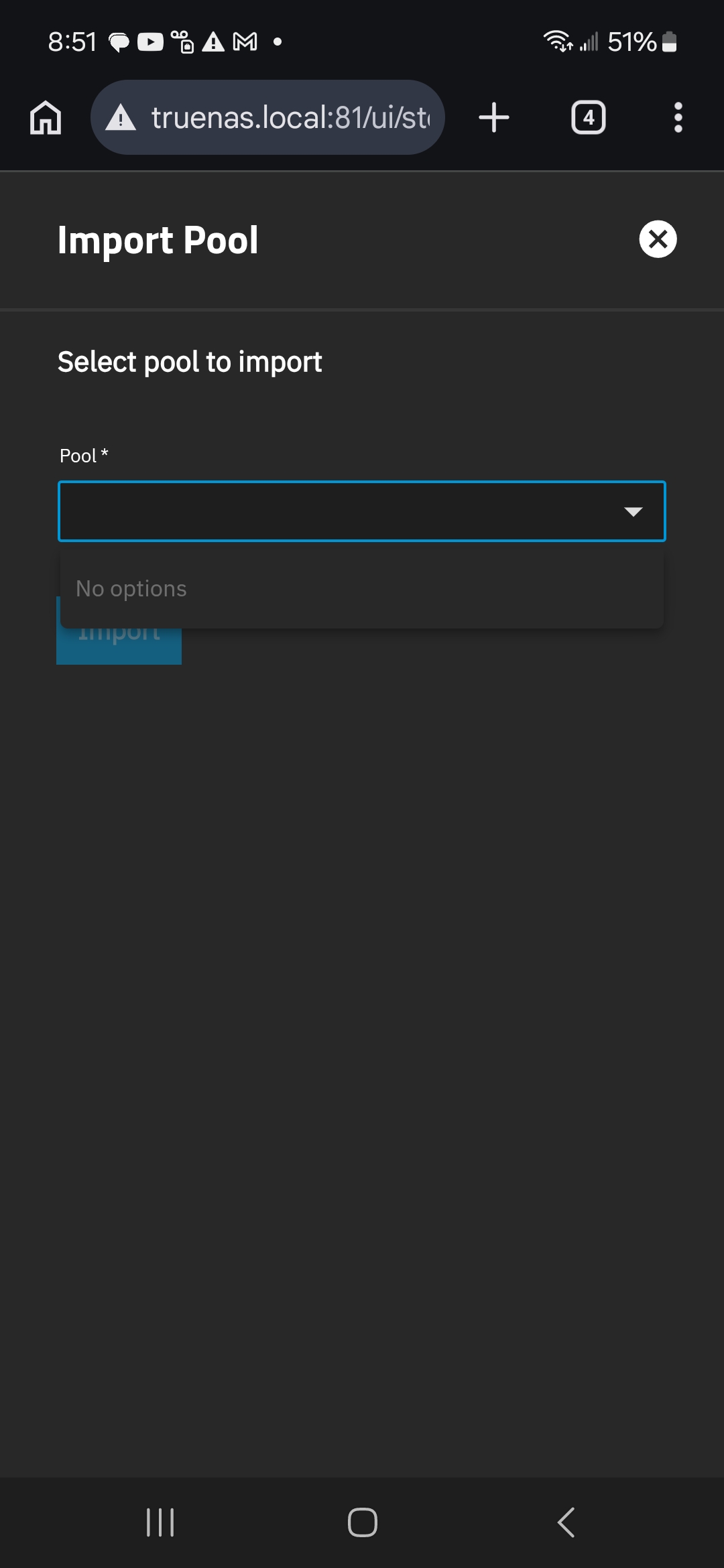
Note how it shows that it can see “JacobsNAS” as the pool name associated with this set of hard drives. Yet import options are empty.
I do not know if these two factors are related even, but I will try some kind of CPU stress test for now.. my remaining question is this:
Am I going to be f*cked when I do fix the system and try to import the pool? What reasons are there that would allow my previous storage pool to show up as an existing pool but not allow me to import it? Is the pool corrupted or is it possible that errors with the CPU or motherboard could be causing this issue? I set up this NAS for data preservation and I’m going to be super disappointed if I find out that the only way to actually ensure data integrity is to have another $600 worth of hard drives sitting on the sidelines to be a full backup. I’m just a guy, not an enterprise, I store personal data, creative projects and memories, and I thought that RAIDZ1 (or RAIDZ2 ideally, in the future) should be sufficient for me.. until I developed faulty ram (which apparently could have possibly been caused by a faulty CPU or mobo?), and it’s all very disheartening.
EDIT: Note to self.. Oh my God, proofread when using talk to text.. good lord Fixed
Hardware failures like the CPU or RAM could have corrupted the pool and ZFS wouldn’t be able to save you from that. That is why you hear that users should have at least a backup of the data elsewhere. ZFS was keeping your data safer with its checksums and having extra drives for parity in Raid-Z(1,2,3). Some of us have at least two ZFS / TrueNAS systems in different physical locations.
If you get your hardware to 100%, we can still try to get the pool and data back. Your screenshots are just showing the system knows those disks belong with a pool but it is not healthy enough to just import as normal.
If you can post screenshots from a regular computer instead of a phone, it helps. Having a full 1080, or larger screen is helpful for the GUI
Can you borrow a computer that can fit your data disks? We could run the CPU and RAM tests there. Install TrueNAS Scale and attempt to get the pool to import and recover the data.
Another option is if you wanted to try professional data recovery. Klennet Recovery is a product that a few have used to see if the pool could be brought back. It’s about $300 for the personal use license but you can download and run the software to see what it thinks it can recover. You pay for actual recovery.
@OutbakJak after installing the new RAM, you did not state that you ran MemTest86+ version 8 (current version) again nor a CPU stress test. If you did not do this, then you could be making more trouble for yourself. Hopefully you did these tests again and just didn’t mention it. System stability always comes first.
I hope you are able to recover your data.
Last thing, if you do not know what the commands do, do not take AI advise. AI can often be wrong. Last night I was working on a Raspberry Pi. The advice I was given was wrong more than it was right. And the typical excuse “I’m glad you called me out on that, blah blah blah… This command is correct.” And guess what, it was wrong as well. And i will not say all advice is bad, but if you don’t know what will happen or you are taking a risk.
Good luck, you are in good hands here.
Firstly, holy hell forgive the terrible grammar in my last post, using talk to text + too many beers is not the best combination -_-
Thank you, I am pretty experienced at dealing with AI’s BS, it’s been wrong many times for me as well. I am careful 
I thought I mentioned re-running memtest86, but yes I did run it on the new RAM as soon as it was installed and it passed. As far as a CPU stress test, I’ve searched to find an application that can be run from a USB drive (a live image or bootable utility like memtest) some of the answers I found was to use memtest86 (not sure how helpful that is), or a Debian live image and run some utilities that are built in, I don’t recall the names of the applications, but I am having the issue where there’s no video once the system starts, so that option is irrelevant. The server shows up on my router IP table and I can access the GUI for TrueNas via the IP but with both the Debian live image and the TrueNAS OS, once the system is started the video cuts off. Weirdly, that did not happen the first time I booted it after re-seating the CPU, and it never occurs when using memtest86, or the installation media for TrueNAS, nor at the Ventoy menu screen, nor during the installation of TrueNAS/launching of Debian live image.. it is ONLY after TrueNAS or the Debian live image is fully booted that I lose my display.
The next option I’ve found is to use the bootable image of “StresKit” (GitHub - valleyofdoom/StresKit: StresKit is a lightweight bootable ISO based on Porteus Linux containing a compendium of stress-testing related tools and utilities) and run the FIRESTARTER utility.. but is there any other recommendation others have for this, considering booting into a graphical OS seems to disable my external display?
Aside from that, the main reason for the update was to ask, is it even likely that some odd CPU/mobo issue is the cause of TrueNAS being able to “see” that my HDD’s belong to an existing pool, but unable to import them? I will search the forum some more to find info on this issue right now. Really at this point, most of this has become just general PC troubleshooting so I don’t want to bother folks here about it.. but I am curious what would cause that (inability to import, as shown in my last screenshots)
I guess as always, will report if I figure out the problem. I suppose I’ll try some kind of stress test for now and continue researching
I just updated my last post to say excuse my terrible grammar, I used talk to text and did not proofread. I was drinking and posting while upset, my apologies I’ll try to use the PC for screenshots going forward.
No unfortunately this is the only “real” PC in in the home (only one with SATA ports at least), I’ll have to invest in a cheap mobo/LGA 1700 CPU to try to import the pool to another system, OR attempt to use USB HDD docks and a mini PC, maybe? I do have both of those laying around.. a two drive USB-C dock and a 1x drive USB 3.1 dock. I suppose that is worth an attempt just to check how far I can get.
Honestly, I’m very lucky that this data was mostly not incredibly important, I fear I may have lost some old photos, but I believe I actually backed up the most important stuff (old PC data) to an external USB drive as well in the past so.. hopefully that thing still works, otherwise it’ll just be a massive inconvenience if it’s lost.. I do plan to use the NAS for musicnull production, video and photo editing shtorage in the future, it will be a highserious problem if this happens again.. unfortunately having multiple/off-site backup is ajust not feasible for me cost-wise. I will have to make due with my 4TB Google Drive storage for anything super important for now. Maybe one day I can have one, then eventually maybe two 8TB drives I’ll back up everything important to occasionally.. my ideal setup will be RAIDZ2, 6x 4TB drives for 12TB total but with two drives for backup that’s like $1,0l600 these days. SO. For now it’s Z1 @8TB until I haveemm money.
I did recently look into data recovery options when I messed up an important camera SD card with photos from going to see the last total solar eclipse.. I may end up using that option if it can save both my ZFS pool and my photos.. thank you for the recommendation.
Anyway. I will attempt to install TrueNAS to my mini Dell office PC, connect my USB docks and attempt a CPU stress test on the existing system.. although I’m not sure that will rule out anything like a faulty mobo or PSU.
The Ultimate Boot CD (UBCD) is an ISO image that is bootable. It has a lot of utilities on it, including MemTest86+ and several CPU stress tests. Be careful of the website you download it from, a lot of ads that want you to download something.
I expect an updated version in the near future that will update MemTest86+ to version 8, but version 5 works just as well on older hardware. But you already have Memtest86 so no big deal.
Doubtful. It would be the OS in control of that.
Users tend to learn the hard way about data redundancy and backups, only when something hits the fan. It happens to all of us. Anyone who says they never had it happen, has not been using computers long enough.
There is a lot written here so I will just ask the questions, and yo may have already tried all of this:
- Have you reinstalled TrueNAS from the ISO, and did not (to ensure your config file isn’t corrupt) uploaded your old configuration file?
- Then configure the network only.
- Now does TrueNAS see your pool?
- Can you import your pool? , If yes then you should run a scrub.
- If the scrub passes without file errors
zpool status -v, then if you have any READ/WRITE/CHSUM Errors, runzpool clear yourpoolnameand run a scrub again. - Check the scrub results again
zpool status -vand if there are no errors at all, start to copy your data to a safe place. - Again, all of this without restoring your original configuration file.
- Let us know what happens here.
Bet of luck.
Thank you so much for trying to help, I’m a bit slow getting back to it so I hope you see this but,
-
Yes I’ve tried a fresh install of TrueNAS, I had the same issues before attempting to upload my previous config
-
Not sure what you mean by this, assuming you mean that the only change I should make to a fresh install is to set up my network connection? I suppose it was irrelevant because I lost external video the moment TrueNAS launched anyway so I got frustrated and didn’t troubleshoot very much further. It’s been a while, forgive my poor memory. I can try this, though!
-
Again, not sure exactly what you mean, but assuming you mean how the GUI shows it, it’s in this post I made in this thread, there are two screenshots showing what I meant:( Server defaulting to unfamiliar GRUB menu, randomly disconnected storage pool, constant Checksum errors - #28 by OutbakJak )
-
Cannot import the pool, as shown in that post/comment/images, they show up but not in the drop down for import.
As for the rest, I suppose I’ll have to try everything all over again specifically making sure not to upload my previous config.. however, I have a small update that may or may not have anything to do with your advice, which I will try shortly. For now, I will make a separate reply detailing my new findings/test results. Thanks again
Ok, small update. After much research I settled on trying “Hiren’s BootCD PE,” then after flashing it to a USB drive, it launched successfully, without losing external video output (which has been a consistent problem so far) so then I downloaded, installed and ran the software called “Prime95”, all inside of the boot environment of Hiren’s BootCD PE,
Hiren’s etc. was, of course, recommended by Gemini AI (after several bad, incorrect recommendations, like Intel’s IPDT which simply REFUSED to launch…) because Googling is an impossible task nowadays yielding nothing but advertisement filled, fake ass sites that you can’t find any info on, unless you add “Reddit” or “from: (website name)” to your search.. so please let me know if that particular stress testing tool is insufficient somehow?… Anyway..
Prime95 after running for over an hour on multiple different settings yielded ZERO errors. From what I have read, this means my CPU is not, in fact, faulty. Does this sound correct? Has anyone used this utility?
Tl;dr it seems like my CPU is fine at this point.. I can post the results from my two Prime95 runs, if it’s helpful. To be clear, I ran it on:
“Small FFT’s” and
”Blend”
Each time was over 45 minutes
At this point I’m again at a loss other than to try what @joeschmuck recommended, which I’m pretty certain I’ve already tried but since it’s been a while and I’m not 100% certain, I will try (again, maybe) as soon as I can.
This is wild to me, still.. how badly and completely this thing seems to have failed. It is what it is. Pulling my hair out now because for whatever reason I cannot run the Intel IPDT software, and therefore cannot test the igpu alone, and even if I could I’ve had so many other issues, the RAM and CPU seem to be testing out just fine, and all that’s left is the motherboard… but I can’t afford to just buy a replacement mobo and CPU to throw at it and hope.. very stressful. Oh well, I’ve learned to live without being able to control 8 of my lights/watch Star Trek at night for months now, I’ll get through it.
Thanks
The UBCD may have video conflicts, this is known. Thankfully you got past that.
An hour is not enough. Run it for at least 4 hours using the default settings. This is a heat generating event, intensionally.
When you run MemTest86+ (you can download version 8 and run it for free or use the one on UBCD, an older version but works), you need to make sure it completes a minimum of 5 passes, more is fine.
These “should” tell you that your system is fairly stable. It is not a 100% guarantee.
Next is cooling, then cables.
On the way out the door, best of luck.
Why (in your other post you show this) are you appending port 81 to your Truenas url? as in: truenas.local:81/ui/
I have never had any bare metal install come up looking like that.
Defaults are these ports
Web Interface HTTP Port: 80
Web Interface HTTPS Port: 443
You don’t need to add the port anyway for the default. “truenas.local” is good enough to get to the ui after first install. You can verify the ports in System → General. I ask this because if it is not on bare metal and you are passing through things like video and drives to Truenas then it needs to be done in a specific fashion or it presents issues.
If I can figure out a way to edit my previous posts I will consolidate everything into one to make this actually informative for others without having to dig through it.. at the very least, I will post a summary of what I learned and mark it as the solution. This is a quick, semi-final update:
I troubleshooted thoroughly, turns out my ZFS pool was thoroughly corrupted beyond repair. It is very unfortunate, I only really backed up the data, and the true nast config file, but in this situation the data sets still need to be rebuilt manually and I don’t remember any of the settings for any of them so, . I still do not know if it was the RAM that failed first, or if my motherboard has a power issue.. as a preliminary conclusion I will just say this:
I should not have ignored all of the checksum errors I was getting constantly across all of my drives for months. Everything continue to working normally so I just ignored it, much regret. Anyway, thanks again to everyone and I will do a final write up when I can. Hopefully after I get through the process of restoring what I can maybe I can add some info on that process as well. Thanks for trying to help