System: Aoostar R1, 2 x 8TB WD Red Plus
TrueNAS CE 25.10.0.1 - Goldeye
- Installed TrueNAS
- Created Mirror pool with name of “main”
- Created dataset under “main” with name of “share”
- Created SMB share for “share”, created user to access it
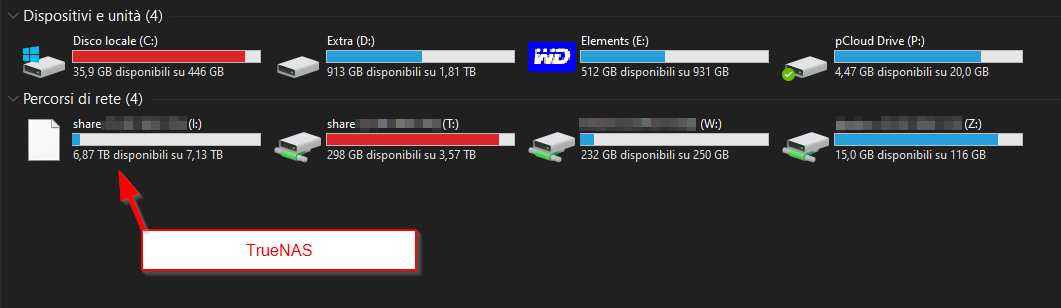
- On Windows 10, connected SMB share “share” and mapped it as drive letter I:
- Share works fine, read/write as expected, no problem there
- However its icon is a blank paper sheet and not the default Windows 10 icon for network shares.
- This happens on two separate & indepedent Windows 10 installations
- I have other network shares from other devices (a Synology DS214, a rasperry pi) and their network drive icon is perfectly fine.
No idea what caused this and any help is appreciated.
First time posting so if I forgot information or made mistakes - my apologies and I am happy to answer any question. I wanted to add a screenshot but the system wouldn’t let me, so I thought of uploading it to imgur and leaving the link in this post, but that too, apparently, is forbidden. I’m happy to share a screenshot in any other way that is allowed, if that would help.
Thank you in advance.