I have Windows 11 recently updated to 25H2 and TrueNAS 13.3. All was working fine for several years until a couple of weeks ago when my mapped drives in Windows explorer failed. I can still open TrueNAS in a browser, I can still access Plex from various devices and I can still play music + films via the TV but I can’t access the disks via Windows so can no longer edit any contents or access backups from my computer. I have noticed that when I click Network in explorer it shows TrueNAS but it is in a workgroup with a different name to my network workgroup (it is a simple home network), and I also see that other posts on the internet seem to blame SMB for the issuebut I have not found any proposed solution that works.
Has anybody got any suggestions ?
I have some screen shots of my setup and error messages but when I add them to this post it says I can’t embed media in a post - is there another way to do that ?
That sounds like maybe the wrong settings are loaded for wsdd or nmbd (these are daemons that make it appear in the network neighborhood in windows). You can try toggling them in the network configuration.
That said, since this is a home network and these servers are probably at static IP addresses you can just access the servers by IP address instead of relying on potentially spotty broadcast protocols to find them.
Thanks for the reply but I do not understand your post. If I put the NAS IP address (which is static) into windows explorer it just opens the TrueNAS web interface in my browser. What are you saying I need to do to access the folders and files that make up the pools ?
Also I do not know what wsdd and nmbd are or where to go to edit them or what they should be if I find them. I will do some internet searches but if there is an easy set of instructions I could follow I would be grateful.
Thanks - I left out the \\ at the beginning but I still have issues:
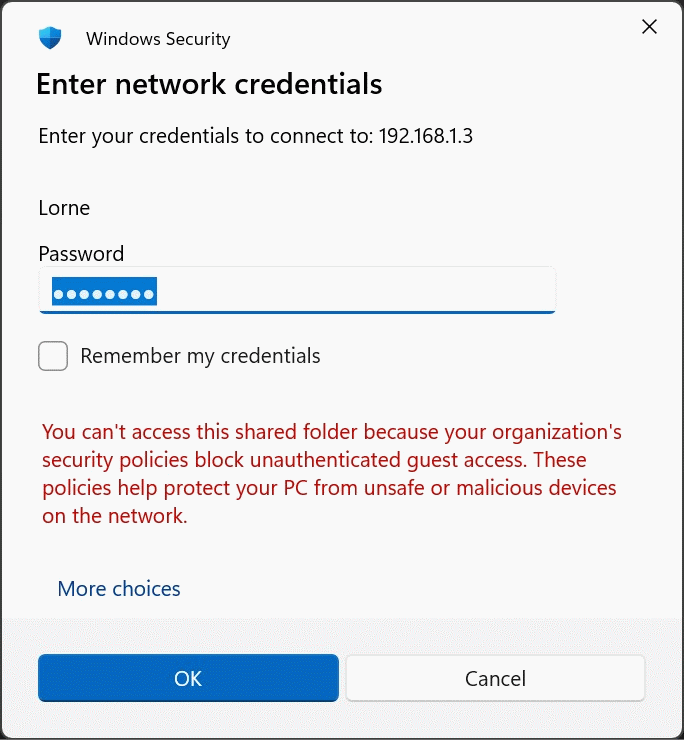
I get a box asking for a user name and password but access is refused with the message that my organisation’s security policies block unauthorised guest access despite me entering the correct (and only) normal user which is listed in the users list I can see under account on TrueNAS UI page in my browser.
I got out and old laptop and clicking TrueNAS in the network area does list all the shares and I can see all the files but with read only access. If I try and move or edit a file it says I need permission from unix user \Lorne which is the listed user name I have in the users list (other users are Plex and root).
I tried using my root credentials that allow me in from the browser but that failed as well.
I have uploaded some screenshots here: Attachments
This has to do with a windows security update. You will have to disable guest authentication on your computer, in order to get access back the way you had it, you have to run some commands. Pretty easy if you copy and paste.
Don’t forget to open powershell as administrator for both these options. Run Each Separate.
Unfortunately when other posts failed to find a solution I spent a day playing with every setting I could find to try and solve it and I seem to have changed something on my other 3 pools that stop me accessing them from explorer even thought they still work fine when access from my TV or music system. I will have to try and find out what I did. I am getting a window asking for my user name and password but the user name shown in the pool info is not letting me in.
For some users who have historically used insecure guest authentications in windows there are steps provided above in the following linked post:
WARNING: this is not a general solution to resolving authentication problems in Windows and should not be used in a business or enterprise environment. This configuration will almost certainly violate most organization’s security guidelines and is may also break in future Windows updates.
TrueNAS admins should use dedicated accounts on the truenas server (no guest authentication). This is more in line with modern security recommendations and upstream OS vendor guidelines / design.