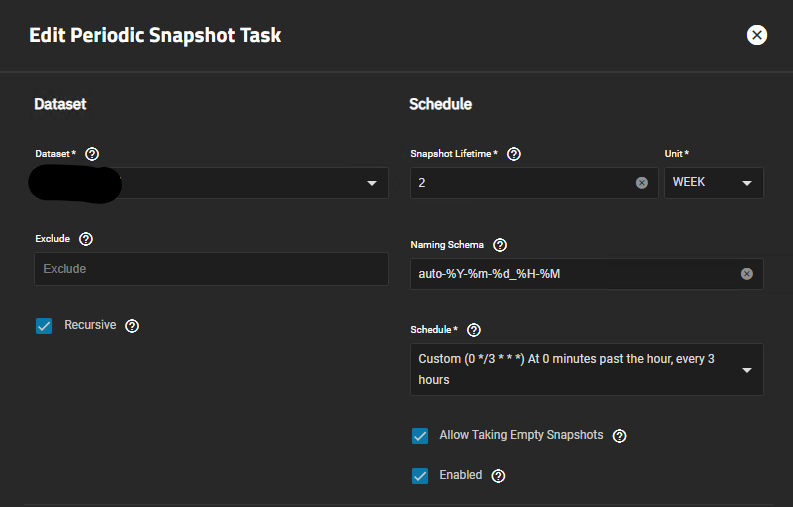
Snapshots taking up more space than actually advertiesd

Hi all

I’m hoping someone in the community would be able to help diagnose our situation.

We have two separate TrueNAS deployments, deployed exactly the same and configured the same. They both have the same amount of data being written to them and their pool / zvol / datasets are the same size.

However, on one of the deployments the snapshots are taking up over 30TiB of data, and the only way to clear it is to delete the snapshots.

These used to be running CORE, and had the issue prior to moving to SCALE.

Any ideas?

Edit: I can provide more details if that would help in identifying the issue

Thank you

Not really. All out of ideas here. We’ve expended every possibility.

When you come across more information, it might help to clue the readers. But really, more information is not needed.

1 Like
1 Like

We’re not trying to be mean, but you really need to see it from the other person’s perspective.

Let me demonstrate. Pretend I’m the one seeking help, and you are here to offer your time to try to help me.

This is what I’m going to provide:

“I’ve enabled block-cloning and upgraded my pools but block-cloning doesn’t work. My datasets show more space is being used after I copy a bunch of files. This happened on the latest Core, and it still happens even with SCALE. I confirmed that my pools were upgraded.”

Where would you start?

This is all I know:

  • You have two separate TrueNAS SCALE systems that were upgraded from Core
  • You’re using snapshots
  • Snapshots are (supposedly) consuming over 30 TiB of space on one system, but not the other

That’s it. That’s everything I know.

I’m not even sure if these two TrueNAS instances are “related”. Is one the backup of the other?

It sounds like it. But for all I know, you’re just alluding to these two systems being “used” similarly. So perhaps they’re not related at all, nor is one a backup of the other?

No, sorry, one isn’t a backup of the other.

  • Two datasets configured on each TrueNAS server
    • Size: 50 TiB
    • Sync: Standard
    • Compression level: lz4
    • ZFS Deduplication: Off
    • Read-only: Off
    • Snapdev: Hidden

The servers using the datasets:

  • Two windows servers that capture camera footage. Each server is capturing from different cameras, but they are all configured to the same format and kept for the same length of time. (They’re using the same amount of space within the server too with over 15TB free)

  • Two linux servers that host an elasticsearch DB

  • They’re connected with Block iSCSI Share Targets

  • The snapshots that take up space appear to be from the windows server dataset only (When clearing the snapshots for that dataset the space is freed up again)

  • Camera footage dataset for problematic server

    • Used: 50.78 TiB
    • Available 54.51 TiB
    • Data Written: 32.48 TiB
    • Provisioning Type: Thick
  • Camera footage dataset for non problematic server

    • Used: 50.44 TiB
    • Available 30.73 TiB
    • Data Written: 42.24 TiB
    • Provisioning Type: Sparse

Would it be beneficial to provide the same data for the elasticsearch dataset?

Is there more that I can provide that will help? Or is it staring me in the face now with the provisioning types?

Thank you

So you’re comparing apples to oranges because this is different data on possibly different pool geometries, with different provisioning for the shares.
And we still do not know where and how you’re measuring snapshot size. “Size” and “space” are complicated issues with a CoW filesystem.

Yes to both. There’s still too many unknowns compared with the disclosed, including the snapshot policies.

By the way, it seems that one of your pools is already over the “50% used” mark, which is not good with iSCSI shares.

2 Likes

I don’t think I am, the cameras are identical, and roughly recording the same things. I would agree if the windows disks were showing as full too and vastly different space used

image
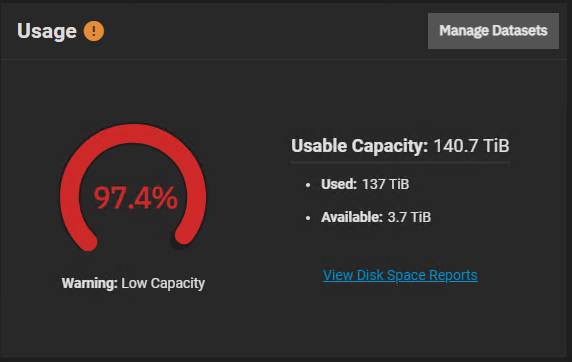
I’m using this widget, once a snaptshot of that dataset is taken, it jumps to 97%


This is the same on both servers

Thank you, will take a look at this and see if we will run into any issues, the working node hasn’t had any issues for the couple years its been running.

Anything else I can provide to help, I can add

Taking a snapshot doesn’t add any new data to a dataset. It simply “retains” data that would otherwise be discarded.

Do you really mean that when you take a snapshot… the used space immediately jumps to 97%?

Correct

So if you took a manual snapshot of the dataset right now… the used space would jump to 97%?

Just did that now
image

1 Like

What the heck? :flushed:

Do you know how to use SSH or the Shell to copy and paste the results of a command, and then enclose it in triple backticks?

What is the output of these:

zpool list <nameofpool>
zfs list -r -t filesystem,volume -o space,volsize <nameofpool>

Feel free to hide/filter any private names.

1 Like

The zpool with the issue

NAME             SIZE  ALLOC   FREE  CKPOINT  EXPANDSZ   FRAG    CAP  DEDUP    HEALTH  ALTROOT
server-01-pool-01   141T  35.4T   106T        -         -    21%    25%  1.00x    ONLINE  /mnt
NAME                                                             AVAIL   USED  USEDSNAP  USEDDS  USEDREFRESERV  USEDCHILD  VOLSIZE
server-01-pool-01                                                   3.70T   137T       80K    200K             0B       137T        -
server-01-pool-01/.system                                           3.70T  6.17G      768K    855M             0B      5.33G        -
server-01-pool-01/.system/configs-a617fea1951f4cf0a2768ef9d432a087  3.70T  68.5M     2.05M   66.4M             0B         0B        -
server-01-pool-01/.system/cores                                     1024M   280K       80K    200K             0B         0B        -
server-01-pool-01/.system/netdata-a617fea1951f4cf0a2768ef9d432a087  3.70T  4.87G     3.10G   1.77G             0B         0B        -
server-01-pool-01/.system/rrd-a617fea1951f4cf0a2768ef9d432a087      3.70T   373M        0B    373M             0B         0B        -
server-01-pool-01/.system/samba4                                    3.70T  23.8M     23.0M    812K             0B         0B        -
server-01-pool-01/.system/services                                  3.70T   200K        0B    200K             0B         0B        -
server-01-pool-01/.system/syslog-a617fea1951f4cf0a2768ef9d432a087   3.70T  5.99M        0B   5.99M             0B         0B        -
server-01-pool-01/.system/webui                                     3.70T   200K        0B    200K             0B         0B        -
server-01-pool-01/camera-footage-dataset                            54.5T  83.3T     21.0M   32.5T          50.8T         0B    50.0T
server-01-pool-01/elasticsearch-dataset                             54.5T  53.7T      987G   1.96T          50.8T         0B    50.0T

Including the zpool without the issue too in case that helps with anything that sticks out

NAME             SIZE  ALLOC   FREE  CKPOINT  EXPANDSZ   FRAG    CAP  DEDUP    HEALTH  ALTROOT
server-02-pool-01   138T  55.6T  82.1T        -         -    30%    40%  1.00x    ONLINE  /mnt
NAME                                                             AVAIL   USED  USEDSNAP  USEDDS  USEDREFRESERV  USEDCHILD  VOLSIZE
server-02-pool-01                                                   30.7T   106T        0B    208K             0B       106T        -
server-02-pool-01/.system                                           30.7T  8.30G        0B   2.07G             0B      6.23G        -
server-02-pool-01/.system/configs-7a6a616639514a76ab8da3e8aa6a9cc9  30.7T  59.8M     2.05M   57.8M             0B         0B        -
server-02-pool-01/.system/cores                                     1024M   200K        0B    200K             0B         0B        -
server-02-pool-01/.system/netdata-7a6a616639514a76ab8da3e8aa6a9cc9  30.7T  5.34G     3.50G   1.84G             0B         0B        -
server-02-pool-01/.system/rrd-7a6a616639514a76ab8da3e8aa6a9cc9      30.7T   816M        0B    816M             0B         0B        -
server-02-pool-01/.system/samba4                                    30.7T  25.5M     24.7M    788K             0B         0B        -
server-02-pool-01/.system/services                                  30.7T   200K        0B    200K             0B         0B        -
server-02-pool-01/.system/syslog-7a6a616639514a76ab8da3e8aa6a9cc9   30.7T  5.67M        0B   5.67M             0B         0B        -
server-02-pool-01/.system/webui                                     30.7T   200K        0B    200K             0B         0B        -
server-02-pool-01/camera-footage-dataset                            30.7T  50.5T     8.21T   42.3T             0B         0B    60.0T
server-02-pool-01/elasticsearch-dataset                             81.4T  55.9T     1.32T   3.76T          50.8T         0B    50.0T
server-02-pool-01/iocage                                            30.7T  10.2M        0B   9.01M             0B      1.17M        -
server-02-pool-01/iocage/download                                   30.7T   200K        0B    200K             0B         0B        -
server-02-pool-01/iocage/images                                     30.7T   200K        0B    200K             0B         0B        -
server-02-pool-01/iocage/jails                                      30.7T   200K        0B    200K             0B         0B        -
server-02-pool-01/iocage/log                                        30.7T   200K        0B    200K             0B         0B        -
server-02-pool-01/iocage/releases                                   30.7T   200K        0B    200K             0B         0B        -
server-02-pool-01/iocage/templates                                  30.7T   200K        0B    200K             0B         0B        -

You didn’t create sparse zvols for camera-footage-dataset and for elasticsearch-dataset on the pool server-01-pool-01.

That means you’ll always have about 102 TiB “used”, even without writing anything to the pool.

Because you did not create sparse zvols, you lose the benefits of ZFS snapshot efficiency.

I haven’t messed around with zvols (other than testing), but I believe there’s a way to safely remove the “refreservation” or reduce it to a level of the used capacity of the zvol itself.

EDIT: Don’t cameras have the ability to write video files directly into an SMB or NFS share? Why the need for zvols / iSCSI?

Wait…

I was curious about the results of the zfs/zpool commands when your pool was supposedly at 97% capacity.

Can you take a snapshot, and then redo those commands again while the pool is supposedly at 97% capacity?

Those commands were run when there was a snapshot, I can provide it the other way round if you would like?

But I think you may have hit the nail on the head with the datasets not being set to sparse on the pool with the issue

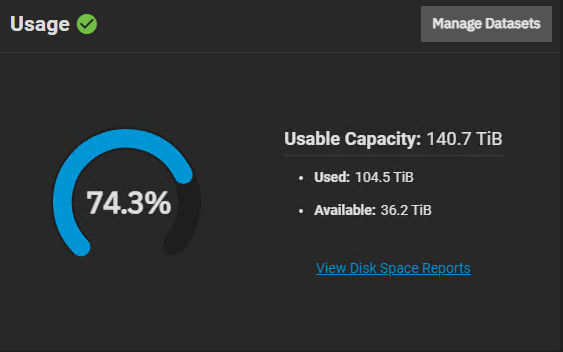
Yeah but if you didn’t have the GUI, you would be met with this, which is more accurate of the pool’s actual capacity and used space:


I believe the GUI is reporting what it sees from the root dataset, not the pool itself.

This isn’t the first time that SCALE’s GUI gave the user the wrong impression about their pool’s used capacity.


“ZFS Math” gets really confusing and all over the place.

This is especially true when some or all of these are taken into account:

  • Block-cloning
  • Sparse vs non-sparse zvols (and “refreservation”)
  • Pool properties vs root dataset properties
  • Snapshots for children that contribute to the “used” of an empty parent
1 Like

Next time, I would consider two things before committing to a pool layout:

  • Do I really need to use zvol/iSCSI, or can I use SMB/NFS shares instead?
  • If I need to use zvols, do I really need to reserve their entire capacity, or can I get away with a sparse volume?

Thank you all for the help, I believe it’s what winnielinnie said with the pool not being sparse provisioned.

I will also take into consideration all the other helpful tips provided.

Now the fun task of rebuilding the pool without data loss :sweat_smile: