Speed up file transfers

I have been looking at ways to speed up file transfer speeds between my pc and Truenas ElectricEel-24.10.2.4, and any other device.

I have changed the lan cable to a Cat6a, also changed my failing Netgear 1Gb switch to a TP Link 2.5Gb switch, but the transfer speed between my pc and Truenas is only around 65mb/sec

The specs are:

x5 2Tb Western Digital all in 1 pool

16Gb of Kingston Value ram ECC

SuperMicro X95CM-F motherboard with Gigabit lan ports

I googled how to do what I want and basically it says to enable mutichannel in advanced settings of SMB. When I do that I get an error:

NetBIOS names may not be one of following reserved names: dialup, batch, gw, world, null, local, enterprise, builtin, anonymous, domain, self, interactive, network, gateway, proxy, server, restricted, users, authenticated user, internet, tac

So I guess it’s not a simple job then.

Edit:

I found a link to the TrueNas documentation on setting up SMB mutichannel, but if there is any other way of speeding up file transfers , I’d rather go that way if possible

Thanks
Forget about multichannel. There is something else amiss.

First run a test with iperf3 between Truenas and your windows? PC. Iperf3 is available on Truenas and can be downloaded for windows.

Also, what is your pool layout ? RAIDZ1 ? Do you get 65MB/s writing or reading ? What type of file(s) are you using for the test ?

2 Likes

Agree, it has nothing to do with multi-channel.

If this is write performance, are you SURE that these are not so called Device-Managed Shingled Magnetic Recording (DM-SMR) hard drives? The capacity suggests they wouldn’t be but what is there Model / Make?.

1 Like

Thanks for the reply.

My pc is Linux mint and I have iperf3 on it. When I run iperf3 on my pc to the ip address of TrueNAS iperf3 -c 192.168.0.42, I get iperf3: error - unable to send control message: Bad file descriptor

Then when I run it on TrueNAS to the ip address of my PC I get: iperf3: error - unable to connect to server: Connection refused

The pool layout is Raidz1 and the 65mb/sec speed is for transfering from my pc to TruNAS , so writing to TrueNAS

use the webshell or an ssh session and simply type iperf3 -s. that will start the iperf server on the truenas side or iperf3 -c if you want to use truenas as the client

1 Like

The HDs are WD 2TB NAS drives and I don’t have any other information as they have been in the system for just over 12 years now

Thanks for the information on iperf3 and I ran it from my pc , which gave a transfer speed of over 900Mbits/sec, and on TrueNAS it was reading?? at the same speed.

ID] Interval Transfer Bitrate
[ 5] 0.00-10.00 sec 1.08 GBytes 928 Mbits/sec

So, silly question time, why don’t I get that when I transfer a 1.5Gb file to TrueNAS

Iperf reads and writes to RAM.

It seems 65MB/s write performance is your pools maximum.

1 Like

No benefit to switch to a faster switch unless all NICs can run at 2.5GbE or better.

You should double and triple check that all wires are good.

Then see if you’re dealing with an auto-negotiation issue. Ie hard code 1GbE speeds.

Even with a single VDEV, I am able to saturate a 1GbE connection.

Just saw your iperf data. Is that random, incompressible data? If so, we can rule out the network.

The age of the drives suggests they shouldn’t be SMR either.

SMB runs on a single core - thread.

When you transfer a huge file and look at the dashboard CPU utilization, what is the max of any of the cores / threads?

You may be CPU bound.

Impressive.

It would help to know what model they are, to rule out SMR. The “Disks” screen will show you the model #'s.


I think you mean MB/s? This equals 520 Mb/s, which is about half the throughput of what a 1-GbE ethernet adapter is capable of.

How are you transferring files on Mint? Did you mount the shares via the cifs kernel module? (mount, fstab, or systemd-mount)

If you’re using the built-in “Network” feature of the file browser, such as Caja, Nemo, or Thunar, then you can expect to see as much as a 50% performance decrease.

The model numbers of the disks

WDC_WD20EFRX-68EUZN0

WDC_WD20EFRX-68AX9N0

WDC_WD2001FFSX-68JNUN0

WDC_WD20EFRX-68AX9N0

WDC_WD20EFRX-68AX9N0

Oops, yes it is MB/sec.

I’m transferring files from my linux machine to TrueNAS via the Files window, and opening a folder in Network/TrueNAS etc

Ok so a 50% decrease due to using Nemo file browser, so which other method should I use for a better speed. I use Nemo more of a convenience , but if there is a faster or better way, I’ll try it

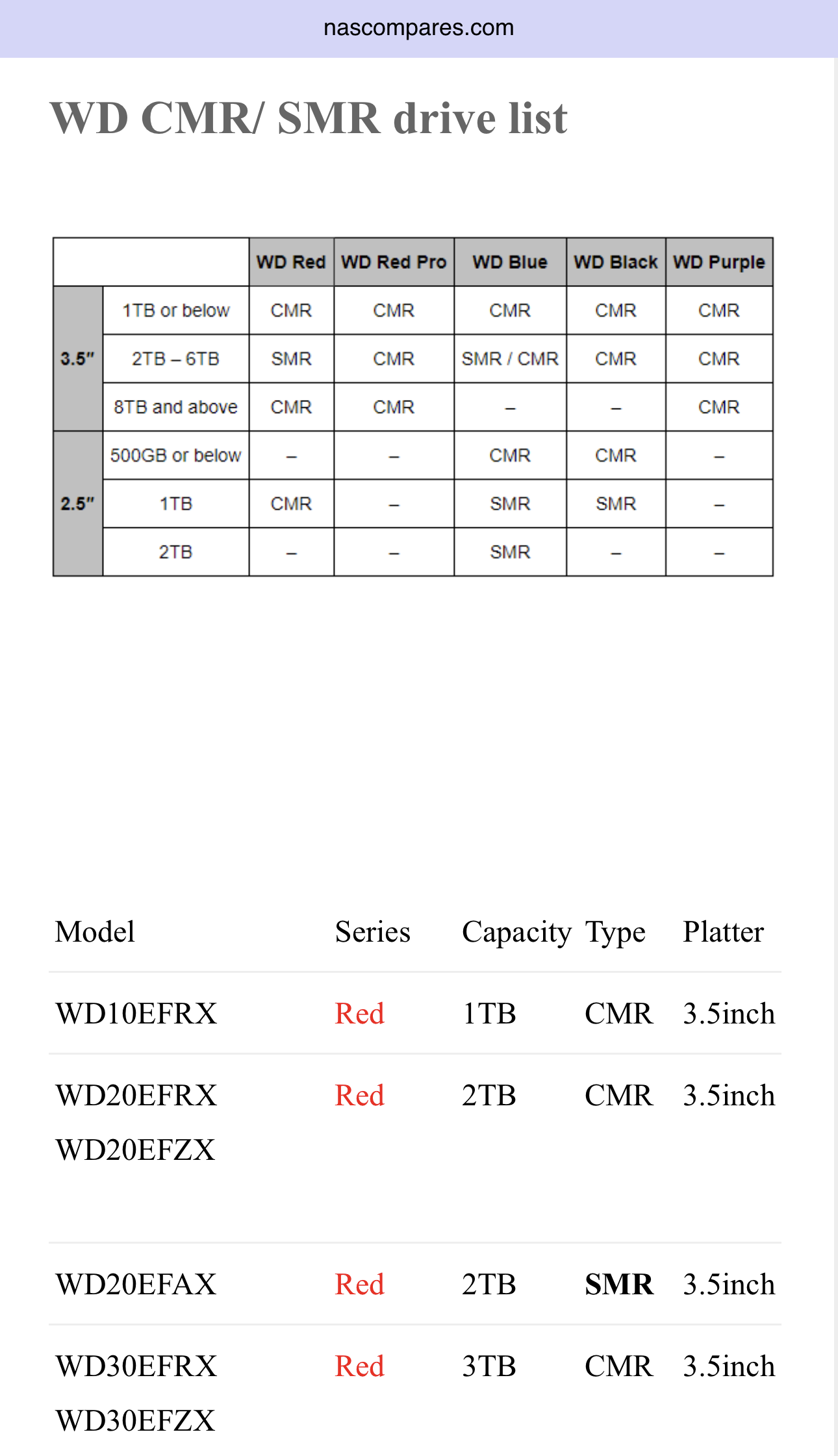
Per NAScompares, those are CMR

That leaves a misconfiguration re: SMB or CPU overload?

Did all these drives pass their SMART tests? Or, is the NAS web gui showing any alerts / error messages re: drive performance?

No not all the drives passed a Smart test, as 1 of them has failed with 7 errors and I guess it needs to be replaced.

Could that be a reason of slowish transfer speeds

The file manager’s built-in method uses GVFS, which is where the 50% performance penalty comes from.

You can still use Nemo to access your shares, but you need to mount them using the cifs kernel module.

  1. Create an entry in /etc/fstab.
  2. Reload the systemd daemon.
  3. Restart the “remote file systems” systemd service.
  4. Navigate to the path of the share.

To make it more convenient, you can add a shortcut to your “Places” side pane or in your “Favorites”. This will be as easy as accessing a folder, except that the “folder” is the root directory to your SMB share on the network.

I switched to a faster switch because I needed another because 6 of the 16 ports had failed and I need 11 ports for all my lan connections. I bought an 8 port 2.5Gb switch and already had another 5 port switch which is used for things that don’t need a lot of speed