Stuck in the purgatory between SMB and NFS. Pls halp

Hia,

In need of some assistance as I must be missing something.

I have a container hosted on a windows PC, which I need to make talk to my TrueNAS server.

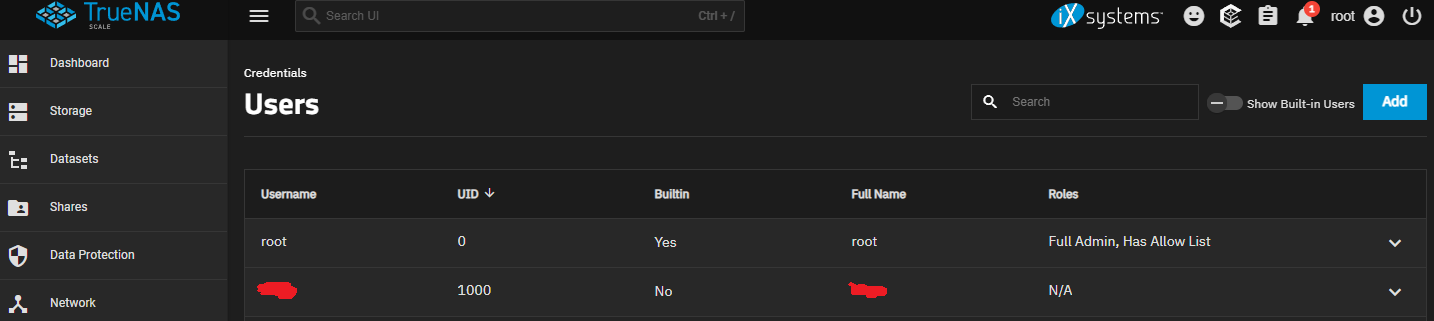
The TrueNAS Server is one dataset, set to SMB/NFS. Both SMB and NFS shares are available. UID 1000 is given permission via NFS, but the containers give the error “user does not have permission” when attempting to access inside the share - I assume because it’s wanting SMB after that point.

The Windows PC can successfully talk to the mounted TrueNAS. However, once I have my arr-stack spun up and volumes successfully mounted, they see the folder but none of the contents.

This appears to be some kind of issue where SMB is not presenting the share folder/files correctly to the container.

I have tried mounting via the windows mount (J:), spinning up a WSL vm and mounting through that, I’ve tried to create a new NFS user. I’m not sure what else I can do at this point.

Win 10, AMD 64, 16gb ram.
TrueNAS ElectricEel-24.10.2 AMD 64, HBA adapter, 12x SAS

This seems really backwards to me. You’re spinning up things on windows (I’m assuming docker) amd trying to map truenas purely as storage?

Majority of containers on truenas natively use 568:568 as the apps user and group. Docker doesn’t. 1000:1000 is my guess but you should know if you’re managing those containers somewhere outside of truenas.

This is a simple permissions issue not a choice of sharing protocols. Once you match permissions things will work.

The arr stack is running in containers, hosted on the windows pc. Which then talks to the seperate truenas machine as storage yep.

I am only doing it this way because I wanted the nas to be universally usable by all the different operating systems, but windows doesn’t want to play nice it seems. If there is a better way I’m all ears. I have already set the UID and GID in the container environment variables to no avail.

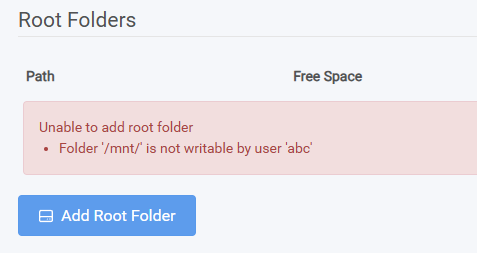
Shows us what user abc’s permissions look like in truenas and on the share itself.

So the user abc is the default for the arr-stack utilities. In this instance it’s been set so that abc = 1000:

services:
  sonarr:
    image: linuxserver/sonarr:latest
    container_name: sonarr
    environment:
      - PUID=1000
      - PGID=1000
      - TZ=Australia/Melbourne
    volumes:
      - D:\docker\sonarr:/config
      - G:\trr:/downloads

On the TrueNAS box, the primary user is an SMB user also set to UID 1000. Windows has an entry in the credentials manager that matches the SMB user name which allows access.

The permissions for the /mnt folder from within the container show:

drwxr-xr-x  2 root root    4096  Sep  25  21:47  mnt

Using docker on windows means that docker runs inside a linux virtual machine. Accessing windows network drives from that virtual machine is tricky. Even accessing local drives can cause issues.

If you want to avoid that problematic layer of indirection, mount the SMB share directly.

Here’s an example on how to do that:

services:
  alpha:
    image: docker.io/alpine:latest
    command: ls /data
    user: 1000:1000
    volumes:
      - data:/data

volumes:
  data:
    driver: local
    driver_opts:
      type: cifs
      device: "//192.168.XX.XX/share"
      o: "username=smbuser,password=smbpass,uid=1000,gid=1000"
2 Likes

Hi @bacon thanks for your reply.

I agree, using SMB would be the easy option. Unfortunately, when I try to mount the SMB share directly in the containers it doesn’t work. This is what first led me to needing to create a virtual Ubuntu machine on my windows machine as the point - as a forum post suggested it was the only way to get around the known bug where docker containers on a windows machine fail to pass through the file/folder structure even though they can technically see the mount itself.

Happy to be corrected on any of this if there is another solution, but yeah I’ve tried that unfortunately.

The example I posted works on my machine. I tested it using latest docker desktop with WSL2 backend.

Ok I must be doing something wrong. I’ll try resetting my other settings and using this config :slight_smile:
I also found this issue with portainer, which I’m wondering if it is also playing a role, although I may be misunderstanding.

Will let you know how I go

So you were right, it is indeed now correctly seeing the mounts. I wasn’t aware that I could mount drives in that way so thanks for sharing the info! My final dockerfile ends up looking like this:

services:
  sonarr:
    image: linuxserver/sonarr:latest
    container_name: sonarr
    environment:
      - PUID=1000
      - PGID=1000
      - TZ=Country/City
    volumes:
      - C:\docker\sonarr:/config
      - E:\dl:/downloads
      - truenaspool:/media
    ports:
      - "8989:8989"
    restart: unless-stopped

  radarr:
    image: linuxserver/radarr:latest
    container_name: radarr
    environment:
      - PUID=1000
      - PGID=1000
      - TZ=Country/City
    volumes:
      - C:\docker\radarr:/config
      - E:\trr:/downloads
      - truenaspool:/media
    ports:
      - "7878:7878"
    restart: unless-stopped

  lidarr:
    image: linuxserver/lidarr:latest
    container_name: lidarr
    environment:
      - PUID=1000
      - PGID=1000
      - TZ=Country/City
    volumes:
      - C:\docker\lidarr:/config
      - E:\trr:/downloads
      - truenaspool:/media
    ports:
      - "8686:8686"
    restart: unless-stopped

  bazarr:
    image: linuxserver/bazarr:latest
    container_name: bazarr
    environment:
      - PUID=1000
      - PGID=1000
      - TZ=Country/City
    volumes:
      - C:\docker\bazarr:/config
      - truenaspool:/media
    ports:
      - "6767:6767"
    restart: unless-stopped

  qbittorrent:
    image: lscr.io/linuxserver/qbittorrent:latest
    container_name: qbittorrent
    environment:
      - PUID=1000
      - PGID=1000
      - TZ=Country/City
      - WEBUI_PORT=8080
    volumes:
      - C:\docker\qbittorrent:/config
      - E:\dl:/downloads
      - truenaspool:/media
    ports:
      - "8080:8080"
      - "6881:6881"
      - "6881:6881/udp"
    restart: unless-stopped

  jackett:
    image: linuxserver/jackett:latest
    container_name: jackett
    environment:
      - PUID=1000
      - PGID=1000
      - TZ=Country/City
    volumes:
      - D:\docker\jackett:/config
      - G:\trr:/downloads
    ports:
      - "9117:9117"
    restart: unless-stopped

  prowlarr:
    image: linuxserver/prowlarr:latest
    container_name: prowlarr
    environment:
      - PUID=1000
      - PGID=1000
      - TZ=Country/City
    volumes:
      - C:\docker\prowlarr:/config
    ports:
      - "9696:9696"
    restart: unless-stopped

volumes:
  truenaspool:
    driver: local
    driver_opts:
      type: cifs
      device: "//192.IPI.IP.IP/truenaspool"
      o: "username=username,password=password,uid=1000,gid=1000,iocharset=utf8,file_mode=0777,dir_mode=0777"

Thanks again!

2 Likes