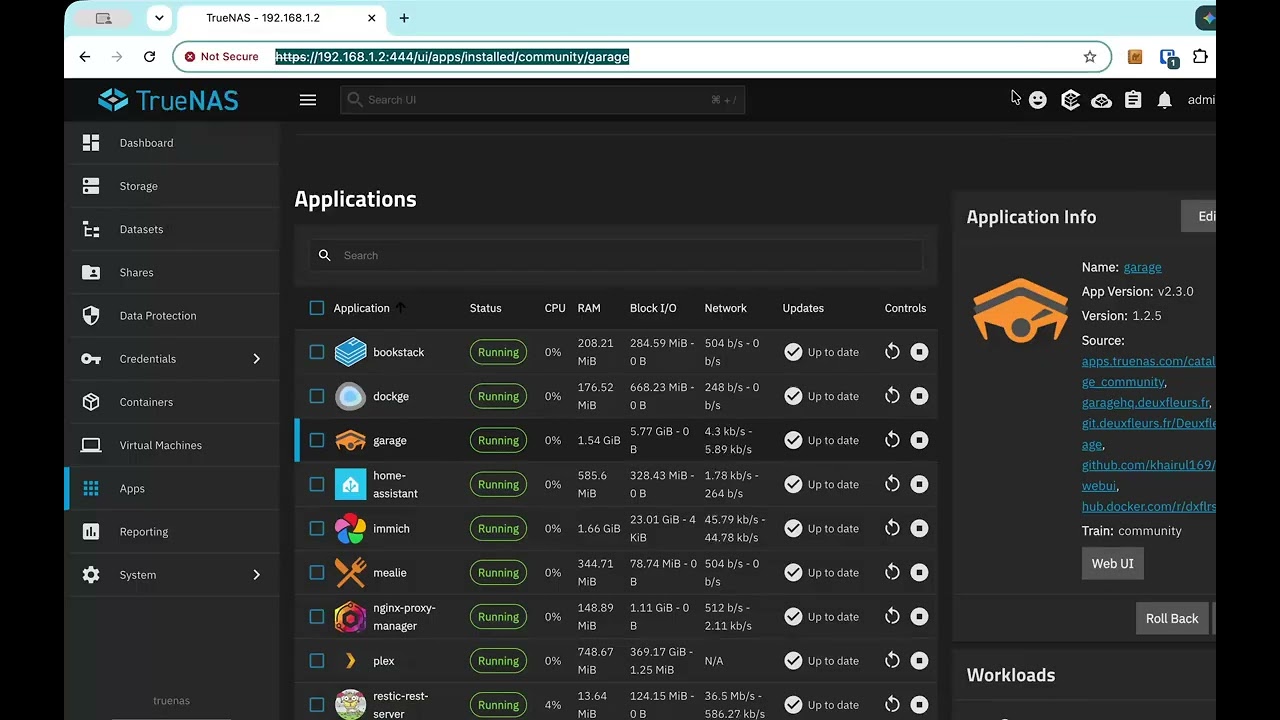
I don’t think it has always been this way but today I found that for certain applications with a lot of containers it is almost impossible to see the options for logs and opening a shell from a laptop with a small screen.
In the attached video (no audio) I show accessing the applications tab from Chome and trying to get to the settings to open a shell on one app. At the default size clicking the application goes to a new view, but since that view doesn’t have a scroll bar and can’t scroll I can see the data. Then when I shrink the size in Chrome we switch to putting the app in a popup on the right, but you still can’t see the data. Only when I get the ui down to 67% can I finally see the controls I want. I just can’t read them.
This is TrueNAS 25.10.4 on Chrome on a Mac if it matters.
I have reported this issue before. The problem is (probably) that the scroll bar is not showing up because in your System Settings you have “show scroll bar” set to “Auto”. There’s a bug in that the scroll bar is really there, but you don’t see it until you try to start scrolling. Change your “Show Scroll bar” to “Always” and it’ll work fine and be scrollable.
@Grimper is totally correct. Note “system settings”. You have to change the scrolling settings of the entire OS to have it work for this one website.
The issue seems to be that this web page doesn’t respond to mouse wheel events. The way these things happen on macos is that you use two fingers to start scrolling and the scrollbar appears and then you can continue scrolling or switch to using the scrollbar. You can see in the video where the pages is “bouncing” that is me trying to scroll and the page not allowing the event.
If I force scrollbars to always be present (everywhere!) then the scroll bar appears here and you can use it, but two-finger scrolling is still broken. That should be the same as a mouse wheel event on other systems…
If it is not obvious from above. This topic has be “solved” as I know the cause but this is still a bug in TrueNAS that I hope they will fix it.
BTW I can demonstrate the problem on Linux with Chrome by just making the window small enough. It isn’t as critical on Linux because the scrollbars not not automatically hidden unless a scroll event is seen.