After updating to Fangtooth, I lost the web interface - no IPs given. It was accessible via ssh. I had to go back to TrueNAS-24.04.2.5 to finally get a working web interface.
I use pihole on my network for DNS and NGINX for reverse proxy.
After reverting back, I cannot access Truenas with FQDN; I get this message: “Connecting to TrueNAS … Make sure the TrueNAS system is powered on and connected to the network.”
I can access the Web using the IP address and can connect via ssh. I dig the FQDN and it points to pihole and nginx properly.
Truenas seems to be blocking secure access, I decided to try change the cert from self signed to one provided by letsencrypt. I set that up but I can’t get the CSR to create a certificate.
Apr 8 13:04:10 truenas kernel: kube-bridge: port 3(veth1a247f77) entered blocking state
Apr 8 13:04:10 truenas kernel: kube-bridge: port 3(veth1a247f77) entered forwarding state
Apr 8 13:04:14 truenas kernel: kube-bridge: port 4(vetha6785cf0) entered blocking state
Apr 8 13:04:14 truenas kernel: kube-bridge: port 4(vetha6785cf0) entered disabled state
Apr 8 13:04:14 truenas kernel: vetha6785cf0: entered allmulticast mode
Apr 8 13:04:14 truenas kernel: vetha6785cf0: entered promiscuous mode
Apr 8 13:04:14 truenas kernel: kube-bridge: port 4(vetha6785cf0) entered blocking state
Apr 8 13:04:14 truenas kernel: kube-bridge: port 4(vetha6785cf0) entered forwarding state
I am not sure what to try at this point, everything I tried thus far seems to dig me in deeper.
I do not seem to be able to move to DragonFish if I can’t get the web server fixed.
Would I be better off to unmount my zfs pool and do a fresh install of the latest Truenas or continue trying to resolve the issues with connecting this version?
I lost the web interface - no IPs given. It was accessible via ssh.
Well… it must have had an IP for you to be able to access it via SSH. The fact that you were able to connect via SSH means that at the bare minimum the system networking was functional.
To be clear on versions here though, what was the upgrade path you took? You mention fangtooth, but that you reverted to dragonfish (24.04). The next logical upgrade from dragonfish is to electric eel (24.10). It’s entirely possible that in trying to upgrade directly from Dragonfish → Fangtooth you have ended up skipping a migration.
One such rather important example with Dragonfish to Electric Eel is that the entire apps backend has changed from Kubernetes to Docker. If you’re using any Truecharts apps at the moment, keep in mind that they will not work, and you should migrate prior to upgrading!
When upgrading TrueNAS to a new major version, follow the upgrade path of major versions until the system is on the desired major version release.
So in your case, you should be going from 24.04 → 24.10 → 25.04, etc until you hit your desired major release.
I did upgrade to 24.10 before moving on. It was functional. It was going to 25. that the web interface quit working. I did not know enough to determine anything from the terminal- other than the network was up and functional. On the Boot screen, all of the configuration info was correct. I have never used IPV6 but turned it on and got IPv6 addresses but nothing for IPv4.
I then rebooted to 24.10 and the web interface still would not start on boot. That pushed me back to 24.04.2.5. It works with IP address, not with FQDN and not through NGINX.
I do not have any apps on this machine.
I tried to delete the boot environments for 25 and it could not be deleted….
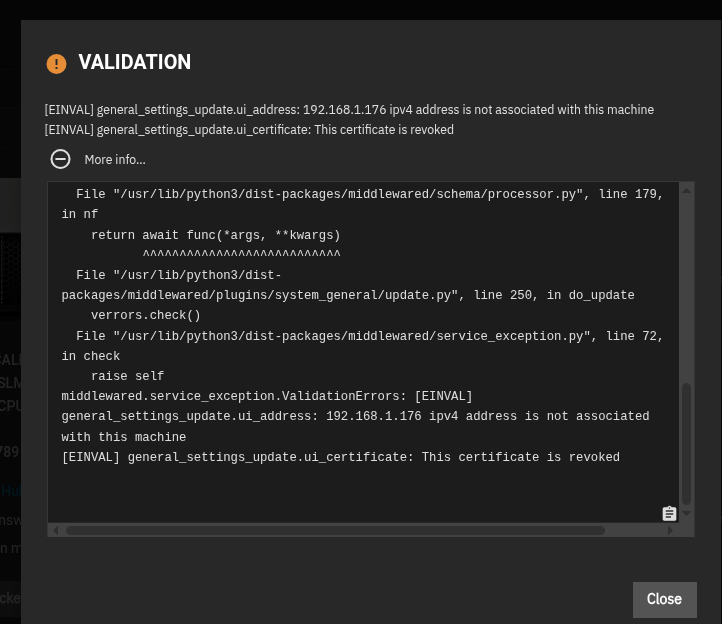
I decided to try the update to 24.10. It worked and I have access to the web gui. I still cannot access thru FQDN. I tried to update the GUI settings and I think I found a thread. Long ago the IP was 192.168.1.176. I have often seen where that address was mention and it reverted to 0.0.0.0. Every search I tried said ignore it… Now I get the message that the GUI SSL cert is tied to that IP address.
I do not know how to delete the Certificate from the self-signed Cert Authority and I dont seem to be able to get an Acme cert to to populate.
I do not think I can fix this from the gui, but dont really know how to address from the terminal