I don’t understand your first post completely. Are you saying you have no access to the SMB share from the Windows 11 system or are you able to modify the contents over SMB but can’t copy a new file into the SMB share? Are the operations on the shared folder direct using the command line or a file browser on TrueNAS?
Do you have any other computers to try access to the SMB share? Trying to figure out where the problem is and if it is Windows 11 or on TrueNAS.
Easiest may be reading a few other posts here on SMB and Windows 11 and trying to diag and reset Windows 11.
Just a very big shot in the dark. Did you set your nas up a long time ago and used the root dataset for smb shares?
If yes this is no longer supported since you can’t add permissions to the root dataset and root can no longer be used as user for smb.
A screenshot of your Dataset layout would propably help
First: sorry for the trouble and thanks to you for taking care.
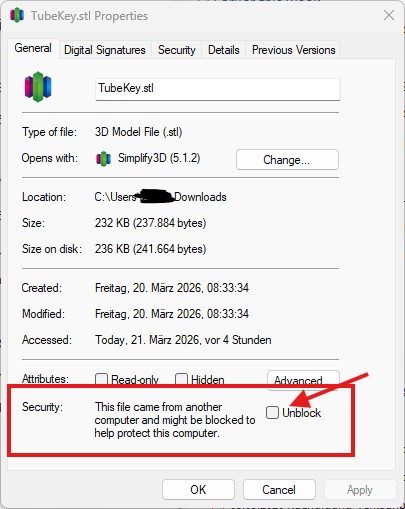
I found out that the “problem” is a Windows 11 security feature which blocks the files to be copied or moved to elsewhere for the files downloaded from internet.
The solution is to ‘unlock’ this files in this file properties before a copy/move.