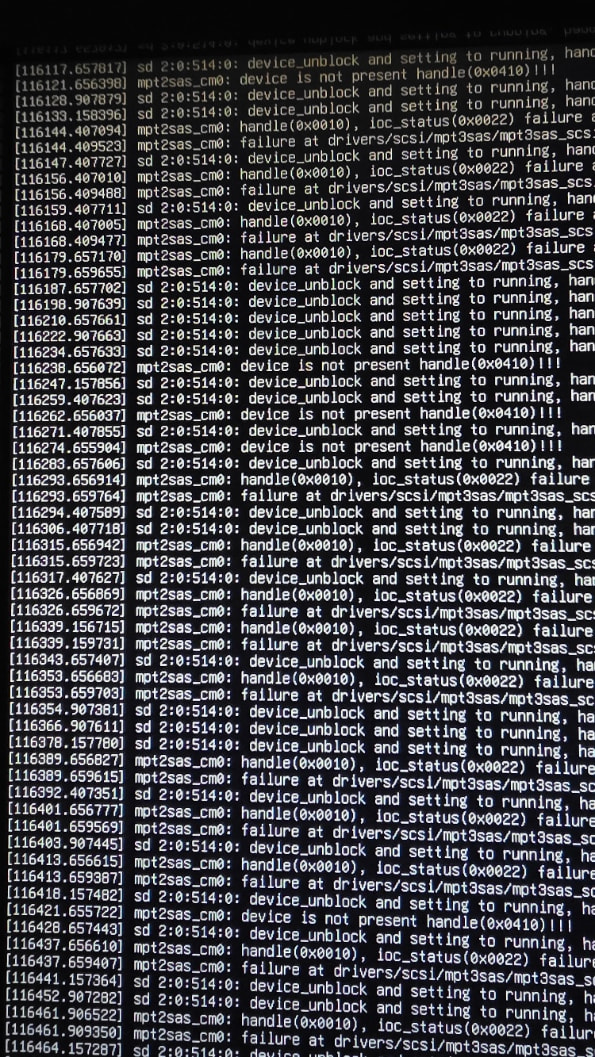
So my Truenas scale failed after a power supply issue. Since then I have had issues setting up a new nas. As a result I replaced everything Mobo, memory, power supply, drives, HBA cards, and jbod drives. as well as all fans and wiring for the entire unit. Now the nightmare. I started the unit and only 5 drives show up! 3 directly connected to the mobo, and 2 in the JBOD. A total of 24 are installed. I let the unit sit and it starts running script. ( I am assuming it is identifying more drives in the system). I has been 2 days and will not allow me to boot in again, yet. Now you may be wondering about my system. Ok, Asus P6T Mobo with core I7-930 2.80Ghz Processor. Core Vengance 8Gb (3) and 4gb ram (40GB DDR3 total) IBM 46C8935 LSI SAS9212-414e 6gps HBA. Shark ATX 1000 Power supply. 1- 250 gig Samsung SSD boot drive. 5- 2TB Western Digital hard drives. 4- 3TB Hitachi SAS drives connected to the HBA. 6 120mm fans with controller in a Fractal Design R4 case. It is connected to A Jbod filled with 12 3tb SAS drives through an Adaptec HBA, with a 1000w Aptiva gold power supply. Which also runs 6 120mm fans with controller in a Fractal Design R5 case. The HBA is powered by a stand alone PCIE riser card. So my question. (1) Should I wait a few more days to let the system figure itself out? (2) The best settings for the bios. Currently I am running AHCI, Should I go IDE, or Raid? (3) Any bios settings I should pay attention to, as I am running auto on most settings. To answer a few questions ahead of time. Yes I know it is an older mobo, but it is solid. I do plan to install more memory. OS is Truenas Goldeneye 25.10.01. This is an example of the script over the last 2 days.
What has changed since your previous post? Was your server setup ever working correctly?
Have you booted a Live Linux version and verified the RAM with Memtest86, run stress tests on the CPU and verified the HBA cards are operational and are getting proper cooling air flow?
Well I changed alot! I eventually ended up running 2 different Nas systems. Without going all into it, the PGT became the second Nas and it worked with 11 drives out of 12. Perfect, ran that for a few weeks. While my other nas was not still seeing all the drives with the JBOD installed 10 out of 22. So I moved the P6T back to my main case and installed the JBOD with new HBA cards and installed all drives previouslly read in the 2 Nas systems. Once done only 5 or 6 drives showed once I booted into the system. I left the system running and started getting a lot of script. First it seemed like it was seeing new drives. Measuring up to SDH. Then it switched over to the script previouslly shown. I has been running that script for 1.5 days, and I am not able to boot into the nas. My hope is I let the script run, then see hard drives at the end. But I am not sure. I work for the next 48 hours or so, so I can let it go. I also wonder if there is a bios setting that I have wrong. I have another mobo I can swap in, as well as 6 different HBA cards with cables, Sas cables, and enough extra parts to again build another NAS. I just don’t understand why I am having so many issues getting my system back up!
Okay, different system. Start by testing your hardware and a minimum number of drives in your case. You want to start with just the boot drive or a boot drive and a few HDs that fit in the case. Make sure that can boot and all hard drive ports are working on motherboard. Then move on to testing your HBAs to make sure all ports and cable are working. Don’t attach any external drives. If that is all working then start on testing your external drive setups the same way. You have to narrow down what the problem is. Do you have cables for data or power to the drives, etc.
Well, I took your advice. I iinstalled my other mobo. Fired up the unit, no drives found. Replaced the harddrive power cables, now 3 out of 6 sata drives found. replaced all sata data cables, now all sata drives and 3 out of 4 sas drives found. Now working on the JBOD, only 3 out of 12 drives found. HBA card and all cables are new. Now checking for power to each SAS drive, if needed I will have to order new cables and replace them next week. Thanks for the push in the right direction!