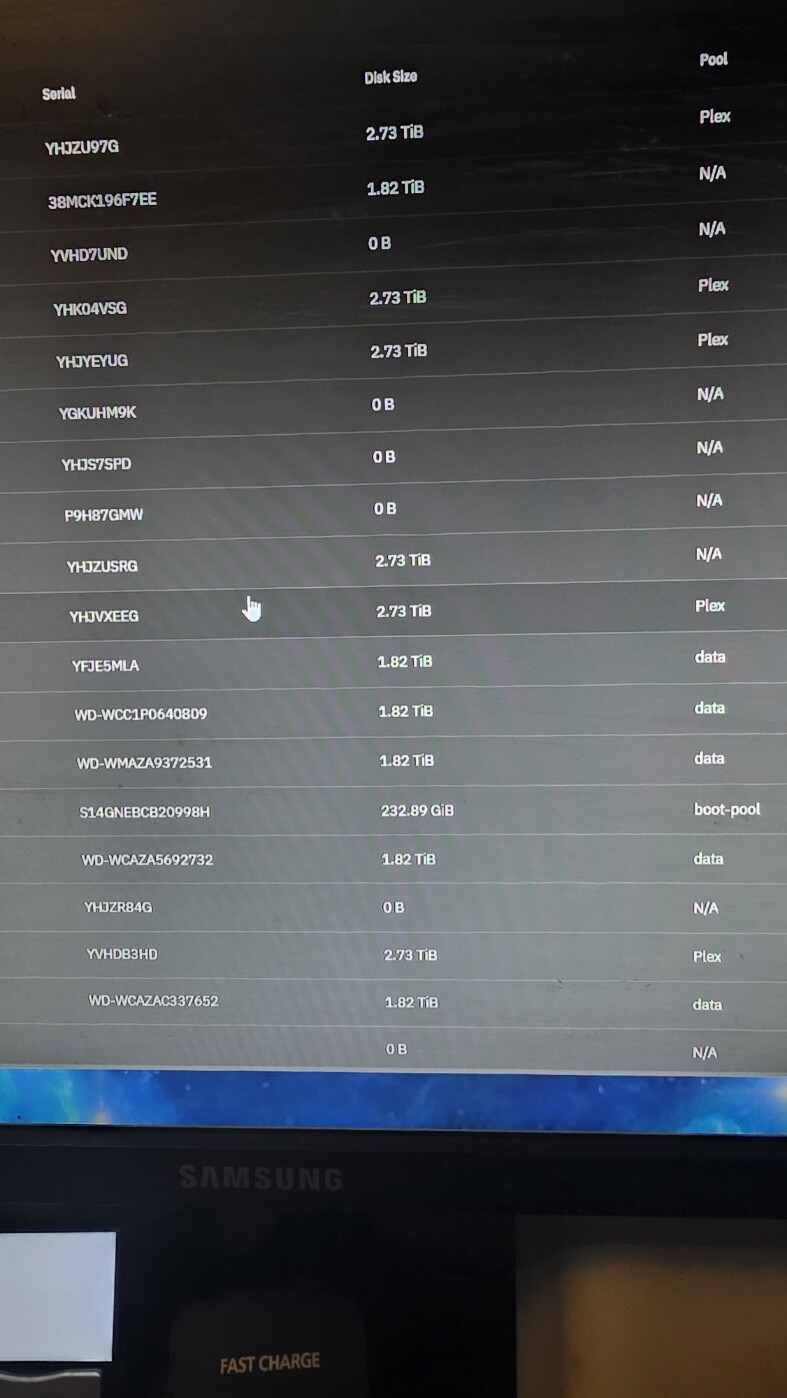
Hello all,
A few of my drives show 0B, some of these previously worked fine before. Some are not showing at all. Only 19 out of 26 are showing. All are Hitachai 3tb sas, formatted correctly.
My server is running Goldeneye with 6 Western Digital 2 TB sata drives with a Jbod running 20 Hitachi, Seagate, Dell, and HGST 3 TB sas drives.
First I thought my HBA cards were the issue. When I changed them out a few drives that were reporting 0B started working. Then I changed out the sas cables for the drives that didn’t report correctly and, no change. Lastly I have a bunch of sas drives here. So I added another sas cable to the Jbod and I am trying to connect 4 more drives while leaving all others in place. 12 drives in and no new drives appear correctly.
Any ideas or help would be greatly appreciated! I am lost at this point!
You have to post full hardware details along with how everything is connected. Pool details along with their layout is helpful. We need to know what we are expecting to see.
Could be an odd sector size. smartctl -a /dev/sdx should confirm.
Thank you:
In the server I am running a Asus P6T mobo with 40GB of ram. Hard drives are set as IDE with 6 western digital 2 TB hard drives. I am using a HP Smart Card HBA. All but 1 ard drive connected to the mobo work. I had 4 SAS drives plugged in, all None on the HBA show. 5 outta 6 on the mobo show.
Connected to that is my JBOD with now 20 3TB Hitachi, Segate, HGST, and Dell drives on an 8 port HBA . Some of the ones that show, show 0B, While others don’t show at all. Power supplies in both units is 1k watt gold. OS is Truenas Goldeneye’.
The most I get out of this setup is about 21 drives with 5 to 7 showing OB. Id love to see 30.
I have 5 of the 8 port HBA cards here. When I switch then out in the JBOD, and restart I get different amount of drives showing. Sometimes as low as 12. If I put one in the server, the JBOD does not show at all.
I had this system up and running for two years with no issue till my hard drive failed. So I rebuilt the system with a new mobo, power supply, cpu, and wiring, but the same HD’s. I have about 20 other SAS drives, and 20 SATA drives that I can trade out, tried, but nothing worked. I am feeling like my HBA cards may be the issue. But I have very little expierence in reconfiguring them.
Sorry, meant to say, my power supply failed. It was short supplying power to my system, causing errors, till it burned out. After that I replaced it with a new one, then had troubles. So then I replaced everything except the hard drives. Finally got the system up, and drives not showing, or showing correctly. Even drives that were not in the aforementioned system.
If you have Broadcom / LSI HBA cards, the following may help you check firmware and what mode the card is in.
That motherboard, according to the documents I saw, tops out at 24GB and uses triple channel RAM. You may need to make different choices for your server use. You probably have to review all the makes and models of your hard drives to see if they are compatible or have any weird formatting.
sudo sas2flash -list
sudo sas3flash -list
sudo storcli show all
My 8 ports are serial RFOCBP2145 if that helps. I really don’t know how to configure those HBA’s. I am using them as they are in it mode.