TrueNAS Storage Pool Degraded - Need Help with FAULTED Disks

Hi everyone,

My storage pool has become degraded, and I’ve searched through other degradation discussions on the forum, but I’m not sure if they apply to my specific situation. I’m hoping someone can help me resolve this issue.

System Information:

Platform: Generic
Version: TrueNAS-SCALE-22.02.4
CPU: 12th Gen Intel(R) Core™ i5-12400
MotherBoard: ASUS PRIME Z690M-PLUS D4
HDD: WDC_WUH721818ALE6L4 18TB * 6
SSD: WD_BLACK SN750 SE 1TB * 2
Memory: Cuso 16G DDR4 2666MHz * 4
PowerSupply: Seasonic SS-350M1U

Error Message I’m Encountering:

CRITICAL
Pool main state is DEGRADED: One or more devices are faulted in response to persistent errors. Sufficient replicas exist for the pool to continue functioning in a degraded state.
The following devices are not healthy:
Disk WDC_WUH721818ALE6L4 4ZG4DU2V is FAULTED
Disk WDC_WUH721818ALE6L4 4ZG76JLV is FAULTED
Disk WDC_WUH721818ALE6L4 4ZG743KV is DEGRADED
2025-08-16 16:22:05 (Asia/Shanghai)

Additionally, I’ve noticed that since 2023, there have been continuous “ATA error count increased” errors appearing intermittently.

Console Output:

root@truenas[~]# zpool status -x
  pool: main
 state: DEGRADED
status: One or more devices are faulted in response to persistent errors.
        Sufficient replicas exist for the pool to continue functioning in a
        degraded state.
action: Replace the faulted device, or use 'zpool clear' to mark the device
        repaired.
  scan: scrub repaired 0B in 12:13:36 with 0 errors on Sun Aug 10 12:13:40 2025
config:

        NAME                                      STATE     READ WRITE CKSUM
        main                                      DEGRADED     0     0     0
          raidz2-0                                DEGRADED     0    64     0
            5fbd08f9-1766-4a98-a925-6ec72e57c9b7  ONLINE       0     0     0
            eddd497a-2a17-4881-8dc7-9e072502ca0d  FAULTED      0    11     0  too many errors
            635b948c-c99a-4050-89af-fc53976bc787  FAULTED      0    14     0  too many errors
            fe62f7a9-2176-4951-a1b1-c076bd78a221  DEGRADED     0    66     0  too many errors
            43907c64-a7b2-452d-a096-b7745fc9a43a  ONLINE       0     0     0
            34514601-4f4b-40e7-bc38-934d98408c77  ONLINE      15     0     0

errors: No known data errors
CRITICAL
Device: /dev/sde [SAT], ATA error count increased from 2 to 3.
2023-05-07 03:16:04 (Asia/Shanghai)

CRITICAL
Device: /dev/sde [SAT], ATA error count increased from 3 to 4.
2023-12-31 00:04:36 (Asia/Shanghai)

CRITICAL
Device: /dev/sdc [SAT], ATA error count increased from 0 to 1.
2024-02-28 13:26:28 (Asia/Shanghai)

CRITICAL
Device: /dev/sdc [SAT], ATA error count increased from 1 to 2.
2024-03-01 03:26:28 (Asia/Shanghai)

CRITICAL
Device: /dev/sdc [SAT], ATA error count increased from 2 to 3.
2024-03-04 16:49:47 (Asia/Shanghai)

CRITICAL
Device: /dev/sdc [SAT], ATA error count increased from 6 to 8.
2024-03-12 10:43:31 (Asia/Shanghai)

CRITICAL
Device: /dev/sde [SAT], 8 Currently unreadable (pending) sectors.
2024-04-12 13:53:13 (Asia/Shanghai)

CRITICAL
Device: /dev/sde [SAT], ATA error count increased from 4 to 8.
2024-04-12 13:53:13 (Asia/Shanghai)

CRITICAL
Device: /dev/sde [SAT], 32 Currently unreadable (pending) sectors.
2024-04-13 13:53:13 (Asia/Shanghai)

CRITICAL
Device: /dev/sde [SAT], ATA error count increased from 8 to 15.
2024-04-14 00:23:14 (Asia/Shanghai)

CRITICAL
Device: /dev/sdc [SAT], ATA error count increased from 8 to 9.
2024-04-18 18:23:13 (Asia/Shanghai)

CRITICAL
Device: /dev/sdc [SAT], ATA error count increased from 9 to 10.
2024-04-19 23:23:13 (Asia/Shanghai)

CRITICAL
Device: /dev/sde [SAT], ATA error count increased from 15 to 19.
2024-05-05 21:10:37 (Asia/Shanghai)

CRITICAL
Device: /dev/sde [SAT], ATA error count increased from 19 to 20.
2024-05-19 00:10:37 (Asia/Shanghai)

CRITICAL
Device: /dev/sde [SAT], ATA error count increased from 20 to 24.
2024-05-29 01:03:56 (Asia/Shanghai)

CRITICAL
Device: /dev/sdd [SAT], ATA error count increased from 24 to 28.
2024-06-14 19:21:08 (Asia/Shanghai)

CRITICAL
Device: /dev/sdd [SAT], ATA error count increased from 28 to 29.
2024-06-23 00:21:08 (Asia/Shanghai)

CRITICAL
Device: /dev/sdd [SAT], ATA error count increased from 29 to 30.
2024-07-28 00:21:08 (Asia/Shanghai)

CRITICAL
Device: /dev/sde [SAT], 24 Currently unreadable (pending) sectors.
2025-02-24 11:54:39 (Asia/Shanghai)

CRITICAL
Device: /dev/sde [SAT], ATA error count increased from 40 to 44.
2025-02-24 11:54:39 (Asia/Shanghai)

CRITICAL
Device: /dev/sde [SAT], ATA error count increased from 44 to 48.
2025-02-27 20:04:42 (Asia/Shanghai)

CRITICAL
Device: /dev/sde [SAT], ATA error count increased from 48 to 49.
2025-03-02 00:04:43 (Asia/Shanghai)

CRITICAL
Device: /dev/sde [SAT], ATA error count increased from 49 to 54.
2025-03-14 22:00:56 (Asia/Shanghai)

CRITICAL
Device: /dev/sde [SAT], ATA error count increased from 54 to 55.
2025-04-06 00:00:56 (Asia/Shanghai)

CRITICAL
Device: /dev/sde [SAT], ATA error count increased from 55 to 56.
2025-05-11 00:00:56 (Asia/Shanghai)

CRITICAL
Device: /dev/sde [SAT], ATA error count increased from 56 to 57.
2025-06-01 12:00:57 (Asia/Shanghai)

CRITICAL
Device: /dev/sde [SAT], ATA error count increased from 57 to 58.
2025-07-06 00:00:57 (Asia/Shanghai)

CRITICAL
Device: /dev/sdb [SAT], ATA error count increased from 0 to 1.
2025-08-06 13:30:56 (Asia/Shanghai)

CRITICAL
Device: /dev/sdc [SAT], ATA error count increased from 11 to 12.
2025-08-07 10:00:56 (Asia/Shanghai)

CRITICAL
Device: /dev/sde [SAT], ATA error count increased from 61 to 62.
2025-08-10 00:00:56 (Asia/Shanghai)

CRITICAL
Device: /dev/sdb [SAT], ATA error count increased from 2 to 4.
2025-08-10 20:00:57 (Asia/Shanghai)

My Questions:

  1. Are the ATA errors serious? Should I check my data cables or power supply connections?
  2. Should I replace the hard drives, use the zpool clear command to ignore the errors, or perform some other operation to resolve the storage pool degradation?
  3. I’m running an older version of TrueNAS. Should I upgrade to the latest version 25.04?

Any advice would be greatly appreciated. Thank you in advance for your help!
First make a backup of everything of value.

You have a RAIDZ2 vdev with two failed drives. If that degraded one also fails, all your data will be gone for good.

2 Likes

As @pmh says - you have a serious problem with your pool.

Make sure you have a good backup

Cabling issue are usually chksum errors, not read and write errors.

My inital thought is that your PSU isn’t big enough - but that would be an educated guess. Remember is not the total wattage that is important, but the wattage on the various voltage lines that counts.

You may of course have 1 failing disk and 2 failed disks. How old are they? Also given the model they are - were they second hand / refurb’d disks (although they are SATA)?

Acording to the tech specs for the mobo:
3 * M.2 & 4 * SATA 6Gb
You have 6 SATA and 2 M.2.

If I was to hazard a guess one of your M.2 ports contains some sort of SATA adapter which are generally frown’d upon by community members due to their ability to work for a bit and then everything goes wrong (aka shit the pool at an inconveniant point).

The failing disks - what are they attached to. Actually please specify how you have attached each disk to the motherboard

You’re absolutely right that data safety should be the top priority. However, I already have approximately 40TB of data, which means I would need to purchase 3 additional 18TB drives just for backup purposes.

Beyond that, if I want to replace the problematic drives in the storage pool, would I need to purchase another 3 matching 18TB drives to swap them out, and then copy the data back from the backup? That would mean I’d need to buy a total of 6 new 18TB drives.

While this seems like a significant investment, I understand it may be necessary for data safety. Could you confirm if my understanding of this process is correct?

You’re right - I did forget to mention that I’m using an M.2 to dual SATA adapter. I’ve now checked their connection status and confirmed that sde and sdf are the two drives connected to the motherboard through the adapter. Currently, sde shows no errors while sdf has 15 read errors, but both are showing as ONLINE status. Here are the outputs from my diagnostic commands:

root@truenas[~]# lspci | grep -i "sata\|ahci\|storage"
00:17.0 SATA controller: Intel Corporation Device 7ae2 (rev 11)
07:00.0 SATA controller: ASMedia Technology Inc. Device 1166 (rev 02)
root@truenas[~]# lshw -class storage -class disk      
  *-storage                 
       description: Non-Volatile memory controller
       product: Sandisk Corp
       vendor: Sandisk Corp
       physical id: 0
       bus info: pci@0000:02:00.0
       version: 00
       width: 64 bits
       clock: 33MHz
       capabilities: storage pciexpress msix msi pm nvm_express bus_master cap_list
       configuration: driver=nvme latency=0
       resources: irq:16 memory:84d00000-84d03fff
  *-raid
       description: RAID bus controller
       product: Volume Management Device NVMe RAID Controller
       vendor: Intel Corporation
       physical id: e
       bus info: pci@0000:00:0e.0
       version: 00
       width: 64 bits
       clock: 33MHz
       capabilities: raid msix pciexpress pm bus_master cap_list
       configuration: driver=vmd latency=0
       resources: iomemory:600-5ff iomemory:600-5ff irq:0 memory:6002000000-6003ffffff memory:82000000-83ffffff memory:6005100000-60051fffff
  *-usb:1
       description: Mass storage device
       product: UNRAID
       vendor: TANK
       physical id: 6
       bus info: usb@1:6
       logical name: scsi41
       version: 11.00
       serial: TAMB25FI542OA9LLS59S
       capabilities: usb-2.00 scsi emulated
       configuration: driver=usb-storage maxpower=500mA speed=480Mbit/s
     *-disk
          description: SCSI Disk
          product: UNRAID
          vendor: TANK
          physical id: 0.0.0
          bus info: scsi@41:0.0.0
          logical name: /dev/sdg
          version: 1100
          serial: AA00000000000489
          size: 14GiB (15GB)
          capabilities: removable
          configuration: ansiversion=4 logicalsectorsize=512 sectorsize=512
  *-sata
       description: SATA controller
       product: Intel Corporation
       vendor: Intel Corporation
       physical id: 17
       bus info: pci@0000:00:17.0
       logical name: scsi8
       logical name: scsi4
       logical name: scsi5
       logical name: scsi6
       logical name: scsi7
       version: 11
       width: 32 bits
       clock: 66MHz
       capabilities: sata msi pm ahci_1.0 bus_master cap_list emulated
       configuration: driver=ahci latency=0
       resources: irq:176 memory:84f20000-84f21fff memory:84f23000-84f230ff ioport:4090(size=8) ioport:4080(size=4) ioport:4060(size=32) memory:84f22000-84f227ff
     *-disk:0
          description: ATA Disk
          product: WDC  WUH721818AL
          vendor: Western Digital
          physical id: 1
          bus info: scsi@4:0.0.0
          logical name: /dev/sdb
          version: W232
          serial: 4ZG76JLV
          size: 16TiB (18TB)
          capabilities: gpt-1.00 partitioned partitioned:gpt
          configuration: ansiversion=5 guid=bdc88f83-63c9-48af-8f13-b3676440086d logicalsectorsize=512 sectorsize=4096
     *-disk:1
          description: ATA Disk
          product: WDC  WUH721818AL
          vendor: Western Digital
          physical id: 2
          bus info: scsi@5:0.0.0
          logical name: /dev/sda
          version: W232
          serial: 4ZG6S90V
          size: 16TiB (18TB)
          capabilities: gpt-1.00 partitioned partitioned:gpt
          configuration: ansiversion=5 guid=5043dcfa-1538-4333-a0b8-b916feaca66f logicalsectorsize=512 sectorsize=4096
     *-disk:2
          description: ATA Disk
          product: WDC  WUH721818AL
          vendor: Western Digital
          physical id: 3
          bus info: scsi@6:0.0.0
          logical name: /dev/sdc
          version: W232
          serial: 4ZG4DU2V
          size: 16TiB (18TB)
          capabilities: gpt-1.00 partitioned partitioned:gpt
          configuration: ansiversion=5 guid=dca4be87-1979-4b8d-a95f-69b59d40b9e7 logicalsectorsize=512 sectorsize=4096
     *-disk:3
          description: ATA Disk
          product: WDC  WUH721818AL
          vendor: Western Digital
          physical id: 0.0.0
          bus info: scsi@7:0.0.0
          logical name: /dev/sdd
          version: W232
          serial: 4ZG743KV
          size: 16TiB (18TB)
          capabilities: gpt-1.00 partitioned partitioned:gpt
          configuration: ansiversion=5 guid=63f801c4-8656-46e1-ad94-6d9e89f7c89d logicalsectorsize=512 sectorsize=4096
  *-storage
       description: Non-Volatile memory controller
       product: Sandisk Corp
       vendor: Sandisk Corp
       physical id: 0
       bus info: pci@0000:03:00.0
       version: 00
       width: 64 bits
       clock: 33MHz
       capabilities: storage pciexpress msix msi pm nvm_express bus_master cap_list
       configuration: driver=nvme latency=0
       resources: irq:16 memory:84c00000-84c03fff
  *-sata
       description: SATA controller
       product: ASMedia Technology Inc.
       vendor: ASMedia Technology Inc.
       physical id: 0
       bus info: pci@0000:07:00.0
       logical name: scsi9
       logical name: scsi10
       version: 02
       width: 32 bits
       clock: 33MHz
       capabilities: sata pm msi pciexpress ahci_1.0 bus_master cap_list rom emulated
       configuration: driver=ahci latency=0
       resources: irq:177 memory:84a82000-84a83fff memory:84a80000-84a81fff memory:84a00000-84a7ffff
     *-disk:0
          description: ATA Disk
          product: WDC  WUH721818AL
          vendor: Western Digital
          physical id: 0
          bus info: scsi@9:0.0.0
          logical name: /dev/sde
          version: W232
          serial: 4ZG745AV
          size: 16TiB (18TB)
          capabilities: gpt-1.00 partitioned partitioned:gpt
          configuration: ansiversion=5 guid=10642fe0-fdf2-4c90-8742-8cd8845e5f21 logicalsectorsize=512 sectorsize=4096
     *-disk:1
          description: ATA Disk
          product: WDC  WUH721818AL
          vendor: Western Digital
          physical id: 1
          bus info: scsi@10:0.0.0
          logical name: /dev/sdf
          version: W232
          serial: 4ZG747WV
          size: 16TiB (18TB)
          capabilities: gpt-1.00 partitioned partitioned:gpt
          configuration: ansiversion=5 guid=29f375d5-3e24-4393-8c75-85c4b1672033 logicalsectorsize=512 sectorsize=4096

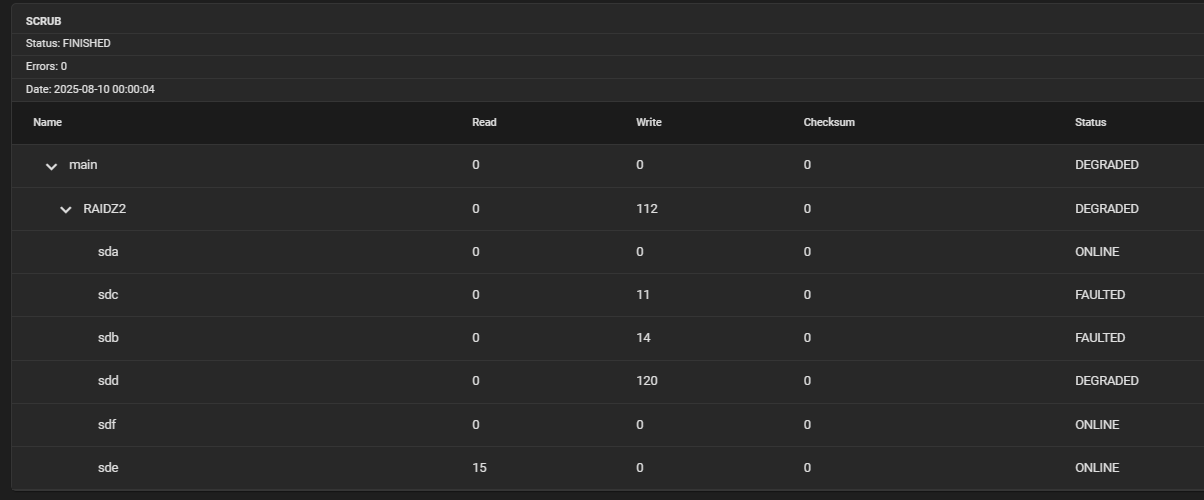
And this is what I see in the GUI interface for drive status:

From these results, it doesn’t seem like the adapter-connected drives are the problem, but I’m not sure if using the adapter could still affect other drives somehow.

All these drives and host components were purchased in June 2022. The drives were brand new Ultrastar DC HC550 18TB models with 5-year warranty service. However, I’m not sure how to prove that one is faulty. I might connect it to my Windows computer after replacement and use some software to test it.

If it’s not the M.2 to SATA adapter causing the issue, I’ll try to find a more suitable power supply. And my current case only supports small 1U power supplies, which limits my DIY options significantly. Perhaps I’ll end up building an entirely new NAS and avoid using adapters altogether.

Thank you very much for your help.

I tried using AI to analyze the problem I’m encountering and made some new discoveries.

I had AI analyze the SMART data from my sdc drive, and here are the console output and conclusions:

root@truenas[~]# smartctl -a /dev/sdc
smartctl 7.2 2020-12-30 r5155 [x86_64-linux-5.10.142+truenas] (local build)
Copyright (C) 2002-20, Bruce Allen, Christian Franke, www.smartmontools.org

=== START OF INFORMATION SECTION ===
Model Family:     Western Digital Ultrastar DC HC550
Device Model:     WDC  WUH721818ALE6L4
Serial Number:    4ZG4DU2V
LU WWN Device Id: 5 000cca 2a6c20191
Firmware Version: PCGNW232
User Capacity:    18,000,207,937,536 bytes [18.0 TB]
Sector Sizes:     512 bytes logical, 4096 bytes physical
Rotation Rate:    7200 rpm
Form Factor:      3.5 inches
Device is:        In smartctl database [for details use: -P show]
ATA Version is:   ACS-4 published, ANSI INCITS 529-2018
SATA Version is:  SATA 3.3, 6.0 Gb/s (current: 6.0 Gb/s)
Local Time is:    Sun Aug 17 14:26:03 2025 CST
SMART support is: Available - device has SMART capability.
SMART support is: Enabled

=== START OF READ SMART DATA SECTION ===
SMART overall-health self-assessment test result: PASSED

General SMART Values:
Offline data collection status:  (0x82) Offline data collection activity
                                        was completed without error.
                                        Auto Offline Data Collection: Enabled.
Self-test execution status:      (   0) The previous self-test routine completed
                                        without error or no self-test has ever 
                                        been run.
Total time to complete Offline 
data collection:                (  101) seconds.
Offline data collection
capabilities:                    (0x5b) SMART execute Offline immediate.
                                        Auto Offline data collection on/off support.
                                        Suspend Offline collection upon new
                                        command.
                                        Offline surface scan supported.
                                        Self-test supported.
                                        No Conveyance Self-test supported.
                                        Selective Self-test supported.
SMART capabilities:            (0x0003) Saves SMART data before entering
                                        power-saving mode.
                                        Supports SMART auto save timer.
Error logging capability:        (0x01) Error logging supported.
                                        General Purpose Logging supported.
Short self-test routine 
recommended polling time:        (   2) minutes.
Extended self-test routine
recommended polling time:        (1857) minutes.
SCT capabilities:              (0x003d) SCT Status supported.
                                        SCT Error Recovery Control supported.
                                        SCT Feature Control supported.
                                        SCT Data Table supported.

SMART Attributes Data Structure revision number: 16
Vendor Specific SMART Attributes with Thresholds:
ID# ATTRIBUTE_NAME          FLAG     VALUE WORST THRESH TYPE      UPDATED  WHEN_FAILED RAW_VALUE
  1 Raw_Read_Error_Rate     0x000b   100   100   001    Pre-fail  Always       -       0
  2 Throughput_Performance  0x0005   138   138   054    Pre-fail  Offline      -       88
  3 Spin_Up_Time            0x0007   083   083   001    Pre-fail  Always       -       343 (Average 345)
  4 Start_Stop_Count        0x0012   100   100   000    Old_age   Always       -       24
  5 Reallocated_Sector_Ct   0x0033   100   100   001    Pre-fail  Always       -       0
  7 Seek_Error_Rate         0x000b   100   100   001    Pre-fail  Always       -       0
  8 Seek_Time_Performance   0x0005   140   140   020    Pre-fail  Offline      -       15
  9 Power_On_Hours          0x0012   097   097   000    Old_age   Always       -       27165
 10 Spin_Retry_Count        0x0013   100   100   001    Pre-fail  Always       -       0
 12 Power_Cycle_Count       0x0032   100   100   000    Old_age   Always       -       24
 22 Helium_Level            0x0023   100   100   025    Pre-fail  Always       -       100
192 Power-Off_Retract_Count 0x0032   100   100   000    Old_age   Always       -       1161
193 Load_Cycle_Count        0x0012   100   100   000    Old_age   Always       -       1161
194 Temperature_Celsius     0x0002   053   053   000    Old_age   Always       -       40 (Min/Max 19/57)
196 Reallocated_Event_Count 0x0032   100   100   000    Old_age   Always       -       0
197 Current_Pending_Sector  0x0022   100   100   000    Old_age   Always       -       0
198 Offline_Uncorrectable   0x0008   100   100   000    Old_age   Offline      -       0
199 UDMA_CRC_Error_Count    0x000a   100   100   000    Old_age   Always       -       12

SMART Error Log Version: 1
ATA Error Count: 12 (device log contains only the most recent five errors)
        CR = Command Register [HEX]
        FR = Features Register [HEX]
        SC = Sector Count Register [HEX]
        SN = Sector Number Register [HEX]
        CL = Cylinder Low Register [HEX]
        CH = Cylinder High Register [HEX]
        DH = Device/Head Register [HEX]
        DC = Device Command Register [HEX]
        ER = Error register [HEX]
        ST = Status register [HEX]
Powered_Up_Time is measured from power on, and printed as
DDd+hh:mm:SS.sss where DD=days, hh=hours, mm=minutes,
SS=sec, and sss=millisec. It "wraps" after 49.710 days.

Error 12 occurred at disk power-on lifetime: 26921 hours (1121 days + 17 hours)
  When the command that caused the error occurred, the device was active or idle.

  After command completion occurred, registers were:
  ER ST SC SN CL CH DH
  -- -- -- -- -- -- --
  84 43 00 00 00 00 00  Error: ICRC, ABRT at LBA = 0x00000000 = 0

  Commands leading to the command that caused the error were:
  CR FR SC SN CL CH DH DC   Powered_Up_Time  Command/Feature_Name
  -- -- -- -- -- -- -- --  ----------------  --------------------
  61 78 b8 c0 f5 26 40 08  46d+01:33:03.596  WRITE FPDMA QUEUED
  61 10 b0 10 a2 08 40 08  46d+01:33:03.595  WRITE FPDMA QUEUED
  61 20 30 48 06 a6 40 08  46d+01:33:03.594  WRITE FPDMA QUEUED
  61 c8 e0 c0 a9 d0 40 08  46d+01:33:03.594  WRITE FPDMA QUEUED
  61 30 f8 98 77 6e 40 08  46d+01:33:03.594  WRITE FPDMA QUEUED

Error 11 occurred at disk power-on lifetime: 15626 hours (651 days + 2 hours)
  When the command that caused the error occurred, the device was active or idle.

  After command completion occurred, registers were:
  ER ST SC SN CL CH DH
  -- -- -- -- -- -- --
  84 43 00 00 00 00 00  Error: ICRC, ABRT at LBA = 0x00000000 = 0

  Commands leading to the command that caused the error were:
  CR FR SC SN CL CH DH DC   Powered_Up_Time  Command/Feature_Name
  -- -- -- -- -- -- -- --  ----------------  --------------------
  61 88 d0 f0 aa 47 40 08   7d+11:31:57.727  WRITE FPDMA QUEUED
  61 60 68 b8 eb 40 40 08   7d+11:31:57.726  WRITE FPDMA QUEUED
  61 30 40 28 f4 9d 40 08   7d+11:31:57.726  WRITE FPDMA QUEUED
  61 50 b0 48 64 02 40 08   7d+11:31:57.725  WRITE FPDMA QUEUED
  61 08 60 c8 2b f7 40 08   7d+11:31:57.725  WRITE FPDMA QUEUED

Error 10 occurred at disk power-on lifetime: 15624 hours (651 days + 0 hours)
  When the command that caused the error occurred, the device was active or idle.

  After command completion occurred, registers were:
  ER ST SC SN CL CH DH
  -- -- -- -- -- -- --
  84 43 00 00 00 00 00  Error: ICRC, ABRT at LBA = 0x00000000 = 0

  Commands leading to the command that caused the error were:
  CR FR SC SN CL CH DH DC   Powered_Up_Time  Command/Feature_Name
  -- -- -- -- -- -- -- --  ----------------  --------------------
  61 08 98 50 08 d0 40 08   7d+09:06:18.026  WRITE FPDMA QUEUED
  61 08 a0 80 b4 9a 40 08   7d+09:06:18.026  WRITE FPDMA QUEUED
  61 08 08 b0 bc 57 40 08   7d+09:06:18.025  WRITE FPDMA QUEUED
  61 08 78 90 20 68 40 08   7d+09:06:18.025  WRITE FPDMA QUEUED
  61 08 f0 58 2d ff 40 08   7d+09:06:18.023  WRITE FPDMA QUEUED

Error 9 occurred at disk power-on lifetime: 15595 hours (649 days + 19 hours)
  When the command that caused the error occurred, the device was active or idle.

  After command completion occurred, registers were:
  ER ST SC SN CL CH DH
  -- -- -- -- -- -- --
  84 43 00 00 00 00 00  Error: ICRC, ABRT at LBA = 0x00000000 = 0

  Commands leading to the command that caused the error were:
  CR FR SC SN CL CH DH DC   Powered_Up_Time  Command/Feature_Name
  -- -- -- -- -- -- -- --  ----------------  --------------------
  61 18 e8 68 dd c9 40 08   6d+04:16:42.346  WRITE FPDMA QUEUED
  61 10 80 c0 e9 53 40 08   6d+04:16:42.345  WRITE FPDMA QUEUED
  61 18 20 48 dd c9 40 08   6d+04:16:42.344  WRITE FPDMA QUEUED
  61 10 e0 10 ff bd 40 08   6d+04:16:42.344  WRITE FPDMA QUEUED
  61 08 60 08 37 19 40 08   6d+04:16:42.343  WRITE FPDMA QUEUED

Error 8 occurred at disk power-on lifetime: 14773 hours (615 days + 13 hours)
  When the command that caused the error occurred, the device was active or idle.

  After command completion occurred, registers were:
  ER ST SC SN CL CH DH
  -- -- -- -- -- -- --
  84 43 00 00 00 00 00  Error: ICRC, ABRT at LBA = 0x00000000 = 0

  Commands leading to the command that caused the error were:
  CR FR SC SN CL CH DH DC   Powered_Up_Time  Command/Feature_Name
  -- -- -- -- -- -- -- --  ----------------  --------------------
  61 20 68 00 62 0a 40 08      19:07:08.405  WRITE FPDMA QUEUED
  61 18 d0 30 62 0a 40 08      19:07:08.405  WRITE FPDMA QUEUED
  61 08 c8 f0 61 0a 40 08      19:07:08.404  WRITE FPDMA QUEUED
  61 20 c0 78 7b aa 40 08      19:07:08.403  WRITE FPDMA QUEUED
  61 10 48 68 e3 58 40 08      19:07:08.403  WRITE FPDMA QUEUED

SMART Self-test log structure revision number 1
No self-tests have been logged.  [To run self-tests, use: smartctl -t]

SMART Selective self-test log data structure revision number 1
 SPAN  MIN_LBA  MAX_LBA  CURRENT_TEST_STATUS
    1        0        0  Not_testing
    2        0        0  Not_testing
    3        0        0  Not_testing
    4        0        0  Not_testing
    5        0        0  Not_testing
Selective self-test flags (0x0):
  After scanning selected spans, do NOT read-scan remainder of disk.
If Selective self-test is pending on power-up, resume after 0 minute delay.
✅ **Drive Health Status: Good**

* Overall Health Assessment: PASSED ✅
* All critical indicators are normal:
  * Reallocated Sector Count (ID 5): 0 ✅
  * Current Pending Sector Count (ID 197): 0 ✅
  * Offline Uncorrectable Sectors (ID 198): 0 ✅
  * Reallocation Event Count (ID 196): 0 ✅

🔌 **Key Finding: Connection Issues** All errors are ICRC (Interface CRC) errors:

*Error: ICRC, ABRT at LBA = 0x00000000 = 0*

This indicates the problem is at the data transmission level, not the drive itself!

📊 **Error Pattern Analysis** ICRC Error Meaning:

* Interface CRC Error = Interface Cyclic Redundancy Check Error
* ABRT = Command Abort
* Occurs during data transfer from drive to controller

The AI suggests this could be SATA cable/power supply/SATA controller or interface issues. I then checked power-related errors along with power-on time, temperature, and voltage information, with the following output:

[    1.997313] thermal_sys: Registered thermal governor 'power_allocator'
[    2.375562] ACPI: Power Resource [DRP1] (on)
[    2.388807] ACPI: Power Resource [PRBT] (on)
[    2.397613] ACPI: Power Resource [WRST] (on)
[    2.409729] ACPI: Power Resource [FN00] (off)
[    2.417356] ACPI: Power Resource [FN01] (off)
[    2.421354] ACPI: Power Resource [FN02] (off)
[    2.425353] ACPI: Power Resource [FN03] (off)
[    2.429353] ACPI: Power Resource [FN04] (off)
[    2.433879] ACPI: Power Resource [PIN] (off)
[   20.585513] input: Power Button as /devices/LNXSYSTM:00/LNXSYBUS:00/PNP0C0C:00/input/input5
[   20.593989] ACPI: Power Button [PWRB]
[   20.597905] input: Power Button as /devices/LNXSYSTM:00/LNXPWRBN:00/input/input6
[   20.605438] ACPI: Power Button [PWRF]
zsh: command not found: #
=== /dev/sda ===
  9 Power_On_Hours          0x0012   097   097   000    Old_age   Always       -       27165
194 Temperature_Celsius     0x0002   052   052   000    Old_age   Always       -       41 (Min/Max 19/56)
=== /dev/sdb ===
  9 Power_On_Hours          0x0012   097   097   000    Old_age   Always       -       27165
194 Temperature_Celsius     0x0002   053   053   000    Old_age   Always       -       40 (Min/Max 20/54)
=== /dev/sdc ===
  9 Power_On_Hours          0x0012   097   097   000    Old_age   Always       -       27165
194 Temperature_Celsius     0x0002   053   053   000    Old_age   Always       -       40 (Min/Max 19/57)
=== /dev/sdd ===
  9 Power_On_Hours          0x0012   097   097   000    Old_age   Always       -       27165
194 Temperature_Celsius     0x0002   055   055   000    Old_age   Always       -       39 (Min/Max 19/57)
=== /dev/sde ===
  9 Power_On_Hours          0x0012   097   097   000    Old_age   Always       -       27165
194 Temperature_Celsius     0x0002   053   053   000    Old_age   Always       -       40 (Min/Max 19/55)
=== /dev/sdf ===
  9 Power_On_Hours          0x0012   097   097   000    Old_age   Always       -       27165
194 Temperature_Celsius     0x0002   052   052   000    Old_age   Always       -       41 (Min/Max 19/53)

The AI confirmed that power-related information is also normal and believes it’s a motherboard SATA controller issue - possibly a controller chip failure causing multiple drives to experience write errors simultaneously. However, the AI doesn’t know that I’m using a drive cage to connect the drives. I feel it’s more likely that the drive cage’s connection cables are the problem rather than the motherboard, since the drive cage is unbranded and may be using inferior quality cables.

I’d like to know if the AI’s analysis of the SMART data from this FAULTED sdc drive is correct - whether the ICRC errors it mentioned truly represent data transmission layer errors, or if there are other commands I can use to gather information that would corroborate this analysis?

If the AI’s analysis is correct, I should need to replace the SATA cables and drive cage. However, my storage pool is currently in a very dangerous state, and I’m worried that restarting might cause the entire pool to fail. Should I ignore the errors for now and let the FAULTED drive continue working?

I don’t like the look of your maximum temperature. 57 is very hot.

The faulted drives are not working, they are faulted. They are no longer taking part in the pool.

I hope you have a backup.