
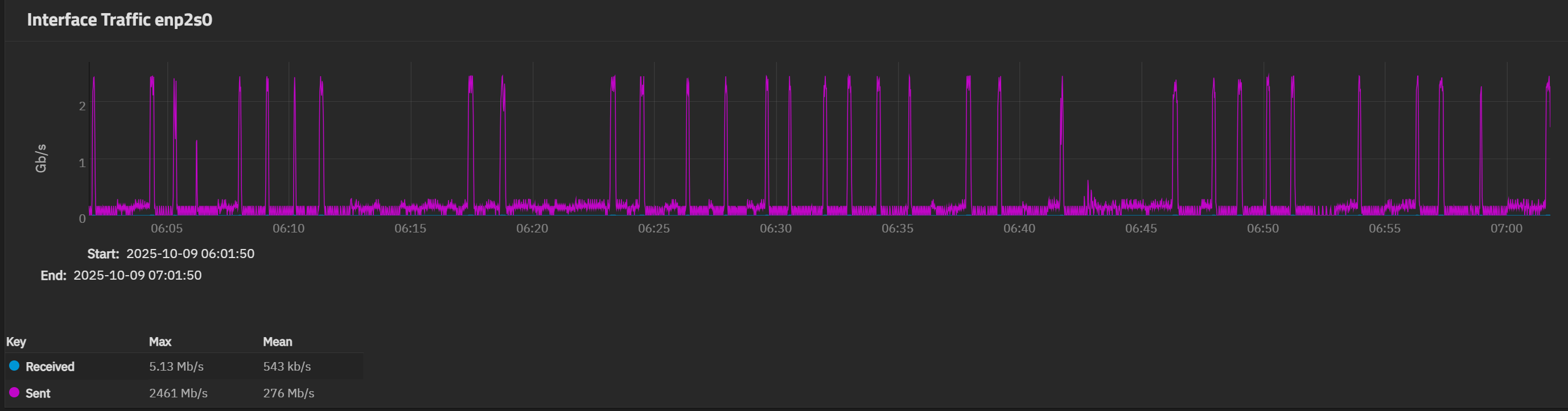
I have a direct 2.5 Gbps connection between two (2) truenas systems and during an initial 1.6 TB zfs replication from one machine to the other, it took nearly 14 hours. I was excepting maybe 2-3 hours? I understand there is overhead and I’m going to get teh full 2.5 Gbps the entire time, but if you see the network speed history of the network card, it’ll spike every so often to nearly 2.5 Gbps, but the majority is around 200 Mbps. Everything from the network side is pretty much default except the MTU size on both sides is 9000. Anything else I could tweak or look into?
Please give us the complete details of the 2 machines and the network involved aswell as VM or bare metal, Pool layouts, Truenas version etc etc.
In the meantime, can you try it with a 1Gb/s connection ?
-both machines are bare metal
-both have tplink tx201 2.5 NICs without switch in between
-both running 25.04.2.4
same thing when running at 1Gb/s NIC through a network switch; spikes to a fully saturated 1 Gbps, then goes back down to 200 Mbps or so
i ran iperf both send / receive and it holds solid it sits at 2.5 Gbps
Would be interesting to see if the speed changes if you used NETCAT.
same issue with NETCAT
Same speed? If so then something is very wrong with the networking.
Can you share your system specs please.
It’ll spike every so often to nearly 1 Gbps, but the majority is around 200 Mbps.
primary (send): Xeon W-2135, 64 GB DDR4 ECC, 1 x RAIDZ2 | 7 wide | 3.64 TiB (HDDs)
backup (receive): i7-6700, 16GB DDR4, 1 x MIRROR | 2 wide | 3.64 TiB (SSDs)
Do you get full speed on an iperf test between the two nodes?
On one system:
sudo iperf3 -s
From the other
sudo iperf3 -c 1.2.3.4
i did… works no issue, fully saturates the link (on both 1 Gbps and 2.5 Gbps). As another test I’m sending over a TB data from a Synology NAS to the ‘backup’ truenas over SMB, fully saturates the 1 Gbps link (through a switch)
seems to be something related to replication?
Can your disk setup on both system handle the disk datapressure ??
One of the “Gurus” here should be able to tell you how2 test disk read/write speed on the system.
Could you try to “Test replicate something” the “other way” ?
I’m getting around 850…884Mb/s sustained on a 1Gb link when replicating my weekly ~500GB from my pri to my backup (hw in signature).
Note - The machines doesn’t do anything but this, and Intel NIC’s at both ends.
so… other way around, fully saturated 2.5 Gbps link
Note:
I’m still a NAS Beginner, my TrueNas setup is my first.
Just to recap …
Repliction speed from :
Pri - (Xeon, 7 x spinning rust, RZ2) , to Bkup - (i6700, 2 x SSD, mirror) - Speed ~200Mb
Bkup - (i6700, 2 x SSD, mirror), to Pri - (Xeon, 7 x spinning rust, RZ2) - Speed ~2.5Gb
iperf shows full speed (2.5Gb) both ways
I’m impressed that the Xeon (Rust disks) can receive 2.5Gb sustained
Guru’s - How does one test, the write speed of the SSD Mirror ?
I suppose OP want’s a non destructive test.
you have that all correct; i’m ok with a destructive test; i’m just starting out on the backup system

guess i should have added. these are Crucial BX500’s drive which after some research are terrible for ZFS workloads