so i’m just starting Selfhosting at home and would love to spin up some services in my lokal Network. I’m thinking about
Homebox
Actual Budget
Mealie
and Vaultwarden
BUT i would love to not only spin up the Apps but to have like… a neat folder Structure i could backup. I know the apps run all in their own container but is it possible to have them “paste” their persistent data to a Folderstructure like:
/Homelab/
/App1
/App2
and so on? So i can just copy and paste the Folder to somewhere else?
Is that something i can easily do or is it “tricky” ?
A friend suggest i should just install a Pod Manager like portainer and manage it that way but i would rather like to stick to what is already their and keep it “simpler”.
Well. Thanks so far for reading and i hope i might get a good answer!
The magic word is Hostpaths. There’s currently 2 types of storage for apps, hostpaths and iXVolumes. iXVolumes is the default option, but is not persistent and should only be used for testing an app.
With hostpaths you can create dedicated datasets for each app and map them to app configs, databases and so on. Another option would be one Parent dataset and use folders for each app.
If you choose one dataset for one app you can set different snapshot policies for each app.
If you choose one “app” dataset and go the folder route, you can’t choose different snapshot policies for each app.
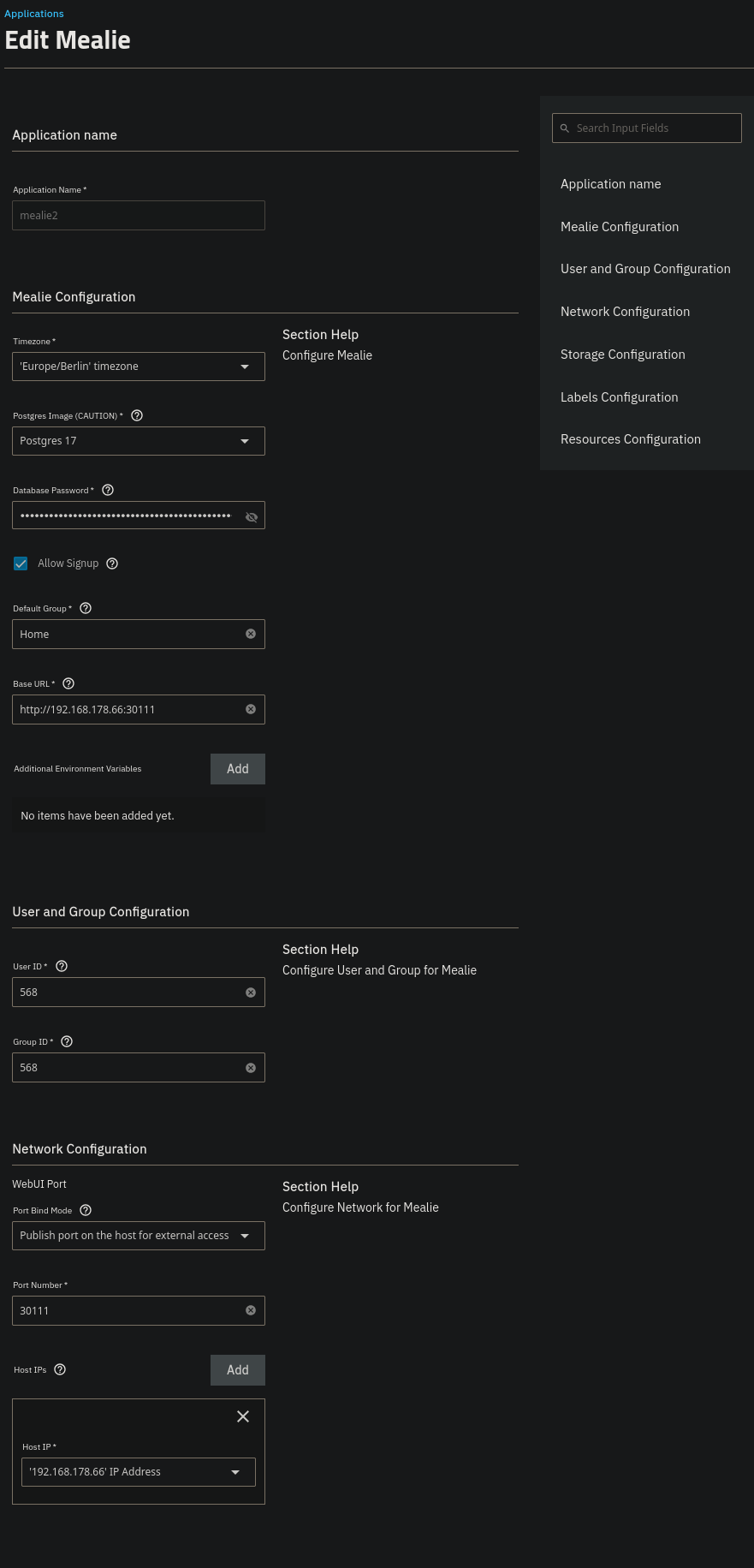
but i guess im configuring something the wrong way?
I get all sorts of permission errors.
I searched for a “dumb person guide” but could’t find one. I’m happy to read up on stuff! Don’t get me wrong…
2025-09-15 17:23:39.517954+00:00from mealie.core.dependencies.dependencies import (
2025-09-15 17:23:39.517985+00:00File "/opt/mealie/lib/python3.12/site-packages/mealie/core/dependencies/__init__.py", line 1, in <module>
2025-09-15 17:23:39.518076+00:00from .dependencies import *
2025-09-15 17:23:39.518095+00:00File "/opt/mealie/lib/python3.12/site-packages/mealie/core/dependencies/dependencies.py", line 17, in <module>
2025-09-15 17:23:39.518203+00:00from mealie.db.db_setup import generate_session
2025-09-15 17:23:39.518232+00:00File "/opt/mealie/lib/python3.12/site-packages/mealie/db/db_setup.py", line 12, in <module>
2025-09-15 17:23:39.518335+00:00settings = get_app_settings()
2025-09-15 17:23:39.518447+00:00^^^^^^^^^^^^^^^^^^
2025-09-15 17:23:39.518463+00:00File "/opt/mealie/lib/python3.12/site-packages/mealie/core/config.py", line 43, in get_app_settings
2025-09-15 17:23:39.518582+00:00return app_settings_constructor(env_file=ENV, production=PRODUCTION, data_dir=determine_data_dir())
2025-09-15 17:23:39.518907+00:00^^^^^^^^^^^^^^^^^^^^^^^^^^^^^^^^^^^^^^^^^^^^^^^^^^^^^^^^^^^^^^^^^^^^^^^^^^^^^^^^^^^^^^^^^^^^
2025-09-15 17:23:39.518927+00:00File "/opt/mealie/lib/python3.12/site-packages/mealie/core/settings/settings.py", line 458, in app_settings_constructor
2025-09-15 17:23:39.519251+00:00"SECRET": determine_secrets(data_dir, ".secret", production),
2025-09-15 17:23:39.519431+00:00^^^^^^^^^^^^^^^^^^^^^^^^^^^^^^^^^^^^^^^^^^^^^^^^^^
2025-09-15 17:23:39.519463+00:00File "/opt/mealie/lib/python3.12/site-packages/mealie/core/settings/settings.py", line 56, in determine_secrets
2025-09-15 17:23:39.519636+00:00with open(secrets_file, "w") as f:
2025-09-15 17:23:39.519729+00:00^^^^^^^^^^^^^^^^^^^^^^^
2025-09-15 17:23:39.519768+00:00PermissionError: [Errno 13] Permission denied: '/app/data/.secret'
Most apps run as user 568, so make sure that user 568 “apps” has permission on the hostpaths you want to use. In addition to user 568, apps that use postgres as a databse need permission for user 999 “netdata” because the database runs as user 999 not 568
The article you were looking at was just the UI reference for the Install Custom App screen, which isn’t really what you’re looking for. For apps tutorials and resources, you want to take a look at apps.truenas.com. In this case Installing Apps | TrueNAS Apps Market might be helpful, though it wouldn’t address this particular permissions issue.
It looks like we do have a brief community-submitted deployment resource for Mealie though (Mealie | TrueNAS Apps Market) which suggests a few config settings including User/Group 911/911 for this app. I haven’t validated that though.
Thank you so much.
As before… this will take me some time to look at! But thanks to you both for teaching me stuff! I will read up on this and write again if i got stuff to work
SO! As Promised i’m coming back to this The answer from DjP-iX is right. Also basically it is just “put the UIDs of the right users into the Lists that can work with your preffered directorys.”
So yeah. Thanks a lot and i hope that Someone might read this one day and find this helpfull. I guess if you are a Linux Pro you already know about all the LInux User Rights settings stuff and the UUID stuff and all that. I didnt and together with a friend i got to manage this.
Thank to the Forum and my Friend. See you all soon with the next beginner question at another point in Time



 The answer from DjP-iX is right. Also basically it is just “put the UIDs of the right users into the Lists that can work with your preffered directorys.”