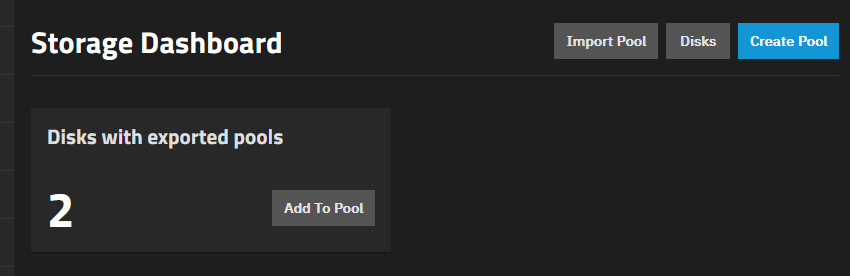
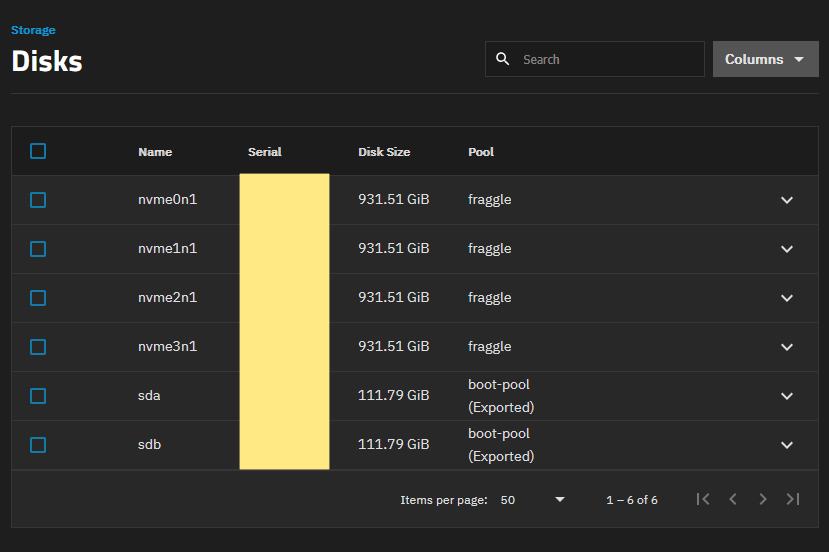
I have been looking around and the only solution I could find was to wipe TrueNAS and install from scratch. I am trying to avoid this because I am not the most confident at this sort of stuff.
Question
Is it still the case that the only solution is to:
make a config backup
wipe the boot drives (i will zero fill externally)
The error condition is a bit unfortunate but I’ve explained the reason why this happens in ticket here. We’re also adding this as a known issue to the 24.10.0 documentation.
It looks like your system is on and running because of the screenshots so the export happened after successful boot. Did you try the Import Pool button in your first screenshot and were there any errors?
Save the config file while your headless chicken NAS is still running… and wait for someone to come up with an idea of how you could possibly end up that way and what to do.
Your description is a bit off if the NAS reboots fine then it is importing the boot-pool when it starts. Did you do something to Export the boot-pool?
Running the following commands in the Shell and posting the results back using Preformatted Text mode. One for each command, will let us see the current state of your system pools and if it sees any pools to import. </> or Ctrl+e on the toolbar is Preformatted Text
It was probably caused by the known bug I listed in the first post. But I have got the results of the commands you requested as it might help find a solution
root@tns[/home/admin]# zpool import
no pools available to import
root@tns[/home/admin]#
root@tns[/home/admin]# zpool status -v
  pool: boot-pool
 state: ONLINE
status: Some supported and requested features are not enabled on the pool.
        The pool can still be used, but some features are unavailable.
action: Enable all features using 'zpool upgrade'. Once this is done,
        the pool may no longer be accessible by software that does not support
        the features. See zpool-features(7) for details.
  scan: scrub repaired 0B in 00:00:41 with 0 errors on Sun Oct 11 03:45:43 2026
config:

        NAME        STATE     READ WRITE CKSUM
        boot-pool   ONLINE       0     0     0
          mirror-0  ONLINE       0     0     0
            sdb3    ONLINE       0     0     0
            sda3    ONLINE       0     0     0

errors: No known data errors

  pool: fraggle
 state: ONLINE
config:

        NAME                                      STATE     READ WRITE CKSUM
        fraggle                                   ONLINE       0     0     0
          mirror-0                                ONLINE       0     0     0
            6fc3cdb5-xxxxxxxxxxxxxxxxxxxx-9e24b4  ONLINE       0     0     0
            f6072272-xxxxxxxxxxxxxxxxxxxxx-0c26a  ONLINE       0     0     0
          mirror-1                                ONLINE       0     0     0
            bf315af8-xxxxxxxxxxxxxxxxxxxxxx-f3de  ONLINE       0     0     0
            c6c4eeb5-0xxxxxxxxxxxxxxxxxxxd-xxxxx  ONLINE       0     0     0

errors: No known data errors
root@tns[/home/admin]#