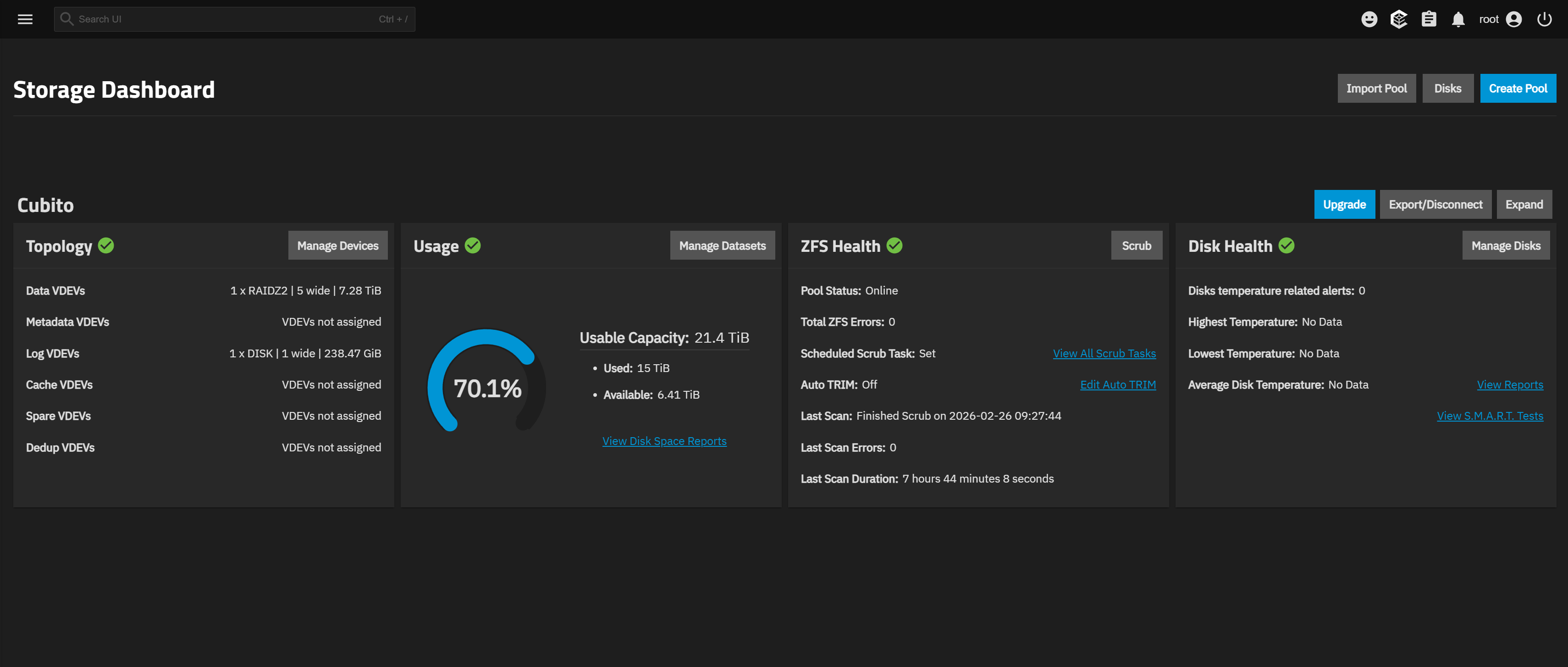
Hello everyone, It’s been a few months that I started getting Checksum Errors, I’ve tried scrubbing but no fix at all. A month ago I got around 500-800 Checksum Errors, that’s when I decided to research potential solutions. I’ve replaced the ‘M.2 B+M Key to SATA III 2 Ports Expansion Card’ and all SATA Cables that are connected to the motherboard. It hasn’t increased the errors yet as they been holding around the 70-85 errors. I use the NAS as a Plex server and external storage, so nothing crazy that I believe is affecting it.
I’m really new to this, I don’t have any past experience with Linux or server hosting. Just watched couple of YouTube videos and decided to give it a go. Any help or guidance would be really appreciated. Also I don’t know how forum formatting works, so if there’s anything I did wrong on this post please let me know!
My System Configuration:
- JONSBO N2 Case
- TrueNAS-SCALE-25.04.2.6
- AMD Ryzen 9 5900X 12-Core Processor
- ASUS ROG STRIX B550-I GAMING
- Corsair 2x16GB (32GB of RAM) Running Base Speeds
- Data Pool Running RAIDZ2
-
sda (8TB) (76 Checksum Errors)
-
sdb (8TB) (74 Checksum Errors)
-
sdc (8TB) (76 Checksum Errors)
-
sdd (8TB) (84 Checksum Errors)
-
sdf (8TB) (71 Checksum Errors)
-
- Log VDEV 256GB NMVE (No Errors)
- Crucial 128GB SATA SSD as Boot Drive
2 Hard Drives are being connect by the ‘M.2 B+M Key to SATA III 2 Ports Expansion Card’ and the rest to the motherboard SATA ports.
Some Troubleshooting After Replacing Expansion Card and SATA CABLES:
I’ve been looking at forums and did some commands that other people had luck with:
- I first did a Scrub using the Scrub button on the ‘Storage’ tab
- Then I did another Scrub but using Shell and
zpool scrub $pool_name - Afterwards I did
zpool status -v
I noticed that some corrupted files were gone and repaired? Maybe I’m wrong but those files haven’t reappeared yet.
Pool Status
root@truenas[~]# sudo zpool status
  pool: Cubito
 state: ONLINE
status: One or more devices has experienced an error resulting in data
        corruption.  Applications may be affected.
action: Restore the file in question if possible.  Otherwise restore the
        entire pool from backup.
   see: https://openzfs.github.io/openzfs-docs/msg/ZFS-8000-8A
  scan: scrub repaired 0B in 07:44:14 with 1 errors on Wed Feb 25 08:10:09 2026
config:

        NAME                                      STATE     READ WRITE CKSUM
        Cubito                                    ONLINE       0     0     0
          raidz2-0                                ONLINE       0     0     0
            91d93d30-be96-46fa-9f37-8a52a0b3b7bd  ONLINE       0     0    76
            8037015c-c1d7-4450-94d2-7e294907eab0  ONLINE       0     0    71
            f851a6b9-7bf3-4362-82f4-915bcd2f73b9  ONLINE       0     0    74
            c68798b6-1d45-4089-add9-d33ce59b20fc  ONLINE       0     0    84
            dec6a5f3-d1ae-41bd-b505-cba8052a3ecd  ONLINE       0     0    76
        logs
          dc92be13-4606-4047-9cd2-d517611e0e68    ONLINE       0     0     0

errors: 1 data errors, use '-v' for a list

  pool: boot-pool
 state: ONLINE
status: Some supported and requested features are not enabled on the pool.
        The pool can still be used, but some features are unavailable.
action: Enable all features using 'zpool upgrade'. Once this is done,
        the pool may no longer be accessible by software that does not support
        the features. See zpool-features(7) for details.
  scan: scrub repaired 0B in 00:01:34 with 0 errors on Tue Feb 24 03:46:35 2026
config:

        NAME        STATE     READ WRITE CKSUM
        boot-pool   ONLINE       0     0     0
          sde3      ONLINE       0     0     0

errors: No known data errors
Pool Status with -v command:
root@truenas[~]# sudo zpool status -v
  pool: Cubito
 state: ONLINE
status: One or more devices has experienced an error resulting in data
        corruption.  Applications may be affected.
action: Restore the file in question if possible.  Otherwise restore the
        entire pool from backup.
   see: https://openzfs.github.io/openzfs-docs/msg/ZFS-8000-8A
  scan: scrub repaired 0B in 07:44:14 with 1 errors on Wed Feb 25 08:10:09 2026
config:

        NAME                                      STATE     READ WRITE CKSUM
        Cubito                                    ONLINE       0     0     0
          raidz2-0                                ONLINE       0     0     0
            91d93d30-be96-46fa-9f37-8a52a0b3b7bd  ONLINE       0     0    76
            8037015c-c1d7-4450-94d2-7e294907eab0  ONLINE       0     0    71
            f851a6b9-7bf3-4362-82f4-915bcd2f73b9  ONLINE       0     0    74
            c68798b6-1d45-4089-add9-d33ce59b20fc  ONLINE       0     0    84
            dec6a5f3-d1ae-41bd-b505-cba8052a3ecd  ONLINE       0     0    76
        logs
          dc92be13-4606-4047-9cd2-d517611e0e68    ONLINE       0     0     0

errors: Permanent errors have been detected in the following files:

        /mnt/.ix-apps/truenas_catalog/trains/community/jdownloader2/1.1.3/questions.yaml

  pool: boot-pool
 state: ONLINE
status: Some supported and requested features are not enabled on the pool.
        The pool can still be used, but some features are unavailable.
action: Enable all features using 'zpool upgrade'. Once this is done,
        the pool may no longer be accessible by software that does not support
        the features. See zpool-features(7) for details.
  scan: scrub repaired 0B in 00:01:34 with 0 errors on Tue Feb 24 03:46:35 2026
config:

        NAME        STATE     READ WRITE CKSUM
        boot-pool   ONLINE       0     0     0
          sde3      ONLINE       0     0     0

errors: No known data errors
SMART Values
sda
root@truenas[~]# sudo smartctl -a /dev/sda
smartctl 7.4 2023-08-01 r5530 [x86_64-linux-6.12.15-production+truenas] (local build)
Copyright (C) 2002-23, Bruce Allen, Christian Franke, www.smartmontools.org

=== START OF INFORMATION SECTION ===
Model Family:     Seagate IronWolf
Device Model:     ST8000VN004-2M2101
Serial Number:    WSD3WS13
LU WWN Device Id: 5 000c50 0dc931370
Firmware Version: SC60
User Capacity:    8,001,563,222,016 bytes [8.00 TB]
Sector Sizes:     512 bytes logical, 4096 bytes physical
Rotation Rate:    7200 rpm
Form Factor:      3.5 inches
Device is:        In smartctl database 7.3/6088
ATA Version is:   ACS-4 (minor revision not indicated)
SATA Version is:  SATA 3.3, 6.0 Gb/s (current: 6.0 Gb/s)
Local Time is:    Wed Feb 25 11:26:36 2026 PST
SMART support is: Available - device has SMART capability.
SMART support is: Enabled

=== START OF READ SMART DATA SECTION ===
SMART overall-health self-assessment test result: PASSED
See vendor-specific Attribute list for marginal Attributes.

General SMART Values:
Offline data collection status:  (0x82) Offline data collection activity
                                        was completed without error.
                                        Auto Offline Data Collection: Enabled.
Self-test execution status:      (   0) The previous self-test routine completed
                                        without error or no self-test has ever
                                        been run.
Total time to complete Offline
data collection:                (  559) seconds.
Offline data collection
capabilities:                    (0x7b) SMART execute Offline immediate.
                                        Auto Offline data collection on/off support.
                                        Suspend Offline collection upon new
                                        command.
                                        Offline surface scan supported.
                                        Self-test supported.
                                        Conveyance Self-test supported.
                                        Selective Self-test supported.
SMART capabilities:            (0x0003) Saves SMART data before entering
                                        power-saving mode.
                                        Supports SMART auto save timer.
Error logging capability:        (0x01) Error logging supported.
                                        General Purpose Logging supported.
Short self-test routine
recommended polling time:        (   1) minutes.
Extended self-test routine
recommended polling time:        ( 715) minutes.
Conveyance self-test routine
recommended polling time:        (   2) minutes.
SCT capabilities:              (0x50bd) SCT Status supported.
                                        SCT Error Recovery Control supported.
                                        SCT Feature Control supported.
                                        SCT Data Table supported.

SMART Attributes Data Structure revision number: 10
Vendor Specific SMART Attributes with Thresholds:
ID# ATTRIBUTE_NAME          FLAG     VALUE WORST THRESH TYPE      UPDATED  WHEN_FAILED RAW_VALUE
  1 Raw_Read_Error_Rate     0x000f   082   064   044    Pre-fail  Always       -       0/173690224
  3 Spin_Up_Time            0x0003   082   082   000    Pre-fail  Always       -       0
  4 Start_Stop_Count        0x0032   100   100   020    Old_age   Always       -       31
  5 Reallocated_Sector_Ct   0x0033   100   100   010    Pre-fail  Always       -       0
  7 Seek_Error_Rate         0x000f   089   060   045    Pre-fail  Always       -       0/712601327
  9 Power_On_Hours          0x0032   076   076   000    Old_age   Always       -       21152
 10 Spin_Retry_Count        0x0013   100   100   097    Pre-fail  Always       -       0
 12 Power_Cycle_Count       0x0032   100   100   020    Old_age   Always       -       32
 18 Head_Health             0x000b   100   100   050    Pre-fail  Always       -       0
187 Reported_Uncorrect      0x0032   100   100   000    Old_age   Always       -       0
188 Command_Timeout         0x0032   100   100   000    Old_age   Always       -       0 0 0
190 Airflow_Temperature_Cel 0x0022   061   010   040    Old_age   Always   In_the_past 39 (Min/Max 25/49 #1343)
192 Power-Off_Retract_Count 0x0032   100   100   000    Old_age   Always       -       10
193 Load_Cycle_Count        0x0032   100   100   000    Old_age   Always       -       917
194 Temperature_Celsius     0x0022   039   090   000    Old_age   Always       -       39 (0 14 0 0 0)
195 Hardware_ECC_Recovered  0x001a   082   064   000    Old_age   Always       -       0/173690224
197 Current_Pending_Sector  0x0012   100   100   000    Old_age   Always       -       0
198 Offline_Uncorrectable   0x0010   100   100   000    Old_age   Offline      -       0
199 UDMA_CRC_Error_Count    0x003e   200   200   000    Old_age   Always       -       0
240 Head_Flying_Hours       0x0000   100   253   000    Old_age   Offline      -       21058h+21m+43.185s
241 Total_LBAs_Written      0x0000   100   253   000    Old_age   Offline      -       46898250668
242 Total_LBAs_Read         0x0000   100   253   000    Old_age   Offline      -       792346579365

SMART Error Log Version: 1
No Errors Logged

SMART Self-test log structure revision number 1
Num  Test_Description    Status                  Remaining  LifeTime(hours)  LBA_of_first_error
# 1  Short offline       Completed without error       00%     21072         -
# 2  Short offline       Completed without error       00%     20904         -
# 3  Short offline       Completed without error       00%     20736         -
# 4  Extended offline    Completed without error       00%     20580         -
# 5  Short offline       Completed without error       00%     20568         -
# 6  Short offline       Completed without error       00%     20400         -
# 7  Short offline       Completed without error       00%     20232         -
# 8  Short offline       Completed without error       00%     20064         -
# 9  Short offline       Completed without error       00%     19896         -
#10  Short offline       Completed without error       00%     19728         -
#11  Short offline       Completed without error       00%     19560         -
#12  Short offline       Completed without error       00%     19392         -
#13  Short offline       Completed without error       00%     19392         -
#14  Short offline       Completed without error       00%     19224         -
#15  Extended offline    Completed without error       00%     19092         -
#16  Short offline       Completed without error       00%     19056         -
#17  Short offline       Completed without error       00%     18888         -
#18  Short offline       Completed without error       00%     18720         -
#19  Short offline       Completed without error       00%     18592         -
#20  Short offline       Completed without error       00%     18443         -
#21  Short offline       Completed without error       00%     18275         -

SMART Selective self-test log data structure revision number 1
 SPAN  MIN_LBA  MAX_LBA  CURRENT_TEST_STATUS
    1        0        0  Not_testing
    2        0        0  Not_testing
    3        0        0  Not_testing
    4        0        0  Not_testing
    5        0        0  Not_testing
Selective self-test flags (0x0):
  After scanning selected spans, do NOT read-scan remainder of disk.
If Selective self-test is pending on power-up, resume after 0 minute delay.

The above only provides legacy SMART information - try 'smartctl -x' for more
sdb
root@truenas[~]# sudo smartctl -a /dev/sdb
smartctl 7.4 2023-08-01 r5530 [x86_64-linux-6.12.15-production+truenas] (local build)
Copyright (C) 2002-23, Bruce Allen, Christian Franke, www.smartmontools.org

=== START OF INFORMATION SECTION ===
Model Family:     Seagate IronWolf
Device Model:     ST8000VN004-3CP101
Serial Number:    WWZ2CHFL
LU WWN Device Id: 5 000c50 0e719ad86
Firmware Version: SC60
User Capacity:    8,001,563,222,016 bytes [8.00 TB]
Sector Sizes:     512 bytes logical, 4096 bytes physical
Rotation Rate:    7200 rpm
Form Factor:      3.5 inches
Device is:        In smartctl database 7.3/6088
ATA Version is:   ACS-4 (minor revision not indicated)
SATA Version is:  SATA 3.3, 6.0 Gb/s (current: 6.0 Gb/s)
Local Time is:    Wed Feb 25 11:28:14 2026 PST
SMART support is: Available - device has SMART capability.
SMART support is: Enabled

=== START OF READ SMART DATA SECTION ===
SMART overall-health self-assessment test result: PASSED

General SMART Values:
Offline data collection status:  (0x82) Offline data collection activity
                                        was completed without error.
                                        Auto Offline Data Collection: Enabled.
Self-test execution status:      (   0) The previous self-test routine completed
                                        without error or no self-test has ever
                                        been run.
Total time to complete Offline
data collection:                (  567) seconds.
Offline data collection
capabilities:                    (0x7b) SMART execute Offline immediate.
                                        Auto Offline data collection on/off support.
                                        Suspend Offline collection upon new
                                        command.
                                        Offline surface scan supported.
                                        Self-test supported.
                                        Conveyance Self-test supported.
                                        Selective Self-test supported.
SMART capabilities:            (0x0003) Saves SMART data before entering
                                        power-saving mode.
                                        Supports SMART auto save timer.
Error logging capability:        (0x01) Error logging supported.
                                        General Purpose Logging supported.
Short self-test routine
recommended polling time:        (   1) minutes.
Extended self-test routine
recommended polling time:        ( 712) minutes.
Conveyance self-test routine
recommended polling time:        (   2) minutes.
SCT capabilities:              (0x50bd) SCT Status supported.
                                        SCT Error Recovery Control supported.
                                        SCT Feature Control supported.
                                        SCT Data Table supported.

SMART Attributes Data Structure revision number: 10
Vendor Specific SMART Attributes with Thresholds:
ID# ATTRIBUTE_NAME          FLAG     VALUE WORST THRESH TYPE      UPDATED  WHEN_FAILED RAW_VALUE
  1 Raw_Read_Error_Rate     0x000f   077   064   044    Pre-fail  Always       -       0/45081776
  3 Spin_Up_Time            0x0003   090   090   000    Pre-fail  Always       -       0
  4 Start_Stop_Count        0x0032   100   100   020    Old_age   Always       -       32
  5 Reallocated_Sector_Ct   0x0033   100   100   010    Pre-fail  Always       -       0
  7 Seek_Error_Rate         0x000f   087   060   045    Pre-fail  Always       -       0/539971567
  9 Power_On_Hours          0x0032   076   076   000    Old_age   Always       -       21153
 10 Spin_Retry_Count        0x0013   100   100   097    Pre-fail  Always       -       0
 12 Power_Cycle_Count       0x0032   100   100   020    Old_age   Always       -       32
 18 Head_Health             0x000b   100   100   050    Pre-fail  Always       -       0
187 Reported_Uncorrect      0x0032   100   100   000    Old_age   Always       -       0
188 Command_Timeout         0x0032   100   100   000    Old_age   Always       -       0 0 0
190 Airflow_Temperature_Cel 0x0022   056   026   000    Old_age   Always       -       44 (Min/Max 25/56)
192 Power-Off_Retract_Count 0x0032   100   100   000    Old_age   Always       -       12
193 Load_Cycle_Count        0x0032   100   100   000    Old_age   Always       -       920
194 Temperature_Celsius     0x0022   044   074   000    Old_age   Always       -       44 (0 14 0 0 0)
197 Current_Pending_Sector  0x0012   100   100   000    Old_age   Always       -       0
198 Offline_Uncorrectable   0x0010   100   100   000    Old_age   Offline      -       0
199 UDMA_CRC_Error_Count    0x003e   200   200   000    Old_age   Always       -       1
240 Head_Flying_Hours       0x0000   100   253   000    Old_age   Offline      -       21057h+25m+04.338s
241 Total_LBAs_Written      0x0000   100   253   000    Old_age   Offline      -       46894959927
242 Total_LBAs_Read         0x0000   100   253   000    Old_age   Offline      -       792196069344

SMART Error Log Version: 1
No Errors Logged

SMART Self-test log structure revision number 1
Num  Test_Description    Status                  Remaining  LifeTime(hours)  LBA_of_first_error
# 1  Short offline       Completed without error       00%     21072         -
# 2  Short offline       Completed without error       00%     20904         -
# 3  Short offline       Completed without error       00%     20736         -
# 4  Extended offline    Completed without error       00%     20580         -
# 5  Short offline       Completed without error       00%     20568         -
# 6  Short offline       Completed without error       00%     20400         -
# 7  Short offline       Completed without error       00%     20232         -
# 8  Short offline       Completed without error       00%     20064         -
# 9  Short offline       Completed without error       00%     20010         -
#10  Short offline       Completed without error       00%     19897         -
#11  Short offline       Completed without error       00%     19729         -
#12  Short offline       Completed without error       00%     19561         -
#13  Short offline       Completed without error       00%     19393         -
#14  Short offline       Completed without error       00%     19392         -
#15  Short offline       Completed without error       00%     19224         -
#16  Extended offline    Completed without error       00%     19092         -
#17  Short offline       Completed without error       00%     19056         -
#18  Short offline       Completed without error       00%     18888         -
#19  Short offline       Completed without error       00%     18720         -
#20  Short offline       Completed without error       00%     18593         -
#21  Short offline       Completed without error       00%     18443         -

SMART Selective self-test log data structure revision number 1
 SPAN  MIN_LBA  MAX_LBA  CURRENT_TEST_STATUS
    1        0        0  Not_testing
    2        0        0  Not_testing
    3        0        0  Not_testing
    4        0        0  Not_testing
    5        0        0  Not_testing
Selective self-test flags (0x0):
  After scanning selected spans, do NOT read-scan remainder of disk.
If Selective self-test is pending on power-up, resume after 0 minute delay.

The above only provides legacy SMART information - try 'smartctl -x' for more
sdc
root@truenas[~]# sudo smartctl -a /dev/sdc
smartctl 7.4 2023-08-01 r5530 [x86_64-linux-6.12.15-production+truenas] (local build)
Copyright (C) 2002-23, Bruce Allen, Christian Franke, www.smartmontools.org

=== START OF INFORMATION SECTION ===
Model Family:     Seagate Exos 7E10
Device Model:     ST8000NM017B-2TJ103
Serial Number:    WWZ0EGRR
LU WWN Device Id: 5 000c50 0e4cb5543
Firmware Version: SN01
User Capacity:    8,001,563,222,016 bytes [8.00 TB]
Sector Sizes:     512 bytes logical, 4096 bytes physical
Rotation Rate:    7200 rpm
Form Factor:      3.5 inches
Device is:        In smartctl database 7.3/6088
ATA Version is:   ACS-4 (minor revision not indicated)
SATA Version is:  SATA 3.3, 6.0 Gb/s (current: 6.0 Gb/s)
Local Time is:    Wed Feb 25 11:29:40 2026 PST
SMART support is: Available - device has SMART capability.
SMART support is: Enabled

=== START OF READ SMART DATA SECTION ===
SMART overall-health self-assessment test result: PASSED

General SMART Values:
Offline data collection status:  (0x82) Offline data collection activity
                                        was completed without error.
                                        Auto Offline Data Collection: Enabled.
Self-test execution status:      (   0) The previous self-test routine completed
                                        without error or no self-test has ever
                                        been run.
Total time to complete Offline
data collection:                (  559) seconds.
Offline data collection
capabilities:                    (0x7b) SMART execute Offline immediate.
                                        Auto Offline data collection on/off support.
                                        Suspend Offline collection upon new
                                        command.
                                        Offline surface scan supported.
                                        Self-test supported.
                                        Conveyance Self-test supported.
                                        Selective Self-test supported.
SMART capabilities:            (0x0003) Saves SMART data before entering
                                        power-saving mode.
                                        Supports SMART auto save timer.
Error logging capability:        (0x01) Error logging supported.
                                        General Purpose Logging supported.
Short self-test routine
recommended polling time:        (   1) minutes.
Extended self-test routine
recommended polling time:        ( 695) minutes.
Conveyance self-test routine
recommended polling time:        (   2) minutes.
SCT capabilities:              (0x70bd) SCT Status supported.
                                        SCT Error Recovery Control supported.
                                        SCT Feature Control supported.
                                        SCT Data Table supported.

SMART Attributes Data Structure revision number: 10
Vendor Specific SMART Attributes with Thresholds:
ID# ATTRIBUTE_NAME          FLAG     VALUE WORST THRESH TYPE      UPDATED  WHEN_FAILED RAW_VALUE
  1 Raw_Read_Error_Rate     0x000f   080   064   044    Pre-fail  Always       -       0/93401760
  3 Spin_Up_Time            0x0003   092   092   000    Pre-fail  Always       -       0
  4 Start_Stop_Count        0x0032   100   100   020    Old_age   Always       -       36
  5 Reallocated_Sector_Ct   0x0033   100   100   010    Pre-fail  Always       -       0
  7 Seek_Error_Rate         0x000f   087   060   045    Pre-fail  Always       -       0/538497058
  9 Power_On_Hours          0x0032   076   076   000    Old_age   Always       -       21153
 10 Spin_Retry_Count        0x0013   100   100   097    Pre-fail  Always       -       0
 12 Power_Cycle_Count       0x0032   100   100   020    Old_age   Always       -       37
 18 Head_Health             0x000b   100   100   050    Pre-fail  Always       -       0
187 Reported_Uncorrect      0x0032   100   100   000    Old_age   Always       -       0
188 Command_Timeout         0x0032   100   100   000    Old_age   Always       -       0 0 0
190 Airflow_Temperature_Cel 0x0022   053   013   000    Old_age   Always       -       47 (Min/Max 25/60)
192 Power-Off_Retract_Count 0x0032   100   100   000    Old_age   Always       -       13
193 Load_Cycle_Count        0x0032   100   100   000    Old_age   Always       -       925
194 Temperature_Celsius     0x0022   047   087   000    Old_age   Always       -       47 (0 10 0 0 0)
197 Current_Pending_Sector  0x0012   100   100   000    Old_age   Always       -       0
198 Offline_Uncorrectable   0x0010   100   100   000    Old_age   Offline      -       0
199 UDMA_CRC_Error_Count    0x003e   200   200   000    Old_age   Always       -       0
240 Head_Flying_Hours       0x0000   100   253   000    Old_age   Offline      -       21053h+36m+32.075s
241 Total_LBAs_Written      0x0000   100   253   000    Old_age   Offline      -       46888658695
242 Total_LBAs_Read         0x0000   100   253   000    Old_age   Offline      -       830597697109

SMART Error Log Version: 1
No Errors Logged

SMART Self-test log structure revision number 1
Num  Test_Description    Status                  Remaining  LifeTime(hours)  LBA_of_first_error
# 1  Short offline       Completed without error       00%     21072         -
# 2  Short offline       Completed without error       00%     20905         -
# 3  Short offline       Completed without error       00%     20737         -
# 4  Extended offline    Completed without error       00%     20580         -
# 5  Short offline       Completed without error       00%     20569         -
# 6  Short offline       Completed without error       00%     20401         -
# 7  Short offline       Completed without error       00%     20233         -
# 8  Short offline       Completed without error       00%     20065         -
# 9  Short offline       Completed without error       00%     19897         -
#10  Short offline       Completed without error       00%     19729         -
#11  Short offline       Completed without error       00%     19561         -
#12  Short offline       Completed without error       00%     19393         -
#13  Short offline       Completed without error       00%     19392         -
#14  Short offline       Completed without error       00%     19224         -
#15  Extended offline    Completed without error       00%     19092         -
#16  Short offline       Completed without error       00%     19056         -
#17  Short offline       Completed without error       00%     18888         -
#18  Short offline       Completed without error       00%     18720         -
#19  Short offline       Completed without error       00%     18593         -
#20  Short offline       Completed without error       00%     18443         -
#21  Short offline       Completed without error       00%     18275         -

SMART Selective self-test log data structure revision number 1
 SPAN  MIN_LBA  MAX_LBA  CURRENT_TEST_STATUS
    1        0        0  Not_testing
    2        0        0  Not_testing
    3        0        0  Not_testing
    4        0        0  Not_testing
    5        0        0  Not_testing
Selective self-test flags (0x0):
  After scanning selected spans, do NOT read-scan remainder of disk.
If Selective self-test is pending on power-up, resume after 0 minute delay.

The above only provides legacy SMART information - try 'smartctl -x' for more
sdd
root@truenas[~]# sudo smartctl -a /dev/sdd
smartctl 7.4 2023-08-01 r5530 [x86_64-linux-6.12.15-production+truenas] (local build)
Copyright (C) 2002-23, Bruce Allen, Christian Franke, www.smartmontools.org

=== START OF INFORMATION SECTION ===
Model Family:     Seagate IronWolf
Device Model:     ST8000VN004-3CP101
Serial Number:    WWZ2C6Q0
LU WWN Device Id: 5 000c50 0e719e6f4
Firmware Version: SC60
User Capacity:    8,001,563,222,016 bytes [8.00 TB]
Sector Sizes:     512 bytes logical, 4096 bytes physical
Rotation Rate:    7200 rpm
Form Factor:      3.5 inches
Device is:        In smartctl database 7.3/6088
ATA Version is:   ACS-4 (minor revision not indicated)
SATA Version is:  SATA 3.3, 6.0 Gb/s (current: 6.0 Gb/s)
Local Time is:    Wed Feb 25 11:30:07 2026 PST
SMART support is: Available - device has SMART capability.
SMART support is: Enabled

=== START OF READ SMART DATA SECTION ===
SMART overall-health self-assessment test result: PASSED

General SMART Values:
Offline data collection status:  (0x82) Offline data collection activity
                                        was completed without error.
                                        Auto Offline Data Collection: Enabled.
Self-test execution status:      (   0) The previous self-test routine completed
                                        without error or no self-test has ever
                                        been run.
Total time to complete Offline
data collection:                (  559) seconds.
Offline data collection
capabilities:                    (0x7b) SMART execute Offline immediate.
                                        Auto Offline data collection on/off support.
                                        Suspend Offline collection upon new
                                        command.
                                        Offline surface scan supported.
                                        Self-test supported.
                                        Conveyance Self-test supported.
                                        Selective Self-test supported.
SMART capabilities:            (0x0003) Saves SMART data before entering
                                        power-saving mode.
                                        Supports SMART auto save timer.
Error logging capability:        (0x01) Error logging supported.
                                        General Purpose Logging supported.
Short self-test routine
recommended polling time:        (   1) minutes.
Extended self-test routine
recommended polling time:        ( 701) minutes.
Conveyance self-test routine
recommended polling time:        (   2) minutes.
SCT capabilities:              (0x50bd) SCT Status supported.
                                        SCT Error Recovery Control supported.
                                        SCT Feature Control supported.
                                        SCT Data Table supported.

SMART Attributes Data Structure revision number: 10
Vendor Specific SMART Attributes with Thresholds:
ID# ATTRIBUTE_NAME          FLAG     VALUE WORST THRESH TYPE      UPDATED  WHEN_FAILED RAW_VALUE
  1 Raw_Read_Error_Rate     0x000f   076   064   044    Pre-fail  Always       -       0/43836096
  3 Spin_Up_Time            0x0003   089   089   000    Pre-fail  Always       -       0
  4 Start_Stop_Count        0x0032   100   100   020    Old_age   Always       -       33
  5 Reallocated_Sector_Ct   0x0033   100   100   010    Pre-fail  Always       -       0
  7 Seek_Error_Rate         0x000f   087   060   045    Pre-fail  Always       -       0/534924326
  9 Power_On_Hours          0x0032   076   076   000    Old_age   Always       -       21152
 10 Spin_Retry_Count        0x0013   100   100   097    Pre-fail  Always       -       0
 12 Power_Cycle_Count       0x0032   100   100   020    Old_age   Always       -       34
 18 Head_Health             0x000b   100   100   050    Pre-fail  Always       -       0
187 Reported_Uncorrect      0x0032   100   100   000    Old_age   Always       -       0
188 Command_Timeout         0x0032   100   100   000    Old_age   Always       -       0 0 0
190 Airflow_Temperature_Cel 0x0022   054   014   000    Old_age   Always       -       46 (Min/Max 25/59)
192 Power-Off_Retract_Count 0x0032   100   100   000    Old_age   Always       -       13
193 Load_Cycle_Count        0x0032   100   100   000    Old_age   Always       -       921
194 Temperature_Celsius     0x0022   046   086   000    Old_age   Always       -       46 (0 15 0 0 0)
197 Current_Pending_Sector  0x0012   100   100   000    Old_age   Always       -       0
198 Offline_Uncorrectable   0x0010   100   100   000    Old_age   Offline      -       0
199 UDMA_CRC_Error_Count    0x003e   200   200   000    Old_age   Always       -       0
240 Head_Flying_Hours       0x0000   100   253   000    Old_age   Offline      -       21055h+45m+32.023s
241 Total_LBAs_Written      0x0000   100   253   000    Old_age   Offline      -       46890309442
242 Total_LBAs_Read         0x0000   100   253   000    Old_age   Offline      -       791958860670

SMART Error Log Version: 1
No Errors Logged

SMART Self-test log structure revision number 1
Num  Test_Description    Status                  Remaining  LifeTime(hours)  LBA_of_first_error
# 1  Short offline       Completed without error       00%     21072         -
# 2  Short offline       Completed without error       00%     20904         -
# 3  Short offline       Completed without error       00%     20736         -
# 4  Extended offline    Completed without error       00%     20580         -
# 5  Short offline       Completed without error       00%     20568         -
# 6  Short offline       Completed without error       00%     20400         -
# 7  Short offline       Completed without error       00%     20232         -
# 8  Short offline       Completed without error       00%     20064         -
# 9  Short offline       Completed without error       00%     19896         -
#10  Short offline       Completed without error       00%     19728         -
#11  Short offline       Completed without error       00%     19560         -
#12  Short offline       Completed without error       00%     19392         -
#13  Short offline       Completed without error       00%     19392         -
#14  Short offline       Completed without error       00%     19224         -
#15  Extended offline    Completed without error       00%     19091         -
#16  Short offline       Completed without error       00%     19056         -
#17  Short offline       Completed without error       00%     18888         -
#18  Short offline       Completed without error       00%     18720         -
#19  Short offline       Completed without error       00%     18592         -
#20  Short offline       Completed without error       00%     18443         -
#21  Short offline       Completed without error       00%     18275         -

SMART Selective self-test log data structure revision number 1
 SPAN  MIN_LBA  MAX_LBA  CURRENT_TEST_STATUS
    1        0        0  Not_testing
    2        0        0  Not_testing
    3        0        0  Not_testing
    4        0        0  Not_testing
    5        0        0  Not_testing
Selective self-test flags (0x0):
  After scanning selected spans, do NOT read-scan remainder of disk.
If Selective self-test is pending on power-up, resume after 0 minute delay.

The above only provides legacy SMART information - try 'smartctl -x' for more
sdf
root@truenas[~]# sudo smartctl -a /dev/sdf
smartctl 7.4 2023-08-01 r5530 [x86_64-linux-6.12.15-production+truenas] (local build)
Copyright (C) 2002-23, Bruce Allen, Christian Franke, www.smartmontools.org

=== START OF INFORMATION SECTION ===
Model Family:     Seagate Exos 7E10
Device Model:     ST8000NM017B-2TJ103
Serial Number:    WWZ0EHYW
LU WWN Device Id: 5 000c50 0e4cb5b9c
Firmware Version: SN01
User Capacity:    8,001,563,222,016 bytes [8.00 TB]
Sector Sizes:     512 bytes logical, 4096 bytes physical
Rotation Rate:    7200 rpm
Form Factor:      3.5 inches
Device is:        In smartctl database 7.3/6088
ATA Version is:   ACS-4 (minor revision not indicated)
SATA Version is:  SATA 3.3, 6.0 Gb/s (current: 6.0 Gb/s)
Local Time is:    Wed Feb 25 11:30:56 2026 PST
SMART support is: Available - device has SMART capability.
SMART support is: Enabled

=== START OF READ SMART DATA SECTION ===
SMART overall-health self-assessment test result: PASSED

General SMART Values:
Offline data collection status:  (0x82) Offline data collection activity
                                        was completed without error.
                                        Auto Offline Data Collection: Enabled.
Self-test execution status:      (   0) The previous self-test routine completed
                                        without error or no self-test has ever
                                        been run.
Total time to complete Offline
data collection:                (  559) seconds.
Offline data collection
capabilities:                    (0x7b) SMART execute Offline immediate.
                                        Auto Offline data collection on/off support.
                                        Suspend Offline collection upon new
                                        command.
                                        Offline surface scan supported.
                                        Self-test supported.
                                        Conveyance Self-test supported.
                                        Selective Self-test supported.
SMART capabilities:            (0x0003) Saves SMART data before entering
                                        power-saving mode.
                                        Supports SMART auto save timer.
Error logging capability:        (0x01) Error logging supported.
                                        General Purpose Logging supported.
Short self-test routine
recommended polling time:        (   1) minutes.
Extended self-test routine
recommended polling time:        ( 712) minutes.
Conveyance self-test routine
recommended polling time:        (   2) minutes.
SCT capabilities:              (0x70bd) SCT Status supported.
                                        SCT Error Recovery Control supported.
                                        SCT Feature Control supported.
                                        SCT Data Table supported.

SMART Attributes Data Structure revision number: 10
Vendor Specific SMART Attributes with Thresholds:
ID# ATTRIBUTE_NAME          FLAG     VALUE WORST THRESH TYPE      UPDATED  WHEN_FAILED RAW_VALUE
  1 Raw_Read_Error_Rate     0x000f   080   064   044    Pre-fail  Always       -       0/111051144
  3 Spin_Up_Time            0x0003   092   092   000    Pre-fail  Always       -       0
  4 Start_Stop_Count        0x0032   100   100   020    Old_age   Always       -       34
  5 Reallocated_Sector_Ct   0x0033   100   100   010    Pre-fail  Always       -       0
  7 Seek_Error_Rate         0x000f   087   060   045    Pre-fail  Always       -       0/543777794
  9 Power_On_Hours          0x0032   076   076   000    Old_age   Always       -       21153
 10 Spin_Retry_Count        0x0013   100   100   097    Pre-fail  Always       -       0
 12 Power_Cycle_Count       0x0032   100   100   020    Old_age   Always       -       36
 18 Head_Health             0x000b   100   100   050    Pre-fail  Always       -       0
187 Reported_Uncorrect      0x0032   100   100   000    Old_age   Always       -       0
188 Command_Timeout         0x0032   100   100   000    Old_age   Always       -       0 0 0
190 Airflow_Temperature_Cel 0x0022   055   023   000    Old_age   Always       -       45 (Min/Max 25/58)
192 Power-Off_Retract_Count 0x0032   100   100   000    Old_age   Always       -       12
193 Load_Cycle_Count        0x0032   100   100   000    Old_age   Always       -       926
194 Temperature_Celsius     0x0022   045   077   000    Old_age   Always       -       45 (0 15 0 0 0)
197 Current_Pending_Sector  0x0012   100   100   000    Old_age   Always       -       0
198 Offline_Uncorrectable   0x0010   100   100   000    Old_age   Offline      -       0
199 UDMA_CRC_Error_Count    0x003e   200   200   000    Old_age   Always       -       0
240 Head_Flying_Hours       0x0000   100   253   000    Old_age   Offline      -       21059h+46m+12.228s
241 Total_LBAs_Written      0x0000   100   253   000    Old_age   Offline      -       46888961847
242 Total_LBAs_Read         0x0000   100   253   000    Old_age   Offline      -       891062186704

SMART Error Log Version: 1
No Errors Logged

SMART Self-test log structure revision number 1
Num  Test_Description    Status                  Remaining  LifeTime(hours)  LBA_of_first_error
# 1  Short offline       Completed without error       00%     21072         -
# 2  Short offline       Completed without error       00%     20905         -
# 3  Short offline       Completed without error       00%     20737         -
# 4  Extended offline    Completed without error       00%     20580         -
# 5  Short offline       Completed without error       00%     20569         -
# 6  Short offline       Completed without error       00%     20400         -
# 7  Short offline       Completed without error       00%     20232         -
# 8  Short offline       Completed without error       00%     20064         -
# 9  Short offline       Completed without error       00%     19897         -
#10  Short offline       Completed without error       00%     19729         -
#11  Short offline       Completed without error       00%     19561         -
#12  Short offline       Completed without error       00%     19393         -
#13  Short offline       Completed without error       00%     19392         -
#14  Short offline       Completed without error       00%     19224         -
#15  Extended offline    Completed without error       00%     19092         -
#16  Short offline       Completed without error       00%     19056         -
#17  Short offline       Completed without error       00%     18888         -
#18  Short offline       Completed without error       00%     18720         -
#19  Short offline       Completed without error       00%     18593         -
#20  Short offline       Completed without error       00%     18443         -
#21  Short offline       Completed without error       00%     18275         -

SMART Selective self-test log data structure revision number 1
 SPAN  MIN_LBA  MAX_LBA  CURRENT_TEST_STATUS
    1        0        0  Not_testing
    2        0        0  Not_testing
    3        0        0  Not_testing
    4        0        0  Not_testing
    5        0        0  Not_testing
Selective self-test flags (0x0):
  After scanning selected spans, do NOT read-scan remainder of disk.
If Selective self-test is pending on power-up, resume after 0 minute delay.

The above only provides legacy SMART information - try 'smartctl -x' for more
…
My whole NAS and Truenas config is being held by hopes and dreams but thank you in advance for any help. I would honestly maybe pay someone to help me fix Truenas config since I feel like its messy. This is my first time using Linux and doing any self hosting homelab.
Also thank you to user ‘terrehbyte’ I used his forum post as a guideline to make this post.