I just upgraded my existing FreeNas 9.3 to TrueNas scale 25.04.2.3. I installed 2 mirrored Intel S3500 SSD’s for my boot drives. I just ordered two 16GB sticks of EEC server memory to replace the existing 8GB.
My question is, my Tyan S3500 MB’s current CPU is an INTEL|CELERON G1840 2.8G 2M R 2 cores, 2 threads. The manual says I can run a CPU with 4 cores and I see on eBay they are pretty cheap , less than $20. Would this be a worthwhile upgrade?
I use my server for backing up my documents, pictures, music and backing up my Laptop(s). Here is my current setup:
Case: Lian Li case PC-Q18
Motherboard: Tyan S5533 mini ITX Motherboard
Power Supply: ANTEC PS EA-380D GREEN RT
CPU: INTEL|CELERON G1840 2.8G 2M R 2cores, 2 threads
Good catch. Not sure what I read thinking I could go to 32 but after reading the specs on my MB, you are correct. Fortunately, I was able to cancel the order and order a matching a 8GB stick.
Thanks, I guess I’ll wait to see the CPU performance before I spring for a new CPU.
Well, there is some confusion in this post…
The MoBo is a server grade MoBo, but the Celeron is a desktop CPU.
So my guess would be that it will not start with the new RAM.
I found this link, about all the compatible CPUs you can install to this motherboard: https://www.cpu-upgrade.com/mb-Tyan/S5533-LE_(S5533GM2NR-LE).html
According to this list all suitable CPUs are 4core/8thread ones.
The two, highest clocked variants are the Xeon E3-1281 and the 1286 (up to 4,1GHz turbo)
So, it seems, you need to upgrade your CPU to be able to run your new ECC RAM.
EDIT:
Checked deeper, the difference between 1281 and 1286 is the integrated GPU. ('81 does not have it, the '86 does)
Also, I have an old DELL T6310 workstation, that supports theoretically only 64GB DDR3 ECC (8x8GB)
However last week, I popped in my 4x32GB 4R-2 ECC RDIMM, and surprisingly it worked… Saw all 128GB and MEMtest finished OK.
For the price, the e3 1270v3 has the better price-performance IMHO, just bought one for 18€, is pratically between the i7 4770 and 4790. The 1230-40v3 are also pretty cheap, 12~15€. I would buy those without integrated GPU because this motherboard should have an integrated Aspeed to use in case of need
Yes, that is why the OP should check his current system load…
The 128x is the highest clocked version.
If it works with the pathetic Celeron inside, then ANY Xeon would be a leap forward.
So you are perfectly right that he should not aim for the top dog…
Yeah, I didn’t find the datasheet right away. Found 3 offerings; 2 showed 16GB as max, and the third didn’t have specs. The user manual is a more reputable source for sure.
I followed your advice and ordered a Intel Xeon E3-1270v3 CPU. I didn’t know the Celeron CPU didn’t support EEC memory. The CPU along with the 8GB EEC memory stick, should arrive the end of this week. I suspect I’ll see a big improvement in performance and are looking forward to it. I’ll let you all know how they work together.
My MB didn’t come with a hard copy user manual. So I also had to look for a electronic copy. It’s funny, I also found several different versions of the Tyan MB manual showing 16 or 32 GB max memory. The latest shows the max memory at 32 Gb. Once I get the server upgraded with the new CPU, memory and stable, I want to try installing 32 GB memory. The memory is cheap so it’s worth a shot.
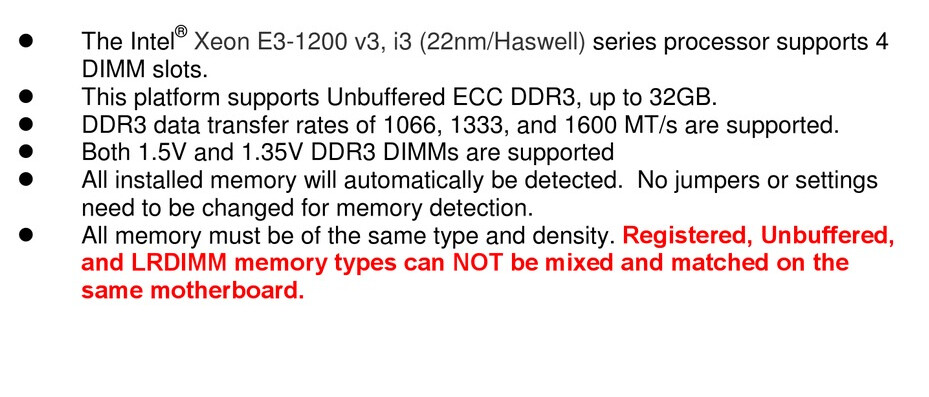
In my opinion the real question is: 16gb single stick of DDR3 UDIMM exists? I never see them, only RDIMM/LRDIMM
This just for say that unless the mainboard does not have 4 slots, you will be limited to 16gb anyway
i think you refer to that part…But i’m quite sure when i say, hoping you don’t have already buy RDIMM modules, that is not a preference but a requirement. Afaik this depends on the CPU, and Haswell Skylake ecc are not RDIMM compatible.
Wait other opinion to be 100% sure
I received both the memory and the new CPU and things did not go well. Not wanting to complicate things anymore than they already are I opted to install the memory first. I booted to the bios and checked the memory and it showed 16GB but only running at 1333 MHz with no apparent way to change it in the bios. I double checked both sticks of memory, and they both were 1600MHz. After booting to TrueNas I checked the dashboard and it showed 16GB ECC.
I then moved to changing the CPU and thats when things really fell apart. it would not even get to the Megatrends logo, hanging up with only the number 55 showing on the bottom right of the screen. I attempted to reseat the CPU, memory, Sata plugs and still got nowhere. I reinstalled the old CPU with the same results. I also cleared the CMOS which had no effect.
Unfortunately, I have a previous commitment so I’ll have to sideline this project first a week or so.
OK, I had a bit of time to work on the issue, so I first blew out the entire case with compressed air, then blew out the memory slots with contact cleaner several times. I inserted each memory stick, one at a time and found it would only boot using B0 memory slot. I couldn’t get it to boot with A0 slot which is unfortunate because the manual states if your using just one it needs to be in A0 slot. It did boot TrueNas up to the console menu and showed the address but I couldn’t access it thru a browser. It also didn’t show up doing a network scan, nor did it show up on my router. It’s like I’m back to where I started a few weeks ago not being able to access the server.
At this point, I believe my MB has issues and it’s time to replace it. Either find an exact match, a similar one that uses the same processor (Xeon E3-1270v3) or buy a totally new setup that will fit my case.
Suggestions for a new itx MB, processor and memory would be appreciated so I can weigh my options. I don’t need the latest and the greatest so a budget system would be OK.
Honestly in your place i would try to dig into this issue a bit more, before think to a replacement. ITX board with ECC are rare in general, costs a lot, i don’t know if you will find something soon that will also fit your cpu.
The first thing to do, a good visual ispection:
you have already clean everything/reseat, but check if the ram slot itself have some bent pin inside
ensure that the socket doesn’t have any bent pins, or thermal paste residual that can break connection
check along the A0 slot if some trace is scratched, or some component are knocked off
(in this area, just last day i have encounter your same issue on an old motherboard, and the culprit was a trace scrached near the heatsink hole, easy repaired with a small wire and a bit of patience)
What is strange, this slot has ever act like that before the CPU swap? If not, the socket pin bent/dirty can be high prob.
For the net problem, there is some ip reservation on the router/modem? In the past i encounter a similar issue, resolved just removing and re adding the reservation on the router. NIC can fails but the same can be easy to add another dedicated one for a low costs (but be sure of that before buy anything!
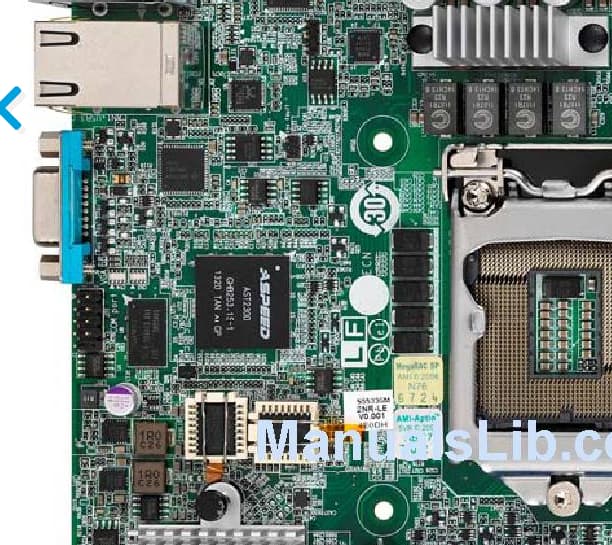
Also really worth step is to check for a bios update, and apply it if available. But care, if i’m right this is the bios chip
if something goes wrong, motherboard won’t boot at all, and if you don’t equip yourself with a programmer like the ~4€ CH3141A (and you are lucky with the clamp, rare thing in my experience xD always need to desolder the chip when is soldered like that) you have literally a paperweight motherboard


 also what is available is quite confusing itself!