From Core and Proxmox to Scale | How to properly set the network?

I am in the process of decommissionning my TN Core and am actually building a TN Scale system in a new physical server.

I also have a Proxmox server (production) running some clients I’d like to have running in the TN-Scale (the clients, not Proxmox) and keep the Proxmox for testing only instead of prod.

When I setup Core 6 years ago, I remember the network stack was a bit tricky and if not set properly in the right order, it would not work, created network collision or the jails/vm were accessing the files from the host through the external network instead of an internal stack.

Since linux is different from FreeBSD, I want to avoid problems.

I read Network | TrueNAS Documentation Hub but I am still not sure.

Context

2 physical NICs on the server

  • eno1
  • eno2
    There is also a 10Gb card NIC installed but not in use yet

Home network is comprised of:

  • LAN (mgt),
  • VLAN10 (IOT),
  • VLAN40 (surveillance)

The NAS is hosting:

  • Documents accessed from Windows through a SMB share
  • Media files managed from Windows but accessed RO from VMs (Jellyfin) or LXC (AssetUPnP server), SMB Share
  • Backups created from either Windows or PBS, NFS Share
  • NVR recordings generated from FrigateNVR, NFS Share

My understanding is that the best practice is to:

  • use NIC1 (eno1) for management LAN (like TN GUI, switches, main PC, Proxmox…)
  • use NIC2 (eno2) to access all the applications either on VLAN10 (Jellyfin client on TV or StreamMagic on audiosystem) or VLAN40 (FrigateNVR)

I already created on LXC for Assetupnp (IOT) and installed one APP (Jellyfin) but it does no mean it’s ok

Questions

Considering the different LXCs and APPS will need to access the NAS (and that it should be done internally by the server without resorting to using NICs),

Q1) Does eno1 (LAN management) need a bridge and why?

In Proxmox/Docker, one can publish ports at the host level or create a new device using a macvlan
Q2) Does bridge10 needs an IP address and why?
Q3) Does bridge40 needs an IP address and why ?

Anything else I am missing ?

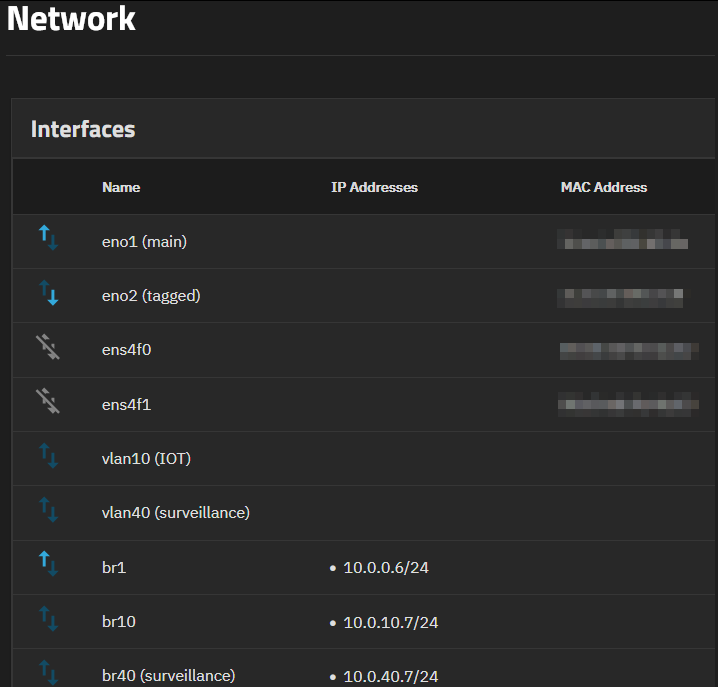
This is the actual setup I replicated from Core (where there was Jails and VMs)
@pmh
You were the one who greatly helped me 6 years ago on Core.
Can I ask your input ?

[EDIT]
This is the whole conversation that had me success with core.
Then I added a Proxmox server last year in which the UI is very different
And now I am trying to take full use of Scale and converge my legacy FreeBSD NAS to Linux NAS and move the Proxmox Containers and bhyve jails in it

Anyone ?

I would definitely like to close this and move on.

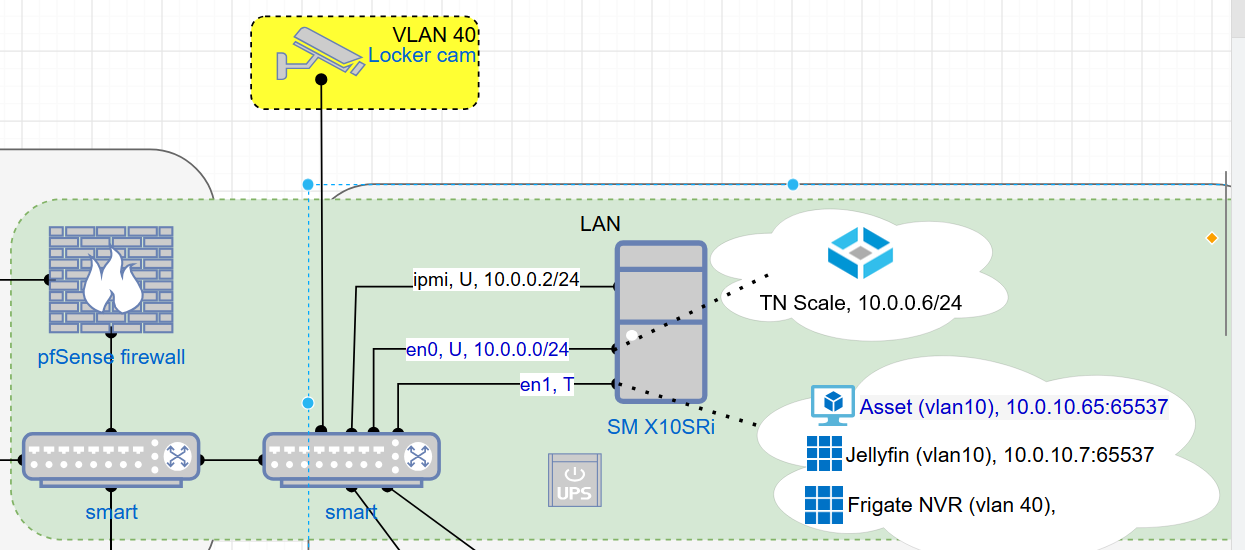
A diagram of your network would be helpful. As just a wall of text, it’s hard to make heads or tails of your desired end state.

1 Like

Will get to drawing

Here is a crop of the relevant part (I hope it makes sense)

Whether your interfaces need a bridge or not is dependent on the use case:

  1. eno0: Do you ever intend to run VMs? VMs needing to mount SMB shares on the host will need a bridge on the SMB interface. You don’t need this with your current diagram, but you may want to add it for future-proofing.
  2. vlan10: You have both LXC and Docker containers running. What network mode are you running both containers? LXC can run bridged or macvlan. Docker apps can run bridged or host via the UI, or macvlan via the ordinary Linux CLI. If both are bridged, then you need a bridge interface with an IP. Your diagram suggests your intent is to run macvlan on both containers, in which case you don’t need a bridge. If you run Docker in host mode, you won’t be able to assign an IP to the container, as it will inherit the interface IP from the host native or bridge interface.
  3. vlan40: Likewise, this can run in bridged, host, or macvlan mode, similar to vlan10.

TrueNAS’s Docker installation isn’t really set up for multi-VLAN operations, and the UI pretty much assumes everything runs off a single host bridge or single host interface. For multi-VLAN setups, you’ll need to use manual Docker compose files yourself, and can’t rely on the built-in app catalog.

In fact, you may want to consider keeping Proxmox, and running 3x separate TrueNAS VMs within, one on each of eno0, vlan10, and vlan40. This would simplify the network configuration of each VM and stay within the design limits of the TrueNAS app service.

Thank you Samuel :+1:

Some precisions:

If I add a bridge for futureproofinf, where goes the IP adress of the system: on eno0 interface or bridge ?

Unless I don’t understand further implications on the TrueNAS part;

  • using pfSense makes it easy to have a good knowledge of all the IP on my network.

  • I prefer that each container (LXC or Docker) be assigned it’s own IP rather than having only the bridge’s IP to refer to with a plethora of ports to keep track of.

  • But if having both LXC and Docker’s (through TN APPS) would be easier to run in host mode, I can live with that (especially since in TN I can just click on the Web UI button while in Proxmox/Portainer, I have to search deeper to retrieve any port configuration I might have forgot).

Yes, the needs may evolve but I don’t see myself going above 10 containers of any types combined.

The important part for me is to keep the cameras off the internet, hence vlan40 for them and this is managed by pfSense.

Frigate NVR could be run in vlan10 for ease of setup in TN.


Do you have any networking basics reading to suggest for me to determine which mode is preferable and where/when/if tho assign an IP to a bridge or not?

I’d be prouder if I limited my questions on this forum to stuff I still don’t understand after self-educating?

Yes, there are network ressources from FreeBSD, Debian, Linuxsize…

But if you are aware of a comprensive one ressource, I’d be happy to do my homework.

I thougth about that.

For now, my system has 40 GB of DDR4 RAM and it’s plenty for the actual setup. Going the Proxmox way would require more RAM which is ridiculously expensive nowadays. Hence why I am trying the all in TN setup.

On the bridge.

Host mode may not be feasible, as it’s restricted to the IP of the TrueNAS management interface. Unless the other VLANs are routed to the management subnet, there won’t be connectivity.

I ran into many of the same issues with my Core→SCALE migration. What helped was having a Mini separate from my Core system I could experiment with various options to see what worked best in SCALE before I migrated my Core system. Since this wasn’t a production system, I could make my mistakes and start over as many times as needed.

In your case, it may be better to install a Docker manager like DockGE or Portainer via the apps UI, running using host networking, and then to use the Docker manager to manage macvlan configs for your actual apps.

1 Like

For the robustness of Core, did you consider keeping Core as a VM under a proxmox server ?

No, as the underlying FreeBSD 13.3 is well past its March 5, 2024, end-of-life, and jails were becoming unviable to maintain as upstream FreeBSD started pulling 13.x releases from download availability.

In addition, one of my jails forced the issue as the software I ran in it stopped providing a FreeBSD build, so I had to bite the bullet on sidegrading to SCALE.

@The-NinthWave sorry, I could not be of help here. I run CE for Docker based workloads mostly and a small select number of VMs.

I use bridges without IP addresses on the NAS itself to map VMs to VLANs just like with CORE, and the default interface of TN for “Apps”.

Keep in mind that even if you use a different IP address and possibly interface for a Docker based App for ingress, that App will still use the main interface with the default route for egress. Can’t be changed at the moment.

I moved my former CORE system with all the jails to Sylve.

HTH,
Patrick

1 Like

Hi @The-NinthWave

I recommend the VLAN for your management interface. There are fewer failure modes – no spanning tree, unwanted L2/L3 functions, etc. It’s boring, stable and if you have a laptop/NIC that supports VLAN tagging, easily recoverable.

@Samuel_Tai ‘s advice is really good advice - install portainer as an app and let it manage other containers. Honestly though, I think the happiest you’ll be with your container system is when you remove other platforms as a dependency. I’d even halfway consider using a VM running in Truenas to install a container host and install Portainer or your choice of container manager. Things are more portable this way if you ever decide to move that to another system and don’t want to rebuild.

Create bridges linked to physical interfaces (br1).
Set IP address(es) on the bridges.

Configure vlans (vlan100). Create bridges linked to vlans (br100).
Set IP addresses on the bridges.