Hardware help

Hey all, first time post, but been lurking here for a while. So here goes…be gentle…it’s my first time.

I’ve been running Windows Pro as a file server for my home since Win7. And been building computers since the 386 days. Our home “server” is for files, graphics, personal photos, home videos, and DVD’s/BlueRays that I’ve ripped from discs.

To date, this server has been merely older computers that I’ve repurposed from my primary machine as I upgrade to get more horsepower for video editing, graphics editing, ripped and downloaded CD’s, and developing photos (all for personal fun, not work). So it’s all been consumer hardware. Hard drives were all JBOD that each had the various files.

The hardware in that computer is pretty old and I think I want to change it up to TrueNAS to provide some redundancy in the discs (i.e. running ZF1 or 2 with a pool of 5 or 6 discs). To say I’ve been lucky for the last 18 years is an understatement. But I pay attention to the discs and I back things up on my workhorse computer.

I was eyeing server grade motherboards, but I’m having a heck of a time finding ECC ram that is compatible with those boards. For instance, the Asrock Rack MOBO’s. They have a list of qualified memory modules, but I just can’t seem to find them in the market, or at least for decent prices.

I’m still debating whether to go with server grade hardware or just sticking with higher-end consumer hardware. For the pat 18 years or so that I’ve had a ‘server’ I’ve yet to lose a file or find that something was corrupted. I know it could happen which is why I’m leaning toward server hardware.

I’ll follow up with specs once I think I figured out where to find the ram (and mobo if you want to extend that help, too).

But what I’m thinking is also running Plex (with the tuners) to get rid of our SageTV computer (currently under our TV) and serve it all from one place.

Anyway, any help pointing me toward ECC ram and a decent MOBO pair would be a huge help.

Memory prices are crazy at the moment for anything above DDR3.

The memory QVL is not always that important. Just make sure the specs are the same (clockspeed and sometimes memory density).

Some boards are super sensitive for the “right” memory and others are not.

To be safe, make sure you can return the order.

As for the TV Tuner Cards in Plex, they need to have Linux support to work. But thats a gray area.

2 Likes

Re the TV tuning - another option is an HDHomeRun to get the broadcast signals on your wired network, and save the PCI slot on the server board for expansion with something else.

the fact that they didn’t qualify other memory modules doesn’t mean that they will not work for your motherboard. I have a Dell T3610 running memory modules not qualified by Dell, flawlessly.

i’m running a truenas on a 10+ year old Dell SC440 (low end server, with a dual core cpu + 4GB of memory). and I am running another NAS server on a Dell T3610 (a low-end workstation, with a 4 core cpu + 32gb of memory - total over kill).

Not sure of your use case but if it is just serving up files, not sure why you need some super-duper hardware.

For those Asrock rack mobo’s the Kingston site has more options. The Crucial site is another option.

https://www.kingston.com/en/memory/server

I’ve done a few Asrock Rack builds with Kingston, no issues.

1 Like

Thanks everyone. I’ll keep looking. It’s good to know there’s a little more flexibility than the QVL. I’m still debating on the pro-sumer (or mid/upper grade consumer) vs server grade. For the latter, I’d likely go with used or older model boards. But memory and CPU I’d want to go brand new.

The Asrock Rack boards seem to thread that needle pretty well.

For the Plex, I didn’t want to get into that too much to try to keep this thread focused on my issue of finding RAM, but yeah, plan to do the HDHomeRun Quatro.

@qili Yeah, it’s mostly serving files and very low usage rate. We’re not crazy media users, and there’s only two of us. So trying to balance, cost and performance (and my desire to tinker).

Anyway, hopefully I can find a deal on Monday and get this going.

Thanks all for the quick response on my first ever post.

Edited to add: Oh, as a starting point I was considering the AsRock Rack B650D4U-2L2T initially. But I keep reading then getting paralysis by analysis. But y’alls input does help.

Update: So I spent today doing more research. Here’s what I’m thinking:

  • Mobo: ASRock Rack W880D4U Micro-ATX
  • CPU: Intel Core Ultra 7 256K
  • Mem: Kingston DDR5 4800MT/s ECC Registered DIMM 2x16GB
    • unless you think 1x32GB is better,
    • I remember that sometime 2x16GB is better, but that might be old school thinking.
    • 1x32GB is less expensive than 2x 16GB, so a single 32GB stick would be better for my wallet
  • Boot drive: Some M.2 NVME of good/decent quality (not mirrored)
  • Storage Drives: 6x 4GB spinners.
    • Probably Seagate IronWolf, Baracuda, or WD Red, or similar
    • In ZFS2 that gives me ~14TB to replace my current 6TB of server and 4TB of TV show recording drives on our SageTV computer under the TV
  • Case: TBD, sized accordingly, might reuse one of my current computers.
  • Drive Pool: Probably ZFS 2
  • Power Supply: Sized accordingly
  • HD Home Run (eventually to replace our SageTV computer)

Why the heavy CPU? Well, just in case I ever need to transcode. At least I can do some of it on the CPU. (at least, that’s what my research on this site and Plex’s site tells me). I can always add a video card later with this board.

If I can get some feedback tonight, early tomorrow, then I’ll probably get the top 3 tomorrow to make use of Black Friday sales (well, no sales on the ram).

PS - Sorry to be “That guy” that starts another hardware thread. But the paralysis by analysis has got me shell shocked.

I don’t want to be the party pooper here :smiley: are you sure about Registered DIMM are supported?
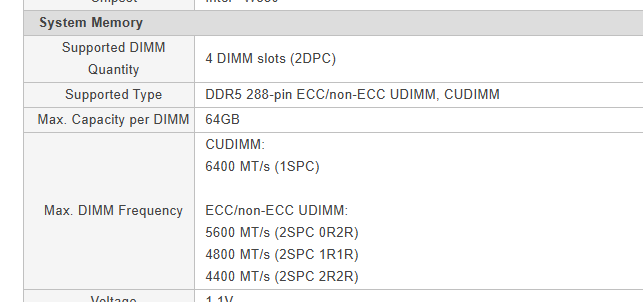

Unbuffered ecc ram hurts… i don’t wanna neither see now how much they can costs :face_with_peeking_eye:

Also, if i may say, you are threating your nas as a “desktop pc”, and you are really going on the massive overkill side. IMHO for example you will benefit more on 64gb ram instead of the horsepower in the CPU, and also i would have probably focus a bit more on the power supply

@oxyde , i’m not sure what you mean about your first sentence. What am I missing about my choice of ram?

And thanks for the comment about the nas vs desktop. This is where I get that paralysis. Any tips you can provide would be a huge help. As I mentioned above I may (emphasis on ‘may’) end up having to transcode UHD media one day, but currently it’s all 1080p or lower. So maybe I go with a lower-end CPU for now, and then add in a video card later if trancoding happens?

If I go this route, then what, get an older Xeon processor and a good amount of ram. I thought 32GB would suffice since I’m just hosting files and at a pretty low rate. Not a lot of parallel action going on.

Oh, concerning the power supply. I figured once I got the board sorted out, then I would get a good power supply with the required power for the system. Probably 500-600W and not the bottom run, but something with good reviews and likley a known brand.

Sorry if i wasn’t enough clear :smile: I was pointing to the fact that you mention ECC Registered dimms as ram choice, but the motherboard seems only supports UNBUFFERED sticks (ecc and not).

My second concern was about ram price, because ecc udimms are sadly - and - steadily expensive compared to the reg, and i think that in this specific market moment you will have hard time to find something at a reasonable price.

IMHO, totally yes. Also because i didn’t get why you are associating transcoding with the CPU :smiley: and because in future you can swap with a new one painless (and probably spending a lot less).

Here you are right, i explained myself very badly. 32gb of rams are good enough for a lot of use case, and you can always add more sticks in future painless… my intention was to emphatize that in your place in future i would have appreciated more adding ram then a powerful CPU, because the benefits are more IMHO

Yep, choose a good PSU can let you save some money on the electric bill, that actually is quite a concern for most people :smile:

1 Like

Awesome. So this goes back to the question of ECC vs non-ECC ram. And that question elicits responses like Ford vs Chevy, Nissan vs Toyota, blue/black vs white/gold dress.

Actually, I re-entered my search parameters into Kingston’s website and it doesn’t mentioned Registered ram. So I may have mis-typed. But 16GB is still $202 and a 32GB stick is $372.

Regardless, with my use case I’m wondering if I can get by with an upper-end consumer board and good ram and not server level components. Then maybe an Intel i5 or equivalent AMD chip. Or maybe lower model or older Xeon processor.

Here I go again being “that guy” asking the same old question of what hardware to use.

Just a quick note about the power usage for the proposed “6×4 TB spinners” (RAIDZ2, ~14 TB usable).

I didn’t see anything saying this server is meant to run 24/7, but if it’s replacing a system that runs Plex, that might be the case.
It also nowhere is mentioned that absolute maximum efficiency is a goal here, but it’s still something to keep in mind.

Those 4 TB drives are probably older models.
Modern HDDs often use the same or even less power than older drives, and if you look at it per TB, the yearly energy cost can add up.

If the drives are already available (“on Hand”), it’s totally fine to start building the server with them. Otherwise, if you want ~14 TB usable, you could also consider just using a mirror of 2×14 TB (or 16 TB / 18 TB) drives instead. (technically, RAIDZ2 would give a bit more redundancy, but maybe a mirror would be perfectly fine too.)

1 Like

Thanks @kricka-kracka I was trying to keep info low so I could keep to the main topic at hand, which is how the heck to I figure out what mobo and CPU to use. i’m still debating the server hardware vs quality consumer hardware.

But, to answer your question, yeah, my file server has been running 24/7 for the last 18 years (well, it’s been three iterations of hardware and I shut it down when we go on extended vacation, but it mostly it’s up and running).

I don’t have the hard drives yet. I was hoping to figure out the trifecta (mobo, cpu, ram) and then slowly buy the rest over the next few months when I see deals.

I think I want to stick with the Z2 for the extra redundancy, although a Z1 would likely be fine because how likely would it be that I would have more than 1 hard drive quit on me? And I do have copies of all our photos on my primary computer. Music and movies would be a hassle to re-rip and download.

But a simple mirror is also an interesting prospect. I hadn’t given too much thought to the cost of runnign it 24/7 becuase I’ve been running the server for so long.

DDR5 (and DDR4 to a lesser extent) is crazy expensive now. If you can live with older DDR3 memory, you can save lots of money without being materially penalized performance-wise.

on fault tolerance, my particular dells (T3600 and T3610) offer RMT: Reliable Memory Technology - once they detect an error area in the memory, they can block it off, in addition to ECC.

Not sure how good it is but it makes me feel better :slight_smile:

All right all, I have to be realistic about things. My data is not that critical. I think I can get by without ECC ram, but if I plan for it, I can always upgrade. So I’m going from a pretty high end system to something that I think is middling.

Again, mostly serving files to my wife and I and our home entertainment center PC (under the TV), but will likely add Plex with a network tuner. Files are home videos, movies, music, and photos. For now, not transcoding 4k, but maybe could one day. Right now 1Gbps NIC is fine, but could one day upgrade to 2.5 (but would also have to upgrade switches and maybe hardwires around the house).

So here goes:

  • MOBO: X570D4U ($304 brand new on amazon)
    • I like that it has IPMI and an HDMI
    • 8 SATA’s plus supports M.2 for a boot drive
    • Supports both ECC and non-ECC
    • Has some PCI slots for GPU and/or faster NIC
    • Could go with the B650D4U-2L2T for $402
      • But don’t need dual 10G ethernet
  • CPU: AMD Ryzen 5 3400G
    • Less than $100 brand new
    • Includes graphic if I want to transcode
    • But also know I can buy an older GPU card to transcode if needed
    • If I go with the B650 board, then Ryzen 5 PRO 8500G for ~$160
  • Memory: 1 x32GB or 2x16GB of non-ECC ram
    • I can always upgrade to ECC if I find I need it (or everyone here tells me I HAVE to have it :wink: )
    • 1x32 Found Crucial CT32G4DFD832A.16FB1 for $173
    • 2x16GB: I’d have to search more
    • Regardless, name brand of some sort with good reviews and hopefully works on the motherboard
    • If I go with the B650 board, then
      • 1x32: CT16G48C40U5.M8A1 for $263
      • 2x16gb: I’d have to search more
  • Boot Drive: Transcend 245GB NVME gen 3x4 ($25)
    • Not sold on this one, but it’s cheap and a decent name brand.
    • I’ve read that you don’t need more than 256 for standard install
    • But maybe go with 512 just in case. Even those can be found pretty inexpensively
  • Drive Pool: Z2 configured 6x4TB Seagate Barracuda or WD Red(5400rpm) (or similar price point)
  • Power Supply: Thermaltake Toughpower GZX2 80+ 600W ($50)
    • Could go with MSI 750W modular ($87)
    • or maybe Coolermaster MWE Gold 750 modular ($70)
  • Case: TBD
    • Maybe reuse an old one if it can fit the drives (have to check on that)
    • Maybe one of the Fractal designs
    • maybe one of those Jonsbo 8 drive cases
    • maybe the Darkrock Classico

Let me know what you think and if I’m in the right ballpark for a home computer that serves files and maybe does Plex stuff (aka a server ). I’m kind of spent with this. Not cost wise, but too many choices. My head is spinning. And trying to do this between tasks at work isn’t helping.

Careful with amd cpus that have igpu, from what I remember not all support ecc & using them for transcoding is more miss than hit.

Honestly better to grab a 3###/5###x and a cheap intel gpu

1 Like

Make that Ryzen PRO xxxxG and you have ECC support. These PRO parts are not expensive on eBay… but check with the vendor that it is NOT vendor-locked.

2 Likes

Don’t know if you realize it, but the X570D4U should have an integrated graphic card (plus the IPMI). This is a very nice to have in my opinion, and you could instead point to a Ryzen 3600 that should supports ECC (and, at least for what i see after a quick googling, be a bit less expensive then the APU 3400G, but this can vary depending on location).
Take this with a grain of salt, is still quite confusional to me the ECC supports for this CPU, hope someone can confirm or deny that assumption.

dual channel is not so important in this scenario, so if the choice is to pick something new, i would pick the biggest one, to leave more margin to future upgrade (if needed!). Probably 1 32gb stick costs also less than 2x16gb.
IMHO, try find something used… and pick what is at the best price. I would also consider slower module, if they are sell at good price… this is really a bad period to buy rams

16gb you mean :smile: buy 1 or 2 16gb Optane/psudo Optane for 3-4€ each and you will be more than fine! Use this disk instead to run apps-Plex, metadata will gain a lot sitting on a NVME instead of rust disks also if you use just Plex (and, in my experience, you will for sure explore other service to run as soon you will have the possibility!)

Seems good enough for me, just consider that it has only 6 sata connector, if you don’t plan to have more disks no problem

As possessor of a Define R5… IMHO is a really beautiful - functional - silent case, but is quite big and heavy. I have 6 disks and they are pretty well covered by 2 front 120mm fans, also all my 3 nvme (sitting on motherboard) are cooled by the side 120mm fan, 1 another 120mm fan on the back - every fan spinning at the minimum speed - and i never see temp going more than 40-42° neither in summer

It is clutch - but exists almost exclusively for remote desktop through the IPMI… uhh or I guess if you hook up a monitor to it for whatever reason. Transcoding on it is a no-go.

1 Like