How do compression / transfer speeds... work exactly on ZFS?

Hey,

bclone explosion guy here.

I’ve been noticing some strange behaviors that as someone who just started using ZFS I don’t really understand.

First of all, the important specs:
Ryzen 5500G (6c/12t)
128GB DDR4
4x Toshiba MG09 18TB drives in RaidZ1 (LZ4 compression, 1MB allocation unit size)
10GbE TP-Link TX401 NIC

I tested three scenarios one after the other.

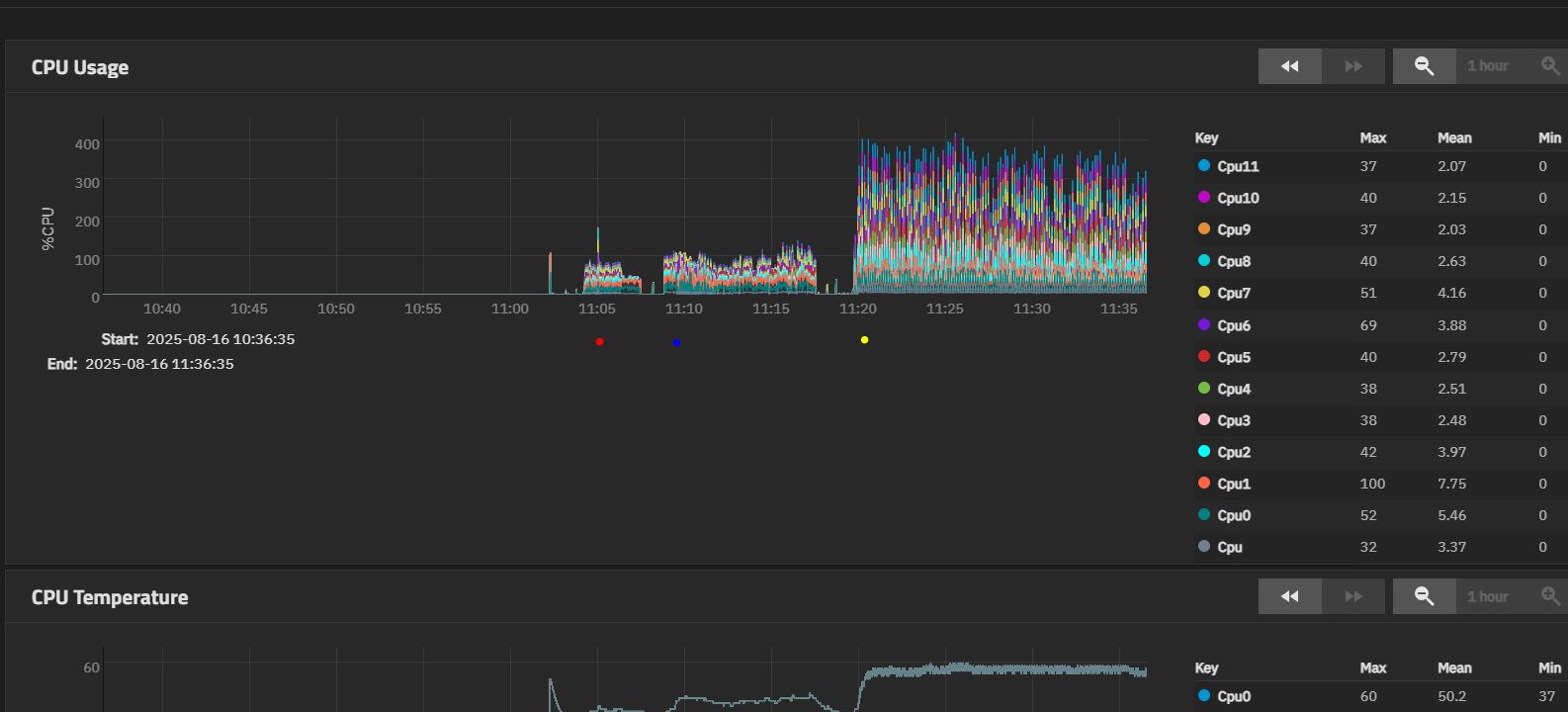
-AJA Video System Test (red dot under graph in dashboard screenshots), testing the R/W with a 64GB test file.
-ATTO Disk Benchmark (blue dot), testing with 32GB
-Simple write from W10 via SMB from a NVME drive (yellow dot).

PS, what are the spoiler tags on this forum so I can collapse the images below?
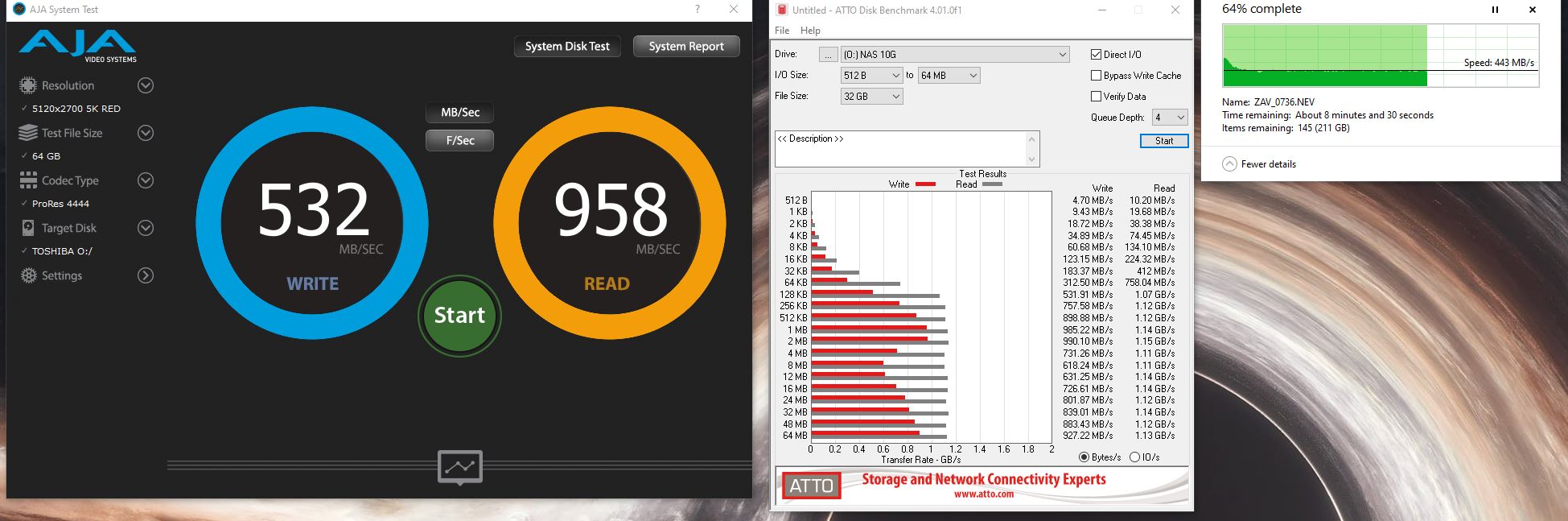
What I noticed:
-AJA System Test - Barely uses the CPU when compressing, and the drives are writing with about 3MB/s. Read speed reported from the drives in the test is almost nonexistent.

-ATTO Disk benchmark - A tad more CPU usage. Even smaller write speeds for the drives at about 0.3MB/s (they don’t even show up because the graph scaled with the transfer later on. Trust me, they’re above the blue dot)

-SMB Transfer - large video files. Stabilized at about 450-500MB/s after a few seconds at 1.1GB/s. Drives started writing with 250-270MB for those first few seconds, then plateaued at about 175MB/s. Which again seems a bit of a bottleneck somewhere as the pool is at 0% fragmentation and I’ve seen them hit 270MB/s sustained when reading. But just sometimes, it’s pretty inconsistent.

This brings me to my question.

I’m guessing the synthetic test data from the first two tests are just a bunch of ones or zeroes in repeating patterns and compression really works on them, and that’s why the write speed reported was so small.
(When testing the AJA System Test file size after it finished writing it, it was just a few MBs although it should have been 64GB.)
So the compression part worked as intended.

But why is the write speed still similar to the normal SMB transfer? Shouldn’t it have gone to the ethernet limits? I mean, if the CPU and the HDDs had absolutely no issue in compressing and writing that data(few MB of real disk space), shouldn’t it have maxed to 10GbE speeds? Especially considering that the 64GB should have easily fit into ARC, no matter what compression happened later? *ARC was empty, tests were ran just after a reboot.

Regarding the read speed, shouldn’t it have also be at 10GbE limits (~1230-1250MB/s), considering that the file that it had to read was only a few MB?

I didn’t run CrystalDiskMark, as that maxxes out the ethernet limits, most likely hitting ARC. (1233MB read / 800-900MB write for a 64GB test file) .But at least this shows the connection is not bottlenecked and can achieve max 10GbE speeds.

I’m not saying there’s an issue, I just want to understand what happens in the background.

P.S. Goldeneye says something that has me hyped, would this improve anything in cases similar to mine described above?

“OpenZFS acceleration: ARC and ZIL improvements, including DirectIO”

ZFS stores writes in ARC. Up to 4GiB by default. The number can be changed with zfs_dirty_data_max_max (clickable); perhaps other param tweaks would be required as well.

So, your writes were stored in ARC, and it is confirmed by

1.1GB/s is 8.8Gbps. My 10G NICs show 9.4 (in iperf, not smb) without jumbo frames. So I think that 8.8 is kinda normal.

Can’t say anything for the other tests.


Also, my i5-12400 (which is pretty similar to your cpu) showed over 3GB/s (was limited by NVMe perhaps) compression for LZ4. So I don’t think it is a bottleneck in your case.

Thanks, Phil. Indeed, ARC is serving writes. But let’s say we got about 3 seconds to fill that first 4GB block. If the compression didn’t take much CPU time, and the hard drives only had to write maybe under a megabyte due to the compression, why weren’t the next 4GB at the same speed?

What I’m noticing is a bottleneck somewhere. If it isn’t the ethernet, isn’t the CPU, and isn’t the pool speed… it might be the way that ZFS handles the whole process?

Because your pool speed is not the same. AFAIK, the theoretical max throughput of a raidzX vdev is the sum of all (non-parity) drives. 3x of a single drive in your case. Throughput lessens toward the drive’s end. Even if we take the throughput of the new drive with no allocated LBAs, it is 270x3 = 810MB/s. You got 450-500. Seems reasonable.

If the drive is half full, throughput would be something like 200MB/s (I’m judging by my 16TB drives). So the theoretical max (600) would be even closer to your numbers.

You can measure your pool performance with fio.

Maybe. AIUI, zfs is not about the highest possible performance. But again, your SMB numbers look ok to me.

That of course makes sense on a real transfer with -almost- uncompressible files, however I’m asking about highly compressible files. Those 64GBs were sent to the NAS, compression kicked in, and the pool had to write with either 0.34MB/s or 3MB/s depending on the test(as pointed in the dashboard screenshots posted in the first post). The final size on disk was a few MBs.

Hence my curiosity. I’m well aware that for normal transfers the main limitation (at least in a config like mine) is the pool speed.

I’ll return with repeated tests once Goldeneye comes out, and see if this changes anything.
“OpenZFS acceleration: ARC and ZIL improvements, including DirectIO”

AFAIK, video files are generally not compressible (by general purpose compression algorithms).

And I was speaking only about smb:

Indeed, well aware of that. The SMB transfer was just to compare the first two with something that had a visible bottleneck (pool speed). By comparison, the first two tests didn’t stress the CPU, barely “touched” the pool writing speed, but the results weren’t as expected.

L.E. Just for the fun of it, I re-ran the AJA test. Misremembering it as “a couple MB”, but from 64GB to 749MB is still theoretically only 1-2 seconds of the pool time (so not the bottleneck), and the limit here should be the ethernet speed.

Judging by the speed graph at the bottom, it did send “impulses” at ~1.1GB/s, however there might something on the NAS side refusing any more for about half the time dropping it to ~300MB/s, so in the end the average was 639MB/s.

Same for the reads, peaks of 1073MB.

It could be that these 2 benchmarks are just writing zeroes to the drives storage.

If that’s the case, all looks ok on the ATTO side. You already got your max network bandwidth with 1M files.

1 Like

No, it is definitely not the same as you just hitting your network max speed.