A couple of month ago I did extensive iSCSI (and NVME-oF) related testing. And the conclusion was and is quite simple that the TrueNas performance when writing towards the TrueNas iSCSI-share is not as good as hooped for.
The NAS is a powerfull AMD Ryzen 9 5900XT system with 96GB-RAM and for this test a 4TB-NVME-drive and a Mellanox Technology ConnectX-4 Lx Ethernet Adapter. The PC at the other side is also powerfull and equiped with a NVME-SSD,
There is a 10GB-cinnection between both systems using jumbo frames (9000). When transporting data to and from a SMB-share, I have full 10G-bit in both directions.
However, when transferring data towards the NAS the effective transmission speed is only 5Gbit. Which is not terrible bad, but surely less than expected. Note I did test with multiple ZFS record sizes, which did not make a significant difference (I think 64K - 16K renage is best).
Of course there is one big difference between iSCSI and SMB. In case of SMB the data is transferred as files, where in case of iSCSI the data has to be written to a ZVOL in for ZFS unkown format, which makes things more complex.
What does not take away that 10Gbit is not extremely fast nowadays ..
I seem to have solved my own issue when specifying the --nr-io-queues flag, as I’m now bottlenecked by the performance of my SSDs rather than my networking or client/server’s CPU performance.
What ever I think that a better result than 5Gbit write should be possible. So I hope someone undersands the bottleneck and knows how to solve it.
I’m guessing you are testing with Windows Server since Windows 10/11 does not support NVMe-oF/TCP? From my experiences, Windows sucks with iSCSI. I’ve had better luck with SMB on Windows than with iSCSI. It works, but not consistently. NVMe-oF and iSCSI in Linux works about the same. I’ve hit 3.2 GB/s (25.6 Gbps) over Conenctx-3 40GbE using multiple vdevs/svdevs configurations for Ubuntu 25.10. I don’t believe RoCE is enabled on Scale, but in Core, I’ve hit 4 GB/s over the same connection. Currently using 26.04 TrueNAS Scale, and it’s been working really great in Linux. For Windows, I prefer SMB over iSCSI.
Another consideration is if you have any IDS/IPS or deep packet inspections between point A-B. Single thread monitoring of traffic on your network can be detrimental for throughput.
I am using Windows11 Pro, which is by default not supporting NVME-Of, even not with the StarWind driver. However, I have been testing with a StarWind support engineer and using a beta driver, it was working. I will be informed if there is news / that driver is released.
RoCE is not supported on the TrueNas CE version, which I use.
But back to the subject of this thread. I have extensively been testing between TrueNas and the WIndows11 PC and the performance is NOT OK for both iSCSI and NVME-oF(TCP) when writing data towards / on the TrueNas system.
And I verdict, can not be 100% sure(!), that the problem is at the TrueNas side. As written both systems should be more than capable to support a full 10Gbit stream up and down.
What I measure is:
SMB-share 10Gbit up and down
NVME-oF 10Gbit towards the PC, 5Gbit towards TrueNas
iSCSI 10Gbit towards the PC and again, 5Gbit towards TrueNas
And that is not what I expected. Somehow TrueNas does not seems to manage to write a full (single file) 10Gbit stream. So I would love to know why !!
And of course assuming the problem is at the TrueNas side, how to solve it.
The test has been executed using
a single big file (20GB),
NVME-ssd at both sides
using a TrueNas pool being a singel 4TB NVME-SSD
using ConnectX4 card running in 10Gbit mode using 9000byte jumbo frames
As far as know (and i have no personal experience with iscsi) iscsi defaults to sync writes (pls correct me if i’m wrong). Have you checked if sync is set to always, standard or never?
If it’s set to always or standard try switching it to never.
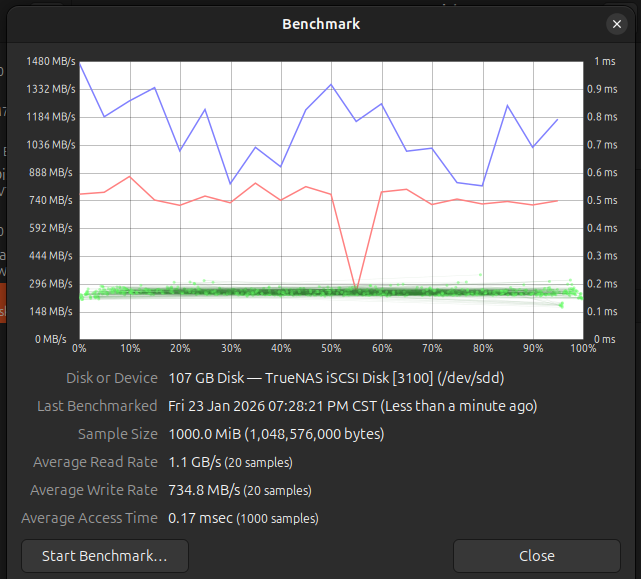
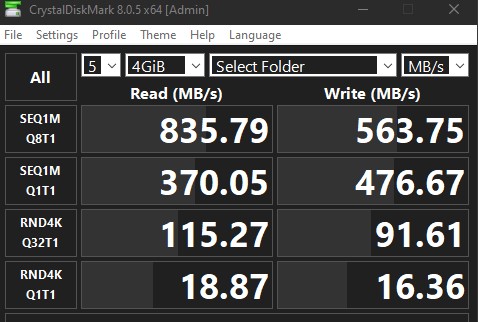
I’ve disabled sync writes in TrueNAS to see if would improve iSCSI in Windows. iSCSI in Windows is just terrible from my experience. Everything else seems to connect just fine to it. Here’s a benchmark I tested from Ubuntu 25.10 to TrueNAS on a test pool consisting of 3x 2TB HDD in stripe vdev setup with a stripe special vdev. The image after is from Windows 10 using CrystalDiskMark. I did something similar, copying a 21 GB iso file to and from. Everything on Linux was great, while Windows experienced inconsistent behavior.
Lars, my sync setting was ‘standaard’ and as far as my knowledge reach that imply that synchronization is only used if the application above ask for it. And iSCSI is by default not asking for ‘Sync’. Never the less it It triggered me to do an extra test.
So I repeated a the basic test of copying a file towards TrueNas with sync explicitly disabled. As expected that did not change any thing.
Never the less good to do that simple test! Thanks.