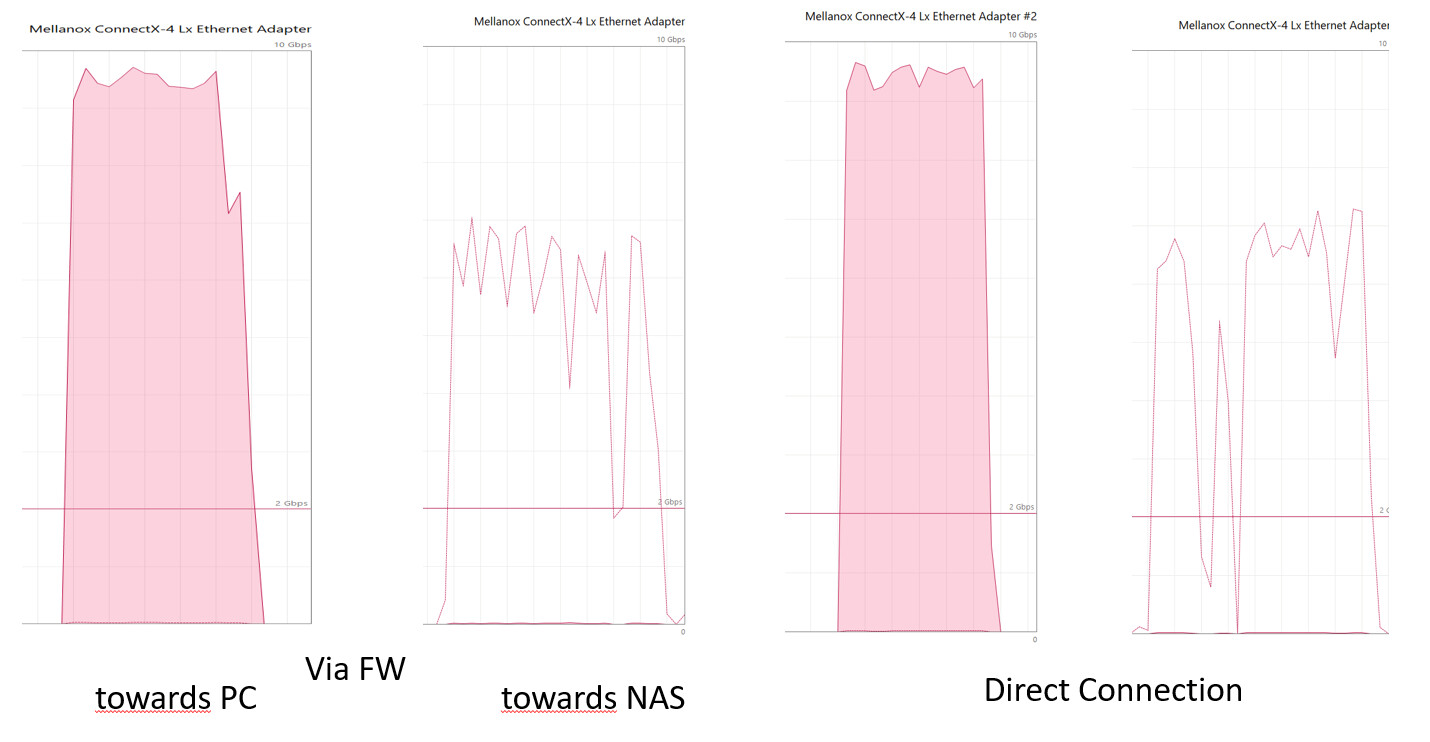
Since long I noticed that on my 10G network transfers from TrueNas to my PC have the expected near 10G speed, however from PC to to TrueNas (Scale) the average speed is much slower (around 5G).
Where IMHO, both systems are fast and are using NVME ssd’s, 10G in both directions should not be a problem. Note that I am talking about the transfer of big files using jumbo frames, via a from a single source single destination.
So I am scratching my head why I do not manage to get full 10G speed and also why it is OK in one direction and not in the other direction.
One of the verdicts I have, just a verdict, that it has something to do with settings like receive window size and or receive buffer size ….. things like that.
So I wonder what the default tcp (IPv4 and 6 & 4) are and how I can change certain settings to see if that solves the issue.
I think that the Tunables screen is gone (community edition)? and that there is a Sysctl screen which perhaps could be used for this kind of settings.
So I am interested in these tunables and of course also if others also noticed this problem and did fix it.
You shouldn’t have to use jumbo frames to accomplish 10Gb speeds. In a lot of cases if jumbo frames isn’t implemented properly, you can see performance issues like this.
Jumbo frames are perhaps not absolutely necessary, however I did extensive tests in the past and my conclusion was ‘better performance when using jumbo frames’.
Also note that the the traffic is also passing my pfSense firewall and jumbo frames are an advantage there as well since the firewall has significant less packages to analyse.
What ever I have been testing ‘from PC to TrueNas’ and ‘from TrueNas to PC’ and of course in both cases the packages are passing and handled by the same elements.
I did also test with a direct connection between the NAS and the PC with nearly the same result. So the problem is either in the PC or the NAS or both.
As said both systems are powerfull machines with NVME-ssd’s using Connect X4 Lx NIC’s. Towards the PC is OK the other way around is ‘so so’ and I do not understand why !
Below the graphs of the traffic (one big file transferred between the two systems)
Have you tested the network in both directions using iPerf? Do you get the full 10Gbps expected? Full hardware details on the TrueNAS server, at least, and the pool set up could help with replies.
I discovered what is causing my issue. I always been using a TrueNas base iSCSI drive for testing, and as jgreco his post explains
*iSCSI is a SAN protocol. NFS, CIFS, etc., are NAS protocols.
For a NAS protocol, the client sends a command to the filer, such as “open this file”, or “read ten blocks”, or “remove this file.” On the filer, the local NAS protocol daemon translates this into UNIX file syscalls, and passes it off to the filesystem.*
So after reading that article, I did create a test SMB-share and did test transfers again. See picture below).
So this changes the question from “how to improve TCP” to, “how to improve writing to an iSCSI-share” (different topic).
Note that the the iSCSI and the SMB based tests where performed with the same equipment, same NVME based pool (single 4TB-ssd) and the same file sizes ~ 20GB.