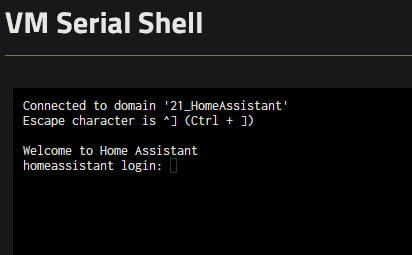
I decided to try a different CPU option, as in the logs I saw a lot of warnings that seemed to point at the CPU (like 2026-01-21T16:38:57.459318Z qemu-system-x86_64: warning: This feature depends on other features that were not requested:). My CPU is an EPYC 7713. Instead of using Host Passthrough or Host Model, I swapped it to kvm64 and I do now see it working in the Serial Shell (still no display, but that’s not an issue for me).
Thanks for your work on this, Troy. I had a play around this afternoon and was able to both create a fresh install per your instructions and restore from a recent backup saved out from HAOS, as well as use them for a base to ingest my entire backed up Hyper-V HAOS install (from a .vmdk).
Hi everyone! I am trying to follow aloong in order to create my home assistant VM. So far, I have only created VMs from iso files, so these steps are new to me.
I have created my Zvol, and made sure the size is correct. I downloaded the file, and ran the second command (creating the raw if i understand correctly). Now, at the last step, i run into an issue.
the path for my zvol is Apps and VMs/Zvols_VMs/HomeAssistant. i suspect the spaces (why did i use spaces?) are the issue. the command i was trying to run was: sudo qemu-img convert -p -O raw haos_ova-18.3.qcow2 “/dev/zvol/Apps and VMs/Zvols_VMs/HomeAssistant”.
this gave the following problem: no such file or directory. anyone can assist me?
Don’t uses spaces. I did not think the GUI allowed spaces.
When you create a VM there is a Disk import feature, unfortunately it is only available when you create a VM, but I would have used this to import the Virtual disk. (v25.10+)
I would have Apps and VM as separate datasets in the root of your pool. I have sided on apps and vms just in-case there are every path issues, but mixed case seems to work fine for most things.
yeah, the spaces are pretty cursed. sadly i have it setup like this years ago. not sure how to correct the name without breaking all my apps and vms.
the exact error is “truenas% sudo qemu-img convert -p -O raw haos_ova-18.3.qcow2 “/dev/zvol/Apps and VMs/Zvols_VMs/HomeAssistant”
qemu-img: /dev/zvol/Apps and VMs/Zvols_VMs/HomeAssistant: error while converting raw: Could not create ‘/dev/zvol/Apps and VMs/Zvols_VMs/HomeAssistant’: No such file or directory”
so it appears the command understands the spaces in my path (i think)
to answer your questions better: Apps and VMs iis my dataset (just like tank for my storage). the Zvols_VMs is a subdataset in there (not sure how yyou call those), in there are all my other zvols from my VMs