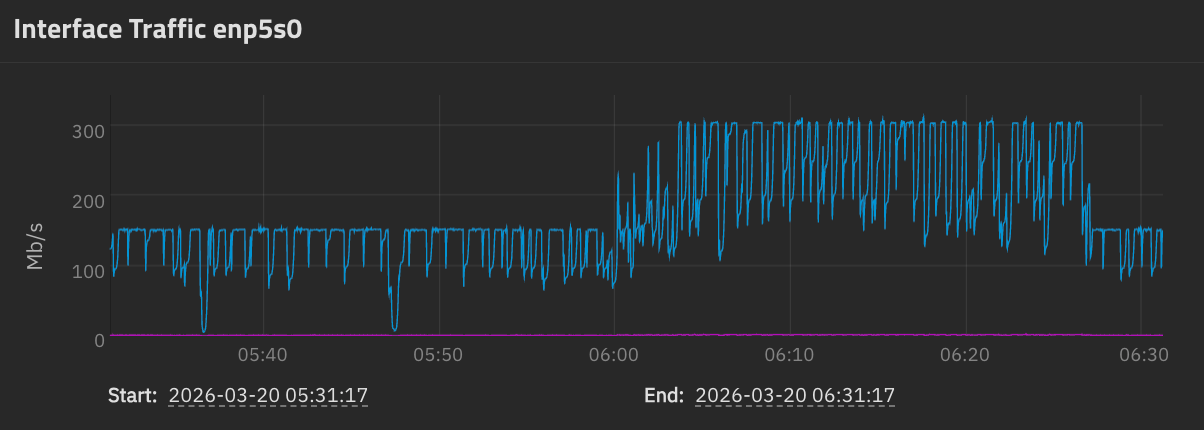
In a different thread in which I mentioned slow replication to my Hetzner server in Finland, it was recommended by @pmh that I try switching away from Tailscale to just using SSH. So I tried, and while with Tailscale I got:
Which is both worse than Tailscale, and highly suspicious.
(This isn’t my disk setup; it’s a 10-disk raidz2, and I have done a fio test that shows it’s capable of sustaining a 1200 MiB/s write. This is definitely not the disks.)
Bandwidth-in-bits-per-second × Round-trip-latency-in-seconds = TCP window size in bits
so
bandwidth × 110ms = 2MiB
so
bandwidth = 16 Mib / .11 s = 145 Mib/s
which is just about exactly what I’m seeing, which feels highly suspicious.
Can someone who knows SSH on TrueNAS comment? I don’t want “SSH+NETCAT”. My servers are more than fast enough to encrypt/decrypt at wire speed, and I have a 1 Gib/s link through. This shouldn’t be like this.
The graphs should be set to the same zoom level of time for comparison. Just changing that makes it look different. It’s just saying the image comparison could be better.
I tried the section that starts “For a host with a 10G NIC, optimized for network paths up to 100ms RTT, and for friendliness to single and parallel stream tools, add this to /etc/sysctl.conf”, specifically:
Given that my network is only 1Gib/s, but about 100ms, and this should be good for single streams, this seemed like the right thing to try. But the network throughput graph stayed stuck at 150 Mib/s and so I did not investigate this path further.
Dammit, again this was voted on and closed due to “not enough votes to prioritize”. There are enough people out here with fast connections and high-latency links. Why this isn’t something to look into is frustrating.
Pardon my ignorance, but why? You mention you’re able to do this inside a Tailscale runnel, so security shouldn’t be a concern, so what’s the downside of using this method?
The two options I tried were Tailscale & SSH+NETCAT in which it seems like Tailscale is simply not fast enough to keep up with the flow, or pure SSH (without Tailscale) in which case SSH’s internal buffers are throttling. I was trying to say that SSH+NETCAT with no Tailscale, in which there is no transit encryption, is not an option.
Right, not suggesting unencrypted replication at all.
Though it would be interesting to check if the link between hosts is capable of high throughput at all, because tailscale itself should be able to do over 10Gib according to them: Surpassing 10Gb/s with Tailscale: Performance Gains on Linux
iperf3 inside the tunnel (and outside it) could be used for benchmarking this, preferably with a longer benchmark (a minute, perhaps?)
Cisco recommends this container with it, I’m unsure if truenas has non-containerized binary of it as one of the base installed packages or I installed it later via dev mode: mlabbe/iperf3 - Docker Image
iPerf inside and outside of the Tailscale tunnel would probably be illustrative. For now I can only say that it was hitting the speeds I noted with CPU usage of 80% so it didn’t seem like there was a lot of headroom. FYI, a stock TrueNAS installation comes with the iperf3 binary so no hackery is needed there.