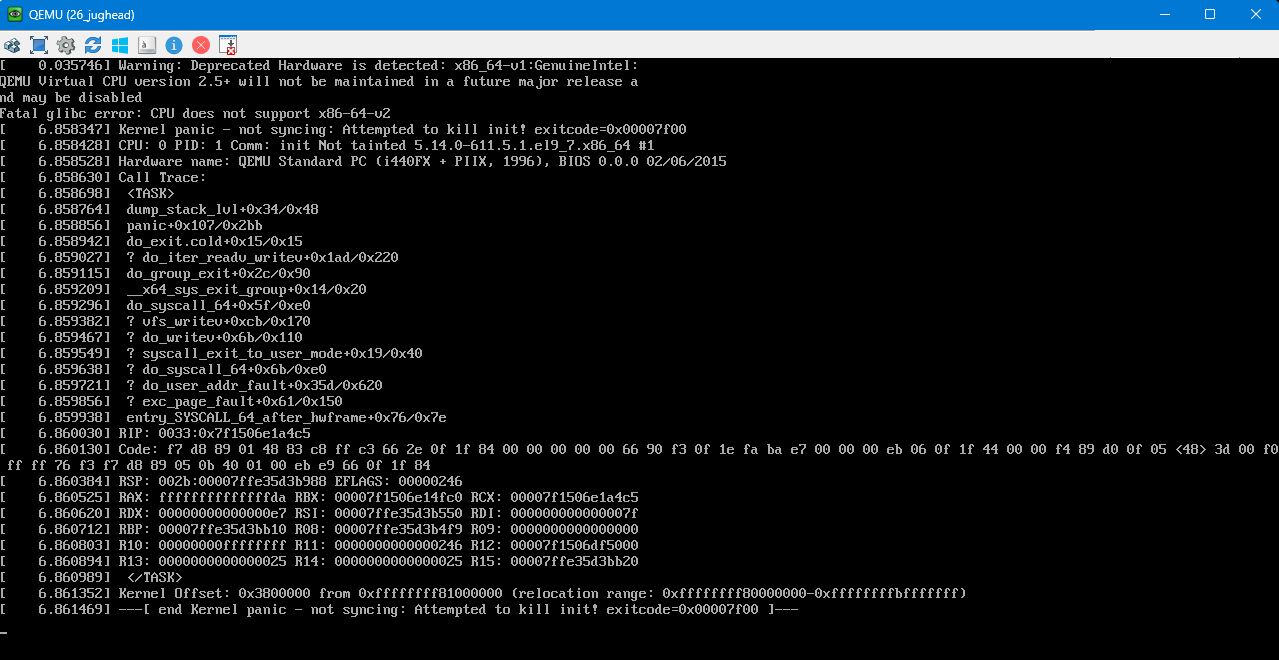
I’m on 25.10.2.1 - Goldeye and I am trying to spin up a new Linux virtual machine. I currently have three VM’s and I’m trying to spin up a new VM, but they all fail with kernel panics. I setup the configs, identical to the previous three machines, start the installation, connect via VNC, select install and they all fail as soon as the install starts with a kernel panic.
2026-04-27 11:27:36.336+0000: starting up libvirt version: 11.3.0, package: 11.3.0-2~bpo12+1 (Debian), qemu version: 10.0.0Debian 1:10.0.0+ds-2~bpo12+2, kernel: 6.12.33-production+truenas, hostname: truenas.
LC_ALL=C
PATH=/usr/local/sbin:/usr/local/bin:/usr/sbin:/usr/bin:/sbin:/bin
HOME=/var/lib/libvirt/qemu/domain-18-26_jughead
XDG_DATA_HOME=/var/lib/libvirt/qemu/domain-18-26_jughead/.local/share
XDG_CACHE_HOME=/var/lib/libvirt/qemu/domain-18-26_jughead/.cache
XDG_CONFIG_HOME=/var/lib/libvirt/qemu/domain-18-26_jughead/.config
/usr/bin/qemu-system-x86_64
-name guest=26_jughead,debug-threads=on
-S
-object ‘{“qom-type”:“secret”,“id”:“masterKey0”,“format”:“raw”,“file”:“/var/lib/libvirt/qemu/domain-18-26_jughead/master-key.aes”}’
-blockdev ‘{“driver”:“file”,“filename”:“/usr/share/OVMF/OVMF_CODE_4M.fd”,“node-name”:“libvirt-pflash0-storage”,“auto-read-only”:true,“discard”:“unmap”}’
-blockdev ‘{“node-name”:“libvirt-pflash0-format”,“read-only”:true,“driver”:“raw”,“file”:“libvirt-pflash0-storage”}’
-blockdev ‘{“driver”:“file”,“filename”:“/var/db/system/vm/nvram/26_jughead_VARS.fd”,“node-name”:“libvirt-pflash1-storage”,“read-only”:false}’
-machine pc-i440fx-10.0,usb=off,dump-guest-core=off,memory-backend=pc.ram,pflash0=libvirt-pflash0-format,pflash1=libvirt-pflash1-storage,acpi=on
-accel kvm
-cpu qemu64
-m size=524288k
-object ‘{“qom-type”:“memory-backend-ram”,“id”:“pc.ram”,“size”:536870912}’
-overcommit mem-lock=off
-smp 4,sockets=2,dies=1,clusters=1,cores=2,threads=1
-uuid 53a7e293-ecaa-4cf3-a068-6cfdba28c16b
-no-user-config
-nodefaults
-chardev socket,id=charmonitor,fd=45,server=on,wait=off
-mon chardev=charmonitor,id=monitor,mode=control
-rtc base=localtime
-no-shutdown
-boot strict=on
-device ‘{“driver”:“nec-usb-xhci”,“id”:“usb”,“bus”:“pci.0”,“addr”:“0x4”}’
-device ‘{“driver”:“ahci”,“id”:“sata0”,“bus”:“pci.0”,“addr”:“0x5”}’
-device ‘{“driver”:“virtio-serial-pci”,“id”:“virtio-serial0”,“bus”:“pci.0”,“addr”:“0x6”}’
-blockdev ‘{“driver”:“file”,“filename”:“/mnt/default/ISO/AlmaLinux-9.7-x86_64-minimal.iso”,“node-name”:“libvirt-2-storage”,“read-only”:true}’
-device ‘{“driver”:“ide-cd”,“bus”:“sata0.0”,“drive”:“libvirt-2-storage”,“id”:“sata0-0-0”,“bootindex”:1}’
-blockdev ‘{“driver”:“host_device”,“filename”:“/dev/zvol/default/VM/jughead-1w2uq”,“aio”:“threads”,“node-name”:“libvirt-1-storage”,“read-only”:false,“discard”:“unmap”,“cache”:{“direct”:true,“no-flush”:false}}’
-device ‘{“driver”:“ide-hd”,“bus”:“sata0.1”,“drive”:“libvirt-1-storage”,“id”:“sata0-0-1”,“bootindex”:2,“write-cache”:“on”,“serial”:“zlJcw4Pd”}’
-netdev ‘{“type”:“tap”,“fd”:“46”,“vhost”:true,“vhostfd”:“48”,“id”:“hostnet0”}’
-device ‘{“driver”:“virtio-net-pci”,“netdev”:“hostnet0”,“id”:“net0”,“mac”:“00:a0:98:1a:73:6d”,“bus”:“pci.0”,“addr”:“0x3”}’
-chardev pty,id=charserial0
-device ‘{“driver”:“isa-serial”,“chardev”:“charserial0”,“id”:“serial0”,“index”:0}’
-chardev socket,id=charchannel0,fd=43,server=on,wait=off
-device ‘{“driver”:“virtserialport”,“bus”:“virtio-serial0.0”,“nr”:1,“chardev”:“charchannel0”,“id”:“channel0”,“name”:“org.qemu.guest_agent.0”}’
-device ‘{“driver”:“usb-tablet”,“id”:“input0”,“bus”:“usb.0”,“port”:“1”}’
-audiodev ‘{“id”:“audio1”,“driver”:“none”}’
-vnc 0.0.0.0:4,password=on,audiodev=audio1
-device ‘{“driver”:“qxl-vga”,“id”:“video0”,“max_outputs”:1,“ram_size”:134217728,“vram_size”:67108864,“vram64_size_mb”:0,“vgamem_mb”:64,“xres”:1920,“yres”:1080,“bus”:“pci.0”,“addr”:“0x2”}’
-device ‘{“driver”:“virtio-balloon-pci”,“id”:“balloon0”,“bus”:“pci.0”,“addr”:“0x7”}’
-sandbox on,obsolete=deny,elevateprivileges=deny,spawn=deny,resourcecontrol=deny
-msg timestamp=on
char device redirected to /dev/pts/27 (label charserial0)
I’m not sure what I’m missing. Thoughts?
Thanks