Hello everyone, and thanks in advance for your help.
Let me briefly explain my situation. I have a TrueNAS Scale 25.04.1 server with IP 192.168.1.13 on which I’ve installed several Docker containers. My home network consists of:
- main network with a modem router with IP 192.168.1.1/24
- secondary network with a modem router with IP 192.168.2.1/24
I need to route traffic from some containers to the secondary network, but despite several attempts, I still haven’t managed to do so. I’m probably making some mistake, but I can’t figure out where.
Test 1: I added an IP 192.168.2.13 to the network card and defined a static route from this IP to the gateway 192.168.2.1. I then assigned this IP address to a test container.
It doesn’t work!
Test 2: Thinking it was a MAC address issue, I installed another network card and assigned an IP address of 192.168.2.13. But still no success.
Furthermore, from the router interface, 192.168.2.1, despite assigning an IP address of 192.168.2.13, doesn’t appear as a connected device. And when I try to ping the router to the server, it’s unreachable, but when I ping the server to the router, it is.
I hope I’ve explained myself well, and I’m hoping you can help me figure out the problem.
Thanks.
PS: I apologize for my poor English.
I don’t think you should assign the IP address to a test container. Simple assigning it to the NIC should be enough.
Did you perform pings from the Truenas, or from the container?
Also, post the output of ip a.
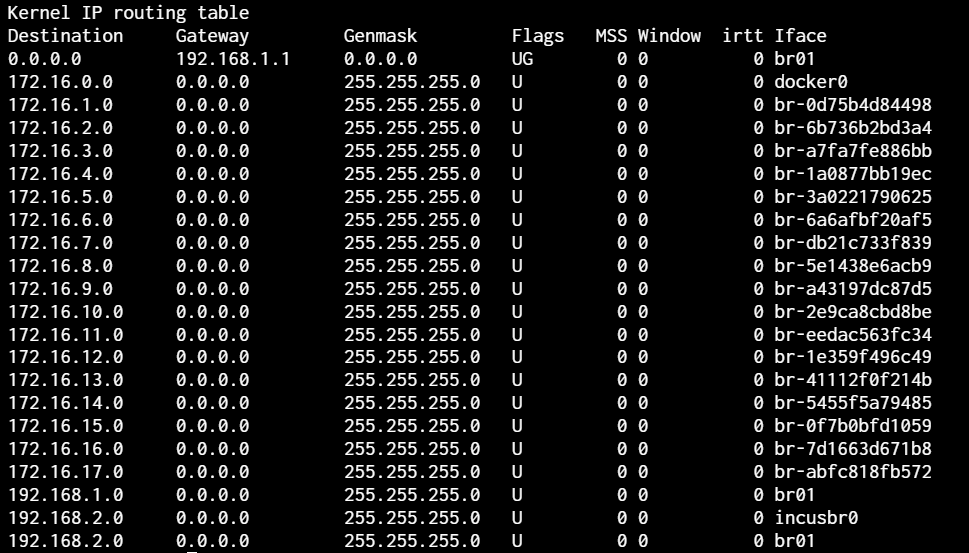
Here’s my netstat -rn:
In short, what I’d like to do is point the alias br01 192.168.2.13 to the gateway 192.168.2.1.
To answer your question (maybe I didn’t explain myself well), I’m having no problems between containers and TrueNAS.
I do believe I got you just fine. I’m not very familiar with static routes, but you don’t need those to reach your second subnet. Just assign an IP (from the desired subnet) on the second truenas NIC (do not forget to remove an IP from the container).
Aiui sending network packets (to the particular IP) from the machine connected to multiple subnets works like this:
- If the destination IP is within one of these subnets, the packet will be sent via NIC with this very subnet.
- If the destination IP is not within any of the subnets, the packet will be sent via NIC with the default gateway. This default gateway is a router that will… route this packet to the next subnet and so on. If there is no default gateway, the packet won’t be sent.
So in your case with the truenas machine connected to two subnets (192.168.1.0/24 and 192.168.2.0/24) via two NICs (each NIC has an IP set from the particular subnet), you don’t need any static routes to reach any IP of these subnets. Moreover, you don’t even have to specify a default gateway (your internet won’t work, though). Thus, your containers also will be able to reach any of these subnets (at least if you didn’t change the network mode). Just tested it (not with truenas).
Disclaimer: I’m not a network guy – can be wrong.
Hi, sorry for the delay, but I haven’t had much time these days.
So, thanks for the info. I managed to reach my containers from the local network 192.168.2.0/24. Unfortunately, I’m having another problem now: how can I reach them from the outside via the secondary gateway? I can’t reach them remotely at the moment; even opening the router ports 192.168.2.1 directly doesn’t work.
Thanks in advance for your support.
As @swc-phil mentioned you won’t be able to access the Internet from the 192.168.2.X network so therefore you won’t be able to access them remotely. If I’m understanding what you are trying to do, I believe you need to setup the networks on your Router with gateways, then setup a static route on it (the router) to point 192.168.2.X traffic to 192.168.1.1 for handling as it’s gateway of last resort. That should send traffic that is not know to the 192.168.2.X network to 192.168.1.1 and if it’s for the 192.168.1.1 network it will go out it’s interface on the router and other traffic will go out to the Internet.
Define the “outside”. If you meant “from the internet”, then why do you care from which gateway (aka router) they would be accessed?
Did you mean “port forwarding”? If so, it should be easy: the external port is the port via which the app/container will be accessed (<router-wan-ip:external-port>); the internal ip is the ip of the container’s host (ip of the truenas in your case); and the internal port is the mapped port of the container through which you access your container within your LAN – <truenas-ip>:<internal-port>. Exact naming can differ.
In general, forwarding ports on the router is not secure. Well, it can even be considered dangerous (especially if you don’t know what you are doing). If you would like to access your LAN from the internet, you should consider setting up a VPN server on your router and then accessing your LAN via VPN.