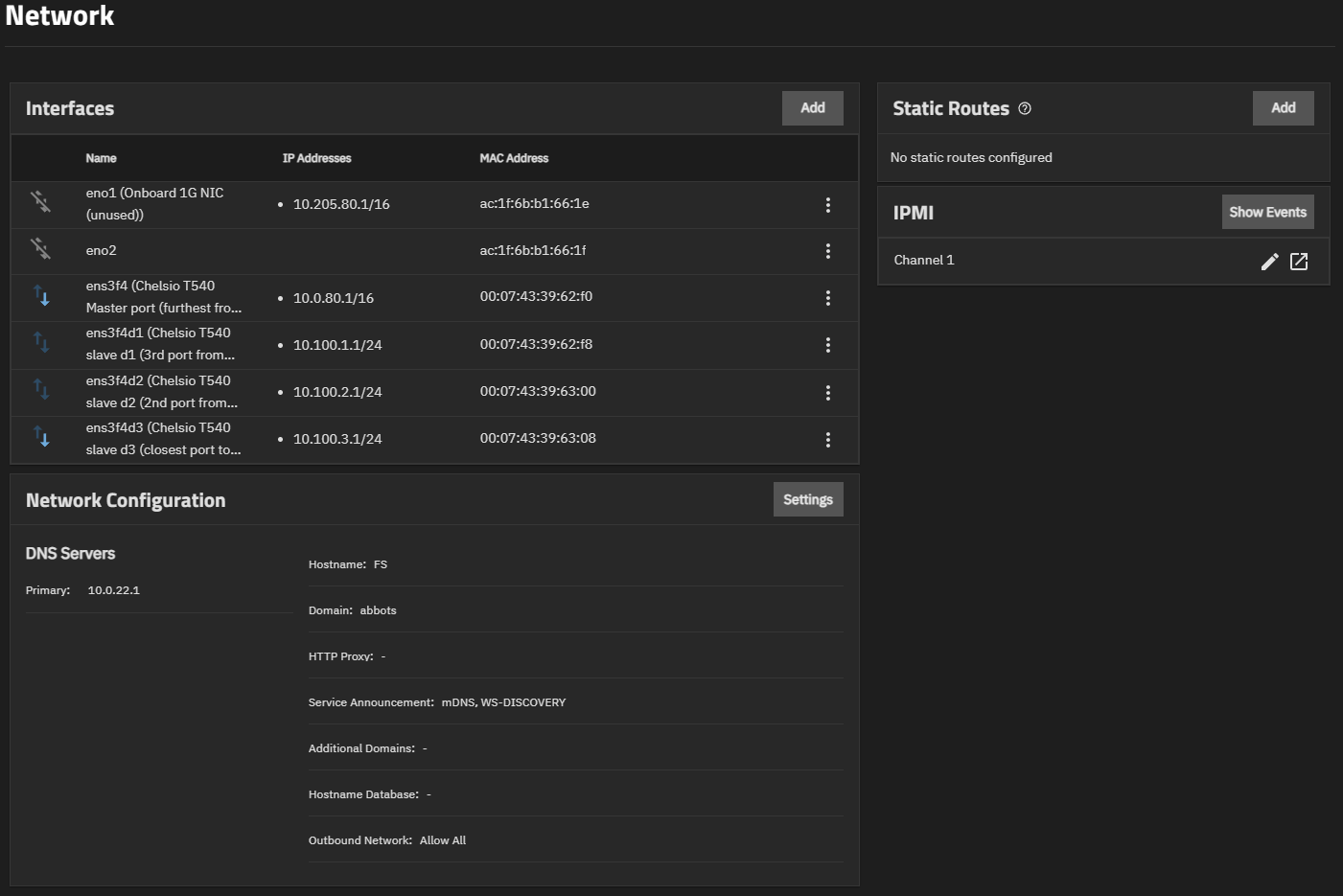
In settings:
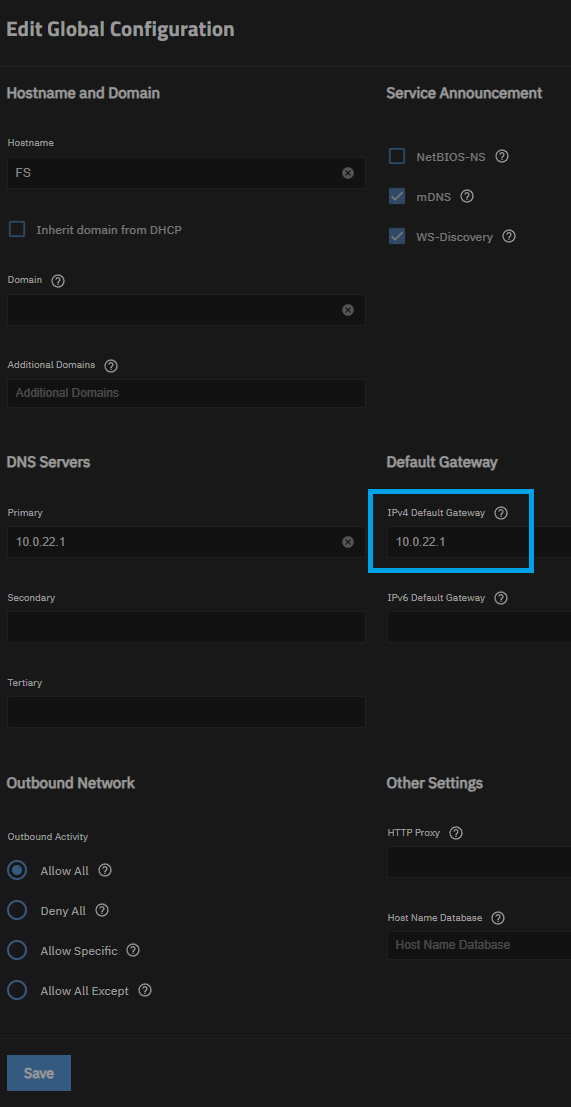
and yet:
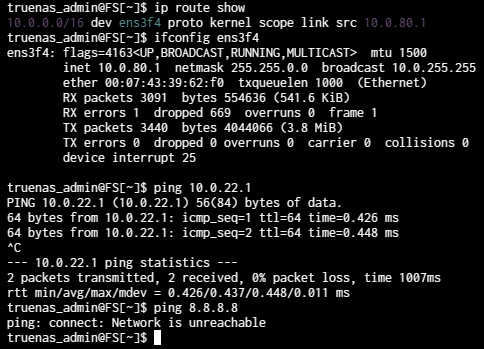
Any ideas why the gateway isnt being applied on boot?
Thanks!
How are 10.0.80.x addresses supposed to connect to 10.0.22.x networks?
Sorry, I just noticed you were able to ping. I will wait for someone else to check network settings
Anyone any ideas? Would be appreciated!
Can you post the whole ifconfig? Just in case.
Sorry reply took a while, IRL hit hard.
But heres the data:
ifconfig

eno1: flags=4099<UP,BROADCAST,MULTICAST>  mtu 1492
inet 10.205.80.1  netmask 255.255.0.0  broadcast 10.205.255.255
ether ac:1f:6b:b1:66:1e  txqueuelen 1000  (Ethernet)
RX packets 0  bytes 0 (0.0 B)
RX errors 0  dropped 0  overruns 0  frame 0
TX packets 0  bytes 0 (0.0 B)
TX errors 0  dropped 20 overruns 0  carrier 0  collisions 0
device memory 0xfb200000-fb27ffff

eno2: flags=4099<UP,BROADCAST,MULTICAST>  mtu 1492
ether ac:1f:6b:b1:66:1f  txqueuelen 1000  (Ethernet)
RX packets 0  bytes 0 (0.0 B)
RX errors 0  dropped 0  overruns 0  frame 0
TX packets 0  bytes 0 (0.0 B)
TX errors 0  dropped 0 overruns 0  carrier 0  collisions 0
device memory 0xfb100000-fb17ffff

ens3f4: flags=4163<UP,BROADCAST,RUNNING,MULTICAST>  mtu 1500
inet 10.0.80.1  netmask 255.255.0.0  broadcast 10.0.255.255
ether 00:07:43:39:62:f0  txqueuelen 1000  (Ethernet)
RX packets 3942  bytes 785286 (766.8 KiB)
RX errors 1  dropped 2423  overruns 0  frame 1
TX packets 3912  bytes 3749544 (3.5 MiB)
TX errors 0  dropped 0 overruns 0  carrier 0  collisions 0
device interrupt 25

ens3f4d1: flags=4163<UP,BROADCAST,RUNNING,MULTICAST>  mtu 9000
inet 10.100.1.1  netmask 255.255.255.0  broadcast 10.100.1.255
ether 00:07:43:39:62:f8  txqueuelen 1000  (Ethernet)
RX packets 608  bytes 266636 (260.3 KiB)
RX errors 0  dropped 0  overruns 0  frame 0
TX packets 86  bytes 12755 (12.4 KiB)
TX errors 0  dropped 0 overruns 0  carrier 0  collisions 0
device interrupt 25

ens3f4d2: flags=4163<UP,BROADCAST,RUNNING,MULTICAST>  mtu 9000
inet 10.100.2.1  netmask 255.255.255.0  broadcast 10.100.2.255
ether 00:07:43:39:63:00  txqueuelen 1000  (Ethernet)
RX packets 616  bytes 268976 (262.6 KiB)
RX errors 0  dropped 0  overruns 0  frame 0
TX packets 87  bytes 12839 (12.5 KiB)
TX errors 0  dropped 0 overruns 0  carrier 0  collisions 0
device interrupt 25

ens3f4d3: flags=4163<UP,BROADCAST,RUNNING,MULTICAST>  mtu 9000
inet 10.100.3.1  netmask 255.255.255.0  broadcast 10.100.3.255
ether 00:07:43:39:63:08  txqueuelen 1000  (Ethernet)
RX packets 5770  bytes 1012587 (988.8 KiB)
RX errors 0  dropped 2423  overruns 0  frame 0
TX packets 91  bytes 13447 (13.1 KiB)
TX errors 0  dropped 0 overruns 0  carrier 0  collisions 0
device interrupt 25

lo: flags=73<UP,LOOPBACK,RUNNING>  mtu 65536
inet 127.0.0.1  netmask 255.0.0.0
loop  txqueuelen 1000  (Local Loopback)
RX packets 313  bytes 28823 (28.1 KiB)
RX errors 0  dropped 0  overruns 0  frame 0
TX packets 313  bytes 28823 (28.1 KiB)
TX errors 0  dropped 0 overruns 0  carrier 0  collisions 0
Running route add default gw 10.0.22.1 ens3f4 fixes it, but thats defined in the config, yet doesnt seem to be taking hold. I have to run it manually each boot.
These are the network settings - ens3f4 is LAN, the others at 10.100.x.x are non-LAN subnets to other local devices, and not routable.
Curious; after boot & it going down does midclt call route.sync fix it (at least for that boot)? Or do you manually have to specify route add default gw 10.0.22.1 ens3f4
Returns null, and yes, it works. Doesnt survive reboot though, as you suggested might be the case.
In theory then, middleware is not the responsible cause (IE, TrueNAS has the correct settings & in theory is applying them at some point during boot, but for whatever reason they vanish).
…I actually don’t have a next step because I have a non-recommended NIC & am experiencing something similar, but instead of finding & resolving the root cause, I’ve just added that midctl call into my post-init script (amoung several other tunables, timers, bounces, and other stupid rituals needed to get my network functional after a reboot).
I think I even managed to pull logs to confirm that TrueNAS does apply the routes, but I couldn’t find any reason that they magically drop afterwards during the boot process
Hopefully this points you towards a relevant resolution (or you can be lazy like me & make a postinit that waits 30 seconds & then applies that midclt call) that I can hopefully steal & apply for my own needs.
Edit: if I had to guess my issue is more so some sort of boot sequence issue between my nic and middleware… which I frankly wouldn’t know how to fix outside of my workaround
Taking into account what @Fleshmauler has said, what about trying to set this network on an interface on a different physical nic (eno2 for one)? Thus, if it would work, we will know that this is a hardware-related issue.
Also, what NICs are these? @Fleshmauler, I think you should post yours too.
In signature:
NIC:
AQC113CS works ok with additional effort & postinit rituals
All my working NICs are on the same card, a 4 port chelsio 10G T5 adapter. Its been a pain to start figuring how to configure them and Ive had to pause halfway - I dont want to tinker in case I lose what Ive figured out somehow.
The entire LAN reachable by cable is 10G OM2/OM3.
Well you can either do a bug report I guess, or just add a postinit with the previous command
Yeah, but you have another 1G NIC.
You do you.
I have a 1G port yes. What I dont have is a 1G LAN connection reachable from it.
You could submit a bug report & provide logs to TrueNAS team & see if it is maybe a TrueNAS glitch. You could go into the deep end trying to investigate if you have some arcane hardware misconfiguration…
…or, you can go to settings>advanced>post init script & then add a script with sleep 15 to give the system a chance to finish booting & then the midclt call route.sync & then have a network that actually works after a reboot even though the root cause itself was never actually fixed.