Well… at least per iperf we’ve resolved the networking.
To actually increase transfer speeds may take a look at hardware & I’m not going to be particularly useful for pool layouts 
Well… at least per iperf we’ve resolved the networking.
To actually increase transfer speeds may take a look at hardware & I’m not going to be particularly useful for pool layouts
Tthanks but you have more knowledge than I do on this subject.
As far as hardware is concerned , my disks are WD Red NAS drives, which probably only run at about 5400rpm, and not the same speed as ssd drives.
The motherboard is a Supermicro X9SCM, and is about 13 years old now.
Ram is Kingston value ECC 16Gb
Then I have a LSI card which connects all my disks. the card sits in a pci-e 3.0 slot.
I have just received my new 4 port 2.5Gb with 2 port 10Gb switch, and would like to ask if the 10Gb ports would give more speed from my TrueNAS to my desktop pc with a 2.5Gb nic, or to any other device.
If it won’t I’ll return it.
Thanks
I doubt you would see any change in file transfer speeds. You would have to change your pool configuration or go to SSD / NVMe.
Ok thanks.
With regard to ssd or NVMe, are you talking about my desktop or TrueNAS.
I ask because I already have both in my desktop, but in TrueNAS, they are all spinning discs, and I’m just curious about swapping them for ssds, if it’s feasable that is.
Thanks
Going from TrueNAS to PC. You should be able to see the fastest transfer speeds if you do a file copy of a large file that can fit entirely in your ARC (ram) of TrueNAS. Repeated file reads of item in the ARC should be fast. Try the copy a few time where you just delete the file on the PC and then copy again from TrueNAS.
You are limited by the read and write speeds of the drive and pool on TrueNAS. Copying to TrueNAS is fast at first as the system can put it in the ZIL (in memory) but once that is full it is throttled by the sustained write speed of your pool.
TrueNAS Systems pool layout whitepaper. This explains some of the pool choices and drives.
My disk setup is 1 x RAIDZ1 | 5 wide | 1.82 TiB, so does that mean it is a 1x 2 way mirror., or something else.
Sorry but I don’t quite understand it, only what I have on my system.
I’ve just been reading up about ssds for TrueNAS etc and basically it is not cost effective for me.
Thanks
You would read the Raid-Z, section 4 of the article.
You get the
Read IOPS of a single drive
Write IOPS of a single drive
Streaming read speed (N-p) drives.
Streaming write speed (N-p) drives
This means a five wide Raid-Z1 would have streaming read of 5-1. N is width of the VDEV and p is the number of parity drives (Z1). You should be able to get streaming reads of about four drives. The same would go for the streaming read speeds
I would check what slot your HBA is in as I would expect you should be able to read and write data at a faster pace. Also make sure you are comparing bits (small b) vs bytes (big B) a Byte is eight bits so it matters when you look at what you are showing on network speeds vs file transfers.
Your 125 Mb/sec, listed above, I am guessing is actually MB/s. 125MB/s is about 1000 Mbps and, oddly the speed of a gigabit network and not your 2.5Gbps network.
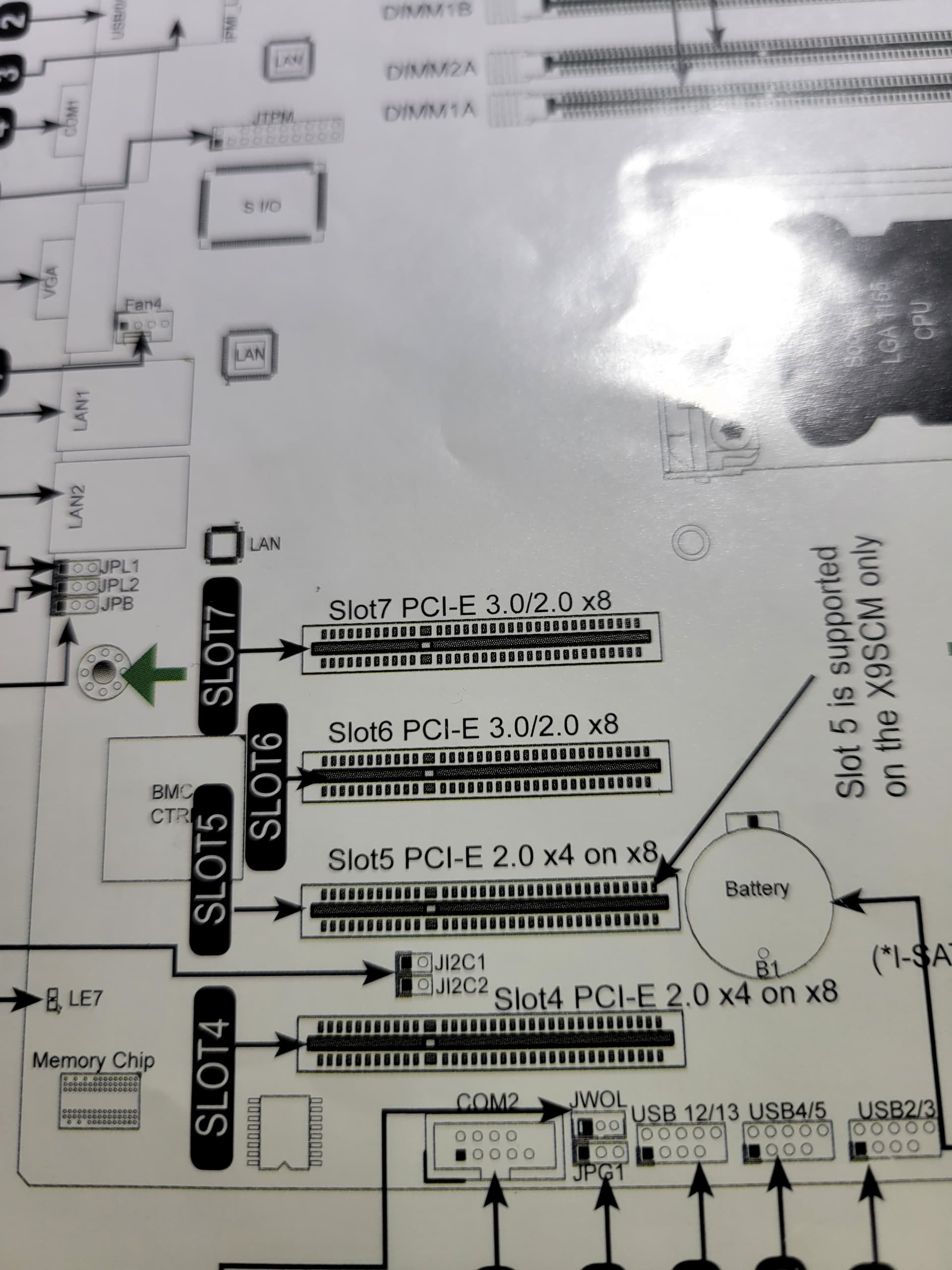
My LSI card is in a PCI-E slot 3.0 on my board which is the fastest there is .
You need to consult your motherboard manual or document from their website and verify what slot you have it in. I don’t know if this is the exact MB model you have but the PCIe slots are not 3.0, but 2.0
From a Review on ServeTheHome
“Whereas the Supermicro X8SIL-F had two PCIe 2.0 x8 slots, one PCIe x8 slot (x4 electrically) and a legacy PCI slot, the X9SCM-F has four physical PCIe x8 slots. Of these four slots, two are PCIe 2.0 x8 and the other two are PCIe 2.0 x4. The net effect is that the Supermicro X9SCM-F loses its legacy PCI support, but adds a lot of PCIe bandwidth.”
That documentation looks like you have the correct slots and it is showing 3.0/3.0 x8 on both.
Regarding this part:
Your 125 Mb/sec, listed above, I am guessing is actually MB/s. 125MB/s is about 1000 Mbps and, oddly the speed of a gigabit network and not your 2.5Gbps network.
That is very strange then.
Oh and yes it is 125MB/sec not 125Mb, my error!
So now I don’t understand why it is not anywhere near the speed of the 2.5Gbps network. All the 2.5Gb nic speed has done , is just increased the file transfer speed by about 33%.
I was rather hoping for quite a bit more.
Thanks
You might want to check this calculator. But those 5x WDRed 2 TB Raidz1 (about 150 MB/s each) should easily saturate your 2.5 GB link (about 300 MB/s). If i watch your iperf results and those retries i actually wonder what kind of cat cable you are using. Maybe switching to some other cable might be a good idea… Especially if you consider buying some 10 GB NIC for your PC and doing a direct connection between your pc and the truenas (in case it has 2 10 GB LAN ports).
Thanks, and I am using cat8 from my NAS to the 2.5Gb switch, then cat6 to my desktop.
I did wonder about buying a 10Gb nic for my desktop, but as I say the switch is just 2.5Gb, so I’d have to buy a 10Gb switch. I can’t say I’ve seen any with 10Gb rj45 sockets. I’m just going by the one I have just returned, and it had 4 2.5Gb rj45 sockets and 2 10Gb sockets but I’d need an adaptor
The x540 will not have 2.5Gbps nor 5Gbps options. You get 1Gbps or 10Gbps. If the switch can’t do 10Gbps, you will drop down to 1Gbps.
The x550 T series would be a better choice with the switch (2.5Gbps) you have.
Ok thanks, appreciated. I’ll go for the 550 then
I have now got a 2.5Gb switch which has x2 10Gb SFP ports, and have ordered x1 SFP RJ45 adaptor
Double check the SFP+ adapter to make sure it supports 2.5 and 5Gpbs. It may only do 1Gbps and 10Gbps
This is it of Amazon:
XZSNET 1000BASE-T SFP Transceiver, SFP to RJ45, 1.25G Copper SFP to Ethernet Module Compatible for Cisco GLC-T/SFP-GE-T, Ubiquiti UniFi UF-RJ45-1G, Mikrotik…
and to be honest I don’t know if it does 1Gb or 5Gb as werll