
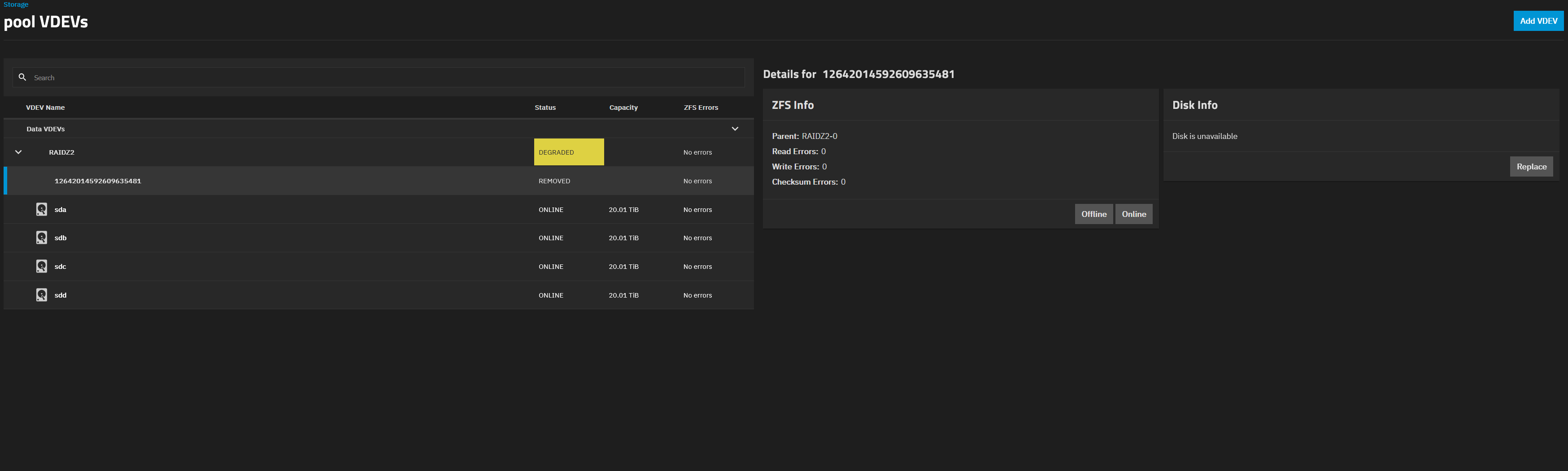
I got a notification that my pool is degraded. I checked the LEDs on my NAS and also the web ui. There I saw that all 5 disks are online but 1 is not part of the vdev. I tried readding the disk but then I got “[EFAULT] [Errno 5] Input/output error”. What else can I try? Should I try the force option? I think thats unlikely to help when there is an I/O error. Is my disk maybe broken?
Please provide your complete hardware including how the discs are connected.
Bare metal or a virtualized Truenas ?
What version of Truenas ?
Did you run a SMART test on the offline disc ?
Whats the output of:
zpool status -v
bare metal
Truenas 25.10.5
zpool status -v
  pool: boot-pool
 state: ONLINE
  scan: scrub repaired 0B in 00:01:13 with 0 errors on Thu Aug  6 03:46:14 2026
config:

        NAME         STATE     READ WRITE CKSUM
        boot-pool    ONLINE       0     0     0
          nvme0n1p3  ONLINE       0     0     0

errors: No known data errors

  pool: pool
 state: DEGRADED
status: One or more devices have been removed.
        Sufficient replicas exist for the pool to continue functioning in a
        degraded state.
action: Online the device using zpool online' or replace the device with
        'zpool replace'.
  scan: scrub repaired 0B in 14:39:49 with 0 errors on Sun Jul 12 14:39:51 2026
config:

        NAME                                      STATE     READ WRITE CKSUM
        pool                                      DEGRADED     0     0     0
          raidz2-0                                DEGRADED     0     0     0
            a23734c5-9286-4c9a-8c7f-746f994b5f22  ONLINE       0     0     0
            9298d3e4-58ed-42d8-b14e-98cb32527823  REMOVED      0     0     0
            bedd514b-ac39-4e47-b2e5-98b4fd0edb0e  ONLINE       0     0     0
            a7820744-ffff-4317-a1d1-27f3c4d071f2  ONLINE       0     0     0
            ce1f07f1-c960-4f5d-b15a-bc9cb60b3cb7  ONLINE       0     0     0

errors: No known data errors
 smartctl -a /dev/sdc
smartctl 7.4 2023-08-01 r5530 [x86_64-linux-6.12.95-production+truenas] (local build)
Copyright (C) 2002-23, Bruce Allen, Christian Franke, www.smartmontools.org

=== START OF INFORMATION SECTION ===
Device Model:     ST22000NM000C
Serial Number:    ZXA07JBL
LU WWN Device Id: 5 000c50 0e8385f9e
Firmware Version: SN02
User Capacity:    22,000,969,973,760 bytes [22.0 TB]
Sector Size:      512 bytes logical/physical
Rotation Rate:    7200 rpm
Device is:        Not in smartctl database 7.3/5528
ATA Version is:   ATA8-ACS T13/1699-D revision 4
SATA Version is:  SATA 3.0, 6.0 Gb/s
Local Time is:    Thu Aug  6 11:33:34 2026 CEST
SMART support is: Available - device has SMART capability.
SMART support is: Enabled

Read SMART Data failed: scsi error device not ready

=== START OF READ SMART DATA SECTION ===
SMART Status command failed: scsi error device not ready
SMART overall-health self-assessment test result: UNKNOWN!
SMART Status, Attributes and Thresholds cannot be read.

Read SMART Log Directory failed: scsi error device not ready

Read SMART Error Log failed: scsi error device not ready

Read SMART Self-test Log failed: scsi error device not ready

Selective Self-tests/Logging not supported

The above only provides legacy SMART information - try 'smartctl -x' for more
That looks like one of your disks has completely failed. You can try powering down and checking connections. Other than that, I think your only choice is to do a drive replacement.
Do you have a backup of your current data? You don’t have much redundancy left in your pool