
I lost 2 disks out of 8, since then I have added one and it seems to have been adopted into the raid, however everytime I reboot my pool has a status of “SCANNING” and once it finishes the GUI crashes and the server becomes pretty unresponsive in general. The pool still seems to work until the GUI crashes as I can access the fileshare that is on it. However once the GUI crashes i lose access to the share until a reboot.
Welcome to TrueNAS and it’s forums!
Could you supply the output of the command zpool status -v from the Unix Shell?
Further, a full listing of your hardware would also be helpful.
Without further information, we can only guess on what is happening.
Thanks for the response. I cannot SSH to the server, and currently cant post a pic of the output, but the summary is that the output shows all of the disks as degraded with a status of “too many errors (resilvering)” and then at the bottom it says “List of errors unavailable: pool I/O is currently suspended”
I have another error that keeps popping up on my monitor that is related to a python script (…python/site-packages/middlewared/client/client.py). As soon as I figure out how to post images I will post that error as well. I have tried restarting middlewared to get the WebUI back up, but that service also wont start.

Hmmm, without the ability to login and gather more diagnostic information, you may be in for a more difficult time determined what is wrong.
Perhaps you should run 24 hours long memory test. Some people with non-ECC memory experience odd failures and assume it is software. Since a long memory test is in general harmless, (except if you have cooling issues with your system board), this can help eliminate memory faults as a cause.
One thing that occasionally crops up, is bad blocks in the boot-pool. Many new users buy cheap USB flash drives thinking they will be suitable. But, most are just that, CHEAP.
This is why it is helpful to list your hardware, and how it is used.
You could try to install a new copy of TrueNAS to a new boot device and restore your configuration.

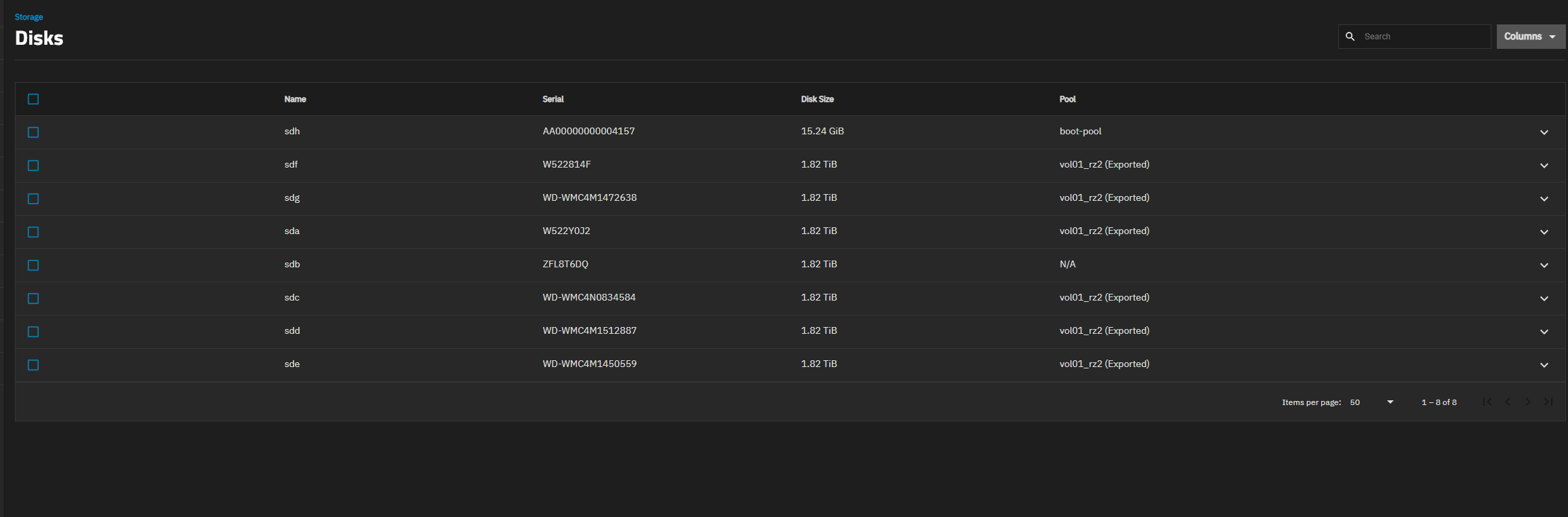


What version of TrueNAS is this?
What hardware are you running it on? Be detailed please, the more information the better.
In some ways the sector error on “sdg” is less of a concern. At worst case, you loose a block out of a file. Best case, nothing lost.
What does this say?
zpool import
I’ve checked and you don’t state explicitly which RAID-Zx level you are using. Just say “Raid Z degraded”. This is why we like details, even if RAID-Z could be assumed to be RAID-Z1. If it is RAID-Z2, (recommended with disks >=2TB and more than 6 disks), then you almost certainly have not lost any data.


Looks like you have RAID-Z2, which has 2 disks of redundancy. This is good news.
The slightly bad news is that “sdg” does have a failing sector, so you may have lost a block in a file. However, since this block was identified during a test import, it is possible that this bad sector is in high level ZFS metadata. That usually has 2, 3 or even more copies, so no data loss.
Yes, with the understanding that you need to immediately deal with the missing disks. Don’t start adding new data, get at least 1 disk’s worth of redundancy restored.
Right after import, run zpool status -v vol01_rz2 and post the results here.
Note that ZFS was designed to do everything on-line, including disk replacements. If you can’t import a pool, you can’t replace a disk.
Good luck.

What does zpool status -v vol01_rz2 say?

Well, I don’t know what else to try except wait.
Any idea where the log file for the pool import is? I’ve looked around and can’t find any logs with anything interesting other than the I/O errors
Sorry, no.
The only log I know of is from HoneyBadger’s posts.
This will show the newest 100 entries:
sudo tail -n 100 /proc/spl/kstat/zfs/dbgmsg
Unforunately, I don’t know how to intepret the output.