I am curious if anyone can provide or point me towards some good troubleshooting tips or best practices to determine the viability of a hard drive that seems to continue to have issues. I am new to TrueNAS and even owning a NAS in general. This past year I modded a Dell Optiplex 5050 and threw some 8tb drives in RAID running HexOS which was obviously running TrueNAS Scale in the background on RAIDZ1. Long story short I have mostly given up on HexOS and have been running to TrueNAS for basically everything. Two weeks ago I had a drive seemingly die on me. I turned the NAS off and back on as that was the typical PC thing I knew to do and still didn’t work. I ended up shutting it down again and the unplug and replug cables method seemed to revive the drive. Through the process I decided to buy another 8tb drive and go to RaidZ2. I finished that about a week ago and today I got another email that the drive is showing faulted, smart error log failed, smart self test log failed, and the drive offline and unreadable. When I added the 4th drive a week ago I switched power cables. Today I am going to try and replace the sata cable and see if I can get it back, but is there anything I could be missing as to why a drive randomly goes offline? Or does anyone have any best practices as to what they do when they start getting drive error messages?
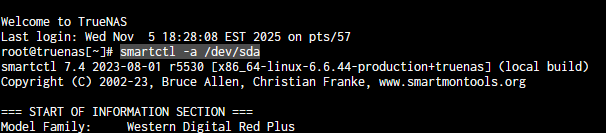
Output of ‘smartcl -a /devlsd#` (replace # with the drive letter), will go a long way in identifying the issue. Any other system details, confirmation on how these drives are connected (directly to motherboard, hba, something horrible?), etc. will go a long way in being able to help.
Do you have scheduled smart tests & scrubs setup? Is it always the same drive failing? Length of sata data cables?
Yeah, thanks for the help. First question the ‘smartcl -a /devlsd#’ command with replacing # with the drive letter, is that supposed to be inserted into shell? I tried it and I got “zsh: command not found: smartcl” Did I input it wrong?
The Dell optiplex 5050 motherboard has 4 SATA drive connections, so I have all 4 drives directly to the motherboard, each on their own cable.
I am unsure if I have smart tests and scrubs setup. HexOS did the initial setup. Since the drive has failed I have received several messages saying “read smart error log failed”, “read smart self test log failed”, “not capable of smart self-check”, so I would imagine some are setup? EDIT: After some looking in data protection menu, I only see scrub tasks programmed to happen once a week. All the other tasks do not seem to have anything set.
So far it has always been the same drive failing. My drive being sdb, and the same serial number every time, I checked both times. The length of the cable is short, maybe 10 inches at the most? I have it all fitting carefully inside the case.
Hopefully those help. Happy to answer any other questions. Thanks for your time.
Take a look at my signature links for the flowcharts. Those will help a lot I hope. It is also in the TrueNAS docs as a step by step process, since I couldn’t upload an image.
Your post provides no information on the hardware, wiring.
And we’re left wondering whether you actually went through “backup-destroy-restore” or merely expanded the initial raidz1 instead of going for raidz2.
Fantastic, thank you sir. I figured there was info already made somewhere. I will start there and see what I can do on my own. I am new to the forums so I wasn’t sure where to look. Thanks for your time!
In the instructions it tells you that all commands are encompassed in single quotes so you know where the command starts and ends. Do not include the single quotes at the front or back of the command.
Edit: none of these commands can cause harm no matter what you do, except the nvme commands. Those could be botched if you try hard enough.
Haha, yeah the Sudo prefix worked for me. It definitely is not communicating though. I just get an inquiry failed. I then tried my other drives and received tons of info, but when using the one for the failed drive, its just back to Inquiry Failed.
And then going through the critical drive error flow chart I obviously cannot get any smart test and its just showing faulted and offline. So seems like something is definitely wrong and I am going to have to replace a cable or the drive. I will finally have time this evening to actually tear into the system. Ill start back with troubleshooting steps if I can get the drive back online again. Thanks for the tips.
Okay, additional question after some troubleshooting. I don’t understand why, but sometimes after clearing any alerts, a simple restart of the NAS, the drive will come back online. At least once it has taken to open the PC and pull plugs, reinstall, and restart the drive pops back up. When I do so it boots without a problem, no errors and everything is green, passes a short SMART test and a Scrub with no errors. But then after a random about of time; could be days, could be hours, the same drive will inevitably hard fail again. This has happened at least 3-4 times now. I have replaced the SATA cable directly to the mother board with a new cable. The drive has been hooked up though a splitter from the power supply and as the other drive has never died, I dont imagine thats the issue. I also tried it in another power configuration and it still failed once. I am at the point where I am 80% sure the drive has some issue where it fails after awhile. Before I just drop another 200 on a new drive, I want to make sure somehow there isn’t some issue with that port on the motherboard, or the motherboard itself.
(I have a Dell Optiplex 5050MT I repurposed that has a Dell WWJRX motherboard.)
So my question is this, how would truenas react to swapping where 2 drives are hooked up on the motherboard? or is there a way to do that officially through TrueNAS? I want to see if the problem follows with the drive or the issue stays on that same location on the Motherboard.
Flowcharts were fantastic. It has definitely taught me a lot. I appreciate it. I don’t know If my drive randomly going offline with no input/output is related, but at least now I see I have 2376 RAW 197 pending sectors and 2376 RAW 198 offline_uncorrectable. But as indicated ill just monitor them. Especially since I am running Raidz2. I have also setup weekly scrubs and short smart test as per guidance I read.
Additional question. I see also by going to SMART test results for the suspect drive that it has many short offline result success, but the two extended offline are showing failed with ‘1409470216’ LBA of First Error. I am trying to run another offline test to see if I can get one to pass, but anytime I try to run an offline smart test I get this response
“Sending command: “Execute SMART off-line routine immediately in off-line mode”. Drive command “Execute SMART off-line routine immediately in off-line mode” successful. Testing has begun.”
But then I get nothing showing in the jobs and I never seem to get another extended offline test that even fails. Am I getting confused with the different style tests? I can run a short and long smart test that passes.
If you cannot pass a SMART Extended/Long test, the drive has failed. If you have not done this, you should do this now. smartctl -t long /dev/sd? for the drive in question. If it cannot “complete” the test and it shows a failure, replace the drive.