
Since I keep getting an issue with failed unmounting of /var/log/journal directory (I tried to fix it but no luck there) during reboot/shutdown of system, I would like to make fresh reinstall.
And to avoid time consuming set up of new system, I would like to copy somehow configuration of all the tasks (snapshots, rsync, smart tests) and network shares setup…
I know I can import my pools (one with data, second with my docker setup - I don’t use “truenas apps”) and I would like to make sure how to backup and restore (some config files?) all tasks related config.
Will data in my “docker pool” survive of re-assignment to applications in order to start docker service?
Is it doable?
System → General Settings → top right corner-> big blue button “Manage Configuration” → Download file will create a backup of your current settings and after a fresh install you can import that config
You can’t choose what will get restored, it’s either the whole config or nothing.
Yes, I’ve done it already and my issue comes back after full config restoration…
Therefore I want to do it selectively. Is it possible to do it at config files level or everything is stored in config database?
everything is stored in the config db
So, is it possible to export selected settings out of db and import them back? In general, is it possible to edit exported configuration?
as far as i know, no not possible, but i never tried it and also have not seen anyone post about it.
afaik, freenas.db is editable with sqlite tools, but I would need to know what to look for 
Can you share more details relating to that? I can’t think of any configuration option that would break something related /var/log/journal. Does it just occur during shutdown?
EDIT: You already specified during shutdown/reboot. Try and check using fuser -vmM /var/log/journal if you have strange processes that keep files open.
So:
fuser -vmM /var/log/journal
                     USER        PID ACCESS COMMAND
/var/log/journal:    root     kernel mount /var/log/journal
                     root        733 F...m systemd-journal
                     root       3193 f...m syslog-ng
Shutdown (started after upgrading to fangtooth) or reboot results in failed unmounting of /var/log/journal folder - it forces me to do hard reset, otherwise is stuck forever. I cleaned that folder in single mode, did rotate and vacuum logs and nothing helps. Still after booting dmesg shows:
dmesg | grep journal
[   15.973228] systemd[1]: Listening on systemd-journald-audit.socket - Journal Audit Socket.
[   15.973634] systemd[1]: Listening on systemd-journald-dev-log.socket - Journal Socket (/dev/log).
[   15.974029] systemd[1]: Listening on systemd-journald.socket - Journal Socket.
[   15.998213] systemd[1]: Starting systemd-journald.service - Journal Service...
[   16.129922] systemd[1]: Started systemd-journald.service - Journal Service.
[   16.151453] systemd-journald[727]: Received client request to flush runtime journal.
[   16.153723] systemd-journald[727]: File /var/log/journal/9a2f5936ccc44b26ab86c36c48b1e82e/system.journal corrupted or uncleanly shut down, renaming and replacing.
[   77.867097] systemd-journald[727]: Data hash table of /var/log/journal/9a2f5936ccc44b26ab86c36c48b1e82e/system.journal has a fill level at 75.0 (8536 of 11377 items, 6553600 file size, 767 bytes per hash table item), suggesting rotation.
[   77.867104] systemd-journald[727]: /var/log/journal/9a2f5936ccc44b26ab86c36c48b1e82e/system.journal: Journal header limits reached or header out-of-date, rotating.
[   78.044461] systemd-journald[727]: Failed to read journal file /var/log/journal/9a2f5936ccc44b26ab86c36c48b1e82e/user-1002.journal for rotation, trying to move it out of the way: Device or resource busy
[   78.044708] systemd-journald[727]: Failed to read journal file /var/log/journal/9a2f5936ccc44b26ab86c36c48b1e82e/user-1004.journal for rotation, trying to move it out of the way: Device or resource busy
And after a week or so of uptime, webui becomes unresponsive with a lot of sigkills of systemd-journald…
Like I mentioned, after fresh reinstall all is ok, it comes back after restoring of configuration.
See also: https://forums.truenas.com/t/shutdown-or-reboot-takes-30-min/39376/1
The post you links show no more information for any of the posters with that ‘issue’ .
My posting is unanswered by anyone in the linked post.
I’ve never seen that issue. The fuser output is normal.
No clue what would keep the file busy during rotation. Maybe some race condition.
Maybe add Storage=volatile to /etc/systemd/journald.conf and see if that fixes the issue. Just for testing purposes, it’s not a permanent solution. Might cut down the possible error sources.
I meant to point out it’s not completely isolated issue…
I’ve already mentioned, it started after upgrading to early fangtooth (coming long way from freenas/core) - that time I had no apps and no docker running, currently system is at 25.04.2.4 and issue still occurs after upgrading to 25.10 RC1 (on fresh install all is ok, only after config restoration).
Truenas has been running and runs as VM (q35, viommu, 64GB ECC, Xeon E-2278G in host mode) in Proxmox with controller passed through.
I run my own docker compose containers, I’d tried already stopping all of them manually, incl. docker service before shutting down system and issue still occurs…
Could you please say something more about this option, what does it do?
EDIT:
Ok, it does what it says: volatile storage for journal logs…
It changes log storage location from /var/log/journal to /run/log/journal.
The storage /var/log is stored on the boot pool and is persistent across reboots. On the other hand /run/log is only stored in-memory and never persisted to disk. On boot, it’s always going to be empty and journald has a clean slate.
This only affects journald. All other log files in /var/log (e.g. /var/log/messages, /var/log/daemon.log,…) are not affected. Those are handled by syslog and logrotate.
1 Like
As far as I know, the file is encrypted.
It is not encrypted.
Been using SQL commands to get or set a couple of values.
You can use SQL DB browser if you have no DB skills.
Is it possible to find tasks related entries in freeness.db?
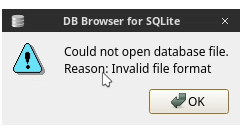
That is interesting as I know iXsystems said many years ago that the file was encrypted, however if you are able to access it, who am I to argue about it.
Are you able to see the user accounts and passwords? You have my curiosity peaked. I know this is off topic so I will toss you a message and we can chat that way and you can teach me a thing or two. 
I never had any problems opening the config database in sqlite, even back in CORE days.
Passwords are encrypted. With unix/smb users only hashes are stored (same as in /etc/shadow). Otherwise the passwords are encrypted. But you also get the encryption key in a separate file (pwenc_secret) if you selected so during config backup.
1 Like