Hallo!
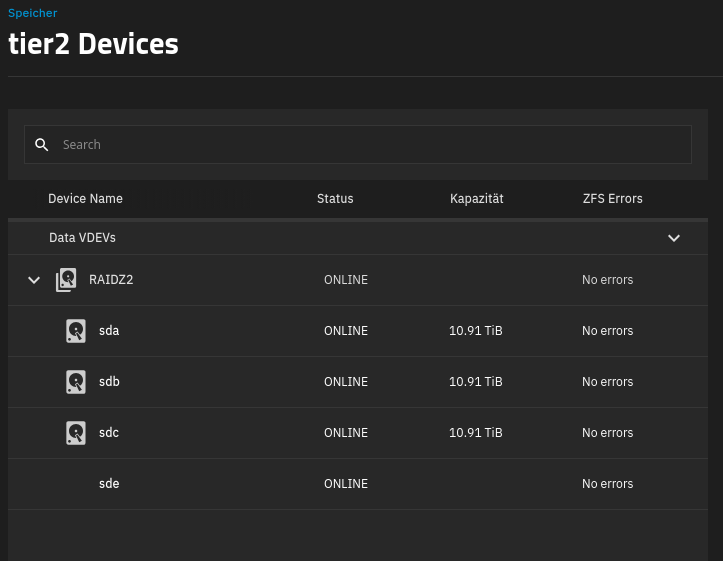
Ich habe meine Hardware in ein neues Gehäuse gepackt und nun stehe ich vor dem Problem, dass alle Pools OK sind, aber eine Festplatte nicht mehr verwaltet werden kann. Die Internet-Suche brachte mir keinen Erfolg, daher versuche ich es hier.
Ausgangssituation:
1 x System auf nvme
1 x Pool tier1 bestehend aus 4 x 16 TByte in RAIDZ2
1 x Pool tier2 bestehend aus 4 x 10 TByte in RAIDZ2
Nach dem Umbau startete resilvering auf
und ich weiß nicht warum. Ich habe dann Statusabfragen im Webinterface und der Konsole gemacht, was zu folgendem Output führte:
root@truenas[~]# lsblk
NAME        MAJ:MIN RM   SIZE RO TYPE MOUNTPOINTS
sda           8:0    0  10.9T  0 disk
├─sda1        8:1    0     2G  0 part
└─sda2        8:2    0  10.9T  0 part
sdb           8:16   0  10.9T  0 disk
├─sdb1        8:17   0     2G  0 part
└─sdb2        8:18   0  10.9T  0 part
sdc           8:32   0  10.9T  0 disk
├─sdc1        8:33   0     2G  0 part
└─sdc2        8:34   0  10.9T  0 part
sdd           8:48   0  16.4T  0 disk
└─sdd1        8:49   0  16.4T  0 part
sde           8:64   0  10.9T  0 disk
├─sde1        8:65   0     2G  0 part
└─sde2        8:66   0  10.9T  0 part
sdf           8:80   0  16.4T  0 disk
├─sdf1        8:81   0     2G  0 part
└─sdf2        8:82   0  16.4T  0 part
sdg           8:96   0  16.4T  0 disk
├─sdg1        8:97   0     2G  0 part
└─sdg2        8:98   0  16.4T  0 part
sdh           8:112  0  16.4T  0 disk
├─sdh1        8:113  0     2G  0 part
└─sdh2        8:114  0  16.4T  0 part
nvme0n1     259:0    0 119.2G  0 disk
├─nvme0n1p1 259:1    0   260M  0 part
└─nvme0n1p2 259:2    0   119G  0 part
root@truenas[~]#
Die Weboberfläche zeigt alles auf grün und sicherheitshalber (oder aus purer Panik) habe ich einen scrub auf tier2 gestartet. tier1 zeigt alle Platten sauber an, aber die Festplatte sde in tier2 zeigt keine Infos und hat keine Verwaltungsoptionen mehr. Die Konsole sagt:
root@truenas[~]# zpool status
  pool: freenas-boot
 state: ONLINE
status: One or more features are enabled on the pool despite not being
        requested by the 'compatibility' property.
action: Consider setting 'compatibility' to an appropriate value, or
        adding needed features to the relevant file in
        /etc/zfs/compatibility.d or /usr/share/zfs/compatibility.d.
  scan: scrub repaired 0B in 00:00:07 with 0 errors on Fri Nov  7 14:03:06 2025
config:

        NAME          STATE     READ WRITE CKSUM
        freenas-boot  ONLINE       0     0     0
          nvme0n1p2   ONLINE       0     0     0

errors: No known data errors

  pool: tier1
 state: ONLINE
status: One or more devices is currently being resilvered.  The pool will
        continue to function, possibly in a degraded state.
action: Wait for the resilver to complete.
  scan: resilver in progress since Tue Nov 11 19:30:56 2025
        2.43T / 21.4T scanned at 420M/s, 652G / 21.4T issued at 110M/s
        158G resilvered, 2.98% done, 2 days 06:59:45 to go
config:

        NAME                                      STATE     READ WRITE CKSUM
        tier1                                     ONLINE       0     0     0
          raidz2-0                                ONLINE       0     0     0
            sdf2                                  ONLINE       0     0     0
            sdg2                                  ONLINE       0     0     0
            66b54861-886f-4564-b81f-9c6d4a0328f9  ONLINE       0     0     0  (resilvering)
            sdh2                                  ONLINE       0     0     0

errors: No known data errors

  pool: tier2
 state: ONLINE
  scan: scrub in progress since Tue Nov 11 21:07:18 2025
        956G / 22.4T scanned at 1.46G/s, 453G / 22.4T issued at 710M/s
        0B repaired, 1.97% done, 09:00:29 to go
config:

        NAME        STATE     READ WRITE CKSUM
        tier2       ONLINE       0     0     0
          raidz2-0  ONLINE       0     0     0
            sdc2    ONLINE       0     0     0
            sda2    ONLINE       0     0     0
            sde2    ONLINE       0     0     0
            sdb2    ONLINE       0     0     0

errors: No known data errors
root@truenas[~]#
Das ganze spielt sich auf truenas Community 25.04.2.6 ab.
Was muss ich machen, damit ich meine Pools wieder hinbekomme?
Vielen Dank im Voraus für sachdienliche Hinweise!